Our Short List of 3

- Best for: Players who want the longest AA battery life and a compact mouse that travels with a laptop.
- Brand: Logitech G
- Model: G305 Lightspeed
- Sensor: HERO, up to 12,000 DPI
- Connection: Lightspeed wireless USB receiver, 1ms report rate
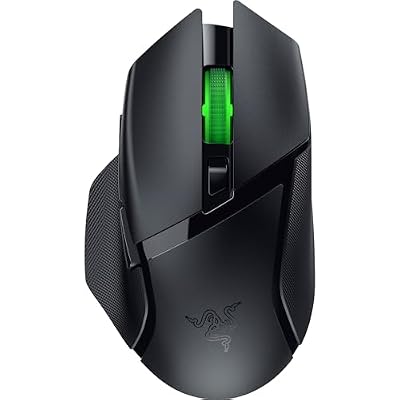
- Best for: Palm-grip players who want extra controls and a Bluetooth mode for a second computer.
- Brand: Razer
- Model: Basilisk V3 X HyperSpeed, RZ01-04870100-R3U1
- Sensor: 5G advanced 18K optical sensor
- Controls: 9 programmable controls

- Best for: Larger hands and palm grips wanting a rechargeable mouse with a fuller shape.
- Brand: Logitech G
- Model: G703 Lightspeed
- Sensor: HERO 25K in the current listing
- Connection: Lightspeed wireless USB receiver
All 3 Picks at a Glance
| Product | Specs | Action |
|---|---|---|
| Logitech G305 Lightspeed Wireless Gaming Mouse |
| Check price on Amazon |
| Razer Basilisk V3 X HyperSpeed |
| Check price on Amazon |
| Logitech G703 Lightspeed Wireless Gaming Mouse |
| Check price on Amazon |
For a wireless gaming mouse bought on a budget, the deciding question is not the maximum DPI printed on the box. It is whether the connection stays stable across your desk setup, session after session, without the battery dying mid-match or the receiver losing the fight against a crowded USB hub. Affordable models separate themselves on battery life, receiver storage and whether the wireless link is a proper low-latency gaming connection.
This guide is for players upgrading from a wired or office mouse without spending flagship money, laptop gamers who play in more than one room, and anyone whose desk sits far from the PC tower. The phrase harga terjangkau in the search simply means an affordable price, so the picks favour value designs, while every specification below comes from the Amazon listing for that mouse.
Quick Picks
As an Amazon Associate we earn from qualifying purchases
| Product | Best for | Key spec from title |
|---|---|---|
| Logitech G305 Lightspeed Wireless Gaming Mouse | Weeks of play from one AA battery and a stored receiver | HERO 12K sensor, 12,000 DPI, 250h battery life |
| Razer Basilisk V3 X HyperSpeed | An ergonomic shape with Bluetooth for a second device | 5G advanced 18K optical sensor, 9 programmable controls |
| Logitech G703 Lightspeed Wireless Gaming Mouse | A larger palm shape with rechargeable battery | HERO 25K sensor listing, 6 programmable buttons |
How to Choose
Treat the wireless link as the first specification
Gaming wireless lives or dies on its connection standard. The mice here use named low-latency links, Lightspeed on the Logitech models and HyperSpeed on the Razer, each built around a USB receiver and a fast report rate. That is what separates a gaming mouse from a Bluetooth office mouse with a gaming shell. Range in practice is set by your room: receivers work best with a clear path to the mouse, and an extender cable or a front USB port often matters more than any headline figure. If your tower sits under a desk or across the room, plan the receiver’s position as part of the purchase.
Read battery claims by mode, not by the biggest number
Battery figures in listings are mode-specific, and honest comparison means matching the modes. A mouse quoting hundreds of hours on Bluetooth will run for less time on its low-latency gaming link, and a replaceable AA cell trades charging cables for occasional battery swaps. Rechargeable models remove the swaps but add a cable session and eventual battery ageing. For long sessions away from the desk, the AA design has a quiet advantage: a spare battery in the drawer ends the problem instantly, with no waiting for a charge before the next match.
Match the shape and weight to your grip
The three picks cover three different hands. The G305 is compact and symmetrical at a listed 99 grams, suited to fingertip and claw grips and smaller hands. The Basilisk is a right-handed ergonomic shape with a thumb rest, suited to palm grip and longer sessions. The G703 is a larger right-handed palm shape, so check the current listing for its weight and dimensions. Weight and shape decide comfort over hours, and no sensor specification compensates for a mouse that makes your hand ache by the third game of an evening session.
Count buttons and software, not just DPI
DPI ceilings passed the point of usefulness long ago; every sensor here tracks far beyond what a player sets in game. What differs is the control set: six programmable buttons on the Logitech picks, nine controls on the Razer, and the software behind them. On-board memory matters if you switch computers, because profiles travel with the mouse instead of living in one installation. If you play games that use extra binds, the button count and placement deserve more attention than another thousand DPI you will never select in any settings menu.
The 3 Best Options
Logitech G305 Lightspeed Wireless Gaming Mouse
- Best for: Players who want the longest AA battery life and a compact mouse that travels with a laptop.
- Brand: Logitech G
- Model: G305 Lightspeed
- Sensor: HERO, up to 12,000 DPI
- Connection: Lightspeed wireless USB receiver, 1ms report rate
Players who want the longest AA battery life and a compact mouse that travels with a laptop.
It has no Bluetooth and no RGB, and the listing’s stated range figures vary between variants, so keep the receiver close with the included extender for a stable link.
The G305 is the value benchmark for wireless gaming, and its listing explains why: a HERO sensor up to 12,000 DPI, Lightspeed wireless with a 1ms report rate, and up to 250 hours of gameplay from a single AA battery. At a listed 99 grams with built-in storage for its USB receiver, it also travels well between a desk and a laptop bag. It suits players who want a proven low-latency link and the longest simple battery story in this guide, and who prefer a compact symmetrical shape. The black version is the listing verified for this guide.
Razer Basilisk V3 X HyperSpeed
- Best for: Palm-grip players who want extra controls and a Bluetooth mode for a second computer.
- Brand: Razer
- Model: Basilisk V3 X HyperSpeed, RZ01-04870100-R3U1
- Sensor: 5G advanced 18K optical sensor
- Controls: 9 programmable controls
Palm-grip players who want extra controls and a Bluetooth mode for a second computer.
Confirm which battery figure belongs to which connection mode in the listing, since the Bluetooth number is far higher than the gaming-link number.
The Basilisk V3 X is the ergonomic and flexible pick. Its listing names a 5G advanced 18K optical sensor, nine programmable controls and Chroma RGB, and the model connects by HyperSpeed wireless for gaming or Bluetooth for a second machine. Battery life is quoted up to 535 hours on Bluetooth in the model’s listing information, with a shorter figure on the gaming link, and it runs on a single AA battery. It suits palm-grip players who also pair the mouse with a work laptop, and who want more controls for game binds than the six-button designs offer.
Logitech G703 Lightspeed Wireless Gaming Mouse
- Best for: Larger hands and palm grips wanting a rechargeable mouse with a fuller shape.
- Brand: Logitech G
- Model: G703 Lightspeed
- Sensor: HERO 25K in the current listing
- Connection: Lightspeed wireless USB receiver
Larger hands and palm grips wanting a rechargeable mouse with a fuller shape.
Older and newer G703 listings carry different sensor revisions, so read the exact listing’s sensor and battery figures before ordering.
The G703 is the step up for larger hands that palm the mouse. Its current Amazon listing is built around the HERO 25K sensor revision, with six programmable buttons, Lightspeed wireless and a rechargeable battery, plus compatibility with the PowerPlay charging system sold separately. It suits players who found the G305 too small, want a fuller right-handed shape, and prefer recharging over swapping AA cells. As the least budget-leaning pick here, it earns its place on shape and sensor rather than value, so weigh it against how much the bigger shell matters to your grip.
Which One Fits Your Situation
Your PC sits across the room from where you play
Any of these receivers benefits from the extender cable and a clear path, so set that up first. Then choose the G305 for its simple AA power, because a mouse used away from the desk is the one most likely to be forgotten until its battery fades. A spare AA nearby solves range-and-power problems together in a way a charging cable across the room cannot.
You game at night and work on the same mouse all day
The Razer Basilisk V3 X fits this double life. HyperSpeed handles the gaming hours, Bluetooth pairs with the work laptop without moving the receiver, and the ergonomic shape with a thumb rest suits long days. Its nine controls also give work shortcuts a home alongside game binds, which the six-button mice here cannot match as comfortably.
You have large hands and a palm grip
Start with the G703. Its fuller right-handed shell is the shape in this guide designed for your grip, and the rechargeable battery suits a fixed desk where a cable is always within reach. If the G703 stretches the budget too far, the Basilisk offers the other ergonomic route, with a thumb rest and AA power instead of recharging.
You carry a gaming laptop between rooms and locations
The G305 was designed for this pattern: light, compact, with its receiver stored inside the mouse and battery life measured in hundreds of hours. There is no cable to pack and no charging routine to maintain between trips. Just remember it has no Bluetooth, so a laptop without a free USB port needs the receiver planned into the setup.
Common Mistakes
- Comparing battery figures across connection modes, such as a Bluetooth endurance number against another mouse’s gaming-link number.
- Plugging the receiver into a rear port under a metal desk and blaming the mouse for dropouts that receiver placement caused.
- Choosing by maximum DPI when every sensor here already exceeds the sensitivity any player actually sets in game.
- Buying a right-handed ergonomic mouse for a left-handed player without checking the shape in the listing.
- Assuming a budget wireless mouse includes Bluetooth, when several gaming models connect by receiver only.
Frequently Asked Questions
How far can a wireless gaming mouse work from the PC?
In a normal room, the practical limit is set by obstacles rather than the radio itself. Metal desks, tower cases and USB 3 hubs can all interfere with a 2.4GHz receiver. Using the included extender cable to place the receiver on the desk, in sight of the mouse, is the reliable fix, and it is why receiver placement appears throughout this guide.
Is Lightspeed or HyperSpeed better than Bluetooth for gaming?
Yes, for gaming specifically. Lightspeed and HyperSpeed are low-latency receiver links with fast report rates, designed so clicks and movements register without perceptible delay. Bluetooth modes, where a mouse offers one, are better saved for work and travel. The Basilisk here offers both, which is why its battery figures differ so much between modes.
AA battery or rechargeable: which is better on a budget?
AA models like the G305 and Basilisk trade a small ongoing battery cost for instant swaps and no ageing internal cell. Rechargeable models like the G703 remove the swaps but depend on a cable session and a battery that wears over years. For value over a long ownership period, the AA designs are simpler to keep running.
Do I need high DPI for competitive games?
No. Competitive players typically use a small fraction of these sensors’ ranges, often in the hundreds or low thousands of DPI. Tracking quality, shape, weight and a stable connection matter far more. Every pick here offers at least 12,000 DPI on its listing, which is headroom you will likely never use rather than a reason to choose one mouse over another.