A mouse pad is the surface every flick, aim correction, and menu click depends on, and a good one does not need a large budget. The pads in this guide are cloth models with proven surfaces, sensible sizes, and non-slip bases, chosen for players who want reliable tracking without spending much. The differences between them come down to surface speed, thickness, size, and edge finishing.
This guide is for players building a first setup, for anyone replacing a worn pad, and for desks where a medium pad fits better than a desk-sized mat. Each pick below was chosen from the name and specifications shown on its Amazon product page, with attention to surface texture, dimensions, thickness, base grip, and how the edges hold up over time. A good budget pad should also last, so edge finishing and base grip matter as much as the surface itself.
Quick Picks
As an Amazon Associate we earn from qualifying purchases
| Product | Best for | Key spec from title |
|---|---|---|
| SteelSeries QcK Medium | Balanced control and speed | Micro-woven cloth, 320 x 270 mm |
| Razer Gigantus V2 Medium | Smooth glide with a thick base | Textured micro-weave, 360 x 270 mm |
| Logitech G240 | Thin, portable cloth surface | 340 x 280 x 1 mm, moderate surface |
| Corsair MM100 | Maximum control on a budget | Textile-weave surface, 320 x 270 mm |
How to Choose
Surface Speed and Control
Cloth pads fall on a range from fast to controlled, and the right point depends on the games played. A smoother weave lets the mouse glide with little resistance, which suits fast flicks in shooters. A rougher weave adds friction that steadies aim, which suits players who value stopping power over speed. Most players settle near the middle, where the mouse moves freely but stops cleanly. The surface should feel even across the whole pad, since a patchy texture makes tracking unpredictable in one corner. Test the surface at slow and fast speeds alike, since a pad can feel right at one speed and wrong at the other.
Size and Desk Space
A medium pad near 320 x 270 mm fits most desks and suits low to medium sensitivity play, while a larger pad suits very low sensitivity and wide arm movements. Measure the space between the keyboard and the desk edge before choosing, because a pad that overhangs the desk curls at the corners and lifts the mouse. Leave room for the keyboard to sit beside the pad rather than on top of it. A pad that is too small forces constant repositioning, which breaks aim during a match. Leave a little spare room around the pad, since a tight fit makes the edges curl and lift the mouse.
Thickness and Comfort
Thickness changes how the pad feels under the wrist and how it handles uneven desks. A thin pad near 1 mm sits almost flat and suits players who like a firm surface, while a 3 mm pad cushions the wrist and smooths over small bumps in the desk. Thicker pads also stay flatter on their own, since their weight resists curling at the edges. Players who rest the wrist on the pad for hours should favour a thicker model, while players who want the mouse to feel close to the desk should go thinner. A thicker pad also forgives small crumbs and dust under the surface, which a thin pad shows at once.
Edges, Base, and Durability
A pad lives on the desk for months, so the edges and base decide how long it stays usable. Stitched edges resist fraying where the wrist rubs, while unstitched edges can peel and lift over time. A rubber or silicone base keeps the pad from sliding during fast movements, and it matters most on smooth desks. Check the base grip on the actual desk surface, since a pad that slides is worse than a smaller pad that stays put. A washable cloth surface also helps, because dust and sweat build up quickly. Wipe the surface weekly, since dust and sweat change the glide long before the pad looks dirty.
The 4 Best Options
SteelSeries QcK Medium

The QcK Medium is the reference cloth pad that other budget pads are measured against, and its micro-woven surface is the reason. The weave gives a balanced glide that sits between fast and controlled, so the mouse moves freely and stops cleanly. At 320 x 270 mm and 2 mm thick, it fits most desks without crowding the keyboard, and the non-slip silicone rubber base holds it steady during quick movements. The surface works with optical and laser sensors alike, and the simple black design suits any setup without drawing attention.
Specs
- Micro-woven cloth surface
- 320 x 270 mm size
- 2 mm thick
- Non-slip silicone rubber base
- Optimised for optical and laser sensors
- Model 63004
Best for: Players who want a balanced, proven cloth pad for any game.
Watch out for: The edges are unstitched, so heavy wrist rubbing can fray them over time.
Razer Gigantus V2 Medium

The Gigantus V2 Medium pairs a textured micro-weave surface with a thick high-density rubber foam base, and that thickness is what sets it apart. At 3 mm thick, the pad cushions the wrist and smooths over small uneven spots on the desk, while the 360 x 270 mm surface gives extra room for wide movements. The textured weave gives a smooth glide with enough control to stop precisely, and the non-slip base keeps the pad planted during fast flicks. The black cloth design fits any desk without fuss.
Specs
- Textured micro-weave cloth surface
- 360 x 270 mm size
- 3 mm thick high-density rubber foam base
- Non-slip base
- Optimised for optical sensors
- Classic black design
Best for: Players who want a thicker pad with extra room for wide movements.
Watch out for: The larger size needs more desk space than the other pads here.
Logitech G240
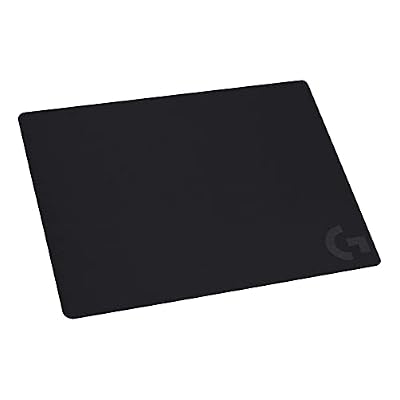
The G240 is the thinnest pad in this guide at 1 mm, and that thin profile suits players who want the mouse to feel close to the desk. Its cloth surface has a moderate friction level that works for low-DPI play, where the mouse travels widely and needs steady resistance. At 340 x 280 mm it gives a generous surface without taking over the desk, and the rubber base keeps it from sliding. The pad rolls up for transport, which makes it a practical choice for LAN sessions and shared desks where the pad moves often.
Specs
- Cloth surface with moderate friction
- 340 x 280 x 1 mm size
- Rubber base for grip
- Designed for low-DPI gaming
- Rolls up for transport
- Soft material for comfortable hand movement
Best for: Players who want a thin, portable pad for low-DPI play.
Watch out for: The 1 mm thickness gives little cushion, so long sessions can tire the wrist.
Corsair MM100

The MM100 is built for control, with a textile-weave surface that adds friction and steadies the mouse during precise aiming. At 320 x 270 mm and 3 mm thick, it matches the size of the QcK while adding a thicker, more cushioned base that stays flat on the desk. The non-slip rubber base holds firm during fast movements, and the surface works with laser and optical mice alike. For players who value stopping power over glide speed, this is the most control-focused pad in the guide, and its plain black design keeps the desk looking tidy.
Specs
- Textile-weave cloth surface for maximum control
- 320 x 270 mm size
- 3 mm thick
- Non-slip rubber base
- Optimised for laser and optical sensors
- Model CH-9100020-WW
Best for: Players who want the most stopping power for precise aiming.
Watch out for: The higher friction surface feels slower than the smoother pads here.
Which One Fits Your Situation
If You Play Fast Shooters
Fast shooters reward a smooth glide and a pad that stays put during flicks. The Gigantus V2 Medium leads here, with its textured weave and thick base giving a free glide with steady stopping. The QcK Medium is a close second for players who want a balanced surface, and both handle quick movements without sliding. Choose the one whose size fits the desk better.
If You Play at Low Sensitivity
Low sensitivity means wide arm movements, and the pad needs room for them. The Gigantus V2 Medium has the largest surface here at 360 x 270 mm, and the G240 follows close behind at 340 x 280 mm. Both give the mouse room to travel without running off the edge. Measure the desk first, since a pad that overhangs the edge curls and lifts the mouse.
If Your Desk Is Small
A small desk needs a pad that fits without crowding the keyboard. The QcK Medium and the MM100 both measure 320 x 270 mm, which fits most compact desks while leaving room for the keyboard. The G240 is slightly larger, so check the space before choosing it. A pad that fits cleanly beats a larger pad that has to bend around other gear.
If You Travel to LAN Sessions
LAN play needs a pad that packs small and sets up fast. The G240 rolls up for transport and unrolls flat on a shared desk, which makes it the natural travel pick. The other pads are better left at home, since their thicker bases resist rolling. Bring a clean cloth to wipe the surface before play, since shared desks collect dust quickly.
Common Mistakes
- Buying a pad that overhangs the desk, then wondering why the corners curl and lift.
- Choosing a fast surface for precise aiming, when a controlled weave would steady the mouse.
- Ignoring the base, then watching the pad slide across a smooth desk mid-match.
- Picking the smallest pad available, then running out of room during wide flicks.
- Never cleaning the pad, so dust and sweat slowly change how the surface feels.
Frequently Asked Questions
What size mouse pad should I buy?
A medium pad near 320 x 270 mm suits most players and most desks, while larger pads suit very low sensitivity and wide arm movements. Measure the space between the keyboard and the desk edge first, and leave room for the keyboard beside the pad. A pad that fits cleanly beats a larger one that overhangs the desk.
Do cloth pads work with any gaming mouse?
Cloth pads work with optical and laser sensors alike, and the models in this guide are designed for gaming sensors. Very old ball mice are the exception, and they are rare today. Keep the surface clean, since dust and hair affect tracking more than the pad material itself.
How do I clean a cloth mouse pad?
Wipe the surface with a damp cloth and mild soap, then let it dry flat away from direct heat. Avoid harsh cleaners, which can damage the weave, and do not fold the pad while it is wet. A quick clean every few weeks keeps the glide consistent and extends the life of the surface.
Are stitched edges worth looking for?
Stitched edges resist fraying where the wrist rubs, which extends the life of the pad noticeably. Unstitched edges can peel and lift over time, especially on pads that see daily use. When two pads are otherwise similar, the one with stitched edges usually lasts longer on the desk.