MMO mice are big by nature, because a thumb panel with a dozen buttons takes space, and that size is exactly the problem for smaller hands. A panel that sits too far forward forces the thumb to stretch, and a heavy body tires the wrist during long raids. The best MMO mouse for small hands is the one with the lightest body, the most reachable panel, and a shape that does not demand a large palm.
This guide is for MMO players with smaller hands who want a full button panel without the strain, and for raiders who play for hours at a time. Each pick below was chosen from the name and specifications shown on its Amazon product page, with attention to weight, panel position, button count, and how the shell fits a smaller grip.
Quick Picks
As an Amazon Associate we earn from qualifying purchases
| Product | Best for | Key spec from title |
|---|---|---|
| SteelSeries Aerox 9 Wireless | Lightest MMO mouse here | 18 programmable buttons, 89 g |
| Corsair Scimitar RGB Elite | Sliding panel for thumb reach | 17 programmable buttons, 18,000 DPI |
| Razer Naga V2 HyperSpeed | Long battery and many buttons | 19 programmable buttons, 400-hour battery |
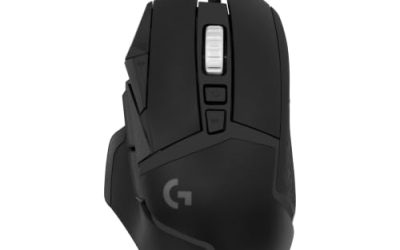
| Logitech G600 | Most buttons for the lowest learning curve | 20 programmable buttons, 12-button thumb panel |
How to Choose
Weight and Hand Fatigue
An MMO mouse carries more hardware than a shooter mouse, so weight is the first thing a small hand feels. Models under 95 g reduce wrist strain during raids that run for hours, while models above 120 g demand more effort with every movement. A lighter body also makes the thumb panel easier to use, because the hand does not fight the mouse while reaching for buttons. Check the listed weight before the button count, since a panel that cannot be reached comfortably is no help at all. Rest the hand on the mouse before buying when possible, since listed weight alone hides balance.
Thumb Panel Reach and Position
The thumb panel is the heart of an MMO mouse, and its position decides whether small hands can use it. A panel that slides forward or backward helps the thumb land on the right row without stretching, and raised or textured buttons make each row easy to find by touch. Count the buttons, then check their spacing: tightly packed rows suit smaller thumbs, while wide rows suit larger ones. A panel with a slight curve follows the thumb’s natural arc better than a flat grid. Rows that curve with the thumb feel natural, while flat grids force the thumb to reach further.
Button Count and Layout
More buttons are not always better when the hand is small. Eighteen to twenty buttons cover a full raid rotation, but only when each button is reachable without shifting the grip. Look for a layout where the most-used abilities sit on the front rows, and use software profiles to move rarely used commands to the back rows. A G-Shift or modifier button doubles the actions without adding hardware, which keeps the panel compact. Start with a few binds and add more as the layout becomes familiar. A modifier key doubles the panel without adding buttons, which keeps the mouse compact for small hands.
Grip Shape and Shell Width
Shell width matters as much as length for smaller hands. A narrow body lets the thumb and ring finger wrap around the mouse without stretching, while a wide body forces the fingers apart and weakens the grip. Check the listed width and compare it with the current mouse, since a few millimetres change the feel more than expected. A slight right-hand curve supports the palm without pushing the thumb away from the panel, and textured sides help the grip when hands get warm. A shell that is too wide weakens the grip, because the fingers cannot wrap around it fully.
The 4 Best Options
SteelSeries Aerox 9 Wireless
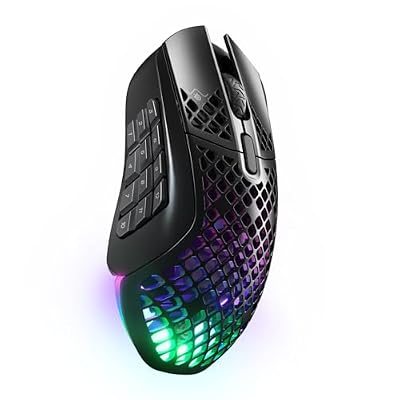
The Aerox 9 Wireless is the lightest MMO mouse in this guide at 89 g, and that lightness is the reason it leads for small hands. Its 18 programmable buttons include a 12-button side panel that sits close to the thumb, and the narrow shell lets smaller fingers wrap around the body without stretching. The TrueMove Air sensor tracks up to 18,000 CPI, and the 180-hour battery covers weeks of evening raids. AquaBarrier protection guards against splashes, and the wireless connection keeps the desk free of cables during long sessions.
Specs
- 18 programmable buttons
- 12-button side panel
- TrueMove Air optical sensor up to 18,000 CPI
- 89 g weight
- 180-hour battery life
- AquaBarrier splash protection
Best for: Small hands that want the lightest full-size MMO mouse.
Watch out for: The perforated shell lets dust in, so it needs a quick clean now and then.
Corsair Scimitar RGB Elite
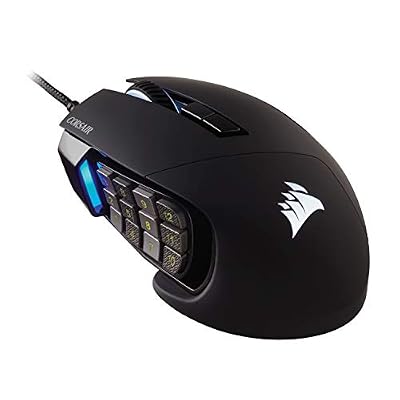
The Scimitar RGB Elite solves the reach problem directly, because its 12-button side panel slides forward and backward to meet the thumb. That Key Slider adjustment is the feature that makes this mouse work for smaller hands, since the panel can move to where the thumb naturally rests. Seventeen programmable buttons cover a full rotation, and the 18,000 DPI optical sensor tracks steadily through raids and PvP alike. iCUE software stores profiles on the mouse, and the braided cable stays out of the way on the desk.
Specs
- 17 programmable buttons
- 12-button side panel with Key Slider adjustment
- 18,000 DPI optical sensor
- 50 million click rated Omron switches
- iCUE software with on-board profile storage
- 122 g weight
Best for: Players who want the panel position adjusted to their thumb.
Watch out for: At 122 g it is heavier than the wireless picks here, so long sessions need breaks.
Razer Naga V2 HyperSpeed

The Naga V2 HyperSpeed pairs a 95 g wireless body with 19 programmable buttons, and that balance of weight and controls suits smaller hands that want a full panel without a heavy shell. The Focus Pro 30K sensor tracks precisely, and the HyperScroll Pro wheel switches between tactile and free-spin modes for inventory and menus. A 400-hour battery life means weeks between charges, and the interchangeable side plates let the panel layout change with the game. Mechanical switches Gen-2 give a firm click that holds up through long raid nights.
Specs
- 19 programmable buttons
- Focus Pro 30K optical sensor
- HyperScroll Pro wheel with free-spin mode
- Up to 400 hours of battery life
- Mechanical mouse switches Gen-2
- 95 g weight
Best for: Players who want many buttons and a battery that lasts for weeks.
Watch out for: The side plates add setup steps when switching between MMO and other games.
Logitech G600

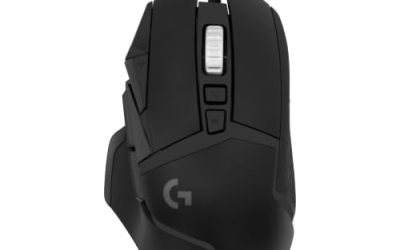
The G600 is the classic MMO mouse, and its 20 programmable buttons remain the largest count in this guide. A 12-button thumb panel sits in two rows of six, and the G-Shift ring-finger button doubles the actions on every other button, so a full rotation fits under the thumb without stretching. RGB lighting marks profiles by colour, and the 8,200 DPI sensor covers the sensitivity range most MMO play needs. At 133 g it is the heaviest pick here, so it suits a palm grip on a desk where the mouse moves less.
Specs
- 20 programmable buttons
- 12-button thumb panel in two rows of six
- G-Shift ring-finger button doubles every action
- 8,200 DPI sensor
- RGB lighting with profile colours
- 133 g weight
Best for: Players who want the most buttons and a proven, simple layout.
Watch out for: The 133 g weight and wide body suit larger palms better than very small hands.
Which One Fits Your Situation
If Your Hands Are Small and You Raid for Hours
Long raids with small hands need the lightest mouse that still carries a full panel. The Aerox 9 Wireless leads here at 89 g, with a narrow shell and a panel that sits close to the thumb. The Naga V2 HyperSpeed is the wireless alternative when battery life matters more than a few grams. Either one keeps the wrist fresh through a long night of pulls.
If You Cannot Reach the Back Rows
A thumb that cannot reach the back rows wastes buttons, and the Scimitar RGB Elite answers that with its sliding panel. Move the Key Slider until the thumb lands on the middle rows without stretching, then bind the most-used abilities to those rows. The Aerox 9 also helps, since its panel sits closer to the thumb than wider models. Test reach in a natural grip before binding a full rotation.
If You Play More Than One MMO
Players who switch between games need profiles that change with the game. The Scimitar RGB Elite stores profiles on the mouse through iCUE, and the Naga V2 HyperSpeed swaps side plates for different layouts. The G600 marks profiles by RGB colour, which makes switching obvious at a glance. Set up one profile per game and keep the most-used abilities on the same buttons across profiles.
If You Are New to MMO Mice
A first MMO mouse should be easy to learn, with buttons that are simple to find by touch. The G600 fits that role, because its two rows of six buttons and G-Shift modifier are straightforward to learn. The Aerox 9 is the lighter alternative for players who want wireless freedom from the start. Begin with six binds on the front rows and add more as the layout becomes familiar.
Common Mistakes
- Buying the mouse with the most buttons without checking whether the thumb can reach them.
- Binding a full rotation on day one, then hitting the wrong ability in a raid.
- Choosing a heavy MMO mouse for long sessions, then fighting wrist fatigue by the second hour.
- Ignoring panel position, which matters more than button count for small hands.
- Forgetting to set up profiles per game, so binds from one MMO clash with another.
Frequently Asked Questions
How many buttons does an MMO mouse need?
Most raiders play well with 12 to 20 buttons, since that range covers a full rotation plus utility spells. The panel matters more than the count: buttons that sit within easy thumb reach get used, while buttons at the far edge stay empty. Start with the front rows and add binds gradually as the layout becomes familiar.
Are MMO mice too big for small hands?
Many are, which is why weight and panel position matter so much. The lightest models near 89 g and panels that slide or sit close to the thumb work best for smaller hands. A narrow shell helps too, since it lets the fingers wrap around the mouse without stretching. Try the grip in hand when possible before buying.
Should I choose wired or wireless for MMO play?
Both work well for MMO play, since raids rarely demand the lowest possible delay. Wireless models keep the desk tidy and suit players who move the mouse widely, while wired models never need charging. Battery life above 100 hours removes most charging worry, so pick the connection that fits the desk setup.
Can I use an MMO mouse for other games?
Yes, and many players keep one MMO mouse for everything. The extra buttons hold weapon swaps in shooters, build commands in strategy games, and shortcuts in everyday work. Set up one profile per game so the binds match the activity, and the mouse becomes useful far beyond raids.