Key Takeaways
- Escape from Tarkov rewards a mouse that holds a steady aim during slow, deliberate peeks and fast flicks when a fight breaks out at close range.
- Extra side buttons matter more in Tarkov than in most shooters, because leaning, checking magazines, changing fire modes, and using medical items all compete for keys.
- A sensor with consistent tracking and a low lift-off distance helps you stay on target when you reposition your hand during long raids.
- Weight is a personal choice, but many Tarkov players prefer a mouse in the middle range: light enough for quick turns, heavy enough to feel planted during careful aim.
- A comfortable shape matters across raids that can run long, so grip style should guide your pick as much as the sensor does.
Quick Picks
- Best all-round pick for Tarkov: Logitech G502 HERO — a proven shape with plenty of programmable buttons for binds, an adjustable weight system, and a precise HERO sensor.
- Best for players who want many binds: Razer Basilisk V3 — a thumb rest, a tilting scroll wheel, and a full set of programmable buttons for lean, medical, and fire-mode binds.
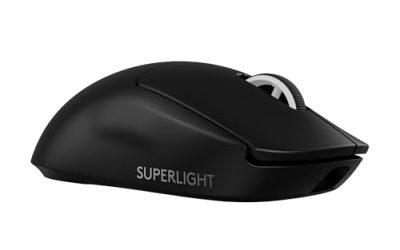
- Best lightweight wireless pick: Logitech G Pro X Superlight 2 — a very light wireless mouse with a precise sensor for players who flick fast and reposition often.
- Best ergonomic pick for long sessions: Razer DeathAdder V3 Pro — a large, comfortable right-handed shape with a light body and a precise sensor.
- Best wireless pick with extra buttons: Logitech G502 Lightspeed — the wireless version of the G502 shape, with the same button layout and a long-lasting wireless connection.
How to Choose
Sensor accuracy and lift-off distance
Tarkov asks for two kinds of aim in the same raid: slow, pixel-precise aiming down a hallway and sudden turns when someone pushes your position. A modern optical sensor with high tracking resolution handles both, and a low lift-off distance keeps your crosshair steady when you lift the mouse to reset your hand. Look for a mouse whose sensor tracks cleanly at the sensitivity you use in game, and avoid older sensors that spin out during fast swipes.
Buttons and binds
Tarkov has more useful binds than a standard shooter. Lean left and right, hold breath, check the chamber, change fire modes, use a painkiller, and switch scopes all benefit from mouse buttons. A mouse with two or three thumb buttons plus a tilting wheel gives you room to move common actions off the keyboard. Programmable software lets you assign each button, and on-board memory keeps your layout when you move between computers.
Weight and balance
A heavier mouse can feel steady during careful aim, while a lighter mouse moves faster during close-range fights. Tarkov mixes both, so most players settle in the middle. Some mice include removable weights, which let you tune the balance toward the front or the back until the mouse feels right in your hand. Try a few settings over several raids before deciding, since first impressions can mislead.
Shape and grip
Palm, claw, and fingertip grips all work in Tarkov, but the shape has to match your hand size. A large ergonomic mouse suits a palm grip and long sessions, while a smaller symmetrical mouse suits a claw or fingertip grip and fast repositioning. If your hand cramps during long raids, the shape is usually the cause, so a different shell often helps more than a different sensor.
Wired or wireless
Modern wireless gaming mice perform on par with wired mice for most players, and they remove cable drag during long sessions. A wired mouse removes battery worries entirely and usually costs less for the same sensor. If you pick wireless, check the battery life and whether the mouse can charge while you play.
Durability and switches
Tarkov sessions run long, and the mouse takes thousands of clicks per raid. Optical switches avoid the double-click faults that wear out mechanical switches over time, and a braided or paracord-style cable resists fraying. A solid build with no rattling buttons will last through many wipes.
The 5 Best Options
1. Logitech G502 HERO

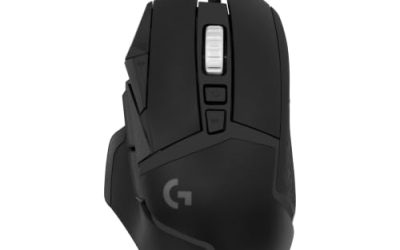
The G502 HERO is the most common recommendation for Tarkov for a simple reason: it has the buttons, the shape, and the sensor that the game asks for. Eleven programmable buttons give you room for lean binds, fire-mode changes, and medical items without reaching across the keyboard. The HERO sensor tracks precisely at high resolution, and the adjustable weight system lets you tune the feel from light to planted. A dual-mode scroll wheel switches between a notched step for weapon selection and a free spin for fast scrolling through inventory screens.
The right-handed ergonomic shape with a thumb rest fits medium and large hands well, and the sniper button on the thumb side drops sensitivity while held, which helps when you hold an angle at long range. It connects over a wired USB cable, so there is no battery to manage during a long raid night.
View the Logitech G502 HERO on Amazon
2. Razer Basilisk V3

The Basilisk V3 is built for players who want a full set of binds under the thumb. It carries eleven programmable buttons, a tilting scroll wheel with distinct left and right tilt inputs, and a thumb rest that keeps your hand relaxed across long sessions. The Focus+ optical sensor tracks precisely, and the optical switches respond quickly with no double-click faults over time.
The ergonomic right-handed shell suits palm and claw grips, and the textured side grip keeps the mouse steady during sweaty fights. The scroll wheel has a smart reel mode that switches between a tactile step and free spin based on how fast you scroll, which is handy when you move through stash screens quickly.
View the Razer Basilisk V3 on Amazon
3. Logitech G Pro X Superlight 2

The G Pro X Superlight 2 is the pick for Tarkov players who want the lightest possible mouse without giving up sensor quality. It weighs very little, which makes fast turns and flicks easier when a fight breaks out at close range. The HERO 2 sensor tracks precisely, and the wireless Lightspeed connection keeps up with wired mice in response time.
The symmetrical shape suits claw and fingertip grips and works for both right-handed players who like a neutral shell. With only five buttons, it has fewer binds than the G502 or Basilisk, so it fits players who keep most actions on the keyboard and want the mouse purely for aim. The battery lasts through many raids on a charge.
View the Logitech G Pro X Superlight 2 on Amazon
4. Razer DeathAdder V3 Pro

The DeathAdder V3 Pro pairs one of the most comfortable ergonomic shapes with a very light body. The large right-handed shell fills the palm, which helps during long Tarkov sessions when your hand would otherwise cramp. The Focus Pro optical sensor tracks precisely at high resolution, and the wireless HyperSpeed connection keeps latency low.
It carries five programmable buttons plus a scroll wheel, so it suits players who want comfort and aim first and keep binds on the keyboard. The smooth feet glide easily across a pad, and the battery runs through many sessions before needing a charge.
View the Razer DeathAdder V3 Pro on Amazon
5. Logitech G502 Lightspeed
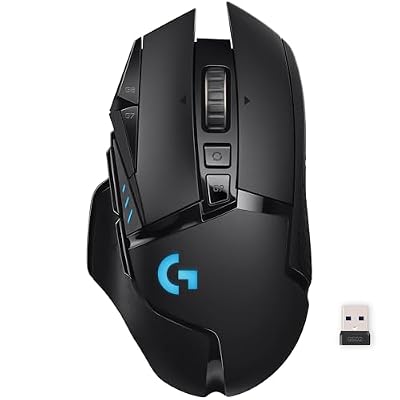
The G502 Lightspeed brings the G502 layout to wireless play. It keeps the eleven programmable buttons, the adjustable weight system, and the thumb rest of the wired G502, with a wireless Lightspeed connection that performs on par with a wired link. The HERO sensor tracks precisely, and the dual-mode scroll wheel switches between notched and free spin.
This is the right pick if you like the G502 shape and button layout but want to remove the cable from your desk. The battery lasts through long sessions, and the mouse can charge on a compatible charging pad while you play. PowerPlay support means you can keep it topped up without plugging in.
View the Logitech G502 Lightspeed on Amazon
Which One Fits Your Situation
- You want the most binds and a proven shape: Pick the Logitech G502 HERO. Its eleven buttons cover lean, fire mode, and medical binds, and the wired connection means no battery management.
- You want a thumb rest and a tilting wheel: Pick the Razer Basilisk V3. The extra wheel inputs and thumb buttons give you more actions under your thumb than most mice.
- You flick fast and reposition often: Pick the Logitech G Pro X Superlight 2. Its light body makes quick turns easier, and the wireless connection keeps your desk clear.
- You play long sessions and want comfort first: Pick the Razer DeathAdder V3 Pro. The large ergonomic shell suits palm grips and stays comfortable across long raids.
- You like the G502 layout but want wireless: Pick the Logitech G502 Lightspeed. It keeps the same buttons and shape with a wireless connection and long battery life.
Common Mistakes
- Picking a mouse with too few buttons: Tarkov has more binds than a standard shooter, and a five-button mouse forces everything onto the keyboard. If you use lean and medical binds often, a mouse with extra thumb buttons helps.
- Chasing the lightest mouse when you aim slowly: A very light mouse can feel twitchy during careful long-range aim. If you hold angles more than you rush, a mid-weight mouse often feels steadier.
- Ignoring grip style: A mouse that suits a palm grip can feel awkward in a claw grip, and the wrong shape causes hand fatigue during long raids. Match the shell to your grip before judging the sensor.
- Setting sensitivity too high: High sensitivity makes close-range turns easy but hurts precise aim at range, which Tarkov punishes. A lower sensitivity with a large pad usually gives steadier aim.
- Forgetting lift-off distance: A high lift-off distance lets the cursor drift when you reposition the mouse, which can throw off your aim mid-fight. A low lift-off setting keeps the crosshair still.
- Skipping on-board memory: If you play on more than one computer, on-board memory keeps your binds and sensitivity settings with the mouse instead of locked to one machine.
FAQ
What makes a mouse good for Tarkov specifically?
Tarkov rewards a mix of precise aim, extra buttons for binds, and comfort across long sessions. A precise sensor, a low lift-off distance, and enough programmable buttons for lean and medical binds matter more here than in a fast arena shooter.
How many buttons do I need for Tarkov?
Five buttons cover the basics, but eight or more give you room for lean left and right, fire-mode changes, and medical items without crowding the keyboard. Eleven-button mice like the G502 and Basilisk V3 are popular for this reason.
Is wireless fine for Tarkov?
Yes. Modern wireless gaming mice respond as fast as wired mice, and they remove cable drag. The main trade-off is battery management, so check battery life and whether the mouse charges while you play.
Does mouse weight matter in Tarkov?
Yes, but it is personal. Lighter mice suit fast turns and flicks, while heavier mice feel steadier during careful aim. Mice with adjustable weights let you find the balance that fits your style.
Should I use a high DPI setting?
High DPI is not required. Most players use a moderate DPI with in-game sensitivity tuned to their pad size and play style. The sensor quality matters more than the maximum DPI number.
Can I use the same mouse for Tarkov and other games?
Yes. All of the mice in this guide work well across shooters and other genres. The extra buttons that help in Tarkov also help in games with many binds.
Final Thoughts
The best gaming mouse for Tarkov is the one that matches your grip, your bind habits, and your aim style. The Logitech G502 HERO is the safest all-round pick, with the buttons and shape that suit the game best. If you want wireless freedom, the G502 Lightspeed keeps the same layout without a cable. Players who value light weight should look at the G Pro X Superlight 2, while those who want comfort across long sessions should consider the DeathAdder V3 Pro. The Basilisk V3 sits in the middle, with a thumb rest and a tilting wheel that give you more binds under your thumb. Whichever you choose, spend a few raids tuning your sensitivity and binds before judging it, since the right setup takes a little time to settle in.
As an Amazon Associate, we earn from qualifying purchases.