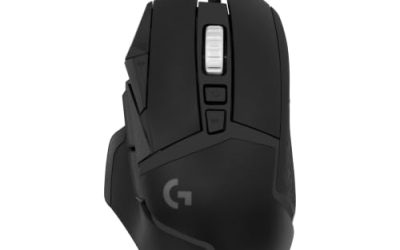
Valorant rewards calm, deliberate aim. Most rounds turn on a single headshot or a clean flick, and a mouse that tracks cleanly at low DPI gives you that control, moving your crosshair in small, predictable steps instead of jumping past a target. This guide explains the DPI range that works best in Valorant, shows you how to work out your own effective sensitivity, and compares five gaming mice built for precise low-DPI play.
As an Amazon Associate, we earn from qualifying purchases.
Key Takeaways
- Most competitive Valorant players use 400 to 800 DPI, paired with a low in-game sensitivity, for steady crosshair control.
- Your effective sensitivity, known as eDPI, is your mouse DPI multiplied by your Valorant in-game sensitivity. Keep it in the 200 to 400 range as a first step.
- A high maximum DPI does not make a mouse better for Valorant. What matters is clean tracking at low DPI, with no smoothing, no acceleration, and no angle snapping.
- Look for 1-DPI step adjustment, a polling rate of at least 1,000 Hz, and a shape that fits your grip. Shape beats specs.
Quick Picks
| Mouse | Best For | Max DPI | Weight | Polling |
|---|---|---|---|---|
| Logitech G Pro X Superlight 2 | All-round Valorant play | 44,000 | 60 g | Up to 8,000 Hz |
| Razer Viper V3 Pro | Lightweight flick aim | 35,000 | 55 g | Up to 8,000 Hz |
| Razer DeathAdder V3 Pro | Palm grip comfort | 30,000 | 63 g | Up to 8,000 Hz with dongle |
| Logitech G Pro X Superlight 2 DEX | Right-hand ergonomic fit | 44,000 | 60 g | Up to 8,000 Hz |
| Razer Basilisk V3 Pro | Extra buttons and versatility | 30,000 | 112 g | Up to 4,000 Hz with dock |
How to Choose
Understand eDPI Before You Touch a DPI Button
DPI alone tells you very little about how fast your crosshair moves in Valorant. The number that matters is eDPI: your mouse DPI multiplied by your in-game sensitivity. A player at 400 DPI with 0.5 sensitivity has an eDPI of 200, and so does a player at 800 DPI with 0.25 sensitivity. When you compare settings, always compare eDPI, not DPI alone.
A good first target for Valorant is an eDPI between 200 and 400: slow enough for micro-adjustments on long angles, yet fast enough to turn and clear corners without lifting your mouse every few seconds. If your current eDPI sits above 500, drop it in small steps over a week so your muscle memory has time to adapt.
Pick a Low DPI Setting
Most Valorant players settle at 400 or 800 DPI. At 400 DPI, each count of sensor movement is larger, which some players find steadier for holding angles. At 800 DPI, movement is finer, which can feel smoother when you track a moving target. Avoid the extremes: very high DPI makes your crosshair jumpy where a few pixels decide a duel, and very low DPI forces huge arm sweeps for basic turns.
Check the Sensor, Not the Headline Number
A mouse marketed with 30,000 or 44,000 DPI is not automatically better at 400 DPI than a mouse with a lower ceiling. What matters at low DPI is native tracking quality: a sensor that reads your hand movement one-to-one, with no smoothing, no acceleration, and no angle snapping. Modern flagship sensors from Logitech and Razer all clear that bar, and they let you change DPI in single steps, so you can tune 400, 500, 700, or 800 DPI exactly. Look for a mouse that stores DPI settings on board, so your settings travel with the mouse.
Polling Rate, Weight, and Shape
Polling rate is how often your mouse reports its position to your PC. At 1,000 Hz it reports 1,000 times per second, which is smooth enough for competitive play. Mice that reach 8,000 Hz can feel slightly more fluid on a high-refresh monitor, though the gain is subtle and the highest rates drain a wireless battery faster. Treat 1,000 Hz as the minimum and anything above it as a bonus.
Low-DPI play means big arm movements, and a heavy mouse tires your arm over a long session. Mice under 70 g feel effortless during flicks, while mice above 100 g can feel planted and stable, which some palm-grip players prefer. Match the shape to your grip: fingertip players want a short, light shell, claw players want a low hump with room for curled fingers, and palm players want a longer shell with a gentle curve.
The 5 Best Options
1. Logitech G Pro X Superlight 2 — Best All-Round Valorant Mouse

The Superlight 2 is the safest pick on this list. It weighs 60 g, uses the Logitech HERO 2 sensor with a ceiling of 44,000 DPI, and reports at up to 8,000 Hz over LIGHTSPEED wireless. Its symmetrical shape suits claw and fingertip grips, and its five programmable buttons keep the layout simple.
Key specs
- HERO 2 sensor, up to 44,000 DPI, 888 IPS tracking speed, and 88 G acceleration
- 60 g weight with zero-additive PTFE feet for a smooth glide
- LIGHTSPEED wireless with polling up to 8,000 Hz
- LIGHTFORCE hybrid switches, up to 95 hours of battery life, USB-C charging, POWERPLAY support
- Five programmable buttons
Why it fits Valorant
At 400 or 800 DPI, the HERO 2 sensor tracks cleanly with no smoothing or acceleration. The 1-DPI step adjustment in Logitech G HUB lets you dial in an exact eDPI, and the light shell makes wide arm sweeps feel easy.
Keep in mind: players with very large hands may want a longer shell, and there is no Bluetooth mode.
2. Razer Viper V3 Pro — Best Lightweight Flick Aim

The Viper V3 Pro is the lightest mouse on this list, built for players who flick fast and reset faster. The white version linked here weighs 55 g, uses the Razer Focus Pro 35K Optical Sensor Gen-2 with a ceiling of 35,000 DPI, and includes the HyperPolling dongle for polling up to 8,000 Hz.
Key specs
- Focus Pro 35K Optical Sensor Gen-2, up to 35,000 DPI, 750 IPS tracking speed, and 70 G acceleration
- 55 g weight in the white version, 54 g in black
- HyperSpeed wireless with polling up to 8,000 Hz through the included HyperPolling dongle
- Gen-3 optical switches built for a 90-million click lifespan
- Up to 95 hours of battery life at 1,000 Hz polling, eight programmable buttons
Why it fits Valorant
Flick aim lives or dies on how quickly you can stop the mouse exactly on a target, and a 55 g shell with a clean sensor makes that easier. The Focus Pro 35K sensor holds its tracking on a wide range of surfaces, and the 1-DPI step adjustment lets you fine-tune your eDPI to a single point.
Keep in mind: the 8,000 Hz polling mode shortens battery life sharply, so most players will run it at 1,000 Hz. The shell has no rubber side grips, so players with sweaty hands may want the grip tape included in the box.
3. Razer DeathAdder V3 Pro — Best for Palm Grip Comfort

The DeathAdder shape has been a competitive staple for years, and the V3 Pro keeps the familiar right-handed ergonomic curve while cutting weight to 63 g. It uses the Razer Focus Pro 30K optical sensor with a ceiling of 30,000 DPI and lasts up to 90 hours on a single charge.
Key specs
- Focus Pro 30K optical sensor, up to 30,000 DPI, 750 IPS tracking speed, and 70 G acceleration
- 63 g weight in black, 64 g in white
- HyperSpeed wireless, 1,000 Hz polling out of the box, up to 8,000 Hz with the HyperPolling dongle
- Gen-3 optical switches, up to 90 hours of battery life, USB-C charging
- Right-handed ergonomic shape for medium to large hands
Why it fits Valorant
The DeathAdder V3 Pro shines when you hold angles and make slow, controlled micro-adjustments. Its ergonomic hump fills the palm and steadies the hand, and the Focus Pro 30K sensor tracks cleanly at 400 and 800 DPI on glass as well as cloth.
Keep in mind: the 8,000 Hz polling upgrade needs the HyperPolling dongle, a separate purchase for the standard model. The shape is right-handed only.
4. Logitech G Pro X Superlight 2 DEX — Best Right-Hand Ergonomic Fit

Logitech G Pro X Superlight 2 DEX
The DEX takes the Superlight 2 formula and reshapes it for right-handed players who want ergonomic support without giving up a light shell. It weighs 60 g, uses the same HERO 2 sensor with a ceiling of 44,000 DPI, and reaches polling up to 8,000 Hz over LIGHTSPEED wireless.
Key specs
- HERO 2 sensor, up to 44,000 DPI, 888 IPS tracking speed, and 88 G acceleration
- 60 g weight with a right-handed asymmetrical shape
- LIGHTSPEED wireless with polling up to 8,000 Hz
- LIGHTFORCE hybrid switches, up to 95 hours of battery life, USB-C charging, POWERPLAY support
- Five programmable buttons
Why it fits Valorant
Everything that makes the standard Superlight 2 good for Valorant carries over here: clean low-DPI tracking, 1-DPI step adjustment, and a light body for wide arm sweeps. The DEX adds a shape that locks the hand in place while you track a strafing enemy.
Keep in mind: the shape is right-handed only, so left-handed players should choose the standard Superlight 2 instead.
5. Razer Basilisk V3 Pro — Best Extra Buttons and Versatility
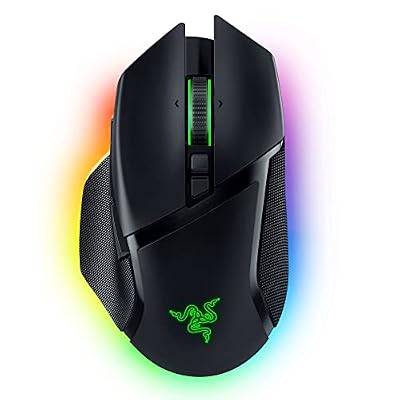
The Basilisk V3 Pro is the heaviest mouse on this list at 112 g, and it earns its place by doing more than just aiming. It uses the Razer Focus Pro 30K optical sensor with a ceiling of 30,000 DPI, carries 13 programmable controls, and adds a HyperScroll tilt wheel. It connects over HyperSpeed wireless, Bluetooth, or a wired USB-C cable.
Key specs
- Focus Pro 30K optical sensor, up to 30,000 DPI
- 112 g weight with a right-handed ergonomic shape and thumb rest
- HyperSpeed wireless, Bluetooth, and wired USB-C connections
- HyperScroll tilt wheel with notched and free-spin modes
- 13 programmable controls, 13-zone Chroma RGB lighting
- Gen-3 optical switches, up to 90 hours of battery life
Why it fits Valorant
The Basilisk V3 Pro suits Valorant players who also use their mouse for work, browsing, and other games. The thumb rest and ergonomic curve keep the hand relaxed, and the extra buttons can hold push-to-talk, utility binds, or a DPI clutch for precise long-range shots. The Focus Pro 30K sensor tracks cleanly at 400 and 800 DPI.
Keep in mind: at 112 g, this mouse is far heavier than the other picks here. Its 4,000 Hz wireless polling needs the Mouse Dock Pro, a separate purchase.
Which One Fits Your Situation
- Safest all-round choice: Logitech G Pro X Superlight 2. Its light shell, clean HERO 2 tracking, and simple layout suit almost any grip and any Valorant role.
- Fast flicks, claw or fingertip grip: Razer Viper V3 Pro. At 55 g with the Focus Pro 35K sensor, it stops on a dime and resets quickly for the next duel.
- Palm grip or medium to large hands: Razer DeathAdder V3 Pro. Its ergonomic curve supports your hand through long sessions and steadies your micro-adjustments.
- Superlight 2 sensor with palm support: Logitech G Pro X Superlight 2 DEX. It keeps the same sensor and weight in a right-handed ergonomic shell.
- One mouse for Valorant, work, and other games: Razer Basilisk V3 Pro. Its thumb rest, extra buttons, and triple connectivity make it the most versatile pick here, though it is the heaviest.
If you are torn between two mice, choose by shape first: a shell that cramps your hand will hurt your aim within an hour.
Common Mistakes
Chasing the biggest DPI number. A 44,000 DPI ceiling looks impressive on a box, but nobody plays Valorant at 44,000 DPI. What matters is how the sensor behaves at 400 or 800 DPI, so judge mice on shape, weight, and feel instead.
Copying a pro setting exactly. Professional players use settings tuned to their own hands, desks, and mousepads. Their eDPI is a useful reference point, not a prescription. Use the 200 to 400 eDPI range as a guide, then adjust in small steps until your crosshair feels steady and your turns feel natural.
Changing DPI and sensitivity at the same time. If you change both at once, you will never know which change helped. Change one number, play several matches, and only then decide whether to change the other.
Ignoring your mousepad and desk space. Low-DPI play needs room. A small pad forces you to lift and recenter the mouse mid-fight, which breaks your aim at the worst moment. A large cloth pad and a clear desk give your arm the space low sensitivity demands.
FAQ
What DPI do most Valorant players use?
Most competitive Valorant players use 400 or 800 DPI, paired with an in-game sensitivity that puts their eDPI between 200 and 400. For example, 400 DPI with 0.5 sensitivity gives an eDPI of 200, and 800 DPI with 0.35 sensitivity gives an eDPI of 280.
Is 800 DPI good for Valorant?
Yes. 800 DPI is one of the most popular settings in Valorant because it gives fine, smooth tracking while keeping your crosshair slow enough for precise micro-adjustments. Pair it with an in-game sensitivity around 0.25 to 0.4 for an eDPI in the 200 to 320 range, then tune from there.
Is higher DPI better for Valorant?
No. Higher DPI makes your crosshair move further for the same hand movement, which makes small aim corrections harder. In a game built around headshots and tight angles, control beats raw speed.
Should I use 400 or 800 DPI?
Both work well, and the difference is subtle. 400 DPI can feel steadier when you hold angles, while 800 DPI can feel smoother when you track moving targets. Try each for a few days with the same eDPI and keep the one that feels more natural.
Does polling rate matter in Valorant?
Yes, up to a point. A polling rate of 1,000 Hz is smooth enough for competitive play and is the minimum you should accept. Higher rates can feel slightly more fluid on a high-refresh monitor, but the gain is small and the battery cost is real.
Final Thoughts
The best gaming mouse DPI for Valorant is a low one: 400 or 800 DPI, tuned to an eDPI between 200 and 400, on a sensor that tracks cleanly with no smoothing or acceleration. That simple formula covers most players, and it is why the mice on this list all share the same traits: a precise modern sensor, fine DPI steps, a high polling rate, and a light, well-shaped body.
If you want one answer, pick the Logitech G Pro X Superlight 2 for all-round play, or the Razer Viper V3 Pro for the lightest flick-aim tool. Palm players will be happiest with the Razer DeathAdder V3 Pro or the Superlight 2 DEX, while players who want one mouse for everything should look at the Razer Basilisk V3 Pro.