

- Top Pick: Womier Retro 75% Gaming Keyboard with OLED Display&Knob, M87 Pro Bluetooth 5.1/2.4GHz /USB-C Wireless Mechanical Keyboard with Hot-Swappable Custom Switch, Compact Gamer RGB Keyboard-Grey
- Best Value: Womier SK80 75% Keyboard with Color Multimedia Display Gaming Keyboard
- Premium Choice: SteelSeries USB Apex 5 Hybrid Mechanical Gaming Keyboard – Per-Key RGB Illumination – Aircraft Grade Aluminum Alloy Frame – OLED Smart Display (Hybrid Blue Switch)
A keyboard with a built-in screen is the ultimate desk flex: a small OLED or LCD panel that shows your CPU temps, the track you are playing, a downloaded GIF, or a custom logo, all without alt-tabbing. It is a genuinely useful feature for streamers, multitaskers and anyone who likes their hardware to do more than just type. But it is also a rare one, so honesty matters here: very few keyboards actually include a true display, and plenty of boards marketed around ‘smart’ features only have RGB. This guide rounds up the best keyboards with an OLED or built-in display in 2026 — and is upfront about which picks have a real screen and which are premium, information-rich alternatives.
- Best Keyboards with OLED / Built-in Display at a Glance
- 1. SteelSeries Apex Pro HyperMagnetic Gaming Keyboard, OLED Smart Display, Adjustable Actuation
- 2. Womier SK80 75% Keyboard with Color Multimedia Display, Mechanical Gaming Keyboard
- 3. Corsair K100 RGB Optical-Mechanical Gaming Keyboard, iCUE Control Wheel, 44-Zone RGB
- 4. SteelSeries Apex 5 Hybrid Mechanical Gaming Keyboard, Per-Key RGB, OLED Smart Display
- 5. Razer Ornata Chroma Gaming Keyboard, Hybrid Mechanical Switches, Customizable Chroma RGB
- 6. AULA F75 75% Wireless Mechanical Keyboard, Hot Swappable, Gasket Mount
- How to Choose a Keyboard with a Display
- Frequently Asked Questions
- Related Guides
- Related Articles
We lead with the boards that genuinely include an on-keyboard display, then round out the list with premium, customizable keyboards that deliver the smart, expressive experience people want from a ‘display’ board even when the screen itself is RGB rather than a panel. Prices run from around $56 to around $200, reflecting that screen-equipped and flagship boards command a premium. Below is an at-a-glance comparison — note the ‘Standout Spec’ column flags exactly which boards have a literal display — followed by a closer look at each and a buyer’s guide to on-keyboard screens, smart controls and customization.
As an Amazon Associate we earn from qualifying purchases at no extra cost to you.





🛒 Best Price Today on Amazon
Prime members get fast, free shipping on everything above, plus member-only deals. New members get a 30-day free trial — cancel anytime.
Best Keyboards with OLED / Built-in Display at a Glance
| Keyboard | Best For | Standout Spec | Approx Price |
|---|---|---|---|
| SteelSeries Apex Pro | True OLED smart display | OLED screen + adjustable actuation | around $200 |
| Womier SK80 75% | Built-in color display | Color multimedia display, 75% | around $56 |
| Corsair K100 RGB | Flagship smart controls | iCUE control wheel, 44-zone RGB | around $200 |
| SteelSeries Apex 5 | Per-key OLED-era hybrid | Per-key RGB, OLED smart display | around $98 |
| Razer Ornata Chroma | Premium hybrid RGB | Hybrid mecha-membrane, Chroma RGB | around $200 |
| AULA F75 75% Wireless | Customizable info-display board | Hot-swap, gasket mount, RGB | around $61 |
1. SteelSeries Apex Pro HyperMagnetic Gaming Keyboard, OLED Smart Display, Adjustable Actuation

SteelSeries Apex Pro TKL Wireless Gaming Keyboard - Black | Esports Tenkeyless — OLED Screen — Adjustable Actuation — PBT Keycaps — Bluetooth — 2.4GHz — USB-C


As an Amazon Associate we earn from qualifying purchases. Product prices and availability are accurate as of the date/time indicated.
The SteelSeries Apex Pro is the headline pick here because it has a genuine OLED smart display built into the top-right corner of the board. That little screen shows system info, settings, song titles and custom images on the fly, while HyperMagnetic switches let you set a custom actuation point for each key. At around $200 it is the flagship, and the only board on this list with a true OLED and per-key adjustable actuation.
If a real on-keyboard display is what you came for, this is the one. The OLED panel is the real deal — adjust settings or glance at info without leaving your game — and the magnetic switches make the typing experience deeply tunable, from a feather-light gaming actuation to a deliberate typing depth. Per-key RGB and premium build round out a board that genuinely earns the ‘display’ label. For the true OLED experience, the Apex Pro is the definitive choice.
Pros: Genuine OLED smart display, per-key adjustable HyperMagnetic actuation, premium build.
Cons: Flagship price; the OLED is small and informational rather than large.
2. Womier SK80 75% Keyboard with Color Multimedia Display, Mechanical Gaming Keyboard

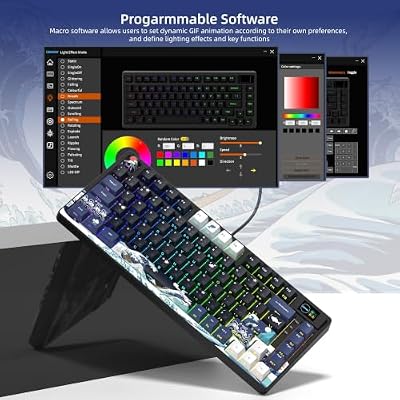
Womier SK80 75% Keyboard with Color Multimedia Display Gaming Keyboard | Creamy Sound Mechanical Wired Hot Swappable Gasket RGB Custom Key board, Pre-lubed Stabilizer for Mac/Win, Black Kanagawa



As an Amazon Associate we earn from qualifying purchases. Product prices and availability are accurate as of the date/time indicated.
The Womier SK80 is the affordable way to get a real screen on your keyboard. This 75% mechanical board builds in a small colour multimedia display that can show animations, system info or custom images, alongside a control knob and vivid RGB. At around $56 it is by far the cheapest board here with a genuine on-keyboard screen, which makes it the value standout for this very specific feature.
This is the pick for someone who wants the screen-on-keyboard flex without spending flagship money. The colour display brings real personality — set it to a looping GIF or a stat readout — the compact 75% layout keeps the desk tidy while retaining arrow and function keys, and the mechanical switches plus control knob make it pleasant to use day to day. If a literal display is non-negotiable but $200 is not in the budget, the Womier SK80 is the answer.
Pros: Real built-in color display, control knob, compact 75% layout, vivid RGB, great value.
Cons: Display is small and colour-LCD rather than OLED; gaming-tier build.
3. Corsair K100 RGB Optical-Mechanical Gaming Keyboard, iCUE Control Wheel, 44-Zone RGB

Corsair K100 RGB Optical-Mechanical Wired Gaming Keyboard - QWERTY US Layout, OPX Switches - PBT Double-Shot Keycaps - Elgato Stream Deck and iCUE Compatible - Black


As an Amazon Associate we earn from qualifying purchases. Product prices and availability are accurate as of the date/time indicated.
The Corsair K100 RGB is the flagship smart-controls pick. It does not have a screen, so let’s be clear about that — but it delivers much of what people want from a ‘smart’ board through its iCUE control wheel and a stunning 44-zone RGB light edge, paired with fast OPX optical-mechanical switches. At around $200 it is a top-tier board for those who value tactile smart controls over a literal display.
This is the keyboard for the enthusiast who wants flagship features and deep software control rather than an OLED panel specifically. The iCUE control wheel acts like a programmable dial for volume, brightness, scrubbing or macros, the OPX switches are blisteringly fast, and the 44-zone RGB with a light edge is genuinely spectacular. If your real goal is a premium, information-and-control-rich board — just without a screen — the K100 is one of the best made.
Pros: iCUE control wheel, ultra-fast OPX optical switches, dazzling 44-zone RGB, dedicated media keys.
Cons: No actual display screen; flagship price for the feature set.
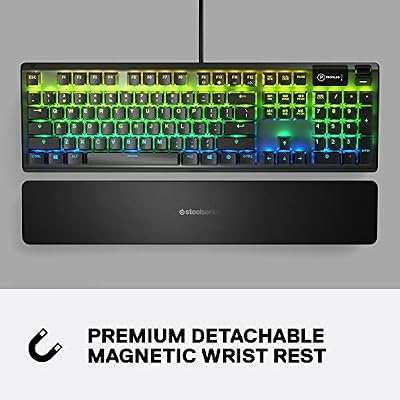
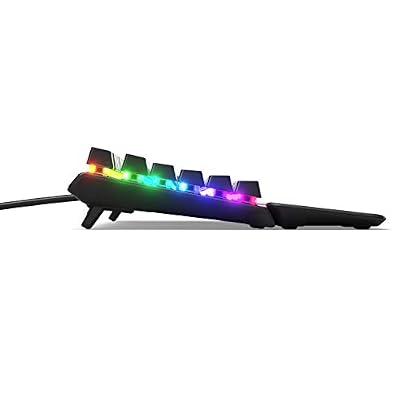
4. SteelSeries Apex 5 Hybrid Mechanical Gaming Keyboard, Per-Key RGB, OLED Smart Display

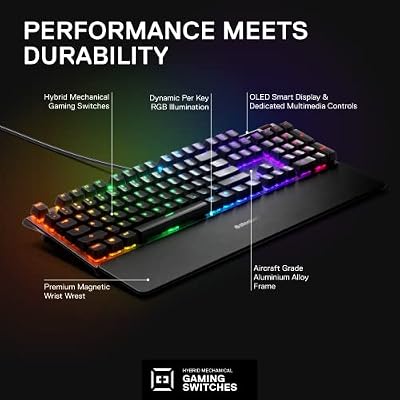
SteelSeries USB Apex 5 Hybrid Mechanical Gaming Keyboard – Per-Key RGB Illumination – Aircraft Grade Aluminum Alloy Frame – OLED Smart Display (Hybrid Blue Switch)





As an Amazon Associate we earn from qualifying purchases. Product prices and availability are accurate as of the date/time indicated.
The SteelSeries Apex 5 brings the OLED smart display down to a mid-range price. Like its Apex Pro sibling it includes a small OLED screen for system info, settings and song titles, and pairs it with hybrid mechanical switches and per-key RGB. At around $98 it is the most affordable SteelSeries board here with a genuine OLED, making it a sweet-spot pick for the display feature.
This is the keyboard for someone who wants a real on-keyboard OLED without stretching to the Apex Pro’s flagship cost. The OLED panel shows useful info at a glance and is configured through SteelSeries Engine, the hybrid switches blend mechanical responsiveness with a softer landing, and per-key RGB lets you light each key individually. A magnetic wrist rest and metal top plate add polish. For an OLED-equipped board at a mid-range price, the Apex 5 is a smart middle ground.
Pros: Genuine OLED smart display, hybrid mechanical switches, per-key RGB, metal top plate.
Cons: OLED is small and informational; hybrid switches are not full mechanical.
5. Razer Ornata Chroma Gaming Keyboard, Hybrid Mechanical Switches, Customizable Chroma RGB
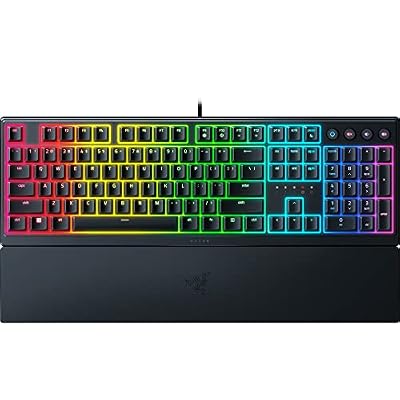
Razer Ornata V3 Gaming Keyboard, Low-Profile Keys, Black | Mecha-Membrane Switches, UV-Coated Keycaps, Backlit Media Keys, 10-Zone RGB Lighting, Snap Tap, Magnetic Wrist Wrest


As an Amazon Associate we earn from qualifying purchases. Product prices and availability are accurate as of the date/time indicated.
The Razer Ornata Chroma is a premium hybrid-RGB pick, included honestly as an alternative rather than a screen board — it does not have an OLED display. What it offers is Razer’s hybrid mecha-membrane switches, which blend a soft cushioned touch with a clicky mechanical feel, plus fully customizable Chroma RGB and a comfortable magnetic wrist rest. At around $200 it is positioned as a premium typing experience.
This is the board for the Razer-ecosystem user who wants expressive Chroma lighting and a distinctive switch feel rather than a literal panel. The mecha-membrane switches are quieter and softer than full mechanical while keeping a tactile click, Chroma RGB syncs across other Razer gear for a coordinated, information-by-colour setup, and the wrist rest aids long sessions. If you would rather express status through synced lighting than a small screen, the Ornata Chroma is a comfortable, premium choice.
Pros: Comfortable hybrid mecha-membrane switches, full Chroma RGB, magnetic wrist rest, Razer Synapse.
Cons: No display screen; premium price for a hybrid-switch board.
6. AULA F75 75% Wireless Mechanical Keyboard, Hot Swappable, Gasket Mount

AULA F75 75% Wireless Mechanical Keyboard, Hot Swappable Creamy Keyboard, Pre-lubed Greywood Switches RGB Backlit Gaming Keyboards, 2.4GHz/Type-C/BT5.0(Salt White Blue)


As an Amazon Associate we earn from qualifying purchases. Product prices and availability are accurate as of the date/time indicated.
Rounding out the list is the AULA F75, a customizable info-display-style board that, in the interest of honesty, does not include an OLED screen — but earns its place for the smart, expressive experience enthusiasts actually want. It is a 75% wireless mechanical board with hot-swappable switches, a gasket-mount design for a softer typing feel, pre-lubed switches and bright RGB. At around $61 it is the customization value pick.
This is the keyboard for the tinkerer who cares more about feel and personalization than a literal panel. Hot-swap sockets let you change switches without soldering, the gasket mount gives a cushioned, premium typing sound and feel, and triple-mode wireless keeps the desk tidy. The bright RGB and compact 75% layout add personality and save space. If ‘smart, customizable and expressive’ is your real definition of a standout board — minus the screen — the AULA F75 delivers a lot for the money.
Pros: Hot-swappable switches, gasket-mount feel, pre-lubed switches, wireless, vibrant RGB, compact 75%.
Cons: No display screen at all; you are buying customization, not a panel.
How to Choose a Keyboard with a Display
The first and most important question is whether you want a literal screen or just a smart, expressive board — and this is where buyers get misled. Genuinely screen-equipped keyboards are rare. On this list, the SteelSeries Apex Pro and Apex 5 have a true OLED smart display, and the Womier SK80 has a colour multimedia display. The Corsair K100, Razer Ornata and AULA F75 do not have a screen at all — they are premium boards we have included honestly as alternatives. Decide first whether the panel itself is the goal.
If a real display is essential, look at what the screen actually does. An OLED smart display like the Apex Pro’s shows system stats, settings, song titles and custom images, and you configure it in the companion software — useful for glanceable info without alt-tabbing. The Womier’s colour panel leans more toward animations and personality. These are small, informational screens, not large touch panels, so set expectations accordingly and value them for convenience rather than spectacle.
If smart control matters more than a literal screen, weigh the alternatives fairly. The Corsair K100’s iCUE control wheel is a programmable dial for volume, scrubbing, brightness and macros, and its 44-zone RGB can convey status through colour. The AULA F75’s hot-swap, gasket-mount design is about a premium, personalized feel. Many people who think they want a screen are actually after this kind of expressive, controllable experience — and these boards deliver it without the screen’s cost.
Finally, factor in switches, layout and budget. Screen and flagship boards command a premium — expect to pay around $99 to $200 for the genuine OLED options here — while a customizable board like the AULA undercuts them. Decide between full mechanical, hybrid or optical switches based on feel, pick a layout (75% boards like the Womier and AULA save desk space), and be honest with yourself about whether the screen earns its premium for how you will actually use it. The best ‘display’ keyboard is the one whose feature set matches what you genuinely need.
Frequently Asked Questions
Which keyboards on this list actually have a real screen?
Three of them. The SteelSeries Apex Pro and Apex 5 both include a genuine OLED smart display for system info, settings and song titles, and the Womier SK80 has a built-in colour multimedia display for animations and information. The Corsair K100, Razer Ornata Chroma and AULA F75 do not have a screen — we included them honestly as premium, smart or highly customizable alternatives.
What can an OLED keyboard display actually show?
On boards like the SteelSeries Apex Pro and Apex 5, the small OLED panel displays system information such as CPU load, current settings and profiles, the song you are playing, and custom images or logos you upload through the companion software. It is a glanceable, informational screen designed to save you alt-tabbing, rather than a large interactive touch display.
Are keyboards with a display worth the extra money?
It depends on how you work. For streamers, multitaskers and people who like glanceable stats or quick settings changes, a real OLED board like the Apex Pro can be genuinely useful and a fun flex. If you mostly want flashy feedback, a smart-control board like the Corsair K100 or a customizable board like the AULA F75 may give you more value without paying for the screen itself.
Is there an affordable keyboard with a built-in display?
Yes. The Womier SK80 at around $56 is the most affordable board here with a genuine on-keyboard screen — a colour multimedia display on a compact 75% mechanical board. The SteelSeries Apex 5 at around $98 offers a real OLED smart display at a mid-range price. Both let you get the screen feature well below the flagship cost of the Apex Pro or Corsair K100.
Related Guides
- Best Mechanical Keyboards
- Best RGB Keyboards
- Best Gaming Keyboards
- Best Streaming Gear
- Best Gaming Headsets
- Best Gaming PC Builds
Affiliate Disclosure: As an Amazon Associate, we earn from qualifying purchases. If you click a link and make a purchase, we may earn a small commission at no extra cost to you. Prices and availability are accurate as of publication and may change.










