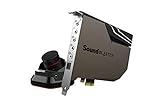
- Top Pick: Creative Sound Blaster Audigy Fx Pro Hi-Res PCIe Sound Card | Hi-Res, PCIe Sound Card, Hi-Res Audio, Surround Sound, Clean Audio, PC Upgrade
- Best Value: XRIKUI PCIe 7.1 Surround Sound Card, CM6212 + CM9881 Chipset, ASIO Support, PCI Express Audio Card for Windows Desktop PC
- Premium Choice: Creative Sound Blaster AE-X Hi-Res PCIe Sound Card for PC | Hi-Res, PCIe Sound Card, 32-bit/384kHz, Hi-Res Audio, PC Audio, Desktop App Support
Motherboard audio has improved, but plenty of builders still add an internal PCIe sound card for a quieter noise floor, a proper headphone amplifier, or surround decoding for games and movies. The decision is narrower than it looks. You are choosing between a premium card with a high-end DAC and a headphone amp, a mid-tier card with surround features, and a simple low-profile card that mainly adds jacks or legacy compatibility. Slot type, operating system support, and driver availability decide whether a card works in your machine at all.
This guide is for PC gamers with wired headsets, music listeners with high-impedance headphones, and anyone upgrading an older desktop for 2026. It compares ten PCIe cards using only what each listing states, like sample rates, signal-to-noise figures, chipsets, and supported Windows versions, and it flags where a title leaves a key question unanswered.
Quick Picks
As an Amazon Associate we earn from qualifying purchases at no extra cost to you.





| Product | Best for | Key spec from the title |
|---|---|---|
| Creative Audigy Fx Pro | A simple Hi-Res upgrade | Hi-Res PCIe, surround sound |
| XRIKUI PCIe 7.1 | ASIO users on a budget tier | 7.1 surround, CM6212 + CM9881, ASIO |
| Creative Sound Blaster AE-X | High sample-rate playback | 32-bit/384kHz, Hi-Res |
| Creative Sound Blaster Z SE | Headphone amp and mic tuning | 24-bit/192 kHz, 116 dB SNR, 600 ohm amp |
| Padarsey PCIe 5.1 | Older Windows 7 builds | 5.1, CMI8738 chip, Windows 7 |
| Creative BlasterX AE-5 Plus | Premium gaming audio with RGB | SABRE32-class, up to 122dB SNR, Xamp |
| Creative Audigy Fx V2 | Entry surround upgrade | 5.1 discrete and virtual, Scout Mode |
| GLOTRENDS ST113 | Hi-Fi listeners wanting an ESS DAC | ES9018K2M DAC, isolated optical output |
| Creative Sound Blaster AE-7 | Audio Control Module convenience | Hi-res DAC, headphone amp, Xamp, ACM |
| EBTOOLS 5.1 PCIe | Low-profile cases | 5.1, low profile bracket, noise balance elimination |
How to Choose
Sample rate, bit depth, and signal-to-noise
Titles quote figures like 24-bit/192 kHz or 32-bit/384kHz. Any of these exceeds what most music files need, so treat them as headroom rather than a night-and-day difference. Signal-to-noise ratio is more telling: a card listing 116 dB or up to 122dB claims a lower noise floor than a plain onboard codec. Do not chase sample rates above 192 kHz unless you work with high-resolution recordings, because your streaming service, game audio, and most lossless libraries stay well below that ceiling.
Headphone amplification
If you own high-impedance headphones, look for a built-in amp. The Z SE lists a 600 ohm headphone amp, and the AE-5 Plus and AE-7 list Xamp-class discrete amplification. Cards without an amp mention are best matched to low-impedance gaming headsets or powered speakers. Match the amp to your headphones, not to the biggest number on the box.
Surround formats and software
Some cards add Dolby Digital Live and DTS encoding, discrete 5.1, or virtual 7.1. Those matter when you connect to a receiver over optical, less so with stereo headphones. Check whether the listing mentions a control app or control module, because mic EQ and scout-style tweaks live there. Driver availability matters too: a title that cites an old operating system, such as Windows 7 or Vista, is warning you about the support window.
Chipset, slot, and where budget cards cut corners
Budget PCIe cards tend to use basic chips such as the CMI8738 or the CM6212 and skip a dedicated DAC, amp, and shielded layout. Confirm your motherboard has a free PCIe slot and that the bracket height fits your case, since the EBTOOLS card advertises a low-profile bracket. Ignore marketing words like clean audio and Hi-Fi unless they are backed by named chips or measurable figures.
The 10 Best Options
Creative Sound Blaster Audigy Fx Pro
This Hi-Res PCIe card is pitched as a PC upgrade with surround sound and clean audio. It suits a user stepping up from onboard sound who wants a recognizable brand and an uncomplicated install without chasing exotic features. The title does not state SNR, sample rate, or amp details, so read the maker’s page before assuming it can drive large headphones. For a stereo-heavy desk, that simple install may be all the upgrade you need.
- Hi-Res branding and surround support cover common upgrade needs.
- A familiar sound card brand keeps driver searches simple.
- Trade-off: few measurable specs appear in the title.
Skip it if you want a stated SNR or a headphone amp.
XRIKUI PCIe 7.1 Surround Sound Card
The XRIKUI lists 7.1 surround, a CM6212 plus CM9881 chipset pair, ASIO support, and Windows desktop compatibility. That combination suits a user who wants low-latency ASIO audio and multi-channel outputs without stepping into premium territory. The two named chips give you something concrete to search for when you look up driver behavior, jack mapping, and compatibility with your digital audio workstation.
- Named chipsets let you research real behavior.
- ASIO support helps music software workflows.
- Trade-off: no headphone amp or SNR figure is listed.
Skip it if you have high-impedance headphones.
Creative Sound Blaster AE-X
The AE-X lists Hi-Res PCIe sound, 32-bit/384kHz capability, and desktop app support. It suits someone who likes the Creative ecosystem and wants a high sample-rate ceiling for lossless libraries. Because the title also mentions desktop app support, it should be easy to adjust equalizer and output settings from Windows rather than relying on a hardware knob alone.
- 32-bit/384kHz exceeds typical music file needs.
- Desktop app support gives software-level control.
- Trade-off: the title names no amp, SNR, or surround formats.
Skip it if you want specific noise-floor numbers before buying.
Creative Sound Blaster Z SE
This internal PCIe gaming sound card and DAC lists 24-bit/192 kHz, 116 dB SNR, ASIO, a 600 ohm headphone amp, mic EQ, discrete 5.1 and virtual 7.1, and support for Dolby Digital Live. It is the most completely documented mid-tier option here, which makes it a good reference point when you compare how many figures the other listings actually give you. Mic EQ is a bonus for voice chat.
- Detailed specs make comparison easy.
- 600 ohm amp support covers demanding headphones.
- Trade-off: it is an older design, so confirm driver support on your Windows version.
Skip it if you need RGB lighting or the newest DAC chips.
Padarsey PCIe 5.1 Internal Sound Card
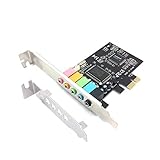
A basic 5.1 card with a CMI8738 chip, 3D stereo audio, and a PCI Express adapter, aimed at Windows 7. It suits an old desktop that needs working audio rather than refined sound, such as a spare family computer or an office machine whose onboard jacks have failed. Confirm that a driver exists for your exact Windows version before you commit to it.
- Plain 5.1 output covers basic surround.
- Named chip helps with driver research.
- Trade-off: the title cites Windows 7, so newer systems need careful checking.
Skip it if you use a modern Windows installation or want a headphone amp.
Creative Sound BlasterX AE-5 Plus
The AE-5 Plus lists a SABRE32-class DAC, 32-bit/384 kHz, Dolby Digital and DTS, a discrete Xamp headphone bi-amp, up to 122dB SNR, and an RGB lighting system. It is aimed at gamers who want premium audio and a lit case interior. The Dolby Digital and DTS mentions suggest it is aimed at users who also feed a home theater receiver, so it can double as a living room PC upgrade as well as a desk card.
- Up to 122dB SNR is the highest figure in this guide.
- Xamp bi-amp aims at headphone drive quality.
- Trade-off: RGB and premium tier add little for stereo-only users.
Skip it if you do not need surround decoding or lighting.
Creative Sound Blaster Audigy Fx V2
This upgradable Hi-res PCIe card lists 5.1 discrete and virtual surround, Scout Mode, and a SmartComms Kit. It suits a gamer who wants positional audio features and a path to upgrade later. The SmartComms Kit reference points to a headset and microphone bundle approach for chat, which helps when you also play voice-heavy multiplayer titles.
- Scout Mode targets competitive game sound.
- SmartComms Kit adds a communications angle.
- Trade-off: no SNR or amp details appear in the title.
Skip it if you want headphone amp power.
GLOTRENDS ST113 PCIe Sound Card
The ST113 lists an ESS SABRE32 ES9018K2M DAC, driver-free setup, and an isolated optical output for noise-free Hi-Fi. It suits a listener wanting a named DAC chip and an optical output for a receiver. Isolation on the optical path is the listing’s pitch for avoiding electrical noise, which matters if your PC sits near a monitor or other noisy gear.
- A named ESS DAC is a clear differentiator.
- Driver-free setup removes install steps.
- Trade-off: no gaming features or surround formats are listed.
Skip it if you want virtual surround or software tuning.
Creative Sound Blaster AE-7
The AE-7 lists a Hi-res PCIe DAC, headphone amp, Xamp, and an Audio Control Module, positioned as a gaming sound card. It suits a user who wants physical volume and input control on the desk without opening an app, such as a streamer who swaps between headphones and speakers during a session and wants the switch within reach.
- The Audio Control Module offers physical controls.
- Headphone amp and Xamp support demanding listening.
- Trade-off: it sits at the top tier and the title lists no SNR number.
Skip it if desk space is tight.
EBTOOLS 5.1 PCIe Sound Card
The EBTOOLS card lists 5.1, 3D stereo surround, a low-profile bracket, noise balance elimination, and a 32/64 bit Vista note. It suits compact cases that need a basic PCIe audio add-in. The noise balance elimination wording hints at a cleaner output path, but the title gives no figure to confirm it, so treat it as marketing until the manufacturer data says otherwise.
- A low-profile bracket fits small chassis.
- It is a simple 5.1 option.
- Trade-off: the Vista reference suggests older driver support.
Skip it if you run a recent operating system.
Which One Fits Your Situation
Gaming with a wired headset
The Creative Sound Blaster Z SE offers a documented amp and virtual 7.1, and the Audigy Fx V2 adds Scout Mode for positional sound.
Premium listening setup
The Sound BlasterX AE-5 Plus and AE-7 combine Xamp-class amps with high sample rates, while the GLOTRENDS ST113 appeals to those who prefer a named ESS DAC.
Older desktop revival
The Padarsey and EBTOOLS cards target older Windows versions, so match them to an equally old install.
Music production on a budget tier
The XRIKUI lists ASIO support, which suits recording and low-latency monitoring.
Common Mistakes
- Chasing sample rates above 192 kHz that your files never use.
- Skipping the operating system line, then discovering no driver exists.
- Buying a headphone amp feature you will not use with a gaming headset.
- Forgetting low-profile brackets for small cases.
- Assuming virtual surround matters for stereo headphones.
Related guides
- Aio Liquid Coolers For High Performance Gaming
- How To Lower Input Delay In Competitive Shooters
- External Hard Drives For Music Production
Frequently Asked Questions
Is a PCIe sound card better than motherboard audio?
It can offer a lower noise floor and a headphone amp, but modern motherboards are decent, so the gain depends on your headphones and speakers.
What does ASIO support do?
ASIO lowers audio latency in music software, which helps recording and live monitoring.
Is a card required for optical output?
Only if you connect to a receiver over optical. Some cards, like the GLOTRENDS, list an isolated optical output.
Will an old card work on Windows 11?
Not always. Cards that cite Windows 7 or Vista may lack current drivers, so check the maker’s support page.