

Photo editing is quiet, focused, detail-driven work — and the right headset supports it in ways you might not expect. Whether you are editing photos with a music or podcast soundtrack, switching to video where audio suddenly matters, or simply blocking out distractions to concentrate, what you want is accurate, balanced stereo sound and comfort for long sessions, not exaggerated gaming bass that colors everything. This guide rounds up the best headsets for photo editing in 2026: comfortable, honest-sounding picks that suit long hours at the screen and still handle a game when the work is done.
- Best Headsets for Photo Editing at a Glance
- 1. OneOdio Wired Over-Ear Headphones, Hi-Res Studio Monitor & DJ
- 2. HyperX Cloud II Gaming Headset, 7.1 Surround, Memory Foam
- 3. Sony MDR-ZX110 Wired On-Ear Headphones
- 4. BENGOO G9000 Stereo Gaming Headset, Over-Ear, Noise-Cancelling Mic
- 5. Turtle Beach Recon 50 Wired Gaming Headset
- 6. Logitech H390 Wired Headset, Noise-Cancelling Mic, USB
- How to Choose a Headset for Photo Editing
- Frequently Asked Questions
- Related Guides
- Related Articles
- Related Guides
Our picks were chosen on what serves an editor at the desk: a clean, balanced sound signature with accurate stereo imaging, comfort across long editing sessions, dependable connection, and value. We have avoided quoting invented measurements — instead we explain each headset’s sound character and who it suits, with prices from around $15 up to around $60. The list spans studio-style over-ear headphones, comfortable balanced gaming picks, and simple everyday options. Below is an at-a-glance comparison of all six, then a closer look at each and a buyer’s guide built around sound signature, comfort and connection — the things that matter when you work by your eyes and want honest audio.
As an Amazon Associate we earn from qualifying purchases at no extra cost to you.


🛒 Best Price Today on Amazon
Prime members get fast, free shipping on everything above, plus member-only deals. New members get a 30-day free trial — cancel anytime.
Best Headsets for Photo Editing at a Glance
| Headset | Best For | Standout Spec | Approx Price |
|---|---|---|---|
| OneOdio Studio Monitor Headphones | Accurate stereo for editing | Studio-style, large drivers, over-ear | around $32 |
| HyperX Cloud II | Premium comfort and balanced sound | Memory foam, 53mm drivers, durable | around $60 |
| Sony MDR-ZX110 | Lightweight everyday monitoring | On-ear, balanced Sony tuning, light | around $15 |
| BENGOO G9000 | Comfortable all-day editing | Over-ear cushions, noise-cancel mic | around $30 |
| Turtle Beach Recon 50 | Editing plus casual gaming | 40mm drivers, flip mic, lightweight | around $27 |
| Logitech H390 | Simple monitoring with clear mic | USB, comfy, noise-cancel mic | around $16 |
1. OneOdio Wired Over-Ear Headphones, Hi-Res Studio Monitor & DJ

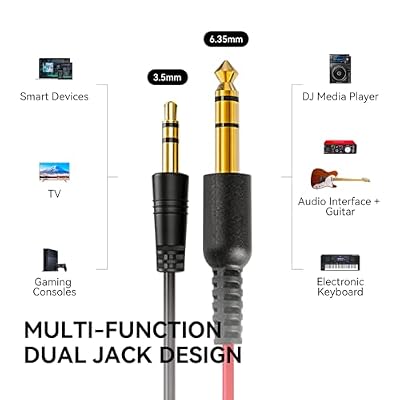
OneOdio Wired DJ Hi-Res Over-Ear Headphones for PC, Keyboard Guitar - Black | headphone with 50mm drivers, dual 3.5mm and 6.35mm jacks for studio monitoring, recording, podcasting, mixing and DJ use.



As an Amazon Associate we earn from qualifying purchases. Product prices and availability are accurate as of the date/time indicated.
The OneOdio studio-monitor headphones are the accurate-stereo pick for photo editing, and the natural place to start. They are full-size over-ear headphones designed with a studio-monitoring and DJ heritage, with large drivers, a Hi-Res-capable tuning that aims for clarity over coloration, and flexible connections, available for around $32. For an editor who wants honest stereo and comfort, they are the headline choice.
This is the headset to choose if you value sound that does not lie to you. The studio-monitor tuning leans toward a clean, balanced presentation rather than the exaggerated bass of many gaming headsets, so music, podcasts and video audio come through faithfully while you work, and the wide stereo imaging helps when you switch from photos to video. The over-ear cups stay comfortable through long editing sessions. For accurate, fatigue-free stereo at a sensible price, the OneOdio is the editor’s pick.
Pros: Balanced studio-monitor tuning, accurate wide stereo, comfy over-ear fit, Hi-Res capable.
Cons: Detachable-mic setup is basic; not a sealed noise-isolating design.
2. HyperX Cloud II Gaming Headset, 7.1 Surround, Memory Foam

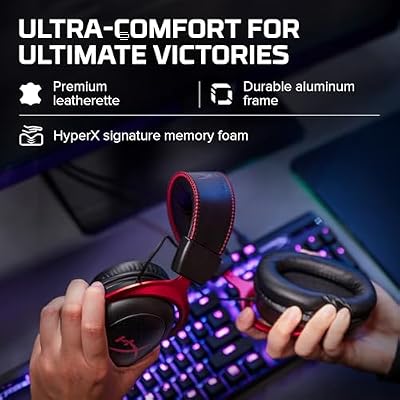
HyperX Cloud II Gaming Headset - 7.1 Surround Sound - Memory Foam Ear Pads - Durable Aluminum Frame - Multi Platform Headset - Works with PC, PS4, PS4 PRO, Xbox One, Xbox One S - Red (KHX-HSCP-RD)




As an Amazon Associate we earn from qualifying purchases. Product prices and availability are accurate as of the date/time indicated.
The HyperX Cloud II is the premium comfort and balanced-sound pick of this list. It is a well-regarded headset built on plush memory-foam cushions, large 53mm drivers with a clean, balanced signature, a durable aluminium frame and a detachable noise-cancelling mic, available for around $60. It is the priciest option here, and the extra spend buys genuine quality.
This is the headset for the editor who wants the most comfortable, honest all-rounder and is happy to invest a little more. The 53mm drivers deliver a balanced, detailed sound that suits accurate listening for music and video without the bloated bass some gaming headsets add, the legendary Cloud memory foam keeps it comfortable through marathon editing sessions, and the build quality is a step above the budget field. The detachable mic adds clear comms when needed. For premium comfort and trustworthy sound, the Cloud II is the standout.
Pros: Balanced detailed 53mm drivers, superb memory-foam comfort, durable build, detachable mic.
Cons: Highest price here; virtual surround is optional rather than studio-flat.
3. Sony MDR-ZX110 Wired On-Ear Headphones


As an Amazon Associate we earn from qualifying purchases. Product prices and availability are accurate as of the date/time indicated.
The Sony MDR-ZX110 is the lightweight everyday monitoring pick, and the cheapest on the list. It is a light on-ear pair of wired headphones from a trusted name, with a folding design, a balanced Sony house tuning and a universal 3.5mm plug, available for around $15. For an editor who wants simple, honest sound for long stretches without spending much, it is a quiet achiever.
This is the headset to choose for affordable, no-fuss monitoring during editing. The Sony tuning is pleasantly balanced for the money, giving a reasonably honest take on music and video audio rather than a bass-heavy gaming sound, the light on-ear design is easy to wear for hours, and the 3.5mm jack plugs into any computer, tablet or phone. It has no microphone and is the most basic option here, but for inexpensive, comfortable, balanced listening at the desk, the MDR-ZX110 is excellent value.
Pros: Very cheap, balanced Sony tuning, light folding on-ear fit, universal 3.5mm plug.
Cons: No microphone; on-ear pads isolate less than over-ear cups.
4. BENGOO G9000 Stereo Gaming Headset, Over-Ear, Noise-Cancelling Mic

BENGOO G9000 Stereo Gaming Headset for PS4 PC Xbox One PS5 Controller, Noise Cancelling Over Ear Headphones with Mic, LED Light, 7.1 Surround Sound, Soft Memory Earmuffs for Nintendo Xbox Series X|S


As an Amazon Associate we earn from qualifying purchases. Product prices and availability are accurate as of the date/time indicated.
The BENGOO G9000 is the comfortable all-day editing pick on a budget. It is an over-ear headset with thick padded cushions, a flexible noise-cancelling microphone and broad compatibility, available for around $30. While it is marketed for gaming, its plush long-wear comfort and inoffensive sound make it a practical, low-cost companion for long editing sessions.
This is the headset to choose when comfort over many hours and a low price matter most. The deep over-ear cushions stay comfortable through extended work at the screen, the closed design helps damp distractions so you can focus on fine detail, and the bendable mic is there for calls or voice notes when you need it. Its sound is more gaming-tuned than studio-flat, so it is best for editors who prioritise comfort and focus over reference-grade accuracy. As a comfy, affordable editing companion, it does the job well.
Pros: Plush over-ear comfort for long sessions, closed design aids focus, mic included, low cost.
Cons: Gaming-tuned sound is less neutral; LEDs need USB power.
5. Turtle Beach Recon 50 Wired Gaming Headset
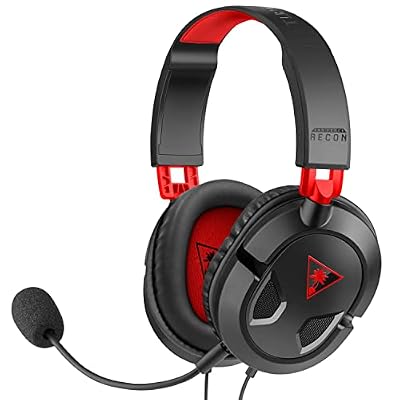
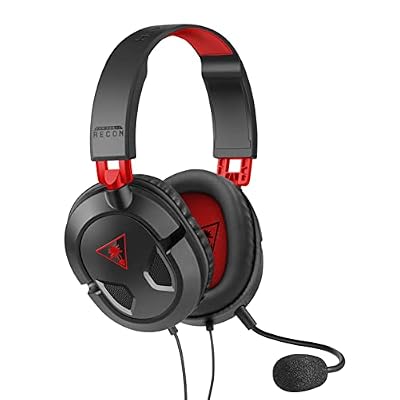
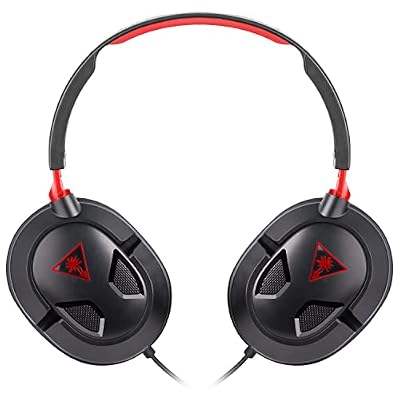
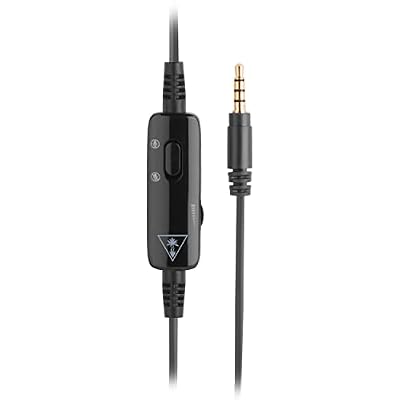
Turtle Beach Recon 50 Wired Multiplatform Gaming Headset for PC, PS5, Xbox | PlayStation, PS4, Xbox Series X|S, PC Splitter Cable, Removable Mic, 40mm Speakers, In-Line Controls, Lightweight, Black Red



As an Amazon Associate we earn from qualifying purchases. Product prices and availability are accurate as of the date/time indicated.
The Turtle Beach Recon 50 is the editing-plus-casual-gaming pick. It is a lightweight wired headset with 40mm drivers, a flip-up mic and easy multiplatform support, available for around $27. For an editor who also unwinds with games and wants one affordable, comfortable headset for both, it is a flexible, budget-friendly option.
This is the headset to choose if your day mixes focused editing with casual gaming breaks. The 40mm drivers give clear, agreeable sound for music and video while you edit, the flip-up mic makes voice chat or notes simple, and the light, comfortable frame suits long sessions at the desk. The wired 3.5mm connection plugs into a computer or console with zero latency and nothing to charge. It is gaming-oriented rather than reference-flat, but as a comfortable, do-both headset at a low price, the Recon 50 fits the bill.
Pros: Clear 40mm sound, light long-session comfort, flip mic, wired plug-and-play for work and play.
Cons: Stereo gaming tuning rather than neutral; build is basic.
6. Logitech H390 Wired Headset, Noise-Cancelling Mic, USB

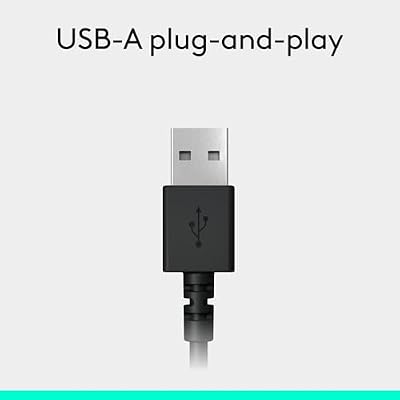
Logitech H390 Wired Headset PC/Laptop Stereo Headphones, USB-A, Black | For PC/Laptop, stereo headphones, microphone, in-line controls, works with Chromebook




As an Amazon Associate we earn from qualifying purchases. Product prices and availability are accurate as of the date/time indicated.
Rounding out the list is the Logitech H390, the simple-monitoring-with-clear-mic pick. It is a USB wired stereo headset with a noise-cancelling boom mic and in-line controls, available for around $16. It is built for clear voice and easy plug-and-play use rather than reference sound, which suits an editor who mainly wants distraction-free monitoring and clean comms.
This is the headset to choose when simplicity and a clear mic matter more than audiophile accuracy. The single USB plug is recognised instantly with no settings to adjust, giving you clean digital stereo for music and video while you edit, the noise-cancelling mic keeps your voice clear for client calls or voice notes, and the padded fit is comfortable through long sessions. Its sound is workmanlike rather than studio-grade, but for fuss-free monitoring with dependable comms at a low price, the H390 is a sensible companion.
Pros: Clean USB stereo, clear noise-cancel mic for calls, comfy padding, simple and affordable.
Cons: Workmanlike sound rather than neutral reference; USB only.
How to Choose a Headset for Photo Editing
For editing work, the sound signature matters more than for almost any other use, because you want honest audio rather than colored gaming sound. A balanced, studio-leaning tuning — as on the OneOdio studio-monitor headphones and the HyperX Cloud II’s 53mm drivers — reproduces music, podcasts and video faithfully without the exaggerated bass many gaming headsets add. If you ever edit video alongside photos, that accuracy and clean stereo imaging help you judge audio properly, so favour a neutral, even presentation over a hyped one.
Comfort across long sessions is the next priority, because editing means hours of uninterrupted focus at the screen. Over-ear designs with plush padding, like the Cloud II’s memory foam and the BENGOO G9000’s deep cushions, surround your ears and stay comfortable far longer than tight on-ear pairs, while light options like the Sony MDR-ZX110 are easy to wear for everyday monitoring. Look for soft pads, even clamping pressure and low weight — a headset you forget you are wearing keeps you in the creative flow.
Stereo versus surround is a key distinction for editors. Accurate stereo is what you want for honest listening and for any stereo audio work, and clean two-channel imaging — as the OneOdio and Cloud II provide — gives a faithful left-right picture. Virtual surround, found on several gaming headsets here, is a fun option for immersion and games but is not how you should judge accurate audio. Treat surround as an extra for play, and rely on good stereo for editing-related listening.
Finally, weigh isolation, the microphone and budget together. Closed-back cups help block distractions so you can concentrate on fine detail, a clear mic — like the H390’s or the Cloud II’s detachable boom — is useful for client calls and voice notes, and prices here run from around $15 to $60, so accuracy and comfort do not require a fortune. Decide whether reference-style accuracy, premium comfort, everyday simplicity or a do-both gaming option is your priority, and pick the headset on this list that best supports long, focused editing.
Frequently Asked Questions
Do I need an accurate-sounding headset for photo editing?
Photo editing itself is visual, so accurate sound is not strictly required — but if you also edit video, take client calls, or simply want honest audio while you work, a balanced headset helps. Studio-leaning picks like the OneOdio monitor headphones and HyperX Cloud II reproduce music and video faithfully rather than coloring everything with heavy bass, which many editors find more pleasant and trustworthy for long sessions.
What is the best headset here for editing comfort?
For premium long-session comfort, the HyperX Cloud II’s memory-foam cushions are the standout — they stay comfortable through marathon editing without pressure points. On a budget, the BENGOO G9000’s deep over-ear pads are genuinely comfy too, and the lightweight Sony MDR-ZX110 is easy to wear for everyday monitoring. Prioritise plush padding, low weight and even clamping for hours at the screen.
Should I choose stereo or surround sound for editing?
Stereo. Accurate two-channel imaging, as on the OneOdio and HyperX Cloud II, gives an honest left-right picture that is right for editing-related listening and any stereo audio work. Virtual surround, available on several gaming headsets here, is enjoyable for immersion and games but is not how you should judge accurate audio. Use good stereo for editing and treat surround as a bonus for play afterward.
Can a gaming headset work well for photo editing?
Yes, especially balanced, comfortable models. The HyperX Cloud II offers clean 53mm sound and superb comfort, and lighter picks like the Turtle Beach Recon 50 are fine for editing with casual gaming breaks. The main caveat is that some gaming headsets tune for heavy bass, which is less ideal for honest listening — so favour a more balanced gaming headset, or a studio-style pair like the OneOdio, if accuracy matters to you.
Related Guides
- Best Studio Headphones
- Best Gaming Headsets
- Best Wireless Headsets
- Best Monitors for Content Creation
- Best Monitors
- Best Budget Gaming Setup
Affiliate Disclosure: As an Amazon Associate, we earn from qualifying purchases. If you click a link and make a purchase, we may earn a small commission at no extra cost to you. Prices and availability are accurate as of publication and may change.










