

🛒 Best Price Today on Amazon
Prime members get fast, free shipping on everything above, plus member-only deals. New members get a 30-day free trial — cancel anytime.
- Top Gpus Under 800 Picks for 2026
- Best GPUs under $800 at a Glance
- 1. ASUS TUF Gaming NVIDIA GeForce RTX 3070 Ti OC Edition (PCIe 4.0, 8GB GDDR6X)
- 2. PNY NVIDIA GeForce RTX 5070 Epic-X ARGB OC Triple Fan (12GB GDDR7)
- 3. ASUS Prime GeForce RTX 5070 SFF-Ready (PCIe 5.0, 12GB)
- 4. GIGABYTE Radeon RX 9060 XT Gaming OC ICE 16G (16GB GDDR6, 128-bit)
- 5. GIGABYTE Radeon RX 9060 XT Gaming OC 16G (PCIe 5.0, 16GB GDDR6)
- 6. MSI Gaming GeForce RTX 3060 12GB 15 Gbps GDDR6 192-Bit (PCIe 4.0, Torx Twin)
- How to Choose a GPU under $800
- Frequently Asked Questions
- Related Guides
- Related Articles
Top Gpus Under 800 Picks for 2026
Here are our current top gpus under 800 picks, compared on real Amazon owner reviews, price, and features. Live prices update below.
The sub-$800 bracket is the sweet spot for a serious gaming graphics card in 2026. It is high enough to buy genuine high-tier silicon with plenty of VRAM for high-refresh 1440p and a real run at 4K, yet disciplined enough to keep the rest of your build in budget. The cards that live here are not entry-level compromises — they are the GPUs most enthusiasts actually aim for, balancing frame rates, memory capacity and modern features without crossing into flagship pricing. This guide rounds up the best GPUs under $800 in 2026 across both NVIDIA’s GeForce RTX and AMD’s Radeon ranges.
Our picks were chosen on what matters most for a high-tier card in this price class: VRAM capacity for high resolutions and detailed textures, the right resolution target (1440p high-refresh through to 4K), modern feature support such as ray tracing and upscaling, and outright value. We have included a spread from around $399 to around $759 so you can match the card to your monitor and budget, and we are honest about where each one really sits — some are aimed squarely at high-refresh 1440p rather than 4K. Below is an at-a-glance comparison of all six, then a closer look at each and a buyer’s guide built around VRAM, resolution and compatibility.
Best GPUs under $800 at a Glance
| Graphics Card | Best For | Standout Spec | Approx Price |
|---|---|---|---|
| ASUS TUF RTX 3070 Ti OC | High-refresh 1440p, top of bracket | 8GB GDDR6X, robust TUF cooler | around $759 |
| PNY RTX 5070 Epic-X ARGB OC | Latest-gen 1440p/4K with upscaling | 12GB GDDR7, current-gen RTX | around $633 |
| ASUS Prime RTX 5070 (SFF-ready) | Current-gen in compact builds | 12GB, SFF-ready, PCIe 5.0 | around $642 |
| GIGABYTE RX 9060 XT Gaming OC ICE 16G | 16GB 1440p with big VRAM | 16GB GDDR6, white ICE design | around $470 |
| GIGABYTE RX 9060 XT Gaming OC 16G | Value 16GB 1440p | 16GB GDDR6, PCIe 5.0 | around $460 |
| MSI Gaming RTX 3060 12GB | Affordable high-VRAM 1080p/1440p | 12GB GDDR6, dual Torx fans | around $399 |
1. ASUS TUF Gaming NVIDIA GeForce RTX 3070 Ti OC Edition (PCIe 4.0, 8GB GDDR6X)
The ASUS TUF RTX 3070 Ti OC sits at the top of this bracket and leads the list for high-refresh 1440p gaming. It pairs NVIDIA’s RTX 3070 Ti GPU with fast 8GB GDDR6X memory and the rugged, over-built TUF Gaming cooler that ASUS is known for, on a PCIe 4.0 interface. At around $759 it is the most expensive card here, and the extra outlay buys you the most raw GPU horsepower in the group.
This is the card to choose if your priority is driving a high-refresh 1440p monitor hard, with ray tracing and DLSS available when you want them. The 3070 Ti has the muscle to keep fast-paced games feeling smooth at high settings, and the TUF cooler keeps it quiet and cool under sustained load. The one caveat worth being upfront about is the 8GB frame buffer: it is ample for 1440p today, but it is the smallest VRAM pool on this list, so it is less future-proof for maxed-out 4K textures than the 12GB and 16GB cards below. For high-refresh 1440p, though, it is the most powerful pick here.
Pros: Most raw horsepower in the bracket, fast GDDR6X, excellent rugged TUF cooler, strong 1440p.
Cons: Only 8GB VRAM (smallest here); highest price; previous-gen RTX.
2. PNY NVIDIA GeForce RTX 5070 Epic-X ARGB OC Triple Fan (12GB GDDR7)

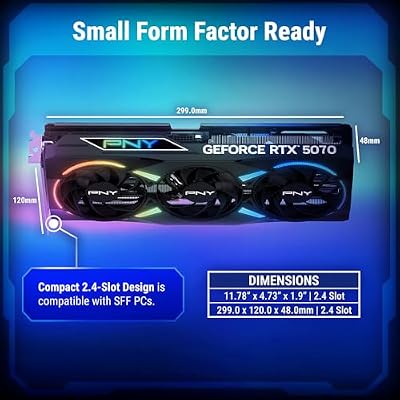
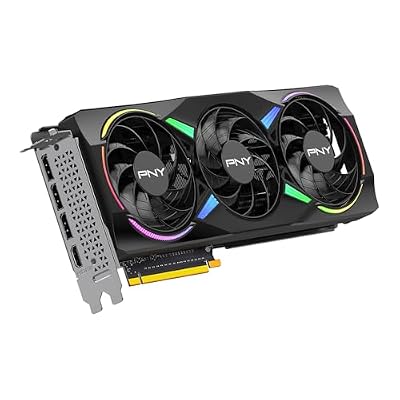
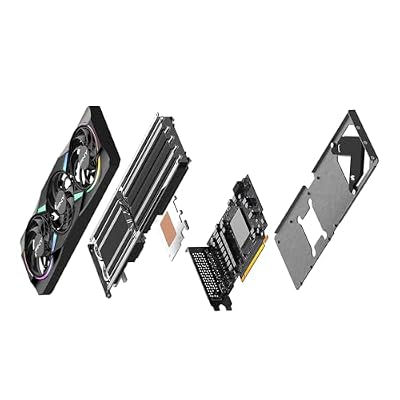
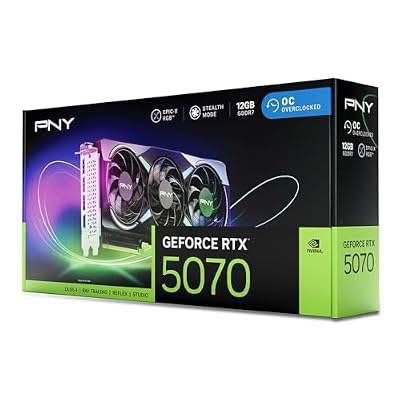
PNY NVIDIA GeForce RTX™ 5070 EPIC-X RGB® OC Triple-Fan Graphics Card | 12GB GDDR7, 192-bit, Boost: 2685 MHz, SFF-Ready, PCIe® 5.0, HDMI®/DP 2.1, 2.4-Slot, NVIDIA Blackwell Architecture, DLSS 5






As an Amazon Associate we earn from qualifying purchases. Product prices and availability are accurate as of the date/time indicated.
The PNY RTX 5070 Epic-X is the current-generation pick of the list. It is built on NVIDIA’s newer RTX 5070 GPU with 12GB of fast GDDR7 memory and a triple-fan ARGB cooler, bringing the latest RTX feature set — including the newest DLSS and ray-tracing capabilities — into the sub-$800 range. At around $633 it undercuts the older 3070 Ti while offering a more modern foundation.
This is the card for the gamer who wants up-to-date technology and a healthier VRAM buffer for high-refresh 1440p and entry 4K. The 12GB of GDDR7 gives more headroom for high-resolution textures than the 3070 Ti’s 8GB, and the latest upscaling and frame-generation features stretch performance further in supported titles. The triple-fan cooler with addressable RGB keeps it cool and looks the part in a glass-panel build. For current-gen NVIDIA capability, modern features and 12GB of memory under $800, the Epic-X is a very strong choice.

Pros: Current-gen RTX 5070, 12GB GDDR7, newest DLSS/ray-tracing, triple-fan ARGB cooling.
Cons: Mid-size 12GB buffer for heavy 4K; ARGB cooler is large.
3. ASUS Prime GeForce RTX 5070 SFF-Ready (PCIe 5.0, 12GB)

ASUS SFF-Ready Prime NVIDIA GeForce RTX 5070 Graphics Card (PCIe 5.0, 12GB GDDR7, HDMI/DP 2.1, 2.5-Slot, Axial-tech Fans, Dual BIOS), 3 Year Warranty


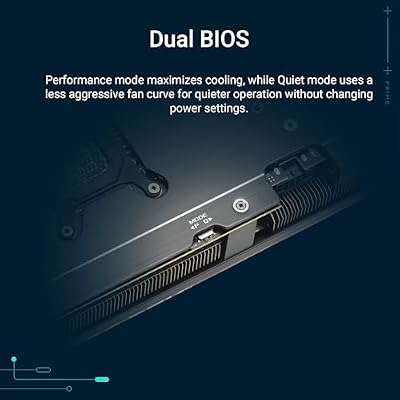


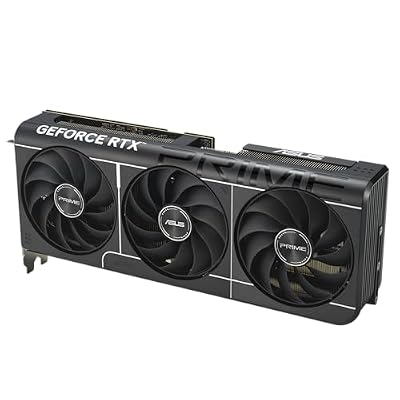
As an Amazon Associate we earn from qualifying purchases. Product prices and availability are accurate as of the date/time indicated.
The ASUS Prime RTX 5070 brings the same current-generation RTX 5070 GPU and 12GB memory in a more restrained, SFF-ready design. ASUS markets it as built to fit small-form-factor cases, with a cooler and footprint tuned for tighter enclosures, and it runs on a PCIe 5.0 interface. At around $642 it sits alongside the PNY card in price but targets compact builders specifically.
This is the pick for someone who wants current-gen RTX 5070 performance and 12GB of VRAM but is building in a small case where a triple-fan ARGB monster will not fit. The SFF-ready dimensions make it far easier to squeeze into mini-ITX and compact mid-tower enclosures, while still delivering the same modern feature set — the latest DLSS, ray tracing and frame generation — for high-refresh 1440p and entry 4K. If your constraint is space rather than outright cooler size, the Prime RTX 5070 is the smarter of the two 5070 options here.
Pros: Current-gen RTX 5070, 12GB, SFF-ready compact design, PCIe 5.0, latest features.
Cons: Compact cooler can run warmer than larger cards; 12GB for heavy 4K.
4. GIGABYTE Radeon RX 9060 XT Gaming OC ICE 16G (16GB GDDR6, 128-bit)
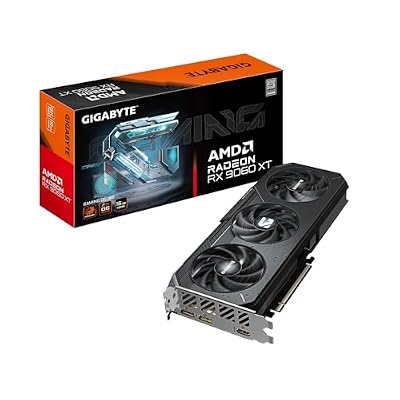
GIGABYTE Radeon RX 9060 XT Gaming OC 16G Graphics Card, PCIe 5.0, 16GB GDDR6, GV-R9060XTGAMING OC-16GD Video Card

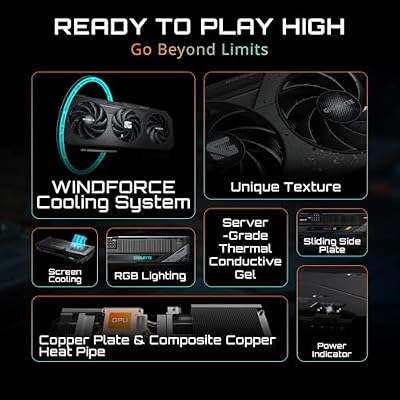


As an Amazon Associate we earn from qualifying purchases. Product prices and availability are accurate as of the date/time indicated.
The GIGABYTE RX 9060 XT Gaming OC ICE is the big-VRAM value pick, and the first of two Radeon cards here. Its headline feature is a generous 16GB of GDDR6 memory — double the 3070 Ti’s frame buffer — wrapped in GIGABYTE’s white ‘ICE’ aesthetic for clean, light-themed builds. At around $470 it is far cheaper than the NVIDIA cards above while offering the most memory on the list.
This is the card to choose for high-refresh 1440p gaming where a large VRAM pool matters to you, whether for high-resolution textures, future headroom or memory-hungry workloads. To be honest about where it sits: this is a strong 1440p card rather than a 4K powerhouse, but its 16GB buffer means it will not run short on memory the way an 8GB card can, and the white ICE shroud is a natural fit for a snow or light-themed PC. For affordable 16GB Radeon gaming with standout looks, the Gaming OC ICE is excellent value.

Pros: Large 16GB GDDR6 VRAM, very good value, clean white ICE design, strong 1440p card.
Cons: Aimed at 1440p rather than 4K; 128-bit memory bus.
5. GIGABYTE Radeon RX 9060 XT Gaming OC 16G (PCIe 5.0, 16GB GDDR6)
GIGABYTE Radeon RX 9060 XT Gaming OC 16G Graphics Card, PCIe 5.0, 16GB GDDR6, GV-R9060XTGAMING OC-16GD Video Card
As an Amazon Associate we earn from qualifying purchases. Product prices and availability are accurate as of the date/time indicated.
The standard GIGABYTE RX 9060 XT Gaming OC 16G is the lowest-priced 16GB card on the list and the pure value play. It offers the same 16GB GDDR6 capacity and Radeon RX 9060 XT GPU as the ICE model in GIGABYTE’s regular dark Gaming OC dress, on a PCIe 5.0 interface. At around $460 it is a touch cheaper than the ICE version, making it the most affordable route to 16GB here.
This is the pick for the value-focused builder who wants the largest practical VRAM buffer for high-refresh 1440p without paying for premium styling or NVIDIA branding. Like its ICE sibling, it is best understood as a capable 1440p card with plenty of memory rather than a 4K flagship, and the 16GB pool gives real comfort for high-detail textures and longevity. If you want maximum VRAM for your money and the standard black aesthetic suits your build, this is the most cost-effective card on the list.
Pros: Most affordable 16GB option, full PCIe 5.0, ample VRAM, great price-to-memory ratio.
Cons: 1440p-class rather than 4K; 128-bit bus limits very high resolutions.
6. MSI Gaming GeForce RTX 3060 12GB 15 Gbps GDDR6 192-Bit (PCIe 4.0, Torx Twin)
Rounding out the list is the MSI Gaming RTX 3060 12GB, the most affordable card here and the high-VRAM 1080p/1440p pick. It pairs NVIDIA’s RTX 3060 with a surprisingly generous 12GB GDDR6 frame buffer on a 192-bit bus, cooled by MSI’s compact dual Torx fan design over a PCIe 4.0 interface. At around $399 it is comfortably the entry point of this bracket.
This is the card to choose when you want dependable 1080p and entry 1440p gaming with a roomy VRAM pool, but cannot stretch to the higher-tier options. It is the least powerful card on the list, so it is honest to call it a strong 1080p and capable 1440p performer rather than a high-refresh or 4K card — but the 12GB buffer is unusually generous for its class and helps with textures and longevity. The compact dual-fan cooler keeps it cool and fits smaller builds. For an affordable, high-VRAM mainstream GPU with NVIDIA features, the RTX 3060 12GB remains a sensible value choice.

Pros: Affordable entry to the bracket, generous 12GB VRAM for its class, compact dual-fan cooler.
Cons: Least powerful card here; best for 1080p/entry 1440p, not 4K.
How to Choose a GPU under $800
Start with the resolution and refresh rate you actually play at, because that decides how much GPU you need. For high-refresh 1440p — the sweet spot for most of these cards — the higher-tier options like the RTX 3070 Ti and the two RTX 5070s have the horsepower to keep fast games smooth at high settings. If you are eyeing 4K, lean toward the cards with both strong silicon and a larger VRAM buffer, and be realistic: in this bracket 4K usually means leaning on upscaling rather than brute-forcing native frames.
VRAM is the spec to scrutinise next, and it varies a lot across this list. The Radeon RX 9060 XT cards lead with 16GB, the RTX 5070s and RTX 3060 carry 12GB, and the RTX 3070 Ti has 8GB. More memory helps with high-resolution textures, future game requirements and memory-hungry creative work, so if longevity or 4K textures matter to you, favour a 12GB or 16GB card. An 8GB card like the 3070 Ti is still excellent for 1440p today, but it has the least headroom for the most demanding future titles.
Weigh generation and features against raw power. The RTX 5070 cards are current-generation and bring the newest DLSS and frame-generation technology, which can stretch performance meaningfully in supported games, while the older RTX 3070 Ti offers more brute force at the top of the bracket but an earlier feature set. AMD’s RX 9060 XT cards counter with the largest VRAM and strong value. Decide whether you prioritise the latest upscaling features, the most raw frames, or the biggest memory pool for the money.
Finally, confirm physical and platform fit before you buy. Every card here works in a standard PCIe x16 slot — the PCIe 5.0 cards are fully backward compatible with PCIe 4.0 boards — but check your case clearance and power supply: large triple-fan models like the PNY Epic-X need room and adequate wattage, while the SFF-ready ASUS Prime 5070 is designed for compact builds. Match the card to your monitor, your VRAM needs, your case and your PSU, and pick the GPU on this list that lands on your priority — there is a high-tier option here for 1080p value through to high-refresh 1440p and entry 4K.
Frequently Asked Questions
How much VRAM do I need for gaming under $800?
For 1080p and 1440p, 8GB is workable today but 12GB is more comfortable, and 16GB — as on the Radeon RX 9060 XT cards here — gives the most headroom for high-resolution textures and future titles. If you game at 4K or do memory-hungry creative work, lean toward 12GB or 16GB. The RTX 3070 Ti’s 8GB is the smallest pool on this list, fine for 1440p now but the least future-proof for maxed-out 4K.
Can any of these cards handle 4K gaming?
The higher-tier cards — the RTX 5070 models and the RTX 3070 Ti — can play at 4K, but in this price bracket 4K typically means using upscaling like DLSS or FSR rather than running everything at native resolution. The RX 9060 XT and RTX 3060 are better understood as high-refresh 1440p and 1080p cards respectively. Be realistic about settings, and use the upscaling features these GPUs offer to hit smooth 4K frame rates.
Will a PCIe 5.0 graphics card work in my PCIe 4.0 motherboard?
Yes. PCIe is backward and forward compatible, so the PCIe 5.0 cards here — such as the ASUS Prime RTX 5070 and GIGABYTE RX 9060 XT — will run perfectly in a PCIe 4.0 (or even 3.0) slot. You simply run at the slot’s speed, which has no meaningful real-world impact on gaming for a single graphics card. Buy the card you want and slot it into your existing board without worry.
Is a current-gen RTX 5070 better than an older RTX 3070 Ti?
They serve different priorities. The RTX 5070 is current-generation with the newest DLSS and frame-generation features and a larger 12GB VRAM buffer, while the RTX 3070 Ti offers strong raw horsepower at the top of this bracket but an 8GB buffer and an older feature set. For modern features and VRAM headroom, the 5070 is the more future-minded buy; for sheer 1440p muscle today, the 3070 Ti still impresses.
Related Guides
- Best GPUs for Your Build
- Best 4K Monitors
- Best Gaming Monitors
- Best Gaming PCs
- Best Power Supplies
- Best PC Cases
Affiliate Disclosure: As an Amazon Associate, we earn from qualifying purchases. If you click a link and make a purchase, we may earn a small commission at no extra cost to you. Prices and availability are accurate as of publication and may change.










