Battlefield 6 asks two things of a monitor at once: it has to stay readable when you pan quickly across a street fight, and it has to keep a distant figure on a ridge distinct from the terrain behind them. Those demands pull in different directions, because the fastest panels are usually smaller and lower in resolution, while the sharpest screens refresh more slowly. Choosing well means deciding which kind of fight you lose more often, close or far, then matching panel speed and pixel density to that answer.
This guide serves PC players chasing high frame rates at 1440p, players who want a larger 4K screen for long sightlines, and console players who need proper HDMI support. Every pick below was chosen from the names and specifications on its Amazon product page.
Quick Picks
As an Amazon Associate we earn from qualifying purchases.
| Product | Best for | Key spec from title |
|---|---|---|
| ASUS ROG Strix XG27AQMR | Players who want the fastest 1440p motion on this list | 300Hz refresh rate |
| Alienware AW2723DF | High-refresh 1440p play with brighter HDR presentation | 240Hz native, overclockable to 280Hz |
| LG UltraGear 27GR83Q-B | PC and console players who need full-rate HDMI 2.1 | 240Hz over HDMI 2.1 |
| AOC Q27G3XMN | Night maps and HDR scenes that need real contrast | Mini LED backlight with DisplayHDR 1000 |
| LG UltraGear 32GR93U-B | Long sightlines where distant detail matters most | 32-inch 4K at 144Hz |
How to Choose
Refresh rate and response time for fast pans
When you swing your view across a rooftop or track a vehicle crossing open ground, the panel has to draw each new frame cleanly or targets smear into the background. Refresh rate sets how many frames the screen can show each second, while response time describes how quickly pixels change. For this game, 144Hz is a sensible floor, 240Hz feels clearly smoother in close fights, and the 300Hz ASUS below only pays off if your graphics card can feed it. Pair any fast panel with variable refresh, covered later, so frame dips do not tear the image mid-pan.
Resolution and size for spotting at range
Spotting is a pixel problem. At 27 inches, 1440p puts enough pixels on a distant soldier to separate a helmet from a rock, and it is far easier for a graphics card to drive at high frame rates than 4K. Stepping up to a 32-inch 4K screen, like the larger LG below, renders long sightlines with finer detail and gives vehicles and aircraft more presence, but each frame costs more to produce. Going larger at the same 1440p resolution spreads those pixels thinner, which can soften exactly the distant detail you bought the screen to reveal.
Panel type and HDR for dark maps
Panel technology decides how dark scenes hold together. Fast IPS, used by the ASUS, Alienware and both LG picks, keeps colours consistent at an angle and moves quickly, but its blacks can look grey in a dim room. The AOC takes the other route: a VA panel behind a Mini LED backlight with local dimming, plus a DisplayHDR 1000 listing, so night operations and shadowed interiors keep separation between a doorway and the player inside it. Decide honestly how much of your play happens in dark maps, because that answer should steer this choice.
Ports and VRR for PC and console cross-play
Connection choice quietly caps everything else. DisplayPort is the reliable route to full refresh on a PC, while HDMI versions differ: the LG 27GR83Q-B carries HDMI 2.1 and can accept 240Hz over it, whereas HDMI 2.0 inputs limit high-refresh play. Variable refresh rate, sold as G-Sync Compatible, FreeSync Premium or Adaptive-Sync, lets the panel follow your frame rate instead of tearing when it dips. If your squad splits time between a PC and a console, our guide to the best controller for Battlefield 6 covers the other half of that setup.
The 5 Best Options
ASUS ROG Strix XG27AQMR

Competitive players who treat every close fight as a tracking exercise get the most from this ASUS. Its Fast IPS panel runs at 300Hz, the highest refresh rate here, and ASUS lists a 1ms gray-to-gray response time alongside Extreme Low Motion Blur Sync, a backlight technique intended to keep moving edges defined. The 1440p resolution keeps the frame-rate target reachable for strong graphics cards, and DisplayHDR 600 gives explosions and tracer fire more punch than a basic HDR listing. It suits a PC-only desk where motion clarity outranks screen size.
Specs
- Panel: 27-inch Fast IPS, flat
- Resolution: 2560 x 1440 (QHD)
- Refresh rate / response: 300Hz, 1ms (GTG) as ASUS lists them
- VRR: NVIDIA G-Sync Compatible, AMD FreeSync Premium Pro
- Motion feature: Extreme Low Motion Blur Sync
- HDR / colour: DisplayHDR 600, DCI-P3 97% and sRGB 120% as ASUS lists them
- Ports: DisplayPort and HDMI, as named in the Amazon listing title
Best for: PC players who prioritise the clearest fast pans at 1440p.
Watch out for: Confirm your graphics card can sustain very high frame rates at 1440p, because a 300Hz panel shows no benefit when the game renders far below that pace.
ASIN: B0BQPZYKH1
Alienware AW2723DF

The Alienware fits players who want high refresh without giving up a brighter, more polished presentation. Dell lists a native 240Hz refresh rate that overclocks to 280Hz over DisplayPort 1.4, a 1ms response time, and VESA DisplayHDR 600, a tier above the basic HDR 400 listings elsewhere here. Its Fast IPS panel covers 95% of DCI-P3 according to Dell, which helps uniforms, vehicles and map signage stay distinguishable in bright daylight scenes. A USB hub and full height, tilt, swivel and pivot adjustment round out a desk-friendly package for long sessions.
Specs
- Panel: 27-inch Fast IPS
- Resolution: 2560 x 1440 (QHD)
- Refresh rate / response: 240Hz native, 280Hz overclocked over DisplayPort, 1ms as Dell lists them
- VRR: NVIDIA G-Sync Compatible, AMD FreeSync Premium Pro
- HDR / colour: VESA DisplayHDR 600, 95% DCI-P3 as Dell lists them
- Ports: DisplayPort 1.4, HDMI and USB hub connections, as listed for this model
- Stand: Height, tilt, swivel and pivot adjustment
Best for: Players wanting 240Hz-class speed with stronger HDR brightness than entry-level picks.
Watch out for: Check which input you will use, because the headline overclocked rate is a DisplayPort figure; plan your cable and port choice before the monitor arrives.
ASIN: B0BCXJ7XXM
LG UltraGear 27GR83Q-B

This LG is the straightforward recommendation for a mixed desk, because it refuses to make you choose between a PC and a console. LG lists 240Hz at 1440p over both DisplayPort 1.4 and HDMI 2.1, so a console or a gaming laptop can reach the full rate without adapters or compromises. The IPS panel answers in 1ms gray-to-gray according to LG, and both G-Sync compatibility and FreeSync Premium are on board, so either graphics card family gets tear-free play. DisplayHDR 400 and 95% DCI-P3 coverage keep the image respectable rather than spectacular.
Specs
- Panel: 27-inch IPS
- Resolution: 2560 x 1440 (QHD)
- Refresh rate / response: 240Hz, 1ms (GtG) as LG lists them
- VRR: NVIDIA G-Sync Compatible, AMD FreeSync Premium
- HDR / colour: VESA DisplayHDR 400, DCI-P3 95% (Typ.) as LG lists them
- Ports: HDMI 2.1 and DisplayPort 1.4, both rated for 240Hz at QHD in the listing
- Stand: Tilt, height and pivot adjustment
Best for: Players splitting time between a PC and a console on one screen.
Watch out for: Verify the cable in your box and your console settings after setup, since reaching 240Hz over HDMI depends on using an HDMI 2.1 connection end to end.
ASIN: B0C63HDHPR
AOC Q27G3XMN
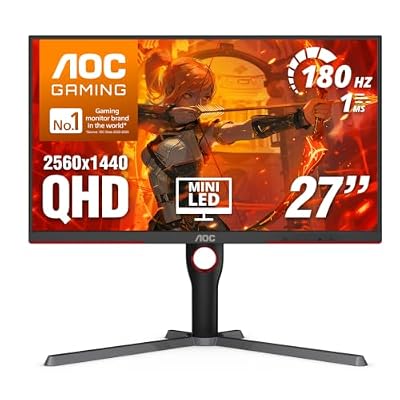
Night fighting is where this AOC earns its place. Instead of chasing the highest refresh number, it pairs a 180Hz VA panel with a Mini LED backlight divided into 336 local dimming zones, so a dark warehouse can hold genuine black next to a lit doorway. AOC lists DisplayHDR 1000 and a 1ms gray-to-gray response time, plus Adaptive Sync to keep frame dips from tearing. That combination suits players who flank through shadowed interiors and want muzzle flash and headlights to read clearly, and who accept a lower refresh ceiling than the 240Hz IPS models in exchange.
Specs
- Panel: 27-inch VA with Mini LED backlight, 336 dimming zones
- Resolution: 2560 x 1440 (QHD)
- Refresh rate / response: 180Hz, 1ms (GtG) as AOC lists them
- VRR: Adaptive Sync, as named in the Amazon listing
- HDR: VESA DisplayHDR 1000, as AOC lists it
- Ports: HDMI 2.0 and DisplayPort 1.4, as named in the Amazon listing title
- Stand: Height adjustable, as named in the Amazon listing
Best for: Players who fight through dark maps and value contrast over maximum refresh.
Watch out for: Remember that its HDMI inputs are the 2.0 generation, so use DisplayPort for the full 180Hz on a PC and check console refresh limits before buying for console-first play.
ASIN: B0C8ZJKPWC
LG UltraGear 32GR93U-B

Choose the larger LG when distance is your problem. Its 31.5-inch IPS panel carries a full 3840 x 2160 resolution, so a prone figure at the far end of a valley occupies more, finer pixels than on any 1440p screen here, and vehicle silhouettes stay recognisable further out. LG lists a 144Hz refresh rate with a 1ms gray-to-gray response, plus support for up to 120Hz on current consoles through HDMI 2.1. That is a deliberate trade: fewer frames each second than the 27-inch picks, exchanged for the clearest long-range picture in this guide.
Specs
- Panel: 31.5-inch IPS
- Resolution: 3840 x 2160 (4K UHD)
- Refresh rate / response: 144Hz, 1ms (GtG) as LG lists them
- VRR: NVIDIA G-Sync Compatible, AMD FreeSync Premium
- HDR / colour: VESA DisplayHDR 400, DCI-P3 95% (Typ.) as LG lists them
- Ports: HDMI 2.1 and DisplayPort, with up to 120Hz console support as LG describes it
- Stand: Tilt, height and pivot adjustment
Best for: Players who hold long sightlines and want maximum distant detail.
Watch out for: Be realistic about your graphics card at 4K, because holding high frame rates at this resolution in large multiplayer matches demands far more than the same settings at 1440p.
ASIN: B0C633799X
Which One Fits Your Situation
You play mostly close-quarters infantry on PC
Take the ASUS ROG Strix XG27AQMR. Its 300Hz refresh and motion-blur feature target exactly the fast pans and snap turns that dominate building-to-building fights, and 1440p keeps the frame-rate goal within reach of a strong card. The Alienware is the fallback if you prefer a brighter HDR presentation at a slightly lower ceiling.
Your desk hosts both a PC and a console
Pick the LG UltraGear 27GR83Q-B. Full 240Hz over HDMI 2.1 as well as DisplayPort means neither machine gets a lesser connection, and both major variable refresh families are supported. You avoid swapping cables between sessions, and the 27-inch 1440p panel suits the viewing distance most shared desks allow for both machines.
You gravitate toward night maps and stealth flanks
The AOC Q27G3XMN was chosen with you in mind. Its Mini LED backlight and 336 dimming zones keep shadowed corners readable instead of crushing them into one grey mass, and DisplayHDR 1000 gives light sources real separation. Accept 180Hz as the ceiling and gain the strongest, most film-like contrast available anywhere in this particular guide.
You snipe, spot and crew vehicles at long range
Go with the LG UltraGear 32GR93U-B. The bigger 4K canvas renders distant targets with the finest detail in this guide, which is the whole job when you are calling out movement across a valley. Just confirm your hardware can drive 4K smoothly before committing, or the clarity will arrive with frame dips attached.
Common Mistakes
- Buying a 240Hz or 300Hz monitor while your graphics card renders the game far below that rate, leaving the extra refresh unused.
- Choosing a larger screen at the same resolution and expecting sharper spotting, when the pixels per inch actually fall.
- Ignoring which HDMI generation a monitor carries, then discovering the console or laptop cannot reach the advertised refresh rate.
- Leaving variable refresh rate disabled in the monitor menu or the graphics driver, so tearing and stutter remain despite capable hardware.
- Judging dark-map performance by a basic HDR label alone, without checking whether the panel has local dimming to back it up.
Frequently Asked Questions
Is 1440p or 4K better for Battlefield 6?
For most PC players, 1440p is the balanced answer: it sharpens distant targets over 1080p while staying far easier to drive at high frame rates. Choose 4K, like the larger LG here, when long-range spotting matters most and your graphics card can hold smooth frame rates at that resolution in large matches.
How much refresh rate do I actually need?
A 144Hz panel already transforms fast pans compared with a basic office screen, and 240Hz adds a further, noticeable step for close fights. Beyond that, gains shrink unless your system consistently renders at matching frame rates. Match the monitor to the frame rate your hardware sustains, not to the largest number on a box.
Does variable refresh rate matter in large multiplayer matches?
Yes, because frame rates in big matches swing as explosions, vehicles and player counts change from one street to the next. G-Sync Compatible, FreeSync Premium and Adaptive-Sync support let the panel follow those swings, preventing the tearing and judder that make tracking a moving target harder precisely when the action peaks.
Can one monitor serve both my PC and my console well?
It can, provided the ports cooperate. Look for HDMI 2.1 if a console shares the screen, as the LG 27GR83Q-B offers, and keep DisplayPort free for the PC at full refresh. Check each input’s refresh ceiling in the listing before buying, because the same monitor can allow different rates over different connections.