

1440p at 144Hz is the sweet spot most gamers should actually buy at right now. It’s a real step up from 1080p in sharpness, it doesn’t need a $700 GPU to drive it like 4K does, and 144Hz is high enough that the jump to 240Hz feels like a nice-to-have rather than a necessity for most people. If you’re trying to decide what to buy, the panel type and the actual refresh rate you’ll hit in your games matter more than brand names.
As an Amazon Associate we earn from qualifying purchases at no extra cost to you.

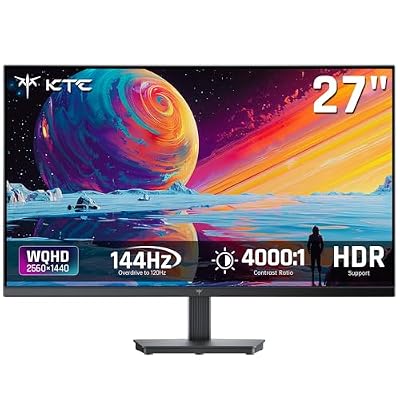

Panel types: VA, IPS, and where TN still fits
At 1440p/144Hz, you’re mostly choosing between IPS and VA panels. TN still exists at this resolution but it’s getting rare, and the washed-out color and narrow viewing angles aren’t worth the small price gap anymore.
IPS panels give you better color accuracy and much wider viewing angles. The trade-off is contrast — IPS blacks look more like dark gray, especially in a dim room, and IPS glow (a hazy sheen near the corners) is noticeable in dark scenes. Response times on good IPS panels are now fast enough that ghosting isn’t a real issue at 144Hz.
VA panels have deeper blacks and better contrast, often 3000:1 or higher versus IPS’s typical 1000:1. That matters a lot in horror games, space games, anything with dark scenes. The downside is slower pixel response, which can cause smearing in fast motion — dragging a dark object across a light background on a cheaper VA panel is where you’ll see it. Higher-end VA panels have mostly fixed this, but budget ones still show it.
If you play a mix of genres and want one monitor that does everything reasonably well, IPS is the safer pick. If you’re mostly playing atmospheric single-player games and don’t mind slightly worse motion clarity in competitive titles, VA’s contrast is genuinely nicer to look at.
What 144Hz actually requires from your PC
A 144Hz panel is only useful if your GPU can push frames close to that number. At 1440p, that means a midrange-to-upper-midrange card. A card that comfortably does 100-144fps in most modern titles at 1440p is the real target — going in with a card that caps out at 70fps means you bought a 144Hz monitor to run games at half that.
Competitive shooters (Valorant, CS2, Overwatch 2) will hit 144Hz+ on far weaker hardware since they’re not GPU-heavy. Demanding single-player games (Cyberpunk 2077, newer Assassin’s Creed titles) are a different story — you’ll likely need DLSS or FSR upscaling to stay near 144fps at native 1440p on anything short of a high-end card. That’s not a flaw in the monitor, it’s just the cost of the resolution and frame rate combo.
Also check the panel’s actual supported range for VRR (G-Sync or FreeSync). Most 1440p/144Hz monitors support adaptive sync from roughly 48Hz up to the max refresh, which eliminates tearing and stutter when you drop below 144fps. Confirm this before buying rather than assuming — some budget panels have narrower VRR windows than advertised.
Panel type comparison
| Spec | IPS | VA |
|---|---|---|
| Contrast ratio | ~1000:1 | 2500:1-4000:1 |
| Color accuracy | Excellent | Good, slightly less consistent off-angle |
| Viewing angles | Wide, minimal shift | Narrower, color shifts off-axis |
| Motion clarity | Very good on modern panels | Can smear in dark fast scenes on budget models |
| Best for | Competitive games, mixed use, content work | Single-player, atmospheric, dark-scene-heavy games |
What’s actually worth paying for
Beyond panel type, a few specs genuinely change the experience and a few don’t. Response time matters, but once a monitor is rated 1ms GtG (or even a real-world 4-5ms with modern VA), further improvements are hard to perceive in actual play. HDR support on sub-$400 monitors is usually marketing — without real local dimming zones (look for at least a few hundred, not a dozen), HDR400 certification does almost nothing for the picture. Don’t pay extra for it at this price range unless the monitor has genuine dimming zones listed in the spec sheet.
Build quality and stand adjustability (height, tilt, swivel) are easy to overlook and annoying to live with if skipped. A monitor that can’t tilt properly will have you hunched over or craning your neck within a week.
If your budget is tight, a 27-inch 1440p/144Hz IPS panel from a mainstream brand is the safest buy — it does nothing badly. You can browse current options through this 1440p 144Hz IPS monitor search to compare current pricing. If you want deeper contrast for darker games and don’t mind the motion trade-off, look at a 1440p 144Hz VA monitor search instead.
Size and curve: does it matter?
27-inch is the standard size for 1440p and the pixel density (about 109 PPI) looks sharp without text or UI elements feeling tiny. Going up to 32-inch at the same 1440p resolution drops pixel density to around 93 PPI, which is noticeably softer, especially for text — fine for gaming-only setups, less fine if the monitor also handles desktop work.
Curved panels are a preference thing, not a performance one. A gentle curve (1500R or 1800R) can feel more immersive and reduce edge distortion on larger screens, but it’s not going to change your K/D ratio. Don’t pay a premium for curve alone — buy it only if you’ve tried one and liked it, or skip it and save the money.
If you’ve got the budget and want the extra immersion without compromising on the panel quality basics covered above, this curved 1440p 144Hz monitor search is a reasonable starting point for comparing current models.
The bottom line on what to buy
Match the monitor to your GPU, not the other way around. If you’re running a card that can’t consistently hit 100+ fps at 1440p in the games you actually play, a 144Hz panel is giving you a number you won’t use. Pick IPS if you play a mix of genres or care about color, pick VA if you’re after contrast in darker games and can live with occasional smearing on cheaper units. Skip the HDR upsell unless the monitor has real local dimming, and don’t let curve or extra inches distract you from the two specs that actually determine daily experience: panel type and whether your rig can feed it enough frames.














