Rainbow Six Siege punishes the shot you almost landed. Rounds turn on holding a doorway at head height for twenty seconds, then making a two-centimetre correction when a defender leans into it. The mouse decision that matters is not raw speed: it is whether the shell lets you stop the crosshair exactly where you intended, click once, and trust the shot. Weight, shape and switch feel decide that far more than a headline DPI figure.
This guide is for ranked players who anchor and hold angles, newer PC players replacing a bundled office mouse, and fingertip players with smaller hands who live on micro-adjustments. Every pick below is a mouse listed for sale on Amazon US, chosen from the names and specifications on its product page, and matched to the grip and play style it suits rather than ranked by sensor numbers alone.
Quick Picks
As an Amazon Associate we earn from qualifying purchases
| Product | Best for | Key spec from title |
|---|---|---|
| Logitech G Pro X Superlight | Anchors who hold one angle through long ranked sessions | HERO 25K sensor, 25,600 DPI, under 63 g |
| HyperX Pulsefire Haste 2 Wireless | Claw players who split time between a gaming PC and a laptop | 61 g, up to 100 hours of battery, dual wireless |
| Pulsar X2V2 Mini | Small hands and fingertip grips built on micro-corrections | 51 g symmetrical shell, PAW3395 sensor, 26,000 DPI |
| SteelSeries Rival 3 Wireless Gen 2 | Players who would rather swap batteries than charge a mouse | TrueMove Air 18,000 DPI, 2.4 GHz and Bluetooth |
| Razer Basilisk V3 | Palm-grip players who bind lean and gadgets to extra buttons | Focus+ 26K sensor, 11 programmable buttons, wired |
How to Choose
Weight and shape decide your corrections
Siege aiming is mostly stillness followed by a tiny movement, so the shell has to sit quietly in your hand and then move without resistance. Lighter mice, roughly under 65 grams, ask less of your wrist during the small flicks that follow a lean peek, and symmetrical shapes suit claw and fingertip grips because the sides stay neutral. Palm players often prefer a taller, right-handed shell that supports the hand during long holds. Measure your current mouse before ordering: length decides whether your fingers drape or cramp, and no sensor upgrade compensates for a shell your hand fights.
Sensor consistency at the DPI you actually play
Most Siege players settle between 400 and 800 DPI and tune the rest with in-game sensitivity, which means the maximum figure on a box is close to irrelevant. What matters is that the sensor tracks slow, deliberate drags without smoothing or snapping, and fast repositions without spinning out. Every sensor in this guide clears that bar comfortably, with ceilings from 18,000 to 26,000 DPI that exist for headroom rather than daily use. Treat DPI as a setting to lock in once, then leave alone for weeks so your muscle memory can settle around it.
Switches and click feel for single shots
Siege firefights are usually decided by the first accurate shot, so the main buttons should actuate cleanly, reset fast and feel identical on both sides. Optical switches, fitted to the Pulsar and the Razer in this guide, register clicks with light rather than metal contacts, which removes the debounce delay older mechanical designs carry. Mechanical switches, like the SteelSeries set rated for 60 million clicks, feel more tactile and cost less. Either technology works; what you are checking is a crisp, predictable break with no mush before the click, because hesitation in the button becomes hesitation on the angle.
Connection and platform support
All five mice here are PC-first products, and their listings state Windows and Mac compatibility; Siege on PC is where a mouse earns its place, because the console versions are built around controllers. For the connection itself, a 2.4 GHz dongle reports at 1,000 Hz and is the mode to play ranked on. Bluetooth, offered by the HyperX and the SteelSeries, is a travel and desktop mode with a slower report rate, fine for menus and other games. A wired mouse removes batteries and charging from the equation entirely, at the cost of cable drag your desk setup has to manage.
The 5 Best Options
Logitech G Pro X Superlight
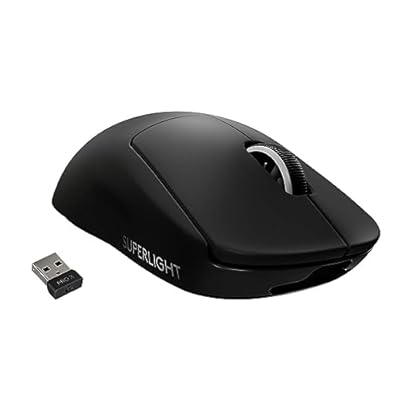
The Superlight is the default recommendation for Siege players who want one mouse that does everything the game asks and nothing it does not. At under 63 grams with a safe symmetrical shape, it stays out of the way during long angle holds and moves with almost no inertia when a peek forces a correction. The HERO 25K sensor has been a ranked staple for years, the two side buttons cover lean or push-to-talk, and the 70-hour battery easily spans a week of evening queues between charges.
Specs
- Sensor: HERO 25K optical, 100–25,600 DPI
- Weight: under 63 g
- Connection: LIGHTSPEED 2.4 GHz wireless, 1,000 Hz report rate
- Buttons: 5 programmable buttons
- Battery life: up to 70 hours in constant motion
- Feet: no-additive PTFE feet
- Compatibility: PC and Mac
Best for: Ranked players who anchor and hold angles on a low sensitivity.
Watch out for: No Bluetooth and only two side buttons, and this generation charges over micro-USB, so check your cable drawer before it arrives.
ASIN: B087LXCTFJ
HyperX Pulsefire Haste 2 Wireless

The Haste 2 Wireless suits claw and fingertip players who split time between a gaming PC and a laptop. Its 61-gram shell and HyperX 26K sensor handle the same low-sensitivity tracking Siege demands, while the connection menu is the real draw: 2.4 GHz for ranked, Bluetooth for everything else, and up to 100 hours of battery so charging rarely interrupts a session. Six buttons keep lean, ping and gadget binds on the mouse without turning it into a macro pad.
Specs
- Sensor: HyperX 26K, up to 26,000 DPI
- Weight: 61 g
- Connection: 2.4 GHz wireless and Bluetooth
- Battery life: up to 100 hours
- Buttons: 6 programmable buttons
- Compatibility: PC
Best for: Claw and fingertip players who also pair a mouse with a laptop or second machine.
Watch out for: Bluetooth reports more slowly than the 2.4 GHz link, so keep the dongle in the gaming PC and save Bluetooth for everything else.
ASIN: B0BX52C4LN
Pulsar X2V2 Mini

Small-handed players are usually handed full-size shells and told to adapt; the X2V2 Mini is built the other way round. Its 51-gram symmetrical body is short enough for a true fingertip grip, so the micro-corrections Siege rewards come from your fingers rather than your whole arm. The PAW3395 sensor and optical switches are the same tier of hardware found in far larger flagship mice, and the 2.4 GHz link reports with a 1 ms response, so nothing about the small footprint costs you tracking quality.
Specs
- Sensor: PixArt PAW3395, up to 26,000 DPI
- Weight: 51 g (1.80 oz)
- Shape: symmetrical, Mini size
- Switches: optical switches
- Connection: 2.4 GHz wireless, 1 ms response
- Model: PX2212
Best for: Small hands and fingertip grips that steer with finger movement alone.
Watch out for: The Mini shell is genuinely small; if your hand is large or you palm your current mouse, size up to the medium version of this mouse instead.
ASIN: B0CH9XHFW8
SteelSeries Rival 3 Wireless Gen 2

The Rival 3 Wireless Gen 2 is for players whose mouse dies mid-queue because charging is nobody’s hobby. It runs on one or two AAA batteries, stretches to 200 hours on its 2.4 GHz connection and far longer on Bluetooth, and the TrueMove Air sensor tracks at up to 18,000 DPI with the consistency Siege needs. The trade is weight: even on a single battery it is the heaviest mouse here, which some players actually prefer for steady, deliberate angle holding.
Specs
- Sensor: TrueMove Air optical, up to 18,000 DPI
- Connection: 2.4 GHz wireless and Bluetooth 5.0
- Battery life: up to 200 hours on 2.4 GHz, up to 450 hours on Bluetooth, from AAA batteries
- Switches: mechanical, rated for 60 million clicks
- Feet: 100% PTFE feet
- Weight: 95 g with one AAA battery, 106 g with two
Best for: Players who would rather swap batteries a few times a year than charge every week.
Watch out for: It is the heaviest mouse in this guide by a wide margin, and it takes disposable or rechargeable AAA cells rather than a built-in battery.
ASIN: B0F69R79PH
Razer Basilisk V3

The Basilisk V3 is the pick for palm-grip players who actually use extra buttons. Eleven programmable inputs put lean, ping, drone and gadget keys under your thumb and fingers, and the tilt wheel adds two more binds most mice cannot offer. Its Focus+ sensor is as consistent as anything in this guide, and the wired connection means zero charging and zero dongle worries. You accept a bigger, heavier, right-handed-only shell to get that control layout, which is exactly the trade Siege’s gadget-heavy rounds can justify.
Specs
- Sensor: Razer Focus+ optical, up to 26,000 DPI
- Buttons: 11 programmable buttons
- Wheel: HyperScroll tilt wheel, free-spin and tactile modes
- Switches: Razer optical mouse switches, 2nd generation
- Connection: wired USB with Speedflex cable
- Lighting: Chroma RGB
Best for: Palm-grip players who bind lean, ping and gadget keys to the mouse.
Watch out for: Right-handed ergonomic shape only, and the wired cable needs a bungee or a clear desk run to stay out of your swipes.
ASIN: B09C13PZX7
Which One Fits Your Situation
You anchor a site and hold one angle most rounds
Take the Logitech G Pro X Superlight. Its low weight disappears during the long, still holds that anchoring demands, the symmetrical shell suits the claw grip most anchors use, and the sensor will not drift during the slow drag as you track a doorway. The 70-hour battery also means the mouse survives a full week of ranked evenings without a charging cable draped across your desk.
Your hands are small and your aim lives in your fingertips
Choose the Pulsar X2V2 Mini. A full-size shell forces small hands into a stretched palm grip, which turns micro-corrections into arm movements; the Mini’s short body lets your fingertips steer instead. You keep a top-tier sensor and optical switches, so the only thing that shrinks is the footprint. Measure your hand first: if your current mouse already feels cramped, step up to the Haste 2 Wireless instead.
You forget to charge things until they die
The SteelSeries Rival 3 Wireless Gen 2 removes charging from your life. A pair of AAA batteries lasts up to 200 hours over 2.4 GHz, replacements take seconds, and running a single battery trims weight when the mouse feels heavy. Bluetooth covers your work laptop between matches. Accept the extra grams as the cost of never tethering your mouse to a cable again.
You split your Siege time between PC and console
On console, Siege is a controller game, so start with our guide to the best controller for Rainbow Six Siege for that side of your setup. On PC, the HyperX Pulsefire Haste 2 Wireless fits the split lifestyle best: its Bluetooth mode pairs with the laptop or tablet you watch VODs on, and the 2.4 GHz dongle takes over when you queue ranked.
Common Mistakes
- Copying a professional player’s DPI and sensitivity as a pair, then changing them again every few days; consistency builds aim, not the number itself.
- Buying a button-covered MMO mouse for Siege, then discovering the extra inputs sit exactly where your thumb needs a clean grip surface.
- Judging sensors by maximum DPI, when every mouse here already tracks far beyond the 400 to 800 DPI range Siege is actually played at.
- Queuing ranked on a Bluetooth connection because the dongle was left in another room; Bluetooth’s slower report rate is meant for desktop work.
- Chasing the lightest shell available while ignoring fit; a 51-gram mouse that cramps your hand will cost more rounds than ten extra grams ever will.
Frequently Asked Questions
What DPI and sensitivity should I start with in Siege?
Start at 800 DPI with a moderate in-game sensitivity, then adjust in small steps over several sessions. Most experienced Siege players land between 400 and 800 DPI because the game rewards small, controlled movements over fast spins. Whatever you choose, keep it fixed for at least a couple of weeks; constantly changing settings is the fastest way to stall your aim development.
Is a wireless mouse responsive enough for ranked Siege?
Yes, on its 2.4 GHz connection. The wireless mice in this guide report at 1,000 Hz through their dongles, the same rate as a standard wired mouse, and their sensors are built for competitive play. The exception is Bluetooth, which reports more slowly to save power; treat Bluetooth as a desktop and travel mode, and always switch back to the dongle before a ranked match.
Does my grip style really change which mouse I should buy?
It changes the shortlist more than any specification does. Fingertip and claw players steer with small movements and suit light, symmetrical shells like the X2V2 Mini and Superlight. Palm players rest their hand on the mouse and aim more steadily with a taller ergonomic shape like the Basilisk V3. If a shell forces your fingers to stretch or bunch, your corrections get slower no matter which sensor sits inside it.
Should I pay attention to polling rates above 1,000 Hz?
Only after shape, weight and sensor consistency are sorted. Every mouse in this guide reports at 1,000 Hz, which sends an update every millisecond and already covers what Siege’s gunplay can show you. Higher rates exist on newer flagship models and can feel marginally smoother on high-refresh monitors, but they will not fix a shell that fits badly or a sensitivity you keep changing.