

Choosing an MSI gaming laptop under $1,500 is not really a brand decision, because the brand is already settled. The real decision is which MSI series earns the money: two machines in this bracket can carry the same graphics chip name yet run it at different power limits, pair it with a plain Full HD panel or a sharper QHD screen, and leave you either a free memory slot or none. Those details, printed on the listing, decide how the laptop feels in two years.
This guide serves four kinds of buyer: competitive players chasing high refresh rates, students who need one machine for classes and games, upgraders who plan to add memory or storage later, and desktop switchers who want a big screen at a desk. Every pick below was chosen from the model names and specifications printed on its Amazon product page, and each one is an MSI configuration positioned inside this budget bracket.
Quick Picks
As an Amazon Associate we earn from qualifying purchases
| Product | Best for | Key spec from title |
|---|---|---|
| MSI Katana 15 HX B14WFK-810US | Players who want current-generation graphics and a QHD screen in a 15.6-inch body | RTX 5060, Core i7-14650HX, 15.6-inch QHD 165Hz |
| MSI Crosshair A16 HX D8WFKG-090US | Desk-based players who want the fastest panel and a second storage slot | RTX 5060, Ryzen 9 8940HX, 16-inch QHD+ 240Hz |
| MSI Katana A15 AI B8VF-448US | Buyers who want 32GB of memory fitted from day one, with no upgrade planned | RTX 4060, Ryzen 7 8845HS, 32GB DDR5 |
| MSI Katana 15 B13VFK-1264US | Buyers who want Windows 11 Pro and a proven RTX 4060 configuration | RTX 4060, Core i7-13620H, 15.6-inch FHD 144Hz |
How to Choose
Read the GPU wattage, not just the GPU name
The graphics chip name is only half the specification. MSI publishes a maximum graphics power figure for each model, and it varies by series: the Katana 15 and Katana A15 AI below run their RTX 4060 at up to 105W with Dynamic Boost according to MSI’s published specifications, while the Crosshair A16 HX line is rated at up to 115W for its RTX 5060. A lower-wattage version of the same chip gives up real frame rates in demanding scenes. Before buying any MSI laptop, find the wattage figure for the exact model code, because two listings with identical GPU names can be meaningfully different machines.
Match the display tier to the games you actually play
This bracket splits cleanly into two panel tiers. The Katana 15 and Katana A15 AI use 15.6-inch Full HD panels at 144Hz, and MSI’s own specification sheets list a 45 percent NTSC colour gamut for them, which is fine for gaming but limiting for colour-sensitive work. The Katana 15 HX steps up to a QHD 165Hz screen, and the Crosshair A16 HX goes further with a QHD+ 240Hz panel. Higher resolution only helps if the graphics chip can feed it, so pair QHD with the stronger configurations and treat Full HD 144Hz as the sensible match for RTX 4060-class hardware.
Count the memory and storage slots before you buy
Upgradeability differs sharply between these models, and it is decided by the slot layout, not the series name. The Katana 15 and Katana A15 AI both arrive with both memory slots already filled, so adding RAM later means replacing sticks rather than adding one. The Crosshair A16 HX, according to MSI’s published specification for the line, keeps a second M.2 storage position free, including one Gen5-compatible slot, so storage can grow without removing the fitted drive. The Katana 15 HX lists a single M.2 slot in MSI’s B14W specification, which makes its 1TB drive a replace-rather-than-expand part.
Check ports and the warranty term on the exact listing
Port layouts look similar across this range but are not identical. The Crosshair’s USB-C port supports DisplayPort and Power Delivery charging, while the Katana 15’s USB-C is a slower Gen1 connection with DisplayPort only, and both Katanas still include one USB 2.0 port that is easy to overlook. Warranty terms also vary by model and region: MSI’s US specification sheets list a one-year limited warranty for three of the four picks here. If you are still weighing MSI against the wider field, the cross-brand best gaming laptop under 1500 guide covers the same bracket before you commit to one maker.
The 4 Best Options
MSI Katana 15 HX B14WFK-810US

The Katana 15 HX is the pick for buyers who want the newest graphics generation inside this bracket without leaving the 15.6-inch format. Its listing pairs an Intel Core i7-14650HX with an RTX 5060 and a QHD 165Hz display, a combination aimed at players who split time between competitive titles at high refresh rates and heavier games at native resolution. MSI’s B14W specification gives the chassis two DDR5 memory slots, so the fitted 16GB can be replaced with a larger kit later, although the single M.2 slot means storage upgrades replace the existing drive instead of adding alongside it.
Specs
- Processor: Intel Core i7-14650HX
- Graphics: NVIDIA GeForce RTX 5060
- Display: 15.6-inch QHD 165Hz
- Memory: 16GB DDR5
- Storage: 1TB NVMe SSD
- Wireless: Wi-Fi 6E
- Keyboard: RGB keyboard
- Operating system: Windows 11
- Model: Katana 15 HX B14WFK-810US
Best for: Players who want RTX 50-series graphics and a QHD panel in a portable 15.6-inch chassis.
Watch out for: Confirm the graphics line on the listing itself before ordering, and check the warranty term shown for this exact model, because the listing’s specification table and title should agree.
ASIN: B0FRVZ7CLY
MSI Crosshair A16 HX D8WFKG-090US

The Crosshair A16 HX suits buyers who mostly play at a desk and want the strongest screen in this group. The listing combines a 16-inch QHD+ panel running at 240Hz with an AMD Ryzen 9 8940HX and an RTX 5060, and MSI rates the Crosshair line’s RTX 5060 at up to 115W maximum graphics power in its published specification. It is also the most expansion-friendly machine here: MSI lists two memory slots and a second M.2 storage position for the line, so both RAM and storage can grow over time instead of being fixed at purchase.
Specs
- Processor: AMD Ryzen 9 8940HX
- Graphics: NVIDIA GeForce RTX 5060
- Display: 16-inch QHD+ 240Hz
- Memory: 16GB DDR5
- Storage: 1TB NVMe SSD
- Wireless: Wi-Fi 6E
- Ports: USB-C listed on the product page
- Operating system: Windows 11
- Model: Crosshair A16 HX D8WFKG-090US
Best for: Desk-based players who want a 240Hz QHD+ screen and room to add storage later.
Watch out for: The fitted 16GB fills both memory slots as two 8GB sticks, so a memory upgrade means buying a matched replacement kit, not a single extra stick.
ASIN: B0FRB5KC3P
MSI Katana A15 AI B8VF-448US
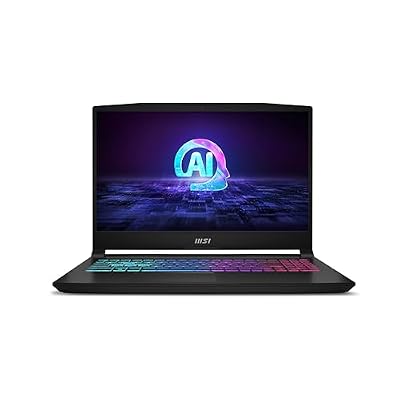
The Katana A15 AI is built around a simple promise: nothing needs upgrading on day one. Its listing fits 32GB of DDR5 memory and a 1TB SSD as standard, double the memory of the other picks here, behind a Ryzen 7 8845HS and an RTX 4060 that MSI rates at up to 105W maximum graphics power for this line. The 15.6-inch Full HD 144Hz panel matches that graphics tier honestly. For students and multitaskers who keep a browser, chat apps and a game open together, the generous factory memory matters more than a sharper screen they would rarely push.
Specs
- Processor: AMD Ryzen 7 8845HS
- Graphics: NVIDIA GeForce RTX 4060
- Display: 15.6-inch FHD 144Hz
- Memory: 32GB DDR5
- Storage: 1TB SSD
- Cooling: Cooler Boost 5
- Operating system: Windows 11
- Model: Katana A15 AI B8VF-448US
Best for: Buyers who want 32GB of memory fitted at the factory and no upgrade project after purchase.
Watch out for: MSI’s specification sheet for this model lists a 45 percent NTSC panel gamut, so pass it over if colour accuracy for photo or video work matters to you.
ASIN: B0CXVGSY2H
MSI Katana 15 B13VFK-1264US

The Katana 15 B13VFK is the conservative choice in this group, and its listing explains why it keeps selling: an Intel Core i7-13620H, an RTX 4060 that MSI rates at up to 105W maximum graphics power, 16GB of memory and a full 1TB of storage, where many entry configurations quietly halve the drive. It is also the only pick here shipping with Windows 11 Pro, which matters to buyers who need its remote desktop and drive encryption features for work. The Full HD 144Hz screen is the honest partner for this hardware, aimed squarely at smooth 1080p play.
Specs
- Processor: Intel Core i7-13620H
- Graphics: NVIDIA GeForce RTX 4060
- Display: 15.6-inch FHD 144Hz
- Memory: 16GB DDR5
- Storage: 1TB NVMe SSD
- Ports: USB 3.2 Gen1 Type-C with DisplayPort
- Cooling: Cooler Boost 5
- Operating system: Windows 11 Pro
- Model: Katana 15 B13VFK-1264US
Best for: Buyers who want Windows 11 Pro included and a well-understood RTX 4060 configuration.
Watch out for: Both memory slots are filled by 8GB sticks and one of its USB ports is USB 2.0 speed, so check your peripheral count before relying on it as a full desk hub.
ASIN: B0C9FRSDBQ
Which One Fits Your Situation
You play competitive shooters and want every frame the bracket allows
Choose the MSI Crosshair A16 HX. Its 240Hz QHD+ panel has the highest refresh ceiling here, the Ryzen 9 8940HX leaves processor headroom for high frame rates, and the RTX 5060 is rated at the highest graphics power figure in this group. The 16-inch screen also gives you more room for interface-heavy games than the 15.6-inch models.
You carry one laptop between lectures, work and gaming
Choose the MSI Katana A15 AI. The 32GB of factory-fitted memory absorbs a browser full of tabs, coursework and a game running together without an upgrade project, and the Full HD panel keeps the RTX 4060 in its comfort zone. It is the pick that asks the least of you after the box is opened.
You plan to upgrade memory or storage in a year or two
Choose the MSI Crosshair A16 HX if storage growth matters most, because its second M.2 position lets you add a drive without discarding the fitted one. Choose the MSI Katana 15 HX if memory is the planned upgrade, since its two DDR5 slots accept a larger replacement kit, while remembering its single M.2 slot makes any storage change a swap.
You need the laptop to double as a work machine
Choose the MSI Katana 15 B13VFK. It is the only configuration here whose listing includes Windows 11 Pro, and its combination of a 1TB drive, Ethernet-class wired networking on the specification sheet and a full-size layout suits a desk that alternates between spreadsheets and games. The other three picks ship with Windows 11 Home editions.
Common Mistakes
- Assuming every laptop with the same GPU name performs the same, when MSI sets different maximum graphics power figures by series and model.
- Buying a QHD or QHD+ model for competitive play without checking that the graphics tier can sustain high frame rates at that resolution.
- Planning to add one memory stick later without checking whether both slots are already filled, as they are on three of these four picks.
- Treating a series name as a specification, when Katana, Crosshair and other MSI lines each contain several model codes with different panels, ports and slot layouts.
- Skipping the warranty line on the listing, even though the term differs between models and regions in this range.
Frequently Asked Questions
Is an RTX 4060 or an RTX 5060 the better buy in this bracket?
It depends on the panel it drives and the power figure behind it. The RTX 5060 models here pair with QHD screens and suit buyers who want the newer generation, while the RTX 4060 configurations run at a healthy 105W in MSI’s published specifications and match their Full HD panels well. Compare the exact model code, not the chip name alone.
Can I upgrade the RAM and SSD in these MSI laptops later?
Mostly yes, with different limits per model. The Crosshair A16 HX offers the easiest path, with two memory slots and a second M.2 position listed by MSI. The Katana models use two memory slots that arrive filled, so RAM upgrades replace the fitted sticks, and the Katana 15 HX has a single M.2 slot, making storage a replacement job.
Does the display resolution matter more than the refresh rate?
For fast competitive games, refresh rate usually matters more, because motion clarity decides how playable high frame rates feel. For slower, visually dense games, the QHD and QHD+ panels here add real sharpness. Match the screen to your library: the 144Hz Full HD picks serve esports titles well, while the 240Hz Crosshair panel rewards both speed and detail.
What warranty do these MSI laptops carry?
MSI’s US specification sheets list a one-year limited warranty, including one year of global coverage, for the Katana 15, Katana A15 AI and Crosshair A16 HX configurations in this guide. Terms can differ by seller and region, so confirm the warranty line on the exact listing before ordering rather than assuming the figure carries across the whole MSI range.









