An external GPU setup lives or dies on one specification that most laptop listings bury: the port. An eGPU enclosure moves all of its graphics data over a single cable, so the laptop needs a port that carries PCI Express traffic — Thunderbolt 5, Thunderbolt 4, or USB4 — and a processor strong enough not to hold the desktop card back once it is connected. Everything else about the laptop matters the way it normally does, but if the port is wrong, no enclosure will ever work, and the failure is total rather than gradual.
Disclosure: As an Amazon Associate we earn from qualifying purchases.
That is not a theoretical risk. Lenovo’s Legion Pro 7i Gen 10 is a flagship gaming laptop, yet Lenovo’s own port list for it shows USB-C ports that are USB 3.2 only, with no Thunderbolt and no USB4 — it cannot run an eGPU at all. The four laptops below were chosen the other way around: the eGPU port was verified from the maker’s or the listing’s published specification first, and only then were the CPU, display, memory and storage weighed. One more thing to budget for before the picks: the enclosure or dock and the desktop graphics card are separate purchases. Nothing below includes them, and the laptop is only half of the setup.
How to choose a laptop for an eGPU
- The port comes first, and the tiers are not equal. Thunderbolt 5 is the current top tier, with 80 Gbps of total bandwidth and PCI Express tunnelling that doubles the graphics data path of the 40 Gbps generation. Thunderbolt 4 and USB4 both run at 40 Gbps and remain fully workable — most enclosures on sale are built for them. OCuLink, a direct PCIe connector, is faster still on paper, but on full-size gaming laptops it remains rare; it shows up mostly on handhelds and mini PCs, and none of the picks below offers one.
- On USB4 machines, check the enclosure, not just the port. USB4 only delivers an eGPU if the host supports PCI Express tunnelling and the enclosure’s controller expects a USB4 host. The port figures quoted below are the makers’ published ones; match them against the enclosure maker’s compatibility list before ordering either half of the setup.
- CPU headroom decides what the eGPU can do. Once the graphics card sits outside the laptop, the processor becomes the ceiling, especially at 1080p and in simulation or strategy titles. The HX- and H-class chips in these picks are there so the external card is fed properly.
- Plug the monitor into the enclosure. A display connected to the desktop card in the dock avoids sending the finished image back down the same cable to the laptop’s own screen, a loop that costs performance. Every pick below also has its own display worth using on the road — that is the point of the format — but at a desk, the external monitor belongs on the enclosure.
- Expect a gap versus a desktop. A card in an enclosure gives up some performance compared with the same card in a desktop’s full-size slot. The gap shrinks at 1440p and 4K, where the GPU works harder per frame, which is why eGPU setups make the most sense aimed at a high-resolution external monitor.
- Upgrade paths and warranty vary by model. Two picks below take more RAM later; two have their memory soldered at the factory, which is noted per pick. Warranty terms also differ by maker and by seller, and several of these models are sold on Amazon by both the maker and third-party stores — check the warranty term printed on the listing for the exact configuration before ordering.
If your shortlist leans AMD, our roundup of the best gaming laptop AMD Ryzen models covers that side of the market in depth; two of the picks below are Ryzen machines chosen because their processors leave an external card plenty of headroom.
1. MSI Vector 16 HX AI — the Thunderbolt 5 pick

The Vector 16 HX AI is the only laptop here with Thunderbolt 5, and it has two of the ports. MSI’s specification sheet lists both as Thunderbolt 5 with DisplayPort output and Power Delivery 3.1, which makes this the cleanest eGPU host on the page: connect the enclosure to one port and the second remains free for other high-speed duties. It is also the strongest upgrade platform below, which matters for a machine meant to anchor a desk setup for years.
The rest of the specification is a full-size gaming laptop with nothing held back for portability: a 24-core Intel Core Ultra 9 275HX (up to 5.4 GHz in MSI’s published figures), an RTX 5070 Ti that is a capable internal card in its own right, and a 16-inch QHD+ IPS display at 240 Hz. The one figure to plan around is memory — this configuration ships with 16 GB of DDR5. MSI fits two SO-DIMM slots rated for up to 96 GB, so moving to 32 GB later is a parts swap, and storage is similarly open, with one M.2 slot carrying PCIe Gen4 and a second compatible with PCIe Gen5.
Specs
- CPU: Intel Core Ultra 9 275HX (24 cores; up to 5.4 GHz, maker figure)
- GPU: NVIDIA GeForce RTX 5070 Ti, 12 GB GDDR7
- RAM: 16 GB DDR5 (two SO-DIMM slots; maker maximum 96 GB)
- Storage: 1 TB NVMe SSD (two M.2 slots: 1x PCIe Gen4, 1x PCIe Gen5, maker figure)
- Display: 16″ QHD+ (2560 x 1600) IPS, 240 Hz
- Ports: 2x Thunderbolt 5 (DisplayPort / Power Delivery), 2x USB 3.2 Gen 2 Type-A, HDMI 2.1, RJ45 Ethernet, SD Express card reader
Best for: buyers building a long-term desk setup who want the fastest eGPU connection available and the freedom to upgrade RAM and storage later.
2. Razer Blade 16 (2025) — the premium USB4 pick

The Blade 16 takes the other route to an eGPU: its two Type-C ports are USB4 at 40 Gbps, a pairing Razer publishes in its specification and independent teardowns of the ports confirm. That is a tier below the MSI’s Thunderbolt 5 for enclosure bandwidth, and this guide will not pretend otherwise — but 40 Gbps is the connection the majority of enclosures are designed around, and the Blade pairs it with the strongest internal specification here for buyers who want one machine that does everything.
That internal specification is headed by an AMD Ryzen AI 9 HX 370 and an RTX 5090 Laptop GPU, with a 16-inch QHD+ OLED display at 240 Hz. The honest framing is that a laptop already carrying a flagship internal GPU is not the typical eGPU candidate; this pick is for the buyer who wants the thin machine for travel and a desktop card — a tier above anything fitted inside a laptop — waiting in a dock at home. Memory is 32 GB of LPDDR5X soldered to the board, so it is fixed for the life of the machine, while storage can grow: Razer fits two M.2 slots and lists expansion up to 8 TB.
Specs
- CPU: AMD Ryzen AI 9 HX 370 (12 cores; up to 5.1 GHz, maker figure)
- GPU: NVIDIA GeForce RTX 5090 Laptop GPU
- RAM: 32 GB LPDDR5X (soldered, not upgradeable)
- Storage: 2 TB PCIe Gen4 SSD (two M.2 slots; maker lists expansion up to 8 TB)
- Display: 16″ QHD+ (2560 x 1600) OLED, 240 Hz
- Ports: 2x USB4 Type-C (40 Gbps, DisplayPort / Power Delivery), 3x USB 3.2 Gen 2 Type-A, HDMI 2.1, SDXC UHS-II card reader
Best for: buyers who want a flagship thin gaming laptop first and a 40 Gbps eGPU path for a desktop card at a home desk.
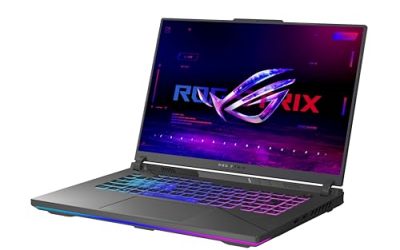
3. ASUS ROG Zephyrus G14 (2025) — the portable pick
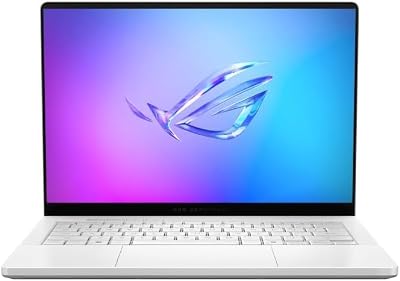
The Zephyrus G14 is the classic eGPU use case in a single product: a 14-inch laptop light enough to carry everywhere — the listing puts it at 3.31 lb — whose left-side Type-C port is USB4 with DisplayPort and power delivery, ready for an enclosure when it comes home. ASUS publishes the port as USB 4.0 Type-C in the GA403 specification, and it sits alongside a second Type-C, two Type-A ports and HDMI 2.1, so the machine does not need a hub for ordinary desk peripherals while the enclosure is attached.
Inside, the Ryzen AI 9 HX 370 gives an external card a strong processor to work with, and the internal RTX 5070 Ti means the laptop is a genuine gaming machine even before anything is plugged in. The display is a 14-inch 3K OLED at 120 Hz, listed at 500 nits with full DCI-P3 coverage. The fixed point is memory: 32 GB of LPDDR5X is soldered, and 32 GB is also the model’s ceiling, so this configuration is the one to buy — there is no later upgrade. Storage is a single 1 TB PCIe 4.0 NVMe SSD.
Specs
- CPU: AMD Ryzen AI 9 HX 370 (up to 5.1 GHz, maker figure)
- GPU: NVIDIA GeForce RTX 5070 Ti, 12 GB GDDR7
- RAM: 32 GB LPDDR5X (soldered, not upgradeable)
- Storage: 1 TB PCIe 4.0 NVMe SSD
- Display: 14″ 3K (2880 x 1800) OLED, 120 Hz, 500 nits, 100% DCI-P3 (listing figures)
- Ports: 1x USB4 Type-C (DisplayPort / Power Delivery), 1x USB 3.2 Gen 2 Type-C, 2x USB 3.2 Gen 2 Type-A, HDMI 2.1, microSD (UHS-II) reader
- Battery: 73 Wh
Best for: buyers who carry their laptop daily and want the eGPU to turn a 14-inch portable into the desk machine at home.
4. ASUS ROG Flow Z13 (2025) — the pick with no discrete GPU at all

The Flow Z13 is the machine on this page that needs an eGPU most, because it does not have a discrete graphics card. Its Ryzen AI Max+ 395 pairs 16 Zen 5 cores with Radeon 8060S integrated graphics — strong for an integrated part, and the reason the tablet plays games credibly on its own — but the upgrade path is entirely external, and ASUS gives it two. Both Type-C ports are USB4 at up to 40 Gbps with DisplayPort and power delivery, per the listing’s published port list, so standard USB4 and Thunderbolt enclosures apply; the same specification also lists support for ASUS’s own XG Mobile docks through its dedicated connector, a proprietary route no other pick here offers.
The rest of the package is built around portability: a 13.4-inch 2.5K touchscreen at 180 Hz, a 70 Wh battery, and a detachable keyboard form factor that works as a tablet. Memory is 32 GB of LPDDR5X unified memory, soldered as part of the processor package — there is no upgrade path, so the capacity has to be chosen at purchase, and higher-memory configurations exist in the same range. Storage is a single 1 TB PCIe Gen 4 SSD.
Specs
- CPU: AMD Ryzen AI Max+ 395 (16 cores; up to 5.1 GHz, maker figure)
- GPU: AMD Radeon 8060S integrated graphics (RDNA 3.5)
- RAM: 32 GB LPDDR5X (unified, soldered, not upgradeable)
- Storage: 1 TB PCIe Gen 4 SSD
- Display: 13.4″ 2.5K (2560 x 1600) touchscreen, 180 Hz
- Ports: 2x USB4 Type-C (40 Gbps, DisplayPort / Power Delivery), 1x USB 3.2 Gen 2 Type-A, HDMI 2.1, microSD (UHS-II) reader, XG Mobile connector (GC34, listing figure)
- Battery: 70 Wh
Best for: buyers who want the smallest machine here and plan to let an external GPU do the heavy lifting at a desk.
What you still need to buy
None of the laptops above is a complete eGPU setup. The enclosure or dock and the desktop graphics card that goes in it are separate purchases, and they are where most of the total spend lands. When choosing the enclosure, match its host connection to the laptop: Thunderbolt 5 hosts can use Thunderbolt 5, Thunderbolt 4 or USB4 enclosures, while a USB4 laptop needs an enclosure whose controller supports USB4 hosts with PCI Express tunnelling. The Flow Z13 adds the option of ASUS’s XG Mobile line, which only fits that connector. Buy the laptop for the port first and the enclosure second, in that order, and the setup will work; buy them the other way around and you are checking compatibility with your fingers crossed.