As an Amazon Associate we earn from qualifying purchases
A fishtank PC case puts your build on display. Instead of a solid front panel and a single side window, these cases wrap the main chamber in tempered glass on two or three sides, so the motherboard, graphics card and cooling hardware stay visible from almost any desk angle. Most current designs also use a dual-chamber layout: the power supply, cables and storage move into a rear compartment, leaving the glass chamber clean.
That layout has trade-offs: glass does not move air like mesh, so fan placement and radiator mounts matter more than on a conventional tower. This guide explains what to verify on the manufacturer specification sheet, then compares four fishtank-style cases sold on Amazon US at the time of writing. For a broader starting point, see our best PC case comparison.
What to check before you buy
Motherboard and power supply fit
Most fishtank cases in this class support ATX, Micro-ATX and Mini-ITX motherboards, but the exact list differs by model, and only some support back-connect boards with rear-facing connectors. Check the motherboard support line on the spec sheet rather than assuming ATX support means every board fits with your cooler and cable routing.
Power supply fit matters too. The rear chamber has a fixed length, so confirm the maximum PSU length listed and compare it with your unit, including room for cables to bend.
GPU, cooler and radiator clearance
Graphics card length is the headline clearance in a glass showcase case, because long cards sit close to the front glass. Manufacturers publish a maximum GPU length, usually assuming a specific fan or radiator configuration. If you mount a radiator where the card needs to pass, usable clearance drops. Treat the published number as a manufacturer-stated maximum, measure your exact card, and leave margin for the power connector.
CPU cooler height and radiator support follow the same rule. Fishtank cases commonly offer 240mm and 360mm radiator positions, but not every position can be used at the same time. Check which mounts work together, how thick a radiator plus fans can be in each spot, and whether a top radiator blocks motherboard connectors or tall memory modules.
Fans, connectors, front I/O and warranty
Some fishtank cases include fans and some include none, so the included-fan list changes what else you need to buy. Note the fan sizes each mount accepts, whether a hub or controller is included, and how the fans connect. Confirm the front USB ports, audio jack and power button layout match your desk setup, and whether a USB-C front port needs a specific motherboard header.
Finally, read the warranty line: length, glass coverage and replacement parts differ by brand. All clearance figures here are manufacturer-stated specifications, not measurements from a physical build, so verify any deciding number against the current spec sheet for your exact variant.
Four fishtank PC cases to compare
1. Lian Li O11 Vision Compact (White, O11VPW)

The O11 Vision Compact is the smaller sibling in Lian Li’s panoramic lineup. The manufacturer describes it as a compact dual-chamber ATX case with three-panel glass, back-connect motherboard support, hidden AIO tube routing and an included 360mm top mesh panel. It suits builders who want the full fishtank look without a large full-tower footprint.
Because it is a compact design, clearance checks matter more here than on larger panoramic cases. Confirm your graphics card length against the manufacturer limit for this exact variant, and check radiator thickness where you plan to mount an all-in-one cooler. Back-connect support is a genuine differentiator if you own a compatible motherboard, since rear-facing connectors keep the glass chamber free of visible cables.
2. HYTE Y70 (White, CS-HYTE-Y70-BW)

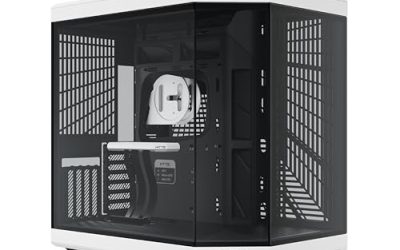
The HYTE Y70 is a dual-chamber ATX mid-tower built around a three-piece panoramic glass design. The manufacturer highlights support for large four-slot vertical graphics card mounting and includes a PCIe 4.0 riser cable with a color-matched canopy, so the card can be displayed vertically without buying a separate riser kit. It is offered in several colorways, including the white version listed here.
Vertical GPU mounting changes how you should read clearance figures. Card thickness, riser routing and the distance between the card and the glass all affect cooling, so check the manufacturer’s guidance for vertical installs rather than relying on horizontal GPU length alone. The dual-chamber interior keeps the power supply and cables out of the main viewing area, and the floor below the graphics card can accept additional fans to feed the card with air, per the manufacturer’s description.
3. NZXT H6 Flow RGB (Black)
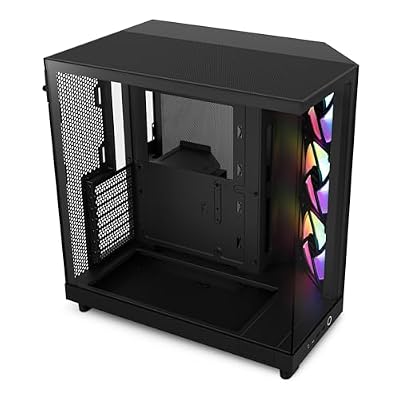
The NZXT H6 Flow is a compact dual-chamber mid-tower with wraparound panoramic glass panels and angled front fans aimed at the graphics card. The RGB version listed here includes three RGB fans, while the standard version includes three 120mm fans, according to the manufacturer. NZXT lists motherboard support for ATX, Micro-ATX and Mini-ITX boards, an ATX power supply type, and steel construction with tempered glass. The manufacturer warranty is listed as two years.
The H6 Flow is the airflow-first option in this group: the glass showcases the interior while the angled fan layout prioritizes GPU cooling. Verify graphics card length and radiator placement together, since a radiator can reduce usable card space, and confirm which fan variant you are buying, because the included fans differ between the standard and RGB versions.
4. Raidmax i801 Tempered Glass Aqua View (White)
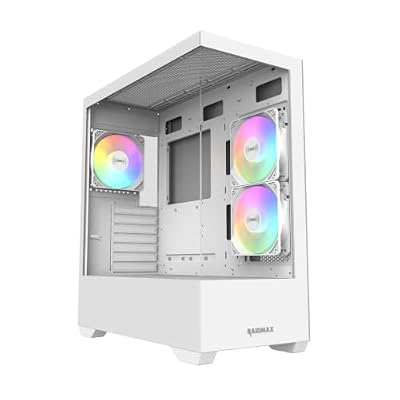
The Raidmax i801 uses a corner structure-free panoramic design, meaning the front and side glass meet without a visible corner pillar for an uninterrupted view into the build. The listing states support for a 360mm water cooler and graphics cards up to 400mm, with three ARGB fans included. Those are manufacturer-stated limits from the product listing, so measure your exact card and cooler before relying on them.
This is the most direct fishtank design here: maximum glass, minimal frame. Check motherboard sizes, PSU length, radiator availability with your fan layout, and how the ARGB fans are controlled.
How to choose between them
Pick the Lian Li O11 Vision Compact if you want a compact panoramic build and value back-connect motherboard support. Pick the HYTE Y70 if vertical graphics card display is the centerpiece of your build and you want the riser cable included. Pick the NZXT H6 Flow RGB if you prefer a compact dual-chamber case that balances the showcase look with a fan layout aimed at GPU cooling. Pick the Raidmax i801 if the uninterrupted corner-free glass view matters most and its stated clearances fit your parts.
Before ordering, run the same final checks: motherboard form factor, PSU length, GPU length and thickness, cooler height, radiator size per mount, included fans, front I/O headers, and warranty terms for your exact variant.