As an Amazon Associate we earn from qualifying purchases
Best Basic PC Case: Simple, Affordable Picks for 2026
A basic PC case has one job: hold your parts safely, let air move through them, and stay out of the way while you build. For a first build, an office PC, or a straightforward gaming system, a plain, well-made chassis is often the smartest choice.
This guide compares four simple cases listed on Amazon US: two compact Micro-ATX models from Cooler Master, one compact ATX mid-tower from NZXT, and one classic ATX mid-tower from Corsair. Specifications below are manufacturer-stated figures from each listing, not lab measurements, so confirm clearances on the product page before ordering.
How to Choose a Basic PC Case
Start with motherboard size. A case must match your board: ATX cases accept ATX, Micro-ATX, and usually Mini-ITX boards, while Micro-ATX cases accept Micro-ATX and Mini-ITX only. Choosing the wrong size is the most common beginner mistake, and no amount of airflow can fix a board that does not fit.
Next, check the parts that most often clash. Graphics cards have grown longer, so note the maximum GPU length. Tower air coolers need height clearance. If you plan a liquid cooler, confirm radiator support by size and position. Also check power supply fit: most basic towers use a standard ATX power supply, but confirm the maximum PSU length if your unit is unusually long, because cable space behind the tray can be tight in compact designs.
Front-panel connectors matter for daily use. Look for USB 3.0 or faster USB ports, an audio jack, and, if your motherboard supports it, a USB Type-C port. Finally, count the fans included in the box. A basic case with one or two fans installed is enough for modest hardware, and you can add more later. Dust filters are a quiet bonus: magnetic filters that lift off for cleaning keep maintenance simple.
For a wider comparison across sizes and styles, see our best PC case compared guide before you narrow the list down.
The Picks
Cooler Master MasterBox Q300L (ASIN: B0785GRMPG)

The MasterBox Q300L is a compact Micro-ATX tower with a transparent acrylic side panel, magnetic dust filters, an adjustable I/O panel, and a ventilated, perforated design. The listing states one 120mm fan is pre-installed. It suits small office or home builds where desk space matters more than expansion slots.
Plan around a Micro-ATX or Mini-ITX motherboard and a standard ATX power supply. The perforated panels favor airflow over silence. The acrylic panel is lighter and less fragile than glass, though it scratches more easily.
Choose this model if you want the smallest, simplest box on this list and your parts are modest. Skip it if you need a full ATX board, many drives, or a large radiator.
Cooler Master Q300L V2 (ASIN: B0CB8WGGNW)

The Q300L V2 keeps the compact Micro-ATX format and adds a tempered glass side panel, a magnetic patterned dust filter, and a USB 3.2 Gen 2×2 front port. Per the listing title, it supports CPU coolers up to 159mm tall and graphics cards up to 360mm long, with a fully ventilated airflow design.
That clearance is generous for a compact case, making it a sensible step up for a small gaming build. The faster front USB port helps with external drives, provided your motherboard has the matching internal header.
Pick the V2 over the original Q300L if you want glass instead of acrylic and the newer front connector. As with the original, confirm your motherboard size first, since full ATX boards do not fit.
NZXT H5 Flow 2024 (ASIN: B0D2MK6NML)
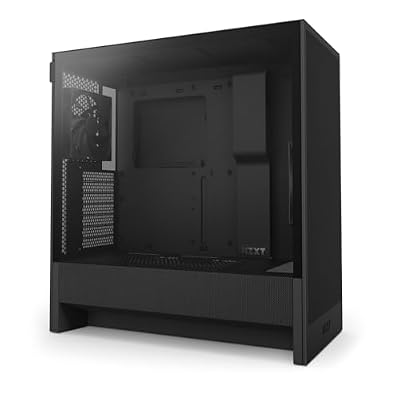
The NZXT H5 Flow 2024 is a compact ATX mid-tower with a high-airflow front panel, tempered glass side panel, cable management features, and two 120mm fans included. The listing title states support for a 360mm front radiator and a 240mm top radiator.
ATX support is the key advantage: you can start with a modest board and still have room for a larger motherboard, a longer graphics card, and a bigger liquid cooler later. Two included fans give a workable setup out of the box.
This is the balanced pick for most people who want a plain, modern tower. Verify the exact fan and radiator positions on the product page, and check whether your chosen liquid cooler fits with your graphics card installed, since front radiators can reduce GPU clearance.
Corsair 4000D Airflow (ASIN: B08C7BGV3D)

The Corsair 4000D Airflow is a tempered glass mid-tower ATX case with a high-airflow front, a cable management system, a spacious interior, and two included 120mm fans, per its listing title. It is a long-running, conventional design: roomy, tidy, and easy to build in.
The appeal of a basic case like this is build ease. A spacious interior and a dedicated cable channel make routing the 24-pin motherboard cable, CPU power cable, and front-panel wires easier, especially for a first build. ATX support keeps your options open for future upgrades, and the airflow-focused front suits air-cooled systems.
Choose the 4000D Airflow if you want the most forgiving building experience on this list and do not mind a standard mid-tower footprint. As always, confirm GPU length, cooler height, and radiator placement against your exact parts list before ordering.
Basic Checks Before You Order
- Motherboard: confirm ATX, Micro-ATX, or Mini-ITX support matches your board.
- Graphics card: compare your card length with the stated maximum, and allow extra room if a front radiator will be installed.
- CPU cooler: compare tower cooler height, or radiator size and position, with the stated support.
- Power supply: confirm ATX PSU support and any maximum PSU length.
- Connectors: confirm front USB type and speed, and that your motherboard has the matching internal headers.
- Fans and filters: note how many fans are included and whether dust filters are removable for cleaning.
- Warranty: check the warranty terms stated on the product page for the specific listing and seller.
Manufacturer specifications describe what a case is designed to fit; they are not independent measurements. Leave a margin rather than planning to the last millimeter.
Verdict
For the smallest simple build, the MasterBox Q300L is the plainest option. For a compact build with glass and a faster front port, the Q300L V2 adds useful touches without complicating the design. For most basic ATX builds, the NZXT H5 Flow 2024 and Corsair 4000D Airflow are the safer long-term choices because they accept larger boards and leave room to upgrade. Pick by motherboard size first, then by clearance, and a basic case will do its job quietly for years.