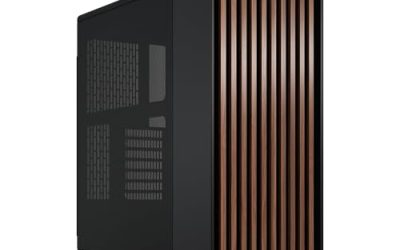
An aquarium PC case, also called a fishtank or panoramic case, uses broad tempered glass on the front and side so the motherboard, graphics card and cooling hardware stay visible from two angles. The name describes the viewing effect only. These enclosures are air-cooled or liquid-cooled computer cases, and they are never filled with water.
As an Amazon Associate we earn from qualifying purchases
What to check before you choose
Glass area alone does not make a good showcase build. Check the motherboard support first, including ATX, Micro-ATX, Mini-ITX and any back-connect board support stated by the maker. Then confirm graphics card length and height clearance, CPU cooler height, power supply length and radiator positions from the official specification sheet. Fan counts, fan sizes and front I/O ports also matter, because many panoramic cases move intake fans to the side or bottom.
Treat maker figures as stated limits, not as measured results. A stated GPU clearance, for example, may assume no front radiator and a standard fan thickness. If you plan a thick radiator, vertical GPU mount or tall memory, leave extra room and re-check the manual for the exact variant you order. Warranty terms also vary by region and seller, so confirm the warranty period and return conditions on the product page before ordering.
For a wider comparison across conventional towers and showcase designs, see our best PC case guide and then narrow the list with the panoramic picks below.
HYTE Y70 — dual-chamber showcase with vertical GPU focus

The HYTE Y70 is a dual-chamber ATX mid-tower built around three-piece panoramic tempered glass. HYTE states support for a four-slot vertical graphics card layout and includes a PCIe 4.0 riser cable in the listed package. The second chamber hides the power supply and much of the cabling, which keeps the visible chamber focused on the board, GPU and cooling.
This layout suits builders who want the graphics card presented vertically as the centrepiece. Before ordering, confirm the exact colour and model code, GPU thickness guidance in the manual, radiator clearance with your chosen fan setup, and whether your power supply cables reach comfortably in the dual-chamber layout. Vertical mounting can change airflow around the GPU, so plan intake and exhaust positions with care rather than assuming glass panels behave like mesh.
Lian Li O11 Vision Compact — flexible panoramic dual chamber

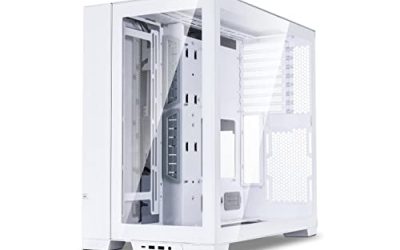
The Lian Li O11 Vision Compact (O11VPW) is a compact dual-chamber ATX case with panoramic glass and back-connect motherboard support stated by Lian Li. Maker specifications list graphics card clearance up to 408 mm and radiator support up to 360 mm in the supported positions, with the exact fan and radiator combination depending on the top panel mode and internal layout you select.
Choose this case if you want a smaller footprint than a full-size showcase tower while keeping a wide glass view. Check whether your motherboard uses standard or back-connect placement, confirm PSU length and cable routing space in the rear chamber, and verify CPU cooler height for air-cooled builds. Because several configurations share similar names, match the O11VPW model code to the listing before you buy.
NZXT H6 Flow RGB — compact panoramic case with angled intake fans

The NZXT H6 Flow RGB (CC-H61FW-R1) is a compact dual-chamber mid-tower with wraparound panoramic glass and three pre-installed 120 mm RGB fans mounted at an angle in the front corner. NZXT lists maximum GPU length of 365 mm in its specification material, along with support for a top radiator up to 360 mm depending on fan and radiator thickness.
The angled fan placement is the main difference from side-intake fishtank designs. It directs air toward the graphics card area while keeping the glass view open. Confirm motherboard size support, top radiator thickness limits and front I/O on the exact listing, and check whether you need additional exhaust fans for your CPU cooler choice. As with every glass case, stated clearances should be checked against your full parts list.
CORSAIR 3500X ARGB — wraparound glass with reverse-connection support
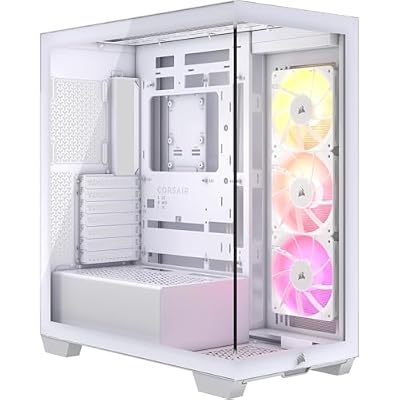
The CORSAIR 3500X ARGB (CC-9011279-WW) is a panoramic mid-tower with wraparound tempered glass, three included RS120 ARGB fans and support for selected reverse-connection motherboards, according to Corsair product material. The case is designed for builders who want hidden motherboard cables where a compatible board is used, while keeping standard ATX support for conventional boards.
Look closely at the variant name before ordering, because the 3500X family includes versions with different fan bundles and lighting control. Confirm radiator support, GPU anti-sag hardware, fan header requirements and whether lighting is controlled through the motherboard 5V ARGB header on the version you select. Also verify E-ATX width support carefully if you use an oversized board, since connector placement can matter as much as the form factor label.
MUSETEX K2 — 270-degree glass with six fans included

The MUSETEX K2 is an ATX mid-tower with dual tempered glass arranged for a 270-degree panoramic view, six pre-installed PWM ARGB fans and a front Type-C port, as described in MUSETEX product material. It supports ATX, Micro-ATX and Mini-ITX motherboards in the listing specifications and is aimed at builders who want lighting and fans included in the box.
An included fan bundle can simplify a first showcase build, but it does not remove the need to check compatibility. Confirm fan connector type, motherboard ARGB header support, radiator mounting positions and GPU clearance with your exact graphics card. Product bundles change over time, so verify the fan count and included accessories on the current listing rather than relying on photos alone.
How to pick the right one
Start with your motherboard and graphics card, then choose the case. If vertical GPU presentation matters most, the HYTE Y70 is the clearest match. If you want a compact dual-chamber layout with back-connect options, compare the Lian Li O11 Vision Compact against your board and radiator plan. If you prefer a smaller panoramic case with fans already installed, the NZXT H6 Flow RGB and MUSETEX K2 cover different fan layouts and lighting approaches. If reverse-connection cable hiding is your priority, check the CORSAIR 3500X ARGB variant that matches your board.
Whichever model you choose, download the manual first, measure your longest components, and confirm power supply length, cooler height and radiator thickness as a complete set. Maker specifications are the starting point for fit, and your own parts list is the final check.