

- Top Pick: Kytok Controller Stand 4 Tiers with Cable Organizer for Desk, Universal Headphone Stand Compatible with Xbox PS5 PS4 Console Nintendo Switch, Headset Holder & Desk Mounts for 8 Packs Controller
- Best Value: Monzlteck Desktop Controller Holder for PS4/PS5/Xbox ONE/Switch Pro/Headset, Controller Organizer,Gaming Accessories
- Premium Choice: KDD Gaming Headphones Stand, Rotatable Headset Stand with Light Modes – Controller Holder with 2 USB Charging Ports and 3.5mm – Earphone Hanger Accessories for Desktop Gamer(Black)
Controllers end up everywhere: wedged between the keyboard and a monitor base, buried in a couch cushion, dangling by a cable from a desk edge. A dedicated stand fixes that, but the category is oddly mixed. Some stands are single-purpose cradles, others are headset towers with a hook for a pad, and a few mount under the desk so nothing sits on the surface at all. The decision is less about looks and more about how many pads you own and what else needs a home.
This guide is for PC and console players who want one tidy spot for a pad or two, and often a headset, on a desk that is already crowded. Every pick is judged only on what its listing title states: tiers, supported platforms, materials, charging ports and mounting method. In 2026 most stands claim broad compatibility, so the real differences are how many items they hold, how they are built and where they sit.
Quick Picks
As an Amazon Associate we earn from qualifying purchases at no extra cost to you.

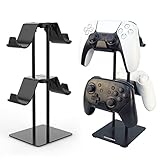





| Product | Best for | Key spec from the title |
|---|---|---|
| Kytok 4-Tier Stand | Multiple pads on a desk | 4 tiers, cable organizer |
| Monzlteck Desktop Holder | Simple multi-system desk | PS4, PS5, Xbox ONE, Switch Pro |
| KDD Gaming Stand with USB | Charging at the desk | 2 USB ports, 3.5mm, light modes |
| Savage Raven Phantom | Showcasing one PS5 pad | Transparent holder, PS5 controller |
| 4-Tier Rotatable Stand | Mixed device households | Rotatable, Switch 2 and PS Portal |
| KDD RGB Headset Stand | Lit-up setups | 9 light modes, detachable hook |
| Solid Wood Holder | Warm, minimal desks | Dual controller rack, solid wood |
| KDD Aluminum Stand | Sturdy, plain look | Aluminum supporting bar |
| Yocice Under-Desk Holder | Clearing the desk surface | Double-sided tape mount |
| 2-Tier Aluminum Display Stand | Elite and Series X pads | 2 tiers, aluminum |
How to Choose
Count Your Controllers and Headsets
Decide how many items need a home before shopping. A single pad needs a cradle; two to four pads call for a tiered tower; a headset plus a pad calls for a combo stand. Buying a stand with fewer slots than your collection just moves the pile back to the desk within a week.
Mounting Method and Desk Space
Tabletop stands need roughly the footprint of a coffee mug. Under-desk holders free the surface but rely on adhesive, so check that the underside is smooth and clean. If the desk sits against a wall, look at rotation: a swiveling tower reaches every item without sliding the whole base.
Compatibility and Pad Size
Most listings name PS4, PS5, Xbox and Switch pads. Larger pads such as the Xbox Elite 2 or the PS5 DualSense have wider grips, so a narrow cradle can feel tight. Check whether the title names your exact pad rather than relying on a generic universal label.
Extras Versus Plain Build
USB ports, lighting and cable organizers look handy but add a power cable to your desk. Budget models often cut corners on base weight, so a tall, light tower tips when you pull a headset off. A weighted base or a metal support bar keeps it steady, and plain designs with nothing to plug in rarely fail.
The 10 Best Options
Kytok 4-Tier Controller Stand
A tower for players who own several pads plus a headset and want them stacked in one place instead of spread across the desk. It reads as the most organized option here for a shared household.
- Four tiers hold multiple controllers and a headset together.
- A built-in cable organizer tames charging cords.
- Trade-off: the tall design needs a stable base and vertical room beside the monitor.
Skip it if you own one pad and want the smallest possible footprint. A tall four-level tower looks excessive for a lone controller and a headset, and a simpler cradle would free up more room beside the keyboard.
Monzlteck Desktop Controller Holder
For a desk shared across consoles, since the title lists PS4, PS5, Xbox ONE and Switch Pro pads plus headsets. It positions itself as an organizer rather than a showpiece.
- Broad platform naming covers most mixed households.
- The organizer layout is aimed at keeping accessories together on the desk.
- Trade-off: the title offers no extras, so there is no charging or lighting.
Skip it if you want USB ports or a statement piece for the desk. Anyone hoping for lighting, charging or a distinctive silhouette should look at the KDD models further down the list instead.
KDD Gaming Headphones Stand With USB Ports
The tech-heavy option for someone who wants a headset and controller hold plus charging at arm’s reach. It turns one corner of the desk into a small docking station.
- Two USB charging ports and a 3.5mm connection are listed in the title.
- A rotatable design with light modes suits RGB desks.
- Trade-off: it needs a power source, which adds another cable behind the monitor.
Skip it if you dislike visible lighting or want a pure, passive stand. Streamers filming under a controlled lighting scheme may also find extra glow on the desk more distracting than useful.
Savage Raven Skull and Co. Phantom Stand
A display piece for one PS5 controller, with a transparent finish that lets the pad itself take center stage. Collectors who rotate special-edition pads will understand the appeal.
- Designed specifically for a PS5 controller.
- The transparent look suits a clean shelf or desk corner.
- Trade-off: it holds a single pad, so a multi-controller household needs more stands.
Skip it if you play on Xbox or need to store several pads together. Because the listing is written around the PS5 controller, a different pad shape may not seat properly in the holder.
4-Tier Rotatable Gaming Controller Stand
Suitable for homes that mix consoles, handhelds and phones, going by the broad compatibility list in the title. The rotating base is its main practical advantage over fixed towers.
- A rotatable base brings each tier within reach without moving the stand.
- The list spans PS5, PS4, Xbox, Switch 2 and PS Portal.
- Trade-off: generic branding in the title makes support details harder to verify.
Skip it if you prefer buying from a named brand. Shoppers who want a recognizable manufacturer behind the product, or a clearly documented warranty, will be more comfortable with the other towers on this list.
KDD RGB Headset Stand With Controller Hook
A lit-up choice for desks already full of color, adding a detachable hook so a pad can hang beside the headset. It is built for show as much as storage.
- Nine light modes are listed in the title.
- The detachable controller hook allows flexible placement.
- Trade-off: the hook holds one pad, so it is not a multi-controller solution.
Skip it if you want a quiet, unlit setup with nothing to switch off. With nine lighting modes in play, a minimalist desk will look busier than the owner probably intends.
Solid Wood Controller and Headphone Stand
For desks that lean warm and minimal, where plastic towers look out of place next to a wooden desktop or a plant. It trades features for material and calm.
- Solid wood construction stands apart from the usual plastic.
- A dual controller rack holds two pads alongside a headset.
- Trade-off: no charging, lights or cable organizer are mentioned.
Skip it if you need USB charging built into the stand. Players who want a powered dock for a headset or phone will have to run a separate charger, which defeats the tidy look the wood is meant to deliver.
KDD Aluminum Supporting Bar Stand
Fits buyers who want a plain, rigid-looking holder that stores headphones and a pad together without any fuss. It is the understated sibling of the lit KDD models.
- An aluminum supporting bar suggests a firmer build than all-plastic designs.
- Universal storage is aimed at headphones, headsets and controllers.
- Trade-off: the title mentions no charging or lighting extras.
Skip it if you want a showy RGB piece for the desk. It is a storage tool first, so anyone shopping for a talking point will find the lit and decor-style options more satisfying.
Yocice Under-Desk Controller Holder
A surface-clearing option that tucks a headset and pad beneath the desk with adhesive. It suits players whose tabletop is already taken up by monitors, a keyboard and a mic arm.
- Under-desk placement frees the tabletop entirely.
- Strong double-sided tape mounting avoids drilling.
- Trade-off: adhesive depends on a clean, flat underside, and moving it later is harder than with a freestanding stand.
Skip it if your desk has a textured or curved underside. Glass tops, thin metal frames and rough laminate are all poor candidates, and a freestanding tower would be the safer route there.
2-Tier Universal Aluminum Display Stand
Built for owners of premium pads such as the Xbox Elite 2, Series X and S controllers, and PS5 pads who like display-style storage. The decor-oriented wording makes it a shelf piece first and a desk tool second.
- Two tiers hold a pair of pads at a visible height.
- Aluminum construction suits a gamer shelf or desk corner.
- Trade-off: only two tiers, and no headset hanger is stated.
Skip it if you need to hang a headset on the same stand. Players who want everything in one spot will outgrow two tiers quickly, so a taller combo stand makes more sense for them.
Which One Fits Your Situation
Two Players, Several Pads
The Kytok 4-Tier or the 4-Tier Rotatable stand keeps a household collection together in one corner, and the rotating base is handy when two people reach for pads from different sides of the room.
Desk With No Spare Surface
The Yocice under-desk holder clears the tabletop completely, which suits compact battlestation desks already crowded with monitors, speakers and a mic arm.
Charging and Lighting Fans
The KDD Gaming stand with USB ports adds charging at the desk, while the KDD RGB model leans harder into the lighting theme with nine modes and a detachable hook.
Clean, Minimal Look
The Solid Wood Holder or the 2-Tier Aluminum Display Stand fits a restrained, tidy desk where the pads themselves are the decoration.
Common Mistakes
- Buying a four-tier tower for a single pad, then fighting its footprint every time you clean the desk.
- Ignoring base weight, which leads to tipping when a headset comes off.
- Assuming adhesive under-desk mounts work on every surface, including rough or painted wood.
- Paying for lights and USB ports that add cables you do not need.
- Skipping compatibility checks for oversized pads like Elite-style controllers.
Related guides
- Aio Liquid Coolers For High Performance Gaming
- Wireless Gaming Headsets Under 100 For Pc
- Ssds For Large Video And Raw Photo Files
Frequently Asked Questions
Do I need a stand for each controller?
No. Tiered towers and dual racks hold two to four pads. Single cradles make sense mainly for display or for one favorite pad you reach for daily.
Will a stand work with both PlayStation and Xbox pads?
Many listings state broad compatibility, but confirm your exact pad is named in the title, especially for larger shapes like Elite-style controllers.
Are USB ports on a stand useful?
They help if you charge a headset or phone at the desk. They also require a power adapter, which adds cable clutter you may be trying to avoid.
Is an under-desk holder secure?
It relies on adhesive and a smooth underside. Clean the surface first and avoid it on textured or painted-over wood, where tape grips poorly.







