

- Top Pick: Asus ROG Strix B550-F Gaming WiFi II AMD AM4 (3rd Gen Ryzen) ATX DDR4 Gaming Motherboard (PCIe 4.0,WiFi 6E, 2.5Gb LAN, BIOS Flashback, HDMI 2.1, Addressable Gen 2 RGB Header and Aura Sync)
- Best Value: GIGABYTE B550 Gaming X V2 AMD AM4 ATX Motherboard, Supports Ryzen 5000/4000/3000 Series Processors, DDR4, 10+3 Power Phase, 2X M.2, PCIe 4.0, Front USB-C, GbE LAN, Q-Flash Plus, RGB Fusion
- Premium Choice: MSI B850 Gaming Plus WiFi Motherboard, ATX – Supports AMD Ryzen 9000/8000 / 7000 Processors, AM5 – DDR5 Memory Boost 8200+ MT/s (OC), PCIe 5.0 x16 & 4.0 x16, M.2 Gen5, Wi-Fi 7, 5G LAN
Gaming at 4K leans hard on the graphics card, so the motherboard’s job is to get out of the way: feed a high-end GPU full PCIe bandwidth, deliver clean, stable power to a strong CPU through a capable VRM, and offer fast M.2 storage so giant game installs load quickly. The board does not push frames itself, but the wrong one bottlenecks or destabilises the components that do. This guide rounds up the best 4K gaming motherboards in 2026 across AMD’s AM4 (B550) and AM5 (B650) platforms, chosen for the connectivity and power delivery a high-end 4K build actually needs.
- Best 4K Gaming Motherboards at a Glance
- 1. GIGABYTE B650 AORUS Elite AX AMD AM5 ATX Motherboard, Ryzen 9000/8000/7000
- 2. ASUS ROG Strix B550-F Gaming Motherboard, Gaming ATX, AMD B550, AM4, DDR4
- 3. ASUS ROG Strix B550-F Gaming WiFi II AMD Socket AM4 ATX DDR4 Motherboard
- 4. MSI MAG B550 Tomahawk Gaming Motherboard, AMD Ryzen 5000, AM4, DDR4, PCIe 4.0
- 5. ASUS ROG Strix B550-F Gaming Motherboard, AMD AM4 Zen 3 Ryzen 5000
- 6. Gigabyte B550 Gaming X V2 Motherboard, AM4, 4xDDR4, HDMI/DVI-D, USB 3.2, M.2
- How to Choose a 4K Gaming Motherboard
- Frequently Asked Questions
- Related Guides
- Related Articles
Our picks were chosen on what matters for a 4K rig: PCIe support for the GPU and NVMe storage, the number and speed of M.2 slots, VRM quality for stable power under sustained gaming loads, and connectivity such as fast networking and USB. We have included a deliberate spread — from around $92 up to around $249 — across both AM4 and the newer AM5 socket. A note on the AM4 boards: B550 supports PCIe 4.0, which still delivers ample bandwidth for current GPUs at 4K, while the AM5 B650 board moves you to PCIe 5.0 and DDR5 for the latest Ryzen chips. Below is an at-a-glance comparison of all six, then a closer look at each and a buyer’s guide built around PCIe, M.2, and VRM.
As an Amazon Associate we earn from qualifying purchases at no extra cost to you.


🛒 Best Price Today on Amazon
Prime members get fast, free shipping on everything above, plus member-only deals. New members get a 30-day free trial — cancel anytime.
Best 4K Gaming Motherboards at a Glance
| Motherboard | Best For | Standout Spec | Approx Price |
|---|---|---|---|
| GIGABYTE B650 AORUS Elite AX (AM5) | Latest AM5 4K platform | AM5, PCIe 5.0, DDR5, WiFi 6 | around $150 |
| ASUS ROG Strix B550-F Gaming (premium) | Robust AM4 VRM rig | B550 ATX, strong VRM, PCIe 4.0 | around $249 |
| ASUS ROG Strix B550-F Gaming WiFi II | AM4 with fast WiFi | B550, PCIe 4.0, WiFi II | around $165 |
| MSI MAG B550 Tomahawk | Value high-end AM4 board | B550, heavy VRM, dual M.2 | around $160 |
| ASUS ROG Strix B550-F Gaming (AM4) | ROG features on a budget | B550 ATX, PCIe 4.0, ROG VRM | around $160 |
| Gigabyte B550 Gaming X V2 | Budget 4K-capable board | B550, PCIe 4.0, M.2, value | around $92 |
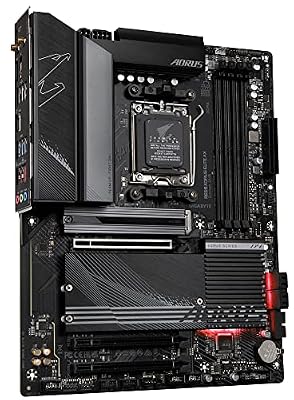
1. GIGABYTE B650 AORUS Elite AX AMD AM5 ATX Motherboard, Ryzen 9000/8000/7000

GIGABYTE B650 AORUS Elite AX AMD AM5 ATX Motherboard, Support Ryzen 9000/8000/7000 Series, DDR5, 14+2+1 Power Phase, PCIe 5.0 M.2, USB-C 3.2 Gen 2, WIFI6E, 2.5GbE, EZ-Latch, Q-Flash, RGB Fusion



As an Amazon Associate we earn from qualifying purchases. Product prices and availability are accurate as of the date/time indicated.
The GIGABYTE B650 AORUS Elite AX is the pick for building a 4K rig on AMD’s latest platform. It uses the modern AM5 socket with support for Ryzen 7000, 8000, and 9000 CPUs, brings PCIe 5.0 and DDR5 memory, includes multiple M.2 slots and integrated WiFi 6, and is built on a robust power-delivery design. At around $150 it is excellent value for a current-generation, future-ready 4K foundation.
For a high-end 4K build this is the forward-looking choice. AM5 gives you the newest Ryzen processors and a platform with a long upgrade runway, PCIe 5.0 provides bandwidth headroom beyond what today’s GPUs require, and DDR5 raises memory performance for a strong CPU feeding a top-tier graphics card. The capable VRM keeps power clean under sustained 4K gaming loads, while multiple M.2 slots and WiFi 6 round out a complete feature set. If you want to build your 4K machine on the current AMD platform with room to grow, the AORUS Elite AX is the standout.
Pros: Modern AM5 with PCIe 5.0 and DDR5, multiple M.2, WiFi 6, capable VRM, great value.
Cons: Requires DDR5 and an AM5 Ryzen CPU; no upgrade path from older AM4 parts.
2. ASUS ROG Strix B550-F Gaming Motherboard, Gaming ATX, AMD B550, AM4, DDR4

Asus ROG Strix B550-F Gaming WiFi II AMD AM4 (3rd Gen Ryzen) ATX DDR4 Gaming Motherboard (PCIe 4.0, WiFi 6E, 2.5Gb LAN, BIOS Flashback, HDMI 2.1, Addressable RGB Header and Aura Sync)


As an Amazon Associate we earn from qualifying purchases. Product prices and availability are accurate as of the date/time indicated.
This premium configuration of the ASUS ROG Strix B550-F is the pick for an AM4 4K rig that prioritises rock-solid power delivery. The ROG Strix B550-F is built around a strong VRM with substantial heatsinks, a full B550 feature set with PCIe 4.0 for the GPU and a fast M.2 slot, and ASUS’s well-regarded ROG tuning and BIOS. At around $249 it is the premium listing here, reflecting its enthusiast positioning.
For a high-end 4K build on the mature AM4 platform, the appeal is stability and headroom. The robust VRM delivers clean, steady power to a powerful Ryzen 5000 CPU during long 4K sessions where the processor must keep a demanding GPU fed, PCIe 4.0 provides ample bandwidth for current graphics cards and NVMe storage, and the ROG board’s quality components and BIOS make for a dependable, tunable foundation. If you are pairing a top Ryzen 5000 chip with a strong GPU and want a proven, robust AM4 board, this ROG Strix B550-F is the enthusiast’s choice.
Pros: Strong ROG VRM for stable power, full B550 / PCIe 4.0 features, fast M.2, proven BIOS.
Cons: Premium price for a B550 board; AM4 / PCIe 4.0 rather than the newer AM5 / PCIe 5.0.
3. ASUS ROG Strix B550-F Gaming WiFi II AMD Socket AM4 ATX DDR4 Motherboard
Asus ROG Strix B550-F Gaming WiFi II AMD AM4 (3rd Gen Ryzen) ATX DDR4 Gaming Motherboard (PCIe 4.0, WiFi 6E, 2.5Gb LAN, BIOS Flashback, HDMI 2.1, Addressable RGB Header and Aura Sync)
As an Amazon Associate we earn from qualifying purchases. Product prices and availability are accurate as of the date/time indicated.
The ASUS ROG Strix B550-F Gaming WiFi II is the pick for an AM4 4K build that wants fast wireless networking baked in. It carries the same ROG Strix B550-F strengths — a strong VRM, B550 with PCIe 4.0, and a fast M.2 slot — and adds an updated integrated WiFi solution for cable-free, low-latency networking. At around $165 it bundles ROG quality with built-in wireless at a sensible price.
This is the board to choose when your 4K rig sits away from a wired connection or you simply want reliable wireless without adding a card. The robust VRM keeps a Ryzen 5000 CPU stably powered through sustained 4K gaming, PCIe 4.0 feeds a high-end GPU and NVMe drive with ample bandwidth, and the integrated WiFi II frees up a slot and tidies the build. For an AM4 4K motherboard that combines ROG-grade power delivery with convenient fast wireless, the B550-F WiFi II is a smart, well-rounded pick.
Pros: ROG VRM and B550 / PCIe 4.0 features plus integrated fast WiFi, fast M.2, tidy build.
Cons: AM4 / PCIe 4.0 platform; like all B550 here, not PCIe 5.0.
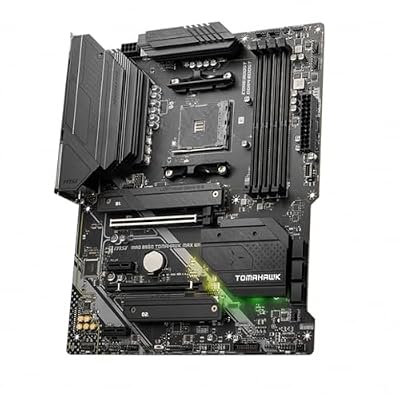
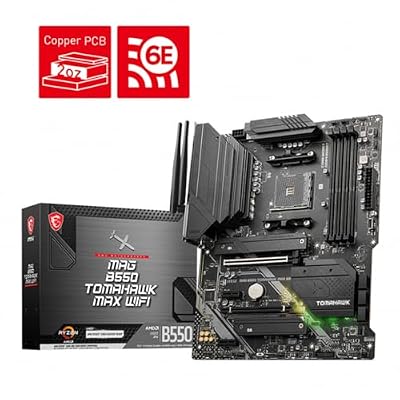
4. MSI MAG B550 Tomahawk Gaming Motherboard, AMD Ryzen 5000, AM4, DDR4, PCIe 4.0

MSI MAG B550 Tomahawk MAX WiFi Gaming Motherboard (AMD Ryzen 5000 Series, AM4, DDR4, PCIe 4.0, SATA 6Gb/s, M.2, USB 3.2 Gen 2, HDMI/DP, Wi-Fi 6E, Bluetooth 5.2, 2.5Gbps LAN, ATX)



As an Amazon Associate we earn from qualifying purchases. Product prices and availability are accurate as of the date/time indicated.
The MSI MAG B550 Tomahawk is the value high-end pick of this list and a famous favourite among AM4 builders. It is renowned for an unusually heavy VRM for its price class, paired with a full B550 feature set: PCIe 4.0 for the GPU, dual M.2 slots for fast NVMe storage, and solid 2.5G networking. At around $160 it delivers genuinely high-end power delivery without a premium sticker.
For a 4K gaming rig this board is a sweet spot. Its strong VRM provides clean, stable power to a powerful Ryzen 5000 CPU during the sustained loads 4K gaming imposes — the area where many cheaper boards cut corners — while PCIe 4.0 supplies plenty of bandwidth for a high-end GPU and an NVMe boot drive. The dual M.2 slots let you run a fast system drive plus a roomy game library, and the Tomahawk’s reputation for reliability is well earned. For high-end AM4 power delivery at a mid-range price, the B550 Tomahawk is the standout value.
Pros: Heavy VRM rare at this price, PCIe 4.0, dual M.2 slots, 2.5G LAN, superb value.
Cons: AM4 / PCIe 4.0 rather than AM5 / PCIe 5.0; WiFi not included on this model.
5. ASUS ROG Strix B550-F Gaming Motherboard, AMD AM4 Zen 3 Ryzen 5000
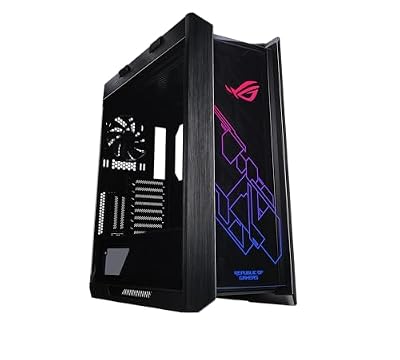
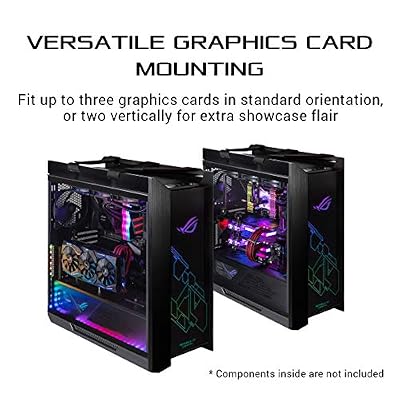
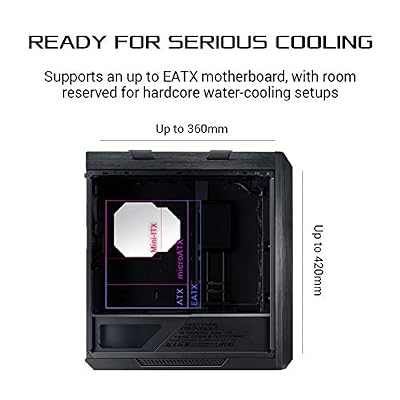
ASUS ROG Strix Helios RGB EATX Mid-Tower Gaming PC Case | Tempered Glass Panels, Supports Radiators up to 420mm long & Graphics Card up to 450mm long, Aluminum Frame, Aura Sync





As an Amazon Associate we earn from qualifying purchases. Product prices and availability are accurate as of the date/time indicated.
This listing of the ASUS ROG Strix B550-F Gaming is the pick for getting ROG features into a 4K build at a more accessible price. It is the core ROG Strix B550-F — a strong VRM, B550 chipset with PCIe 4.0, a fast M.2 slot, and ASUS’s polished BIOS and tuning — explicitly geared for AMD’s Zen 3 Ryzen 5000 chips. At around $160 it lands in the mainstream price band rather than the premium tier.
This is the board for the builder who wants ASUS ROG quality and a robust power stage for a 4K rig without stretching to the premium listing. The capable VRM keeps a Ryzen 5000 processor stably fed through demanding 4K sessions, PCIe 4.0 delivers ample bandwidth to a high-end GPU and NVMe storage, and the ROG BIOS makes tuning and tweaking straightforward. It covers the same essential 4K needs as its pricier sibling at a friendlier cost. For ROG-grade AM4 power delivery on a sensible budget, this B550-F is a strong choice.
Pros: ROG VRM and BIOS, B550 / PCIe 4.0, fast M.2, Zen 3 Ryzen 5000 focus, mainstream price.
Cons: AM4 / PCIe 4.0 platform; WiFi not included on this listing.
6. Gigabyte B550 Gaming X V2 Motherboard, AM4, 4xDDR4, HDMI/DVI-D, USB 3.2, M.2

Gigabyte B550 Gaming X V2 Motherboard (AM4/4xDDR4/HDMI/DVI-D/USB 3.2/M.2)


As an Amazon Associate we earn from qualifying purchases. Product prices and availability are accurate as of the date/time indicated.
Rounding out the list is the Gigabyte B550 Gaming X V2, the budget pick for a 4K-capable build. It is a full B550 board with PCIe 4.0, four DDR4 slots, an M.2 slot for fast NVMe storage, USB 3.2 connectivity, and HDMI and DVI-D outputs, all at around $92 — the most affordable motherboard here. It is the no-frills way onto a capable AM4 platform.
This is the board to choose when you want to direct your budget at the GPU — the component that actually drives 4K performance — while still getting the bandwidth and storage speed a high-end card needs. PCIe 4.0 feeds a strong GPU and an NVMe drive with ample bandwidth at 4K, the four DDR4 slots allow a generous memory loadout, and the essential connectivity is all present. Its VRM is more modest than the Tomahawk’s or ROG boards’, so it suits sensible high-end CPUs rather than the most extreme overclocking, but for an affordable, 4K-capable AM4 foundation that puts the money where it counts, the Gaming X V2 is a smart budget pick.
Pros: Affordable B550 / PCIe 4.0, four DDR4 slots, M.2 storage, frees budget for the GPU.
Cons: More modest VRM than higher-end boards; AM4 / PCIe 4.0, no WiFi.
How to Choose a 4K Gaming Motherboard
The first thing to understand about a 4K gaming motherboard is that it does not produce frames — your GPU does — so the board’s job is to feed and stabilise the components that matter. That reframes the buying decision around connectivity and power delivery rather than any ‘4K’ label. Every board here gives a high-end graphics card a full-bandwidth PCIe x16 slot, which is the foundation; from there you are choosing the platform, the storage, and the quality of the power stage that keep that GPU and its CPU running cleanly.
PCIe generation is the headline platform decision. The AM5 GIGABYTE B650 AORUS Elite AX brings PCIe 5.0 and DDR5 for the newest Ryzen chips and the longest upgrade runway, while the AM4 B550 boards here use PCIe 4.0. Crucially, PCIe 4.0 still delivers ample bandwidth for current GPUs at 4K — gaming does not saturate a 4.0 x16 link — so a B550 board remains a perfectly capable 4K foundation. Choose AM5 if you want the latest platform and future headroom, or AM4 if you are pairing a strong Ryzen 5000 chip and want proven value.
M.2 storage and VRM quality are where boards in this list separate themselves. Fast M.2 NVMe slots load enormous modern game installs quickly, and having two — as on the MSI MAG B550 Tomahawk — lets you run a speedy system drive alongside a roomy game library. The VRM, meanwhile, delivers power to the CPU: a stronger power stage like the Tomahawk’s or the ROG Strix boards’ keeps a powerful processor stable under the sustained loads 4K gaming imposes, where a high-refresh CPU must keep a demanding GPU fed. Budget boards like the Gaming X V2 use lighter VRMs that suit sensible CPUs rather than extreme overclocks.
Finally, weigh connectivity and budget against the rest of your build. Decide whether you need integrated WiFi — the AORUS Elite AX and ROG Strix B550-F WiFi II include it, saving a slot — or fast 2.5G wired networking, present on the Tomahawk. Then size your motherboard spend against the GPU, which is the real driver of 4K performance: it is often wise to choose a solid, well-built board like the Tomahawk or a budget Gaming X V2 and put the savings toward a stronger graphics card. Match PCIe generation, M.2 count, VRM strength, and connectivity to your CPU and GPU, and pick the board on this list that fits your 4K rig.
Frequently Asked Questions
Does the motherboard affect 4K gaming performance?
Only indirectly. Your GPU drives 4K frame rates; the motherboard’s role is to feed it full PCIe bandwidth and supply clean, stable power to the CPU. Every board here provides a full-bandwidth x16 slot for a high-end graphics card, so the meaningful differences are platform (AM4 vs AM5), M.2 storage, VRM quality for CPU stability, and connectivity — not a direct frame-rate boost from the board itself.
Is PCIe 4.0 (B550) enough for 4K gaming, or do I need PCIe 5.0?
PCIe 4.0 is plenty for 4K gaming with current GPUs — gaming does not saturate a 4.0 x16 link, so the B550 boards here remain fully capable 4K foundations. PCIe 5.0, on the AM5 GIGABYTE B650 AORUS Elite AX, adds future bandwidth headroom and comes with DDR5 and the newest Ryzen support. Choose PCIe 5.0 / AM5 for a latest-platform build, or PCIe 4.0 / B550 for proven value with a Ryzen 5000 chip.
Why does the VRM matter for a high-end 4K rig?
The VRM (voltage regulator module) delivers power to the CPU, and a stronger one keeps a powerful processor stable under the sustained loads 4K gaming imposes, where the CPU must keep a demanding GPU fed without throttling. Boards like the MSI MAG B550 Tomahawk and the ASUS ROG Strix B550-F use heavier VRMs with good heatsinks for exactly this reason. Budget boards have lighter VRMs that suit sensible CPUs rather than extreme overclocking.
AM4 or AM5 for a new 4K gaming build?
AM5, on the GIGABYTE B650 AORUS Elite AX, is the latest platform with PCIe 5.0, DDR5, and the newest Ryzen 7000/8000/9000 support plus a long upgrade runway — the better choice for a brand-new build with future headroom. AM4 B550 boards remain excellent value if you are using a Ryzen 5000 CPU and want a proven, capable 4K foundation. Match the socket to the CPU you plan to buy.
Related Guides
- Best Motherboards
- Best AM5 Motherboards
- Best GPUs for 4K Gaming
- Best NVMe SSDs
- Best PSUs for 4K Gaming
- Best 4K Gaming PCs
Affiliate Disclosure: As an Amazon Associate, we earn from qualifying purchases. If you click a link and make a purchase, we may earn a small commission at no extra cost to you. Prices and availability are accurate as of publication and may change.










