

Why this size and spec combo is the sweet spot
27 inches at 1440p gives you roughly 109 pixels per inch, which is sharp enough that you won’t see individual pixels at normal desk distance, but not so dense that older or mid-range GPUs choke trying to drive it. 144Hz is the other half of the equation: it’s the point where motion clarity improves dramatically over 60Hz, but the GPU horsepower and cabling requirements stay reasonable. You don’t need DisplayPort 2.1 or a flagship card to push 1440p at 144Hz consistently. A 6700 XT or RTX 3060 Ti can hold 100+ fps in most competitive titles at this resolution, which is why this combo has become the default recommendation rather than 1080p or 4K.
IPS, VA, or TN: what actually changes day to day
Panel type affects three things you’ll notice immediately: color accuracy, viewing angles, and black levels. TN panels are mostly gone from the 1440p 144Hz segment now, and that’s fine because their main advantage, slightly lower input lag, isn’t worth the washed-out colors anymore.
As an Amazon Associate we earn from qualifying purchases at no extra cost to you.
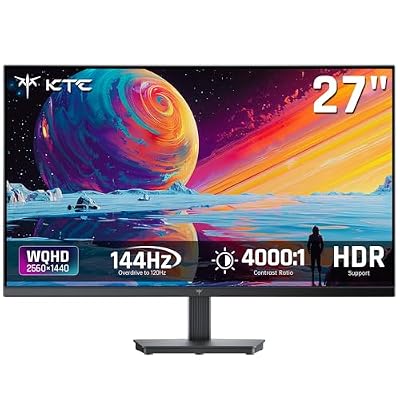


IPS is the default choice for most buyers. Colors look correct from any angle, text is crisp, and response times on modern fast-IPS panels (around 1ms GtG with overdrive) are close enough to VA that you won’t feel a difference in competitive play. The downside is black levels: IPS panels typically sit around 1000:1 contrast, so dark scenes in games or movies look slightly gray instead of black.
VA panels flip that trade-off. Contrast ratios of 3000:1 to 4000:1 make dark content look noticeably better, which matters for horror games, space sims, or just watching movies on the same screen. The cost is response time consistency: VA panels can show smearing or “black crush” during fast dark-to-light transitions, especially on cheaper models. If you’re buying mainly for competitive shooters, IPS is the safer pick. If you split time between gaming and media, VA is worth considering.
OLED is creeping into this category now too, with genuinely instant pixel response and perfect blacks, but at this size and resolution it still carries a price premium and real concerns about burn-in with static UI elements (taskbars, HUDs, chat overlays). Unless you’re specifically chasing OLED’s motion clarity and you’re disciplined about screensavers and auto-brightness, it’s not the default pick yet for a first 1440p 144Hz monitor.
Panel type comparison
| Panel | Typical contrast | Response time | Best for | Main failure mode |
|---|---|---|---|---|
| IPS | ~1000:1 | 1ms (overdrive) | Competitive gaming, color work | Gray-ish blacks, IPS glow in corners |
| VA | 3000-4000:1 | 2-4ms, less consistent | Mixed gaming/movies | Smearing in dark fast scenes |
| OLED | Near-infinite | <1ms | Motion clarity, HDR | Burn-in risk, higher cost |
Does 144Hz actually matter, or should you go higher
144Hz is a real, visible step up from 60Hz, especially in fast-paced games where you can track moving targets with much less blur. Going from 144Hz to 165Hz or 240Hz, though, is a smaller jump with diminishing returns unless you’re playing competitive shooters at a serious level and already hitting those frame rates consistently. For most people splitting time between single-player games, strategy titles, and some competitive play, 144Hz is where the money is best spent. If you’ve got a GPU that can reliably push 200+ fps in your main games, a 165Hz or 180Hz panel in the same price bracket is worth considering since the price difference is often small.
One thing that trips people up: hitting the advertised refresh rate requires DisplayPort or a sufficiently fast HDMI version (2.0 minimum for 144Hz at 1440p, ideally HDMI 2.1 if you’re on a newer console or GPU). Check the ports on both the monitor and your GPU before assuming you’ll get full refresh rate out of the box.
Specs worth checking beyond the headline numbers
Response time numbers on spec sheets are marketing figures measured under ideal conditions, so treat them as relative rankings between models rather than literal numbers. More useful: look for independent reviews that mention overshoot or ghosting at the panel’s native overdrive settings, since manufacturers sometimes ship overly aggressive overdrive by default that introduces inverse ghosting (pale trailing edges).
VRR support matters more than people expect. G-Sync Compatible or FreeSync Premium certification means the monitor has been validated to handle variable refresh rate without flickering across its full range, not just at the high end. A monitor with VRR support but no certification can still work fine, but it’s more of a gamble.
Stand adjustability is an easy thing to overlook and an annoying thing to live with if it’s bad. Height adjustment is standard, but tilt and swivel range vary a lot, and some budget stands only tilt. If you want to mount it on an arm instead, confirm 100x100mm VESA compatibility, which most but not all models include.
Where to actually shop
If you’re set on IPS for color accuracy and consistent motion, browsing 27 inch 1440p 144Hz IPS monitors will show you the current crop, and prices have come down enough that solid options sit in the budget-to-midrange bracket rather than requiring a premium spend. For better blacks and movie nights, look at 27 inch 1440p 144Hz VA monitors instead. If you’ve got the GPU to back it up and want the extra headroom, 27 inch 1440p 165Hz monitors are frequently the same price as 144Hz models from the same product line, so it’s worth comparing before you commit.
For most buyers, the cheaper fast-IPS option is genuinely fine. You’re not giving up much by skipping the pricier VA or OLED tiers unless you have a specific reason, like heavy dark-scene gaming or a dedicated media setup, to want what they offer.















