

- Top Pick: MONITOR Acer Nitro 27in QHD 2560×1440 IPS 240Hz Gaming XV272U W2bmiiprx
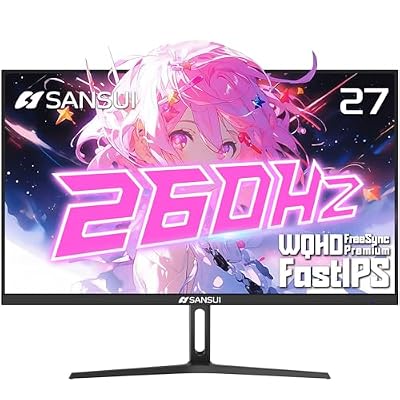
- Best Value: SANSUI Gaming Monitor 27" 1440p 260hz/240hz WQHD 2K – Fast IPS 1ms FreeSync Premium 丨DCI-P3 98% 丨sRGB130% 丨HDR10 丨2×DisplayPort 1.4丨2×HDMI2.0 PC Gaming Monitor with Crosshair
- Premium Choice: LG 27GX704A-B 27-inch Ultragear QHD (2650×1440) OLED Gaming Monitor 240Hz, 0.03ms, NVIDIA G-Sync Compatible, AMD FreeSync Premium Pro, VESA Display HDR TrueBlack400, HDMI 2.1, DisplayPort, Black
What Reddit Actually Agrees On
Search “best 1440p 240hz monitor” on Reddit and you’ll get the same handful of opinions repeated across r/Monitors, r/buildapc, and r/pcmasterrace. Nobody agrees on a single best model, but there’s real consensus on the fundamentals: at 1440p and 240Hz, panel type matters more than brand, and most people are overpaying for refresh rates they can’t use because their GPU can’t push the frames.
1440p at 240Hz needs serious horsepower. A game running below 150-180 fps on your hardware means the extra Hz above that is wasted, you’re just paying for headroom you won’t use for a year or two. If you’re on a mid-range card like a 6700 XT or 4060, a lot of threads will tell you honestly that 165Hz is the more sensible buy and 240Hz is for people already running a 4070 Ti or better in competitive titles like Valorant or CS2.
As an Amazon Associate we earn from qualifying purchases at no extra cost to you.



Panel Types: The Real Debate
This is where most of the actual disagreement lives. Three panel types show up at this resolution and refresh rate, and each has a specific failure mode people complain about months after buying.
| Panel Type | Strength | Common Complaint | Best For |
|---|---|---|---|
| Fast IPS | Good color, wide viewing angles | IPS glow in dark scenes, some ghosting at 240Hz vs TN | Mixed gaming + content work |
| TN | Lowest input lag, cheapest | Washed-out color, bad viewing angles | Pure competitive FPS, budget builds |
| OLED (QD-OLED/WOLED) | Near-instant pixel response, true blacks | Price, burn-in anxiety, ABL dimming on bright scenes | Single-player + competitive hybrid use, if budget allows |
The TN-vs-IPS argument that used to dominate these threads has mostly faded because fast IPS panels closed the response time gap enough that only serious esports players notice the difference anymore. The newer argument is IPS versus OLED, and it comes down to money and risk tolerance. OLED panels at 1440p 240Hz look genuinely better, blacks are black instead of gray, motion clarity is excellent, but you’re paying a real premium and accepting some risk of burn-in if you leave static UI elements on screen for hundreds of hours (think taskbars, HUDs in the same spot, or browser tabs left open overnight). If that doesn’t bother you and your budget stretches, it’s worth looking at a 1440p 240Hz OLED monitor. If you want to sidestep the burn-in conversation entirely, a 1440p 240Hz IPS monitor is the safer, still very good default, and it’s what most people in these threads end up buying.
The VRR Flicker Complaint
If you read enough of these threads you’ll run into complaints about brightness flicker when VRR (G-Sync/FreeSync) is enabled, especially on monitors with local dimming zones. It happens when frame rate swings cause the backlight to hunt for the right brightness level, and it’s most noticeable in games with big fps fluctuations, open-world titles are a common culprit. It’s not universal and not every panel does it, but it’s common enough that it’s worth checking recent owner reviews for your specific model before buying, not just the spec sheet. The fix when it happens is usually to cap your frame rate a bit below the panel’s VRR range ceiling, which stabilizes the backlight behavior.
Is 240Hz Actually the Sweet Spot?
Here’s the part most marketing pages won’t say plainly: the jump from 60Hz to 144Hz is massive and obvious to anyone. If you’re budget-constrained, a 165Hz or 180Hz 1440p monitor will get you 90% of the visual benefit for noticeably less money, and that gap goes straight back into your GPU budget, which usually matters more for actually hitting high frame rates in the first place.
Where 240Hz earns its keep is specifically in low-input-lag competitive shooters, Valorant, CS2, Overwatch 2, where players at a high skill level can genuinely use the extra clarity during fast flicks and tracking. If you mostly play single-player or slower-paced games, you won’t notice much difference between 165Hz and 240Hz, and that’s a fine, honest reason to save the money.
What to Actually Check Before Buying
Skip the headline spec and check these instead: actual response time in ms (not just the panel type), HDR brightness in nits if you care about HDR at all, VESA mount compatibility if you’re using a monitor arm, and whether the stand has height and tilt adjustment, cheap stands are a frequent complaint buried in otherwise positive reviews. Port selection matters more than people expect too, DisplayPort 1.4 is the one you want for full 240Hz at 1440p; HDMI 2.0 on some budget models will cap you below that, which defeats the purpose of buying the monitor at all. If you’re shopping on a budget and want to compare options directly, browsing a 1440p 240Hz monitor listing side by side on specs like these will tell you more than any single Reddit thread will.
The honest takeaway from browsing these discussions for any length of time: there’s no single “best” model that wins across every thread, because people are optimizing for different things, color accuracy, competitive edge, or price. Match the panel type and refresh rate to what you actually play, not what the spec sheet implies you should want.















