

The Benfei DisplayPort to DisplayPort Cable is a 6-foot DP 1.2 cable with gold-plated connectors, sized for the standard PC tower-to-monitor run. DisplayPort 1.2 has been the workhorse PC display connection since the early 2010s and supports the full sweep of mainstream gaming-monitor modes: 4K@60Hz, 1440p@165Hz, 1080p@240Hz, with FreeSync and G-Sync over the same cable. At around $7 the Benfei is one of the cheapest credible DP 1.2 cables you can buy, undercutting the certified IVANKY by a few dollars while delivering the same modes for the most common use cases. This Benfei DisplayPort review covers bandwidth, gaming features, build, compatibility, length and value.

BENFEI [VESA Certified 8K DisplayPort to DisplayPort 6 Feet Cable | DP to DP Male to Male Cable, Supports 8K@60Hz, 4K@144Hz 120Hz, 2K@240Hz Compatible for Lenovo, Dell, HP, ASUS and More




As an Amazon Associate we earn from qualifying purchases. Product prices and availability are accurate as of the date/time indicated.
🛒 Best Price Today on Amazon
Prime members get fast, free shipping on everything above, plus member-only deals. New members get a 30-day free trial — cancel anytime.
As an Amazon Associate we earn from qualifying purchases.

![BENFEI [VESA Certified] 8K DisplayPort to DisplayPort 6 Feet Cable 5 Pack](https://m.media-amazon.com/images/I/51VOzpeJzLL._SL160_.jpg)
![BENFEI 4K DisplayPort to HDMI 6 Feet Cable[Aluminum Shell, Nylon Braided]](https://m.media-amazon.com/images/I/418uIWf8iGL._SL160_.jpg)
![BENFEI [VESA Certified] 8K DisplayPort to DisplayPort 6 Feet Cable 10 Pack](https://m.media-amazon.com/images/I/51IiDz+0OZL._SL160_.jpg)
Benfei DisplayPort to DisplayPort at a Glance
| Component | Specification |
|---|---|
| Type | DisplayPort 1.2 (HBR2) |
| Bandwidth | 17.28 Gbps (HBR2, 4 lanes at 5.4 Gbps) |
| Max resolution + refresh | 4K@60Hz, 1440p@165Hz, 1080p@240Hz |
| HDR support | HDR via DP 1.2 metadata when source and sink support it |
| eARC support | Not applicable — DisplayPort has no ARC channel |
| VRR / FreeSync / G-Sync | AMD FreeSync over DP; NVIDIA G-Sync and G-Sync Compatible over DP |
| Cable length | 6 feet (1.8 metres) |
| Connector type | Gold-plated, moulded PVC jacket, locking latches |
| Approx price | Around $7 |
Bandwidth & Resolution Support
The Benfei is a straight-line DisplayPort 1.2 cable with 17.28 Gbps bandwidth via four 5.4 Gbps HBR2 lanes. That bandwidth maps directly to the mainstream gaming-monitor sweet spot: 4K@60Hz with full chroma for productivity and console-equivalent gaming, 1440p@165Hz with HDR for the bulk of the QHD gaming market, 1080p@240Hz with G-Sync for competitive esports panels. The mode it does not handle is 4K@120Hz with full chroma — that needs DP 1.4 with DSC or HDMI 2.1. Some uncertified DP 1.2 cables claim 4K@144Hz; on a true DP 1.2 cable that is not achievable without DSC, and DSC is a DP 1.4 feature. If your monitor is 4K@144Hz, you want a DP 1.4 cable not a DP 1.2 cable. For everything below 4K@144Hz, the Benfei DP 1.2 carries the modes the panel needs.
HDR, eARC & VRR Features
DisplayPort 1.2 carries HDR metadata signalling, which on an HDR-capable monitor lets games and HDR video sources tone-map for the panel. eARC does not apply to DisplayPort — DP has no Audio Return Channel, and audio normally rides separately on a PC. VRR is the DisplayPort strength: AMD FreeSync runs over DP including FreeSync Premium and Premium Pro modes; NVIDIA G-Sync and G-Sync Compatible run over DP, with G-Sync historically a DP-only technology. The Benfei cable carries every VRR mode the DP 1.2 spec allows, which means in practical terms any FreeSync or G-Sync monitor on the market that supports DP 1.2 will work correctly with this cable.
Build Quality & Durability
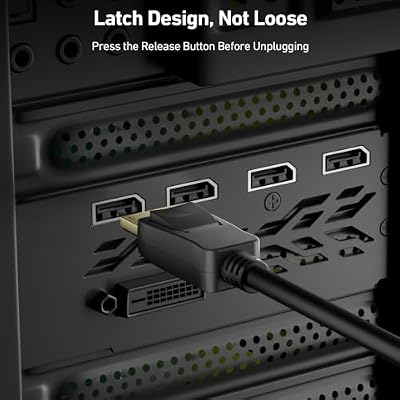
The Benfei uses a moulded PVC jacket — not the nylon braid of the more premium cables — with gold-plated connector pins and the standard DP locking latch. PVC is less photogenic than braid but it is lighter, lies flatter when routed behind a PC tower, and at this price point the trade-off is right. The locking latch is the standard DisplayPort spring-loaded mechanism that engages a small notch in the port and prevents the cable from working loose under its own weight. Press the small thumb-button on the connector to release the latch when unplugging. Gold-plated pins resist corrosion across long-term plug cycles.
Compatibility — PC GPUs and Monitors
Universal compatibility is the Benfei’s strength. DisplayPort has been the standard PC monitor connection since the early 2010s, and every GPU since then has DP outputs. RTX 20/30/40/50 series, Radeon RX 5000/6000/7000/9000 series, Intel Arc — all have DP outputs at DP 1.4 or DP 2.1 levels, all of which negotiate down to DP 1.2 transparently. Monitors marketed for the modes the cable supports — 1440p@165Hz, 1080p@240Hz, 4K@60Hz — have DP 1.2 inputs at minimum. The cable is not the right choice for 4K@120Hz or 4K@144Hz monitors, which want DP 1.4 with DSC. For PS5 or Xbox the cable is irrelevant — those consoles have no DisplayPort outputs.
Length & Signal Integrity
6 feet is comfortably within DisplayPort 1.2’s safe passive range, which extends to 15 feet without active chips for most cables. Signal integrity at 6 feet for DP 1.2’s 17.28 Gbps is not a meaningful concern — there is substantial margin, and HBR2 lane training is reliable at this distance. The cable is light enough that the connector’s locking latch is more than adequate to hold it in place. For longer DP runs the same physics applies but with more headroom than HDMI 2.1 — DP 1.2 at 25 feet of passive copper is sometimes still fine where HDMI 2.1 at 25 feet of passive copper is not.
Verdict
At around $7 the Benfei DisplayPort to DisplayPort Cable is the affordable workhorse DP 1.2 lead — the right cable for a PC monitor running at 4K@60Hz, 1440p@165Hz, 1080p@240Hz or any DP 1.2 mode in between. The build is the honest trade-off: PVC instead of braid, no VESA certification on the box. For the modes within DP 1.2’s bandwidth on a standard PC tower-to-monitor run, that build is right-sized. If you want certification or are wiring a 4K@144Hz monitor, look at a DP 1.4 cable instead. For everything else, the Benfei is well-judged. The DisplayPort versions worth knowing for context: DP 1.2 carries 17.28 Gbps; DP 1.4 carries 32.4 Gbps with DSC support for 4K@144Hz and 8K@60Hz; DP 2.1 carries up to 80 Gbps and handles 4K@240Hz and 8K@120Hz natively. For most current monitors, DP 1.2 is sufficient — high-end PC gaming displays at 4K@144Hz and above are where DP 1.4 or DP 2.1 cables become necessary.
Frequently Asked Questions
Can the Benfei DP cable do 4K at 144Hz?
No. DisplayPort 1.2 carries 17.28 Gbps, which supports 4K@60Hz but not 4K@144Hz. 4K@144Hz needs DisplayPort 1.4 with Display Stream Compression. For 4K@60Hz, 1440p@165Hz or 1080p@240Hz, the DP 1.2 cable is appropriate.
Does it work with G-Sync and FreeSync monitors?
Yes. DisplayPort is the canonical connection for variable refresh rate on PC, and the Benfei carries every VRR mode the DP 1.2 spec allows — AMD FreeSync, NVIDIA G-Sync and G-Sync Compatible all run cleanly over the cable.
How does DP 1.2 compare to HDMI 2.1?
DP 1.2 carries 17.28 Gbps; HDMI 2.1 carries 48 Gbps. DP 1.2 handles 4K@60Hz, 1440p@165Hz, 1080p@240Hz; HDMI 2.1 adds 4K@120Hz, 8K@60Hz and Dynamic HDR. For consoles (HDMI 2.1 only) and high-refresh 4K PC monitors, HDMI 2.1 or DP 1.4+DSC is the answer; for mainstream PC gaming modes, DP 1.2 is sufficient.
Does the cable have a locking latch?
Yes. DisplayPort connectors include a small spring-loaded latch that engages a notch in the port and locks the connector in place. Press the small thumb-button on the connector to release it when unplugging.
More HDMI & DisplayPort Cable Reviews
- BlueRigger 8K HDMI 2.1 Cable 6ft 48Gbps eARC Review
- Snowkids 8K HDMI 2.1 Cable 10ft Nylon Braided Review
- UGREEN HDMI 2.1 Certified Cable 6.6ft 48Gbps Review
- BlueRigger 8K HDMI 2.1 Cable 10ft 48Gbps Review
- Highwings 8K HDMI Cable 6.6ft 48Gbps Braided Review
- Highwings 8K HDMI Long Cable 15ft 48Gbps Review
- IVANKY 10K 8K HDMI Cable 10ft 48Gbps Ultra Review
- Ubluker 10K 8K HDMI Cable 10ft Certified Review
Affiliate Disclosure: As an Amazon Associate, we earn from qualifying purchases. If you click a link and make a purchase, we may earn a small commission at no extra cost to you. Prices and availability are accurate as of publication and may change.










