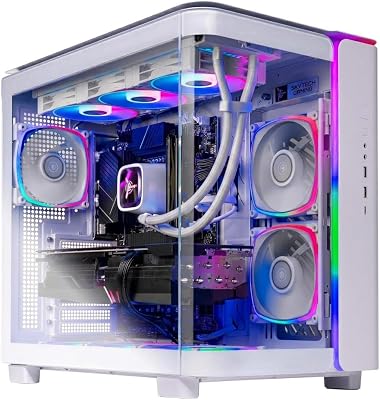
- Top Pick: Skytech Gaming King 95 Desktop PC, Ryzen 7 9800X3D 4.7 GHz (5.2 GHz), NVIDIA RTX 5070 Ti 16GB, 2TB Gen4 NVMe SSD, 32GB DDR5 RAM 6000 RGB, 850W Gold PSU, 360mm ARGB AIO, Wi-Fi, Win 11
- Best Value: The Horizon Autherium Dragon RGB I9 RTX Gaming PC || 64GB RAM || 5TB Storage || Core I9 Upto 5.4Ghz || RTX 5070 OC || Windows 11 PRO || 360MM AIO || 2.4GB/s WiFi, VR, Gaming Ready Desktop Computer
- Premium Choice: Skytech Gaming O11 Vision Gaming PC, AMD Ryzen 7 9800X3D 4.7GHz, NVIDIA RTX 5090 32GB VRAM, X870 Board, 2TB Gen4 NVMe SSD, 32GB DDR5 RAM 6000, 1000W Gold ATX 3 PSU, 360 ARGB AIO, WI-FI 7, Windows 11
🛒 Best Price Today on Amazon
Prime members get fast, free shipping on everything above, plus member-only deals. New members get a 30-day free trial — cancel anytime.
Top 4000 Gaming Build Flagship Gaming Picks for 2026
Here are our current top 4000 gaming build flagship gaming picks, compared on real Amazon owner reviews, price, and features. Live prices update below.
As an Amazon Associate we earn from qualifying purchases at no extra cost to you.



Check Price on Amazon →



Affiliate disclosure: Some links in this guide are affiliate links. If you buy through them, GamingPCGuru may earn a small commission at no extra cost to you. We only recommend parts we would put in our own rigs.
$4000 Flagship Gaming PC Build 2026: the no-excuses flagship with the king of GPUs
Quick Verdict
$4000 buys the RTX 5090, and the RTX 5090 is the only real reason to spend this much. 32 GB of GDDR7, 512-bit bus, 32% faster than the 5080 in 4K and 60% faster in path tracing — it is a generational leap that no other GPU touches in 2026. Everything else in this build exists to feed the 5090 without bottlenecking it.
The 14900K versus 9950X3D pick is a coin flip; I lean 9950X3D for gaming, 14900K for productivity. Same money, different strengths.
The 5090 supply situation in May 2026 is finally calm. Launch-day scalper prices ($3500+) are gone; the card sits at $1899 MSRP in stock at major retailers. The waiting game is over — if you have been holding for sane pricing, now is the moment.
One non-obvious point: the 5090’s 32 GB VRAM is genuinely useful outside gaming. Local LLM hosting, Stable Diffusion XL with high-res workflows, Blender Cycles with large scenes — all benefit massively. The card is the best dual-use gaming/creative GPU ever shipped.
The Recommended Parts List
| Component | Pick | Why |
|---|---|---|
| CPU | Core i9-14900K or Ryzen 9 9950X3D | Top-bin gaming or productivity, depending on which you pick |
| GPU | RTX 5090 | 32 GB GDDR7 and 512-bit bus — the only real flagship in 2026 |
| Motherboard | Z790/X670E flagship | Flagship Z790 or X670E for Gen 5 NVMe arrays and clean VRMs |
| RAM | 64GB DDR5 7200 | DDR5-7200 — top-bin IMCs handle it cleanly at this tier |
| Storage | 4TB NVMe Gen5 | 4 TB Gen 5 — modern game sizes demand it |
| PSU | 1200W Titanium | 1200W Titanium — best efficiency, lowest heat dump |
| Cooler | 420mm AIO | 420mm AIO for sustained 5090 + flagship CPU thermal load |
| Case | Premium full tower | Premium full tower with proper airflow for the 5090’s heat |
Performance Expectations
- Cyberpunk 2077 4K path tracing native: 60–75 FPS, with DLSS Q + FG: 130–160 FPS
- Alan Wake 2 4K path tracing + DLSS Q + FG: 110–130 FPS
- Monster Hunter Wilds 4K ultra: 110–130 FPS
- Black Myth Wukong 4K Cinematic + DLSS Q + FG: 130–150 FPS
- Star Citizen 4K ultra populated server: 90–110 FPS
- Microsoft Flight Sim 2024 4K ultra: 75–95 FPS, smooth
This is the first build that handles 4K 240 Hz OLED panels without compromise.
The 5090 changes what is possible in path tracing. Native 4K path tracing in Cyberpunk hits 60–75 FPS with no upscaling — a sentence I did not expect to type until 2028. With DLSS Quality, you are at 130+ FPS, finally giving the 4K 240 Hz panels something to display.
Multi Frame Generation 4x mode is genuinely usable on the 5090 because the base frame rate is high enough that latency stays under 30 ms. In single-player AAA, 4x MFG turns 80 FPS native into 320 FPS perceived smoothness. The technology finally works as advertised.
Why These Picks
The 5090 is the only GPU that genuinely deserves a 4K 240 Hz monitor in 2026. The 32 GB VRAM is real future-proofing — 8K texture mods, full-fat path tracing, neural rendering all fit in memory without thrashing. No one else under $2000 offers this.
The 9950X3D (mid-2026 release) combines V-Cache with 16 cores — the first chip that does not force you to choose between gaming and productivity. The 14900K alternative wins in raw multi-thread and matches in single-thread, slightly behind in gaming. Choose based on workload.
1200W Titanium PSU because the 5090 peaks at 575W and the CPU adds another 250W under load. 1200W keeps you in the efficiency sweet spot, Titanium reduces heat dump into the case.
DDR5-7200 is the right tier here — the IMC on top-bin parts handles it cleanly, and at 4K the latency reduction matters more than at lower resolutions.
The 14900K vs 9950X3D choice deserves nuance. The 14900K is available now at $429, runs slightly faster in production workloads, but loses 5–8% in gaming. The 9950X3D launched April 2026 at $649 and is the gaming-and-productivity hybrid. If gaming is priority and budget allows, 9950X3D. If productivity dominates and you want maximum value, 14900K with the savings put into storage.
The 16-pin power connector on the 5090 requires attention. Use the included native cable from your modular PSU (Corsair, Seasonic, MSI all ship 16-pin native cables now); do not use the 4x 8-pin adapter from older PSU models. Seat the connector fully — push hard, you should feel a definite click. Inspect after 30 days for any browning on the contacts. The connector design issues from the 4090 era are not fully solved.
What to Skip vs Splurge On
Skip: 128 GB RAM (32 GB is still right unless you do specific 3D / scientific workloads), $1500 motherboards (a $400 board has every feature anyone actually uses), custom water loops (a 420mm AIO + good case airflow handles this rig for 95% of users at 20% the maintenance cost).
Splurge on: the monitor. A 4K 240 Hz QD-OLED at $1200–$1500 is the only display worthy of this build. Pairing this rig with a 144 Hz panel is leaving 40% of capability on the table.
Upgrade Path for 2027+
This rig is end-game for 3 to 4 years. The 5090 will hold the GPU crown until late 2027 at earliest. The 9950X3D / 14900K both have years of life. The only realistic ‘upgrade’ is more storage — add another 4 TB Gen 5 in a year when you fill the first one.
Real-World Daily Use
The 5090 build’s defining experience is path tracing as a normal feature, not a benchmark. Every modern RT title runs path tracing at 1440p native or 4K with DLSS Quality, smoothly. This is the first GPU generation where ray tracing is just ‘on’ for daily play, not a special-occasion mode.
Multi Frame Generation 4x mode is genuinely usable on the 5090 in single-player titles — 80 FPS native turns into 320 FPS perceived smoothness with latency under 30 ms. Pair with a 4K 240 Hz OLED and you’re seeing motion clarity that no other system produces. Competitive players should avoid 4x MFG; everyone else should use it freely.
For AI / creative compute: Stable Diffusion XL at 4 sec/image, Flux models at 8 sec/image, Stable Video Diffusion at 30 sec for 5-second clip. Local LLM hosting up to 30B-class at 25 tokens/sec with full GPU offload. Blender Cycles renders are 3x faster than the 5080 on heavy scenes.
Common Bottlenecks to Avoid
The 5090 has unique power delivery requirements — use ONLY the included 16-pin native cable, never an adapter from older PSUs, and seat it fully or you risk the 12VHPWR connector failure that hit the 4090. Inspect after 30 days for any browning on the contacts.
The other risk: cable management. The 5090 is large enough that without thoughtful airflow planning you cook the GPU’s own VRMs. Front intake fans, top exhaust, side panel mesh, in that order.
FAQ
14900K versus 9950X3D — which?
9950X3D when it ships mid-2026, especially for gaming + productivity. 14900K available now and matches in productivity. Same money, different strengths.
Is the 5090 worth $1000 over the 5080?
Only at 4K 240 Hz, or for path tracing, or for serious GPU compute. At 4K 120 Hz on a 5080 you cannot tell the difference in most games.
Do I need a 1500W PSU for the 5090?
1200W Titanium is correct and gives 30% transient headroom. 1500W is overkill and runs less efficiently at typical loads.
Can I run this with a 700W PSU I already own?
No. The 5090 alone wants 850W minimum and 1000W recommended. Do not cut corners on the PSU at this build tier.
How is the 5090 actually different from the 5080 in daily use?
Path tracing playable native at 1440p (vs DLSS-required on 5080). 32 GB VRAM for very large workloads. About 25% more FPS in everything. For 4K144 gaming, the 5080 is enough; for 4K240, the 5090 is the difference.
Is the 14900K still relevant in May 2026?
Yes — it ties or beats the 9950X in productivity and matches the 9950X3D in non-X3D-favoring titles. The 9950X3D is the gaming-and-productivity hybrid if you want both.
Build Process Notes for Flagship Tier
At the $4000 tier, build process care matters. Anti-static precautions: use a wrist strap, work on a non-carpeted surface, ground yourself before touching the 5090. The card costs $1900 — treat it accordingly.
Mounting the 5090: it is heavy (over 2 kg with cooler) and long (over 320mm). Use the included support bracket; without it, GPU sag stresses the PCIe slot over time and can cause hairline cracks in the PCB. Some cases (Lian Li O11 Dynamic EVO XL) include integrated GPU support shelves.
Cable connections: the 12V-2×6 power connector on the 5090 must seat fully — push firmly until you hear a definite click. Inspect at 30 days, 90 days, and yearly for any browning on the contacts. The connector design improved over the 12VHPWR but still warrants attention.
Should I water-block the 5090?
Only if you specifically value the silence and 3°C lower temps — performance gain is under 3%. EKWB Quantum Vector² 5090 block is the right choice if you go this route ($350).
Final Take
The $4000 build is the rational ceiling — you get the best GPU, a flagship CPU, and a system that handles anything you throw at it for the next 3 years. The $5000 build adds refinement but rarely capability. If you have the money and want the best practical gaming PC of 2026, build this.
Related Guides
- $700 Gaming PC Build 2026 — Entry Gaming PC for 1080p high-refresh
- Best Motherboard and CPU Combo for Gaming 2026: Pairs That Win
- Best GPU for Fortnite in 2026 — 240+ FPS, Ray Tracing & Performance Guide
- Best DDR5 RAM Kits for Gaming (2026)
Frequently Asked Questions
What frame rates should I expect at 4K from a $4000 build?
Expect 90 to 140fps at 4K with high settings in most current titles using quality upscaling, and 60fps or better with full path tracing enabled in the handful of games that support it. Competitive esports titles will run well past 240fps at 4K, which is where a high-refresh 4K panel starts paying for itself.
Does the CPU choice change anything at 4K?
Average frame rate barely moves between a strong 8-core and a flagship 16-core at 4K, but 1 percent lows and frame pacing do improve with a larger cache. If you also stream, record, or run mods and simulation-heavy games, the extra cores prevent hitching. Otherwise put the savings toward the GPU or display.
How much VRAM do I need for 4K with ray tracing?
16GB is the practical floor for 4K with ray tracing and high-resolution texture packs; several 2025 and 2026 titles exceed 14GB at those settings. 24GB or more removes the concern entirely and helps with local AI and video work. Running out of VRAM causes severe stutter that no amount of CPU power can mask.
What case and airflow does a flagship GPU need?
Choose a case with a mesh front intake, at least three 120mm or two 140mm intake fans, and 400mm of GPU clearance since flagship cards now run three to four slots thick. Restrictive tempered-glass fronts can add 8 to 12 degrees to GPU temperatures, which triggers earlier clock throttling under sustained load.
Should I buy this now or wait for the next GPU generation?
There is always a next generation roughly 18 to 24 months out. If your current machine is stopping you from playing at the settings you want today, buy now; a flagship card holds usable performance for four to five years. If you are simply chasing benchmark charts, waiting rarely improves value once availability and launch pricing are factored in.