

- Top Pick: AMD Ryzen 7 9800X3D
- Runner-up: DualShock 4 Wireless Controller (CUH-ZCT2, Jet Black)
- Also consider: Sapphire PULSE Radeon RX 9070 XT 16GB (11348-03-20G)
For most of emulation history, each console generation has arrived on PC years after the hardware faded. PlayStation 4 emulation broke that pattern differently: the PS4 is built on ordinary x86-64 PC architecture with an AMD graphics core, and shadPS4 — an open-source emulator written in C++ — has become the project turning that shared heritage into running games. Linux is a first-class target with native builds, and its Vulkan renderer sits directly on the Mesa drivers most Linux gamers already use.
Honesty matters more here than in most emulation topics. The project’s own README warns that shadPS4 is early in development and that nobody should expect a flawless experience. Some games genuinely run well, many run partially, and plenty do not run at all. This deep dive explains what the compatibility labels actually mean, why one famous game drives most of the interest, what hardware the emulator really asks for, and how the setup is shaped — with games and system files coming only from a console you own.
As an Amazon Associate, we earn from qualifying purchases.
Quick answer
shadPS4 is the leading open-source PS4 emulator, and Linux is one of its native platforms. It needs a modern x86-64 CPU, a Vulkan 1.3 graphics card and games dumped from your own PS4. A small, growing set of titles reaches genuinely playable status — Bloodborne included — but the project is young, per-game results vary widely, and checking the compatibility list before anything else is the whole game.
What shadPS4 actually is
shadPS4 is a free, open-source PlayStation 4 emulator for Linux, Windows and macOS, developed in the open with frequent numbered releases and development builds. Because the PS4’s processor is an eight-core AMD x86-64 chip, the emulator does not face the instruction-translation mountain that older console emulators climbed; its hardest problem is the graphics side, where the PS4’s custom AMD GCN command stream has to be translated into Vulkan work your GPU understands, including recompiling the console’s shaders into a form modern drivers accept.
That architecture shapes everything about the experience. Progress arrives title by title rather than library-wide: a fix for one game’s shader pattern or memory behaviour can unlock that game completely while changing nothing for the next. It also means the project’s own compatibility reporting is the ground truth — not forum impressions, not videos of a single scene, and not the fact that a game boots. A title that reaches its main menu has proven almost nothing about the hours after it.
What “playable” honestly means
The community compatibility list grades each tested game with a status label, and reading those labels correctly is the core skill of PS4 emulation right now. A game marked playable is reported to run from start to finish with acceptable behaviour. In-game means it gets past the menus and plays, but with problems that can range from cosmetic glitches to crashes, broken effects or sections that cannot be passed. Intro and boots describe games that show opening screens or reach a menu and go no further, and nothing means exactly that.
Three caveats keep those labels honest. First, a status belongs to a specific game version and a specific emulator build; updates to either can improve or occasionally break a result. Second, playable does not mean identical to the console — expect occasional graphical artefacts, audio imperfections and frame pacing that differs from real hardware. Third, the tested catalogue is still a small slice of the PS4 library. If the game you care about has no report, the accurate assumption is untested, not working.
The Bloodborne question
One game explains most of the attention. Bloodborne never received a PC release, which makes it the single most requested PS4 title in emulation, and shadPS4’s progress on it — from not booting, to running in-game, to being listed among the project’s documented tested titles with per-game notes — is the clearest public measure of how far the emulator has come. Community patches and configuration tweaks circulate for it, which signals both the interest and the remaining rough edges.
Treat Bloodborne as the emblem, not the promise. Its status shows that a demanding, relatively modern PS4 exclusive can run on this emulator at all, which was not obvious two years ago. It does not mean the rest of the exclusive catalogue — the other FromSoftware titles, the Sony first-party releases, the JRPGs — behaves the same way. Each one stands or falls on its own compatibility report.
What your Linux PC needs
The project’s Quickstart documentation sets the floor plainly. The processor needs at least four cores and six threads above a modest clock speed, built on the x86-64-v3 instruction baseline — Intel’s Haswell generation or newer, or AMD’s Excavator generation or newer — because the emulator leans on those instructions throughout. In practice, CPU strength is the first-order variable: the PS4’s game logic lands on your processor, and demanding titles consume single-thread performance plus core headroom.
The graphics requirement is a GPU with at least 2 GB of VRAM and a driver exposing Vulkan 1.3 with the swapchain and push-descriptor extensions the renderer uses. On Linux that points squarely at Mesa: AMD cards run through the RADV driver and Intel through ANV, both maintained in the open and updated with your distribution, which is why AMD hardware is the path of least resistance for this emulator. The Quickstart names Ubuntu 22.04 as the Linux baseline, memory starts at 8 GB with more being sensible for larger titles, and fast storage matters because game dumps are full console titles, not ROM files.
The setup shape, at a high level
Installation is the easy part: the project publishes Linux builds, and a graphical launcher manages games, settings and updates. The real prerequisite is the library. shadPS4’s own FAQ and README are explicit that games are dumped from your own PlayStation 4, and that the system modules the emulator needs must be dumped from a legally owned console as well. There is no legitimate shortcut around that step, and any source offering games or system files for download is offering piracy, not a setup step.
Once a dump exists, the workflow is per-game: add the title, check its compatibility notes, apply the settings or patches the notes call for, and keep the emulator updated, because status changes land build by build. Backing up your dumps and saves is worth the disk space; re-dumping a library is a job nobody wants twice.
How to choose your approach
Start from the compatibility list, not from hardware. If your target games are reported playable, build around the CPU first: a current eight-core processor with strong single-thread performance is the foundation, and it outlasts any single emulator version. Choose the GPU for its Vulkan driver quality on Linux — a current AMD card on Mesa RADV is the documented smooth path — rather than chasing raw specifications. Budget storage generously, since a modest library of dumps plus the emulator’s shader caches grows quickly, and pick the controller you already like: the original DualShock 4 is the natural match for PS4 games, while a DualSense works as a modern all-purpose pad under the kernel’s PlayStation driver.
Who should skip this
Skip it if your goal is a specific exclusive that has no playable report — waiting is free, and the list grows monthly. Skip it if you do not own a PS4, because the legitimate path to games and system modules runs through your own console. Skip it if you want a set-and-forget experience comparable to mature emulators for older systems; shadPS4 rewards readers who enjoy following a fast-moving project, checking notes and updating builds. And skip it on old or integrated graphics that cannot meet the Vulkan 1.3 requirement — no setting fixes a missing extension.
The hardware that matters
AMD Ryzen 7 9800X3D
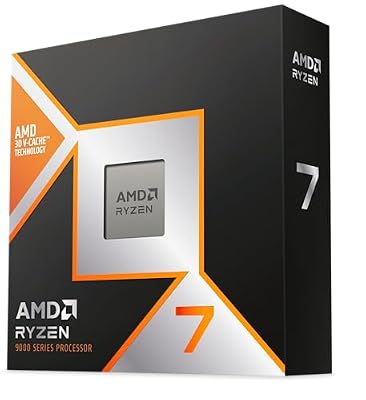
The CPU ceiling pick for emulation builds: eight Zen 5 cores with stacked cache, strong single-thread performance for game logic, and a long platform life on AM5.
- Specs:
- Cores and threads: 8 cores, 16 threads
- Architecture: AMD Zen 5 with 3D V-Cache
- Socket: AM5
- Memory support: DDR5
- Role in this build: host processor headroom for demanding titles
Sapphire PULSE Radeon RX 9070 XT 16GB
A current AMD card whose Linux life runs through Mesa RADV — the driver stack shadPS4’s Vulkan renderer is happiest on — with VRAM headroom far beyond the emulator’s stated floor.
- Specs:
- Architecture: AMD RDNA 4
- Memory: 16GB GDDR6
- Model: 11348-03-20G
- Linux driver: Mesa RADV, Vulkan 1.3 and beyond
- Role in this build: Vulkan renderer target
Samsung 990 PRO 2TB NVMe SSD
Game dumps are full-size console titles; a fast, roomy PCIe 4.0 drive keeps a library, shader caches and the emulator itself on one quick volume.
- Specs:
- Capacity: 2TB
- Interface: PCIe 4.0 NVMe, M.2 2280
- Model: MZ-V9P2T0B/AM
- Role in this build: dump library and shader-cache storage
DualShock 4 Wireless Controller (CUH-ZCT2, Jet Black)
The original PS4 pad is the authentic input for PS4 games, and Linux supports it natively — touchpad, light bar and motion included — over Bluetooth or USB.
- Specs:
- Model: CUH-ZCT2, Jet Black
- Connection: Bluetooth and micro-USB
- Features: touchpad, light bar, built-in speaker, headset jack
- Linux support: kernel hid-playstation driver
- Role in this build: the period-correct controller
PlayStation DualSense Wireless Controller – White (CFI-ZCT1W)
The modern alternative: Sony’s current pad, equally at home in native Linux games and emulators, with kernel driver support and USB-C charging.
- Specs:
- Model: CFI-ZCT1W, White
- Connection: Bluetooth and USB-C
- Features: haptic feedback, adaptive triggers, touchpad
- Linux support: kernel hid-playstation driver
- Role in this build: one pad for emulated and native games alike
FAQ
Is PS4 emulation on Linux legal?
The emulator itself is a legal open-source project. The line the project itself draws is about content: games and the PS4 system modules must be dumped from a console you own. Downloading either from the internet is piracy, and this guide does not cover it.
Can shadPS4 run the whole PS4 library?
No. The tested catalogue is a small, growing slice of the library, and results are per-game and per-version. Some titles are reported playable, many are in-game with issues, and most of the library is untested or not yet working. The compatibility list is the only reliable answer for a specific game.
Why does the CPU matter more than the GPU here?
The PS4 runs ordinary x86-64 code, so its game logic lands largely on your processor, while the graphics translation targets Vulkan — a job most current GPUs handle once their drivers expose the required extensions. A stronger CPU raises the ceiling for demanding titles; the GPU mainly needs to be modern and well-driven.
Does Bloodborne run perfectly?
No, and the project does not claim that. It is among the documented tested titles and the most actively followed one, with community patches addressing known issues — which signals real progress and remaining rough edges at the same time. Check its current compatibility notes for the state of the latest builds.
Final verdict
shadPS4 is the most exciting young emulator in years precisely because the PS4’s PC-like hardware makes the problem tractable, and Linux — with native builds and the Mesa Vulkan stack — is arguably its best home. The honest summary is narrow but real: a growing set of games, Bloodborne at the front, genuinely runs; the library as a whole does not, yet. If you own a PS4, a modern Linux PC and the patience to read compatibility notes, it is worth your time today. Everyone else should bookmark the compatibility list and check back — this project moves fast.











