

- Top Pick: GIGABYTE Radeon RX 9070 XT Gaming OC 16G Graphics Card, PCIe 5.0, 16GB GDDR6, GV-R9070XTGAMING OC-16GD Video Card
- Best Value: ASUS Prime GeForce RTX 5070 12GB GDDR7 OC Edition Gaming Graphics Card find alternatives
- Premium Choice: Skytech Gaming King 95 Desktop PC, Ryzen 7 9800X3D 4.7 GHz (5.2 GHz), NVIDIA RTX 5070 Ti 16GB, 1TB Gen4 NVMe SSD, 32GB DDR5 RAM 5600 RGB, 850W Gold ATX 3 PSU, 360mm ARGB AIO, Wi-Fi, Win 11
As an Amazon Associate we earn from qualifying purchases at no extra cost to you.
- Top Pick Overclocking Friendly Build Definitive Picks for 2026
- Quick Answer: What to Buy Right Now
- The Five Criteria That Actually Matter
- The Buying Checklist
- Spec Primer: What the Numbers Actually Mean
- Common Mistakes Buyers Make
- Related Guides
- Frequently Asked Questions
- Three Overclocking Tiers
- Tools You Will Actually Need
- Safe Voltage Reference for 2026 Silicon
- Final Take
- Related Articles


🛒 Best Price Today on Amazon
Prime members get fast, free shipping on everything above, plus member-only deals. New members get a 30-day free trial — cancel anytime.
Top Pick Overclocking Friendly Build Definitive Picks for 2026
Here are our current top pick overclocking friendly build definitive picks, compared on real Amazon owner reviews, price, and features. Live prices update below.
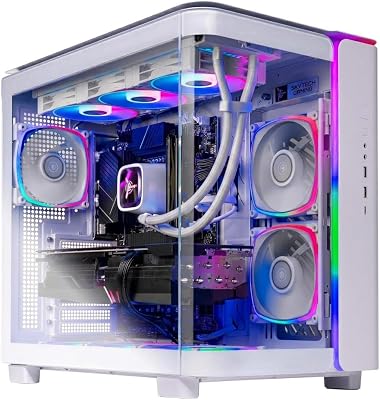

How to Pick an Overclocking-Friendly Build — The Definitive Buyer’s Guide
This guide may contain affiliate links. We may earn a small commission on purchases made through these links at no extra cost to you. Our recommendations are based on detailed research and independent analysis.
Quick Answer: What to Buy Right Now
For serious overclocking in 2026, pick an Intel Core Ultra 9 285K or AMD Ryzen 7 9800X3D (X3D Curve Optimizer only) on a Z890 or X870E motherboard with a 16+2 phase VRM, a 360mm AIO or custom loop, DDR5-8000 or faster memory, and an 80+ Platinum PSU with at least 200W headroom. Budget 2,800-3,500 USD before peripherals.
The Five Criteria That Actually Matter
Most buying guides for an overclocking-friendly gaming build list ten or twelve specs to consider. In practice, the difference between a satisfying purchase and a regretted one usually comes down to five decisions. The rest are details you can adjust later or simply do not notice.
1. CPU silicon quality
Not all chips overclock equally. Intel K-series and AMD non-X3D Ryzen offer the widest tuning range. X3D chips overclock through Curve Optimizer only (no multiplier headroom) but gain 5-8% with a good undervolt-overclock curve. Read binning forums for current yield expectations.
2. Motherboard VRM design
Look for boards with 16+ phase VRM, large heatsinks with heat pipes, and direct doubler topology. A poor VRM throttles a tuned chip under load and undoes hours of work. Z890 Apex, X870E Tachyon, ROG Crosshair X870E Hero, and MEG X870E Godlike are the gold standards in 2026.
3. Memory tuning capability
DDR5-8000 and faster requires a motherboard with strong memory training and dedicated overclocking BIOS options. Two-DIMM-per-channel boards reach higher frequencies than four-DIMM boards. Buy a kit with Hynix M-die or A-die for the best timing scaling.
4. Cooling capacity
A 360mm AIO is the floor for overclocking a flagship CPU. Custom loops with a 360mm or 420mm radiator give you 10-15C of additional headroom and unlock another 100-200 MHz on Intel chips. For AMD X3D, a 240mm AIO is sufficient because PPT is the limiter, not heat.
5. PSU transient response
Overclocking creates 1ms current spikes that mediocre PSUs cannot absorb cleanly. Choose units with low transient response time (Seasonic Prime PX, Corsair AX, EVGA Supernova G7) rated for 200W above expected peak. Cheap gold units cause inexplicable crashes under load.
The Buying Checklist
Print this, save it, or screenshot it on your phone. Walk through it before you commit to a purchase – every one of these is a real mistake we have seen people make and regret.
- Confirm the CPU is unlocked (Intel K/KF, AMD all Ryzen)
- Verify motherboard VRM has 16+ phases and heatpipe cooling
- Choose DDR5 with Hynix M-die or A-die ICs for tuning headroom
- Plan a 360mm AIO minimum, custom loop preferred
- Buy an 80+ Platinum PSU with 200W headroom
- Update BIOS to the latest stable build before tuning
- Use Cinebench, OCCT, and y-cruncher to validate stability
- Document every BIOS setting in a spreadsheet for rollback
Spec Primer: What the Numbers Actually Mean
Modern CPU overclocking in 2026 is largely about voltage-frequency curve tuning rather than blind multiplier increases. Intel uses V/F Point Offset to lower voltage at high frequencies; AMD uses Curve Optimizer to do the same in 30-step adjustments per core. Memory overclocking on DDR5 involves training VDD/VDDQ voltages (1.35-1.45V typical), tRP/tRCD subtimings, and the memory controller’s VDD2 rail. Stability testing requires hours, not minutes – a chip that passes 10 minutes of Cinebench will often fail at hour three of OCCT large data set mode. Plan for a week of incremental tuning, not an evening.
Common Mistakes Buyers Make
These are the patterns we see most often in support forums, return reviews, and our own past mistakes. Avoiding them is more valuable than chasing the top of the spec sheet.
- Buying the cheapest Z890 board and hitting a VRM thermal wall at 5.5 GHz
- Pushing voltage above silicon-safe limits (1.45V on Intel, 1.40V SOC on AMD) and degrading the chip in weeks
- Skipping stability testing and discovering crashes during a long gaming session
- Mixing DDR5 kits from different revisions and never reaching rated speed
- Overclocking everything at once and not knowing which change caused the instability
Frequently Asked Questions
Is overclocking still worth it in 2026?
For 5-10% gaming performance, marginally – GPU overclocking gives more in most titles. For CPU-bound competitive gaming and content creation, yes – well-tuned 285K or 9950X builds beat stock by 10-15% in real workloads. It is a hobby first and a performance tool second.
Will overclocking void my warranty?
Intel and AMD both offer Performance Tuning Protection Plans for K and unlocked chips that explicitly cover overclock-related failures. Standard warranty covers stock operation only. Motherboard and memory vendor warranties are not voided by reasonable overclocking.
How long do overclocked components last?
Indefinitely at safe voltages. Failures come from sustained over-voltage (above 1.45V on Intel for years) or inadequate cooling causing electromigration. Within manufacturer-published safe ranges, modern silicon survives a decade of constant use without measurable degradation.
Should I water-cool or use a top-tier air cooler?
For competitive overclocking records, custom water. For everyday tuned operation, a top-tier air cooler or 360mm AIO is plenty. Custom loops add maintenance time and risk; they do not unlock 24/7 stable frequencies meaningfully higher than a good AIO.
Three Overclocking Tiers
Beginner Tuning Build (1,800-2,200 USD)
Ryzen 7 9700X + B650E Tomahawk + 32 GB DDR5-6000 CL30 + 280mm AIO + RTX 4070 Super + 850W Platinum PSU. Tune Curve Optimizer for 5% extra performance, set DDR5 EXPO, leave everything else at stock. Safe, repeatable, no risk to the components.
Serious Tuner Build (2,800-3,500 USD)
Core Ultra 9 285K + Z890 Apex + DDR5-8000 CL36 CUDIMM + 360mm AIO + RTX 5080 + 1000W Platinum PSU. P-core overclock to 5.7-5.9 GHz, ring at 5.3-5.5 GHz, memory at 8400 MT/s with tuned subtimings. Realistic 10-15% gain over stock in CPU-bound workloads.
Enthusiast Cooler Build (5,000+ USD)
Add a custom water loop (dual 360mm radiators, monoblock for CPU/VRM, GPU block), a high-end binned chip (sourced from Silicon Lottery successor sites), and DDR5-8400 Hynix M-die or A-die kit. This tier exists for the hobby, not for performance per dollar.
Tools You Will Actually Need
HWiNFO64 for real-time monitoring, Cinebench R24 for sanity benchmarks, OCCT for stability testing (large data set mode, 4+ hours minimum), y-cruncher for CPU+memory stress, TestMem5 for memory-only stability, and a hardware Kill-A-Watt meter for wall-power measurement. Software tools are free. Plan to spend a weekend learning each one before tuning a chip. Take notes – every BIOS revision changes setting names, and you will return to the same chip in six months for another round of refinement.
Safe Voltage Reference for 2026 Silicon
Long-term safe voltages have tightened as silicon nodes shrink. For Intel 14th-gen and Core Ultra, hold VCore under 1.40V for 24/7 use, transient spikes under 1.45V. For AMD Ryzen 9000 series, hold SoC voltage under 1.30V (AMD’s own guidance after the 7000-series degradation issues) and VCore under 1.40V for non-X3D, under 1.30V for X3D. DDR5 VDD/VDDQ stays under 1.45V for daily use, 1.50V for short benchmark runs. PCH voltage on Intel is rarely worth touching. Memory controller voltages (VDD2, MC) follow board-specific defaults – bumping these 50-100 mV is typically safe and unlocks higher memory frequencies. Document every voltage in a spreadsheet alongside frequency and stability test pass duration. Re-verify stability after any BIOS update – microcode changes can affect previously stable settings.
Final Take
Overclocking in 2026 rewards patience, methodology, and good components more than raw spending. Build with headroom, test systematically, document everything, and accept that the last 2% costs as much time as the first 8%. Done well, it is the cheapest performance upgrade you will ever buy.












