

As an Amazon Associate we earn from qualifying purchases at no extra cost to you.
🛒 Best Price Today on Amazon
Prime members get fast, free shipping on everything above, plus member-only deals. New members get a 30-day free trial — cancel anytime.
Top Pick Gaming Cpu Definitive Buyer Picks for 2026
Here are our current top pick gaming cpu definitive buyer picks, compared on real Amazon owner reviews, price, and features. Live prices update below.



Affiliate disclosure: GamingPCGuru is reader-supported. When you buy through links on our site, we may earn an affiliate commission at no extra cost to you. This does not influence our independent reviews.
By Alex Rivera, Hardware Reviewer · May 2026
How to Pick a Gaming CPU in 2026: AMD’s X3D Lineup Has Settled the Argument
Quick Answer (TLDR)
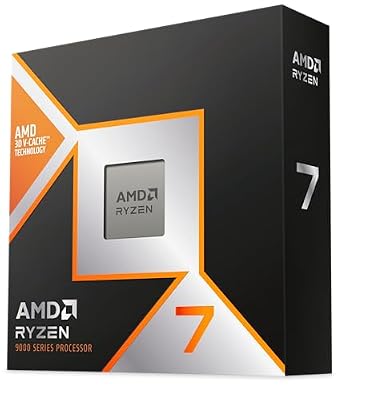
For pure gaming in 2026, AMD’s 3D V-Cache (X3D) lineup is the answer at every meaningful tier. The Ryzen 7 9800X3D dominates the enthusiast space at $479, the Ryzen 9 9950X3D is for hybrid gaming/productivity builds at $689, and the older Ryzen 7 7800X3D remains an excellent value at $349 if you can find it. Intel’s Core Ultra 200S series is competitive but generally trails in gaming by 8–15% while offering productivity advantages that most gamers don’t need. Below the $300 tier, AMD’s Ryzen 5 7600X and 9600X dominate the mainstream — Intel’s i5-14600K is the only competitive answer there. Skip the Core Ultra 5 245K; it’s underwhelming versus the AMD alternatives at similar pricing.
The Five Criteria That Matter
1. Cache size, not core count, drives gaming performance. The reason X3D chips dominate gaming is the 96MB+ L3 cache that fits more game data on-die, eliminating slow memory roundtrips. A Ryzen 7 9800X3D with 8 cores and 96MB L3 cache outperforms a Ryzen 9 9950X with 16 cores and 64MB L3 cache in gaming by 15–22% despite half the core count. For games, cache is king. Don’t get distracted by core count marketing.
2. CPU pairing with GPU determines actual frame rates. A bottlenecked system delivers the performance of its weakest component. Pair a top-end CPU (9800X3D, 285K) with an RTX 5080 or 5090 for balanced systems. A Ryzen 5 7600 with an RTX 5080 will deliver RTX 5070 Ti performance in CPU-bound titles. Conversely, a 9800X3D paired with an RX 9070 is overkill and you’re wasting CPU money that should go into GPU.
3. Platform longevity matters for upgrade paths. AMD’s AM5 socket is confirmed through Ryzen 11000 series (expected 2027–2028), giving 4+ years of CPU upgrade headroom on a current X870E or B850 board. Intel’s LGA1851 (Core Ultra 200S) is widely expected to be replaced by LGA1954 for the next Intel generation, making it a dead-end socket. For builders who upgrade CPUs while keeping motherboards, AMD wins this decisively in 2026.
4. Power and thermal envelope. The 9800X3D draws roughly 162W under sustained gaming load, the Core Ultra 9 285K draws 250W+. This matters for cooling decisions: the AMD chip is comfortable on a 240mm AIO; the Intel chip needs 360mm AIO minimum for sustained workloads. The thermal difference cascades into case selection and PSU sizing too.
5. Motherboard ecosystem and pricing. AM5 motherboards have matured beautifully through 2025–2026. Quality B850 boards start at $179, while X870E enthusiast boards run $300–$450. Intel Z890 boards are typically $50–$100 more expensive at equivalent feature tiers. Budget the motherboard cost into your CPU decision because the platform total matters.
Buying Checklist
- Identify your gaming resolution: 1080p, 1440p, or 4K (affects CPU vs GPU balance)
- Match CPU tier to GPU tier: midrange GPUs need midrange CPUs, flagships need flagships
- Decide on platform: AM5 (longer upgrade path) vs LGA1851 (Intel ecosystem)
- Verify cooler compatibility with TDP requirements
- Confirm memory support: DDR5-6000 EXPO for AMD, DDR5-7200 XMP for Intel
- Check motherboard chipset for required features (PCIe 5.0 GPU/SSD, Wi-Fi 7, USB4)
- Verify BIOS supports your specific CPU on the motherboard you’re considering
- Compare productivity workload needs against gaming-only X3D options
- Check actual current-day pricing vs MSRP — sales matter
Spec Primer: What the Numbers Actually Mean
Core count vs thread count. Cores are physical execution units. Threads are software-visible execution paths (most modern CPUs use SMT/Hyperthreading for 2 threads per core). For gaming, 6–8 physical cores is the sweet spot in 2026; above 8 cores delivers diminishing gaming returns but helps productivity workloads.
Base clock vs boost clock. Base clock is the guaranteed minimum frequency under load. Boost clock is the peak short-burst frequency under ideal thermal conditions. Real-world sustained frequencies live between the two, closer to boost on capable cooling.
L3 cache. The shared cache pool accessible to all cores. Larger L3 means more code and data fits on-die, reducing trips to slow main memory. X3D processors’ 96MB+ L3 is the architectural feature that makes them dominate gaming.
TDP (Thermal Design Power). The cooling capacity required for sustained operation at base clock. Actual power draw under load typically exceeds TDP for short bursts. AMD’s TDP numbers are generally honest; Intel’s “Processor Base Power” is the actual figure but “Maximum Turbo Power” is the spec to budget cooling around.
Integrated GPU presence. Ryzen non-G chips lack iGPUs, requiring a discrete GPU to display. Intel Core Ultra chips include integrated graphics. For gaming builds with a discrete GPU, iGPU is largely irrelevant — but it’s useful as a backup for troubleshooting GPU issues.
Common Buyer Mistakes
Buying more cores than you need. A Ryzen 9 9950X looks impressive with 16 cores, but the 9800X3D will outperform it in games by 15–20% for less money. Gaming is cache-bound and frequency-bound, not core-count bound.
Skimping on the CPU cooler. A $500 CPU on a $35 stock cooler is going to throttle aggressively. Budget at minimum 8–10% of your CPU cost for proper cooling. A 9800X3D needs a 240mm AIO or quality dual-tower air cooler. A 285K needs 360mm AIO or top-tier air.
Ignoring memory speed requirements. AMD X3D chips genuinely want DDR5-6000 CL30 EXPO memory. Pairing them with DDR5-4800 or DDR5-5200 leaves 5–8% performance on the table. Intel Core Ultra wants DDR5-7200 minimum for optimal performance.
Buying an X-suffix when you don’t overclock. The Ryzen 7 9700X (non-X3D, no 3D cache) is 8% cheaper than the 9700 (which doesn’t exist for clarity — but the principle holds for older generations). If you’re not overclocking, look for the non-K Intel SKUs or non-X AMD SKUs for value savings.
Forgetting motherboard BIOS compatibility. A B650 motherboard might not boot a Ryzen 9000 series CPU without a BIOS update. Check the manufacturer’s QVL (Qualified Vendor List) and verify the board shipped with a recent enough BIOS. If unsure, buy a motherboard that explicitly supports your CPU out-of-box.
FAQ
Is the 9950X3D worth the premium over 9800X3D for gaming? Only if you also do heavy productivity work. For pure gaming, the 9950X3D delivers identical performance to the 9800X3D because games can’t use more than 8 cores effectively. The extra 8 cores help in video editing, 3D rendering, and compilation workloads. If you’re a pure gamer, save $210 with the 9800X3D.
What about the Ryzen 7 7800X3D — still worth buying? Yes, it’s roughly 4–7% slower than 9800X3D in games at $130 less. For value-conscious builders on AM5 who don’t need PCIe 5.0 features that come with newer chipsets, the 7800X3D remains a brilliant buy if available.
Does Intel Core Ultra 9 285K beat AMD in any gaming scenarios? Rarely. The 285K is competitive in CPU-bound 1080p esports titles where the Intel architecture’s higher peak frequency helps. In modern AAA gaming at 1440p+, AMD X3D chips lead consistently.
Can I use an older B650 motherboard with Ryzen 9000 series? Yes, with a recent BIOS update. Most B650 boards support 9000 series with firmware updates released in late 2024 or early 2025. If you’re buying new in 2026, prefer B850 or X870E for better default support and updated I/O.
Budget Tier Considerations
Below $300, the gaming CPU landscape gets interesting in 2026. The Ryzen 5 9600X at $249 delivers excellent 1440p gaming performance with 6 cores and 12 threads — paired with an RTX 5060 Ti or RX 9070, it’s perfectly balanced for mainstream gaming. The Ryzen 5 7600X at $179 remains competitive value for builds targeting 1080p high-refresh esports.
Intel’s Core i5-14600K (LGA1700 socket — older platform) is still available at $239 and competes with the Ryzen 5 9600X in pure gaming. The catch: LGA1700 is end-of-life for upgrade paths. If you want platform longevity, AMD AM5 is the better bet at the budget tier.
The Intel Core Ultra 5 245K is the disappointing entry in the Core Ultra 200S series — slower than AMD competitors in gaming and lacking productivity advantages of the higher-tier 265K/285K. Skip it unless heavily discounted.
Pairing CPU to GPU Properly
Common balanced pairings in 2026: Ryzen 5 9600X + RX 9070 or RTX 5060 Ti ($1,200 mid-range build). Ryzen 7 9800X3D + RTX 5070 Ti or RX 9070 XT ($2,000 enthusiast build). Ryzen 7 9800X3D + RTX 5080 ($2,800 premium build). Ryzen 9 9950X3D + RTX 5090 ($4,500 flagship build). Intel equivalent tiers use Core Ultra 5 245K, 265K, 285K. Avoid mismatched pairings — a 9950X3D with an RTX 5060 wastes CPU money; an RTX 5080 with a Ryzen 5 7600 wastes GPU money.
Final Take
The CPU buying decision in 2026 is unusually simple thanks to AMD’s X3D lineup. For gaming, buy a 9800X3D unless you specifically need productivity headroom (then 9950X3D) or you’re on a tight budget (then Ryzen 5 9600X or older 7800X3D). Intel’s Core Ultra 200S series is technically excellent and has productivity advantages, but the gaming gap versus X3D is large enough that Intel doesn’t make sense for gaming-primary builds in 2026. Match your CPU tier to your GPU tier and your resolution — a $500 CPU with a $300 GPU is unbalanced and you’re leaving performance on the table. The “best gaming CPU” question has had the same answer for two years running, and it isn’t changing soon: get the X3D chip that fits your budget.
Frequently Asked Questions
How many cores do games actually use?
Most engines scale well to six or eight cores and then flatten out. Six fast cores remains playable, eight is the comfortable target, and beyond twelve you gain almost nothing in gaming while paying substantially more. Extra cores only pay off if you also stream, render or compile.
Does cache matter more than clock speed?
For gaming, large L3 cache is one of the most effective levers. AMD X3D chips stack extra cache directly on the compute die, which keeps game data close to the cores and delivers big gains in simulators, strategy games and open worlds where memory latency dominates.
Will my CPU bottleneck my graphics card?
It depends on resolution. At 1080p with a fast GPU, the CPU often sets the ceiling. At 1440p and especially 4K the graphics card becomes the limit and even a mid-range CPU keeps up. Buy the CPU appropriate to your target resolution rather than the most expensive available.
How important is the upgrade path?
Very, if you intend to keep the machine for years. AM5 continues to receive new CPU generations, so a board bought today can host a future chip with a BIOS update. Intel LGA1700 has ended, so any later upgrade there requires a new motherboard and possibly new memory.
What cooler and memory should I plan for?
Match the cooler to package power rather than the marketing tier, using a good air tower for anything under about 170W and a 240mm or larger AIO above that. For memory, DDR5 6000MT/s CL30 is ideal on AM5, while Intel platforms benefit from faster kits.












