Our Short List of 3

- Best for: Quiet 1080p gaming in a compact case with a modest power supply.
- Graphics coprocessor: NVIDIA GeForce RTX 4060
- Memory: 8 GB GDDR6, 128-bit interface
- Total graphics power: 115 W (NVIDIA published figure)
- Interface: PCI Express Gen 4

- Best for: Small-form-factor builds that want triple-fan cooling without a high power draw.
- Graphics coprocessor: NVIDIA GeForce RTX 5060
- Memory: 8 GB GDDR7, 128-bit interface
- Total graphics power: 145 W (NVIDIA published figure)
- Interface: PCI Express 5.0

- Best for: 1080p gaming in an AMD-based build with a standard mid-tower case.
- Graphics coprocessor: AMD Radeon RX 7600
- Memory: 8 GB GDDR6, 128-bit interface
- Board power: 165 W (AMD published figure)
- Architecture: AMD RDNA 3
All 3 Picks at a Glance
| Product | Specs | Action |
|---|---|---|
| MSI GeForce RTX 4060 Ventus 2X Black 8G OC |
| Check price on Amazon |
| ASUS Prime GeForce RTX 5060 8GB GDDR7 OC Edition |
| Check price on Amazon |
| XFX Speedster SWFT210 Radeon RX 7600 |
| Check price on Amazon |
Choosing an efficient graphics card is a different decision from chasing the fastest card on the shelf. A card that draws less power also gives off less heat, so its fans can spin more slowly, your room stays cooler, and a modest power supply is often enough. That lower draw also means less electricity wasted as heat, which matters in a small room, a warm climate, or a compact case with limited airflow.
This guide is for builders who want a quiet, cool-running system, for players upgrading an older card in a case with a smaller power supply, and for anyone who values a calm machine over a loud one. Every card below was picked from its Amazon product listing, using the model name and specifications shown there. The order follows published power draw and memory capacity, not a benchmark run by this site, so the lowest-draw card for its class comes first.
Quick Picks
As an Amazon Associate we earn from qualifying purchases.
| Product | Best for | Key spec from title |
|---|---|---|
| MSI GeForce RTX 4060 Ventus 2X Black 8G OC | Quiet 1080p gaming in a compact case | 8GB GDDR6, PCI Express Gen 4, 128-bit |
| GIGABYTE GeForce RTX 5060 WINDFORCE 8G | Modern 1080p gaming with a dual-fan cooler | 8GB GDDR7, 128-bit, PCIe 5.0 |
| ASUS Prime GeForce RTX 5060 8GB GDDR7 OC Edition | Small-form-factor builds that need triple-fan cooling | 8GB GDDR7, PCIe 5.0, 2.5-slot, Dual BIOS |
| XFX Speedster SWFT210 Radeon RX 7600 | Straightforward 1080p gaming on the AMD side | 8GB GDDR6, HDMI, 3x DisplayPort |
How to Choose
Read the Power Draw Figure Before Anything Else
Total graphics power, often shortened to TDP, is the maximum power a graphics card is designed to draw, and it is the single most useful number when shopping for efficiency. A card drawing 115 W leaves far more headroom in your system than one drawing 165 W, and it asks less of your power supply, your case airflow, and your room. Check the figure on the manufacturer specification page for the exact model, because factory-overclocked versions can draw a little more than the reference design. Then compare that number with the wattage on your power supply label, remembering that the processor, drives, and fans all draw from the same supply.
Make Sure the Memory Matches Your Resolution
Efficiency without enough video memory is a false economy, because a card that runs out of memory will stutter no matter how cool it runs. Video memory holds textures and scene data while a game is running, and modern titles at higher settings can fill 8 GB quickly. For 1080p gaming, 8 GB remains workable in most games with sensible settings, which is why every card in this guide carries that amount. At 1440p, however, 8 GB becomes a tighter fit, and you may need to lower texture quality to keep play smooth. Weigh the memory figure alongside the power figure, and do not let a low wattage distract you from a memory limit you will meet every day.
Look at Cooling Design and Noise at Low Power
A low-power card still needs a sensible cooler, because a small heatsink with a loud fan can undo the whole point of choosing an efficient model. Dual-fan designs suit the cards in this guide well, since their modest heat output does not demand a huge cooler, and two fans can move enough air at low speed to stay quiet. Triple-fan designs, like the ASUS Prime below, spread the work across three smaller fans and can run even more quietly, though they take up more space in the case. Check whether the fans stop completely at idle, which many modern cards do, and look at the card thickness in slots, because a thicker card can block the slot below it.
Match the Card to Your Monitor and Processor
An efficient card is only efficient in context, so start with the screen you actually play on and the processor in your machine. A 1080p monitor pairs naturally with the cards in this guide, while a 1440p monitor pushes them harder and may call for lower settings in demanding games. A modest processor pairs well here, because a very powerful processor will sit idle waiting for a mid-range card, while a very weak one can hold back even an efficient card. Think of the whole system as a team: card, processor, monitor, and power supply should all aim at the same resolution, or the efficiency you paid for will be wasted on a bottleneck elsewhere.
The 4 Best Options
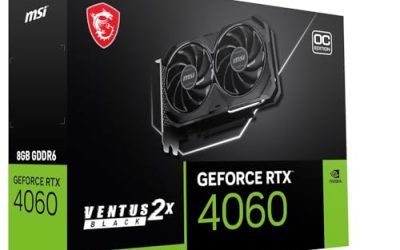
MSI GeForce RTX 4060 Ventus 2X Black 8G OC
- Best for: Quiet 1080p gaming in a compact case with a modest power supply.
- Graphics coprocessor: NVIDIA GeForce RTX 4060
- Memory: 8 GB GDDR6, 128-bit interface
- Total graphics power: 115 W (NVIDIA published figure)
- Interface: PCI Express Gen 4
Quiet 1080p gaming in a compact case with a modest power supply.
8 GB of memory can fill up at 1440p with high texture settings, so confirm your resolution plans before ordering.
This compact dual-fan card leads the ranking because its published total graphics power of 115 W is the lowest here, and it pairs that modest draw with a modern Ada Lovelace design and DLSS 3 support. It suits players who want smooth 1080p gaming in a small or quiet build, where a short card and a smaller power supply are part of the plan. The 8 GB of GDDR6 memory is aimed squarely at 1080p, and the two-fan layout keeps the card short enough for many compact and mid-tower cases without giving up modern features.
Watch out for: 8 GB of memory can fill up at 1440p with high texture settings, so confirm your resolution plans before ordering.
GIGABYTE GeForce RTX 5060 WINDFORCE 8G
This Gigabyte card brings the newer Blackwell architecture to the efficiency question, with a published total graphics power of 145 W and faster GDDR7 memory on a 128-bit bus. It fits players who want a current-generation card for 1080p gaming and are willing to accept a slightly higher draw than the RTX 4060 in exchange for newer features and memory. The WINDFORCE dual-fan cooler suits standard mid-tower cases, and the PCIe 5.0 interface keeps the card ready for newer motherboards. It is a balanced middle step in this ranking for a fresh build.
Specs
- Graphics coprocessor: NVIDIA GeForce RTX 5060
- Memory: 8 GB GDDR7, 128-bit interface
- Total graphics power: 145 W (NVIDIA published figure)
- Interface: PCI Express 5.0
- GPU clock speed: 2497 MHz
- Memory clock speed: 28000 MHz
- Maximum display resolution: 7680×4320
- Cooling: WINDFORCE cooling system
- Model: GV-N5060WF2-8GD
Best for: A new 1080p build where a current-generation card and GDDR7 memory matter.
Watch out for: Factory clock figures vary between Gigabyte RTX 5060 versions, so check the exact model number on the listing matches GV-N5060WF2-8GD.
ASUS Prime GeForce RTX 5060 8GB GDDR7 OC Edition
- Best for: Small-form-factor builds that want triple-fan cooling without a high power draw.
- Graphics coprocessor: NVIDIA GeForce RTX 5060
- Memory: 8 GB GDDR7, 128-bit interface
- Total graphics power: 145 W (NVIDIA published figure)
- Interface: PCI Express 5.0
Small-form-factor builds that want triple-fan cooling without a high power draw.
The 2.5-slot thickness needs more clearance than a slim dual-slot card, so measure the space beside the PCIe slot first.
This ASUS card uses the same 145 W Blackwell chip as the Gigabyte model above, but wraps it in a triple-fan Axial-tech cooler with a dual BIOS switch and an SFF-Ready 2.5-slot design. It suits builders working in a small-form-factor case who still want three fans moving air quietly, and the factory overclock gives it a slightly higher boost clock than the reference design. The extra fan and the dual BIOS make it the most cooling-focused card in this guide, while its power draw stays in the same modest bracket as the other RTX 5060 here.
Watch out for: The 2.5-slot thickness needs more clearance than a slim dual-slot card, so measure the space beside the PCIe slot first.
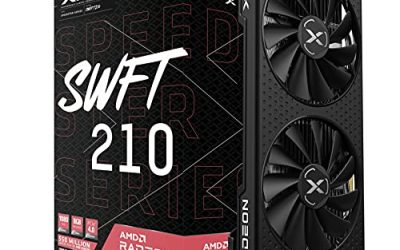
XFX Speedster SWFT210 Radeon RX 7600
- Best for: 1080p gaming in an AMD-based build with a standard mid-tower case.
- Graphics coprocessor: AMD Radeon RX 7600
- Memory: 8 GB GDDR6, 128-bit interface
- Board power: 165 W (AMD published figure)
- Architecture: AMD RDNA 3
1080p gaming in an AMD-based build with a standard mid-tower case.
At 165 W it draws the most power in this guide, so confirm your supply has comfortable headroom before choosing it over the lower-draw options.
This AMD card rounds out the ranking as the alternative for players who prefer the Radeon side, with a published board power of 165 W and 8 GB of GDDR6 memory on the RDNA 3 architecture. It suits straightforward 1080p gaming in a standard mid-tower, where its dual-fan SWFT cooler and three DisplayPort outputs cover a single monitor or a second screen with ease. Its draw is the highest in this group, so it sits last on efficiency, yet it remains a modest card by modern standards and a useful option when you want an AMD build without stepping up to a hotter chip.
Watch out for: At 165 W it draws the most power in this guide, so confirm your supply has comfortable headroom before choosing it over the lower-draw options.
Which One Fits Your Situation
You Want the Quietest, Coolest Build Possible
Choose the MSI GeForce RTX 4060 Ventus 2X Black 8G OC. Its 115 W draw is the lowest in this guide, which means less heat for your case to clear and less work for its two fans. The short dual-fan design also fits compact cases easily, making it the natural pick when silence and low temperatures matter more than having the newest chip.
You Are Building a New PC From Scratch
Choose the GIGABYTE GeForce RTX 5060 WINDFORCE 8G. Its Blackwell design and GDDR7 memory give a fresh build a current-generation foundation, while its 145 W draw still suits a modest supply and a standard mid-tower. The dual-fan WINDFORCE cooler is a straightforward fit for a new case with normal airflow.
You Have a Small Case and Want Three Fans
Choose the ASUS Prime GeForce RTX 5060 8GB GDDR7 OC Edition. Its SFF-Ready 2.5-slot design is made for compact builds, and the triple-fan Axial-tech cooler spreads the cooling load so each fan can spin more slowly. The dual BIOS switch adds flexibility if you want a quieter profile in a tight chassis.
You Prefer AMD and Play at 1080p
Choose the XFX Speedster SWFT210 Radeon RX 7600. Its RDNA 3 design and 8 GB of GDDR6 cover 1080p gaming with room for a second monitor through its three DisplayPort outputs. Accept its higher 165 W draw as the trade for an AMD card, and pair it with a supply that has headroom to spare.
Common Mistakes
- Picking a card by wattage alone and ignoring video memory, then hitting stutter at higher settings.
- Assuming a low-power card needs no airflow, and installing it in a sealed case with blocked intake fans.
- Forgetting to check the PCIe power connector, and finding the supply has no free 8-pin lead.
- Choosing a triple-fan card for a compact case without measuring length and thickness first.
- Leaving the fan curve on an aggressive default, so a quiet card still spins loudly under light loads.
Frequently Asked Questions
What does performance per watt mean?
Performance per watt describes how much gaming work a graphics card delivers for each watt of electricity it draws. A card with strong performance per watt gives you smooth play without a large power supply, heavy cooling, or excess heat. In this guide the ranking follows published power draw and memory, so a lower-draw card that still handles its target resolution ranks ahead of a hotter card.
Does a lower power draw card always run cooler?
Usually, but not always, because cooling design and case airflow matter as much as the wattage figure. A low-draw card with a small heatsink and a loud single fan can still run warm, while a well-cooled card with a larger heatsink can stay quiet at the same draw. Check the fan count, heatsink size, and your case airflow alongside the power figure before deciding.
Is an efficient card enough for 1440p gaming?
It can be, with realistic settings, but the 8 GB cards in this guide are aimed mainly at 1080p. At 1440p you may need to lower texture and shadow settings in demanding games to keep play smooth, because memory fills up faster at the higher resolution. If 1440p is your main target, plan your settings around that limit or look for a card with more memory.
Do efficient graphics cards need a large power supply?
No, and that is one of their main advantages. The cards in this guide carry published draws from 115 W to 165 W, and their makers list a 550 W supply as the recommended figure for the system as a whole. Check your own supply label, count the free PCIe connectors, and leave headroom for your processor and drives rather than running a supply near its limit.