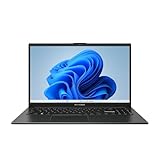
Running a dual-monitor setup with your laptop is one of the most reliable ways to work faster, and portable screen extenders have made it possible anywhere. Instead of squinting at a single display while shuffling windows, you can spread your work across two or more screens that fold neatly against your laptop when it’s time to pack up.
This review examines laptop dual-monitor solutions, focusing on clip-on screen extenders and portable displays, using several strong options as references, so you can build a mobile multi-screen workspace that suits your workflow.
As an Amazon Associate we earn from qualifying purchases.





Design & Build
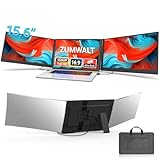
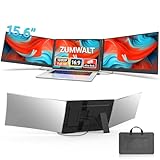
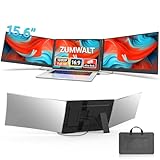
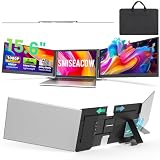
Laptop dual-monitor extenders attach to the back of your screen and unfold to reveal one or two additional panels. Options range from 14-inch dual-screen units like the KEFEYA to larger 15.6-inch models, and triple configurations from brands like SMISEACOW push into three-panel territory for maximum real estate. The best designs stay ultra-slim and lightweight, with sub-4lb triple setups and 1.87lb dual models keeping your bag manageable. Fit matters, so match the extender’s panel size to your laptop’s screen for a clean look, and check that the hinge and clamp feel solid, since they endure repeated folding and carrying.
Performance
These extenders rely on 1080P FHD IPS panels that render sharp text and hold color and contrast at wide angles, which is essential when a second screen sits beside you at a slant. Connectivity typically uses USB-C, with single-cable models being the most convenient by carrying power and video together, while some setups add HDMI for broader compatibility. Most work across Windows, Mac, and Android, though certain units require a driver or specific USB-C support. In daily use, a dual-monitor laptop setup transforms productivity, letting you keep reference material and communication visible while you focus on your main task, and standalone portable monitors like the WGK 15.6-inch display offer a flexible alternative with speakers and a stand.
Pros & Cons
- Major multitasking boost from a portable dual or triple screen
- Crisp FHD IPS panels with strong viewing angles
- Foldable, travel-ready designs that attach to the laptop
- Wide device compatibility across major operating systems
- Clip-on extenders add lid weight and can affect balance
- Some models need drivers or specific USB-C capability
- Extra screens shorten laptop battery runtime
Alternatives to Consider
If you want the most screen space and don’t mind extra weight, a triple extender like the SMISEACOW 15.6-inch model gives you three panels for heavy multitasking. For flexibility and easier eye-level placement, a standalone portable monitor such as the WGK 15.6-inch display with a built-in stand and speakers works well beside any laptop. Lighter 14-inch dual extenders like the KEFEYA suit travelers who prioritize portability over sheer real estate.
Frequently Asked Questions
How many extra screens can I add to a laptop?
Dual extenders add one panel and triple models add two, but your laptop’s graphics and ports set the practical limit. Most modern laptops handle one or two additional 1080p displays comfortably.
Do I need more than one cable?
Single-cable USB-C extenders carry both power and video if your laptop supports DisplayPort Alt Mode. Models with HDMI may need separate connections, so check the requirements for your specific setup.
Will a dual-monitor extender fit my laptop?
Match the extender’s screen size to your laptop’s display for the cleanest fit and balance. Most extenders list a compatible size range, such as 13 to 17 inches, so confirm before buying.
Does adding monitors hurt battery life?
Yes, driving extra panels increases power draw and shortens runtime. For long untethered sessions, keep a charger nearby, since dual and triple setups demand more from the battery.
Verdict
A laptop dual-monitor setup is a proven productivity upgrade, and portable extenders make it possible on the go. For a unified travel rig, a dual extender like the KEFEYA or a SMISEACOW triple delivers real estate that folds away, while a standalone monitor such as the WGK display adds placement flexibility. Choose an IPS panel and confirm your connection type for a smooth experience.