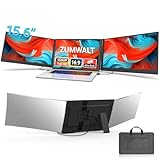
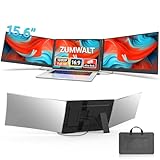
An expandable laptop monitor turns a single cramped screen into a multi-panel command center that folds away when you are done. These clever accessories attach to your laptop lid and slide out one, two, or three additional displays, giving you desktop-style multitasking anywhere you open your machine. For hybrid workers, traders, and anyone who lives in spreadsheets, they are a game-changer.
We tested the leading expandable monitors, evaluating panel brightness, mounting stability, connection simplicity, and how well they balance on different laptops. Here is our complete assessment of the best options.
As an Amazon Associate we earn from qualifying purchases.





Design & Build
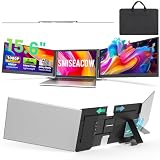
The defining trait of a good expandable monitor is a slim, light panel that adds space without tipping your laptop backward. The Synnov 15.6-inch triple emphasizes ultra-light portability, while the SMISEACOW triple is a mere 0.18 inches thick at 3.9 pounds. The KEFEYA dual and the 235-degree rotation model offer clever hinges that let you angle or detach panels for flexible viewing. Most cover a broad 12 to 17.3-inch laptop range and fold completely flat for transport. Aluminum frames feel the most premium and stay rigid once deployed, which matters for avoiding wobble during use.
Performance
Across these units the FHD IPS panels deliver sharp, evenly lit 1080p images with wide viewing angles. The MNN 15.6-inch portable monitor stands out with its HDR-capable panel and single-cable USB-C convenience, doubling as a standalone screen. The rotation-equipped extender is genuinely useful for swinging a display toward a colleague or flipping into portrait for reading. Triple setups multiply your workspace dramatically but ask more of your laptop’s graphics, and a few require a driver install. Plug-and-play models like the Synnov and KEFEYA get you running in seconds.
Pros & Cons
- Massive workspace expansion from a single laptop, on demand.
- Ultra-slim, foldable panels that travel easily.
- Rotation and detachable designs for flexible viewing angles.
- Broad laptop compatibility across most mainstream sizes.
- Triple panels add noticeable lid weight and can need a driver.
- Power draw increases with each additional screen.
Alternatives to Consider
If you want maximum screen at a desk, a large external monitor delivers more inches per dollar. If you only need one extra panel and value simplicity, the KEFEYA dual is lighter and easier to live with than a triple. For a screen that can also stand on its own, the MNN portable monitor offers the most flexibility beyond just clipping to your laptop.
Frequently Asked Questions
How does an expandable monitor attach to my laptop?
Most use a magnetic or clip bracket that grips the back of the lid, then the panels slide out to the sides. They fold flat against the lid when not in use.
Do I need special software?
Plug-and-play USB-C models like the Synnov work instantly. Some triple units use DisplayLink drivers, which require a quick one-time install.
Can it rotate to portrait mode?
Some models, including the 235-degree rotation extender, let you pivot panels into portrait orientation, which is excellent for reading documents and code.
Will it fit my laptop size?
These typically support 12 to 17.3-inch laptops. Match the panel size to your machine so it does not overhang awkwardly on a smaller lid.
Verdict
The Synnov 15.6-inch triple is our top pick for its light weight and easy plug-and-play expansion, while the SMISEACOW triple wins for sheer slimness. If you only need one extra screen, the KEFEYA dual is the easiest and lightest way to expand your laptop’s workspace.