

- Top Pick: Valve Steam Deck Docking Station
- Runner-up: JSAUX 6-in-1 Docking Station (HB0603)
- Also consider: JSAUX 5-in-1 Docking Station (HB0602)
Every handheld dock promises the same photograph: the handheld in a cradle, a big screen lit up, a keyboard and mouse waiting. Under Linux and SteamOS, whether that photograph survives the first sleep cycle depends on things the box art never mentions — the Ethernet controller inside the dock, how its display output is wired, and whether its firmware can be updated without a Windows machine.
This guide is the buying side of that problem: choosing a dock for a Steam Deck or another Linux handheld, judged by chipsets, display wiring and power behaviour. It is not a usage guide. The companion piece, the Steam Deck docked mode guide, covers setting up TV and monitor play; here the question is which dock deserves the desk space, and the five picks are ordered by class, not by a single winner.
As an Amazon Associate, we earn from qualifying purchases.
Quick answer
Buy the dock whose chips Linux already knows. For a Steam Deck, the official Valve dock is the safest cradle, with DisplayPort, Gigabit Ethernet and firmware updates delivered through SteamOS. The JSAUX HB0603 matches most of that for less, and Thunderbolt docks or travel hubs suit wider desks — provided the Ethernet controller is a mainstream part and the display path is native alt mode, never DisplayLink.
Start with the silicon: the three dock classes
Cradle docks do one job: the handheld sits in a stand, a short captive cable reaches its USB-C port, and the back panel carries display, Ethernet and USB-A ports. The silicon is simple: a hub chip, a display path and a USB Ethernet controller.
Thunderbolt desktop docks are a different species: a Thunderbolt controller, many more ports, card readers, audio and sometimes 2.5 Gigabit Ethernet. They only deliver full behaviour when the host speaks USB4 or Thunderbolt, as the ROG Ally line does. A USB-only handheld such as the Steam Deck connects in USB fallback mode, where behaviour shrinks to what plain USB-C allows.
Travel hubs are pocketable adapters with one HDMI output, a few data ports, card readers and pass-through charging — right for a hotel room, wrong for a permanent desk.
The chipset question: Ethernet and USB under Linux
Linux does not care about a dock’s brand. It cares about controller chips, and Ethernet is where cheap docks cut corners. The safe controllers are mainstream USB Ethernet parts from Realtek and ASIX, whose drivers live in the kernel, so SteamOS recognises the port the moment the dock is plugged in.
The trap is speed class, not brand. Several budget cradles headline Ethernet and quietly fit a 100 megabit controller, which makes the wired port the slowest part of a game download. Check the maker’s specification sheet: Gigabit or 1000 Mbps should be named beside the Ethernet port, and if no speed is stated, assume the slow part is fitted.
Hub chips are class-compliant and almost universally unproblematic. The one display technology to avoid entirely is DisplayLink: docks driving monitors through DisplayLink compression depend on a separate driver that is not part of SteamOS and is fragile on desktop Linux. Native DisplayPort alt mode, or a direct HDMI conversion of it, needs nothing extra — so check the fine print for the DisplayLink name before buying.
DisplayPort alt mode, honestly
A handheld’s USB-C port carries its display output as DisplayPort alt mode, a native DisplayPort signal over the USB-C connector. A dock with a real DisplayPort output passes the signal through most directly, which is why the official Valve dock’s DisplayPort 1.4 socket matters: it best preserves high refresh rates and variable refresh behaviour.
HDMI outputs are conversions of the same signal, and conversion quality sets the ceiling. A well-implemented HDMI 2.0 output gives 4K at 60Hz, covering televisions comfortably. Listings promising very high refresh at 4K through a budget cradle deserve scepticism; read the maker’s own resolution and refresh combinations, because headlines mix modes.
Two extended displays from one alt-mode signal require an MST hub inside the dock, which Valve’s dock includes and most budget cradles omit. Linux handles MST through the standard display stack on AMD hardware; a non-MST dock will mirror or offer one display. If two monitors are the goal, buy a dock that names MST or Thunderbolt.
Power delivery, honestly
Dock power figures are the most misread numbers in this category. The largest printed wattage is the input ceiling, not what reaches the handheld, because the dock’s own circuitry consumes a share first. Anker’s listing for the 555 hub is unusually honest about this split, most makers publish only the input figure.
What the handheld needs is set by its maker. The Steam Deck ships with a 45W-class charger, and a dock passing through at least that much keeps the battery full under load. Windows handhelds such as the ROG Ally ship with higher-wattage chargers and draw more, so a cradle generous for a Deck can leave an Ally slowly draining during play. Match the dock’s delivered figure, not its input figure, to your handheld’s charger class.
SteamOS dock behaviours that separate good docks from frustrating ones
SteamOS treats a dock as a display and device event at every sleep, wake and mid-session undock. Good behaviour looks boring: the screen wakes at the resolution and refresh rate you set, and Ethernet returns without a restart. SteamOS remembers settings per display, so a dock that presents itself inconsistently can scatter settings across phantom display profiles.
Firmware is the second separator. Valve’s dock receives firmware updates through SteamOS itself, delivered while the Deck is docked, so wake and display fixes arrive with system updates. Third-party docks usually update through vendor utilities that are typically Windows programs. A Linux-only household should treat a dock with no Linux update path as fixed forever, and weigh its known wake behaviour at purchase time.
How to choose
Choose by handheld first. A Steam Deck or another USB-only handheld belongs in a cradle dock with native DisplayPort or a well-specified HDMI conversion, Gigabit Ethernet on a mainstream controller, and pass-through power above the handheld’s charger class. A USB4 handheld such as the ROG Ally can also drive a Thunderbolt desktop dock.
Whatever the class, run three checks: the Ethernet speed and maker are named, the display output is native alt mode with no DisplayLink in the fine print, and the quoted power figure is delivered pass-through wattage, not the input ceiling.
Who should skip this
Skip the dock entirely if your play is a couch and a television within cable reach and you never use a keyboard, mouse or wired network; a simple USB-C to HDMI adapter solves that with fewer chips to go wrong. Skip Thunderbolt desktop docks if every machine you own is USB-only. Skip budget cradles with unnamed Ethernet if downloads matter, and skip any DisplayLink dock for a SteamOS machine.
The five docks, by class
Valve Steam Deck Docking Station

The official cradle and the reference point for SteamOS behaviour. Valve fits DisplayPort 1.4 and HDMI 2.0 outputs, an MST hub, three USB-A ports and Gigabit Ethernet. Its decisive advantage is a pipeline rather than a port: dock firmware updates arrive through SteamOS, so display and wake fixes land with system updates.
Specs:
– Display outputs: DisplayPort 1.4 and HDMI 2.0, maker-rated up to 4K at 60Hz or 1440p at 120Hz
– Ethernet: Gigabit
– USB: 3 USB-A 3.1 ports
– Power: USB-C power delivery input, power supply included
– Updates: firmware updated through SteamOS
JSAUX 6-in-1 Docking Station (HB0603)

The mainstream third-party cradle that defined the category: an HDMI output, Gigabit Ethernet, three USB-A 3.0 ports and a USB-C charging input, in an aluminium stand. It lacks DisplayPort and the official update pipeline, but its controllers are mainstream parts with in-kernel drivers — hence its long, uneventful Linux record.
Specs:
– Model: HB0603
– Display output: HDMI, maker-rated up to 4K at 60Hz
– Ethernet: Gigabit
– USB: 3 USB-A 3.0 ports
– Power: USB-C input rated up to 100W, charger not included
JSAUX 5-in-1 Docking Station (HB0602)
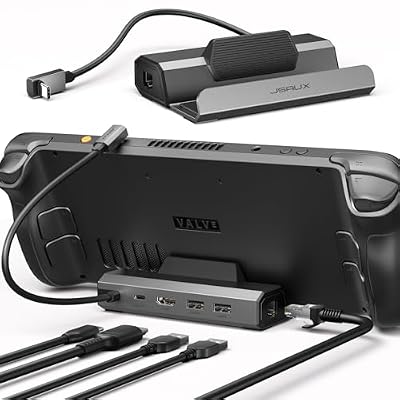
The budget cradle, included as much for its lesson as its value. It mirrors its bigger sibling’s layout, but the Ethernet controller is a 100 megabit part and the USB-A ports run at USB 2.0 speeds. A TV-only setup may never feel those limits; a desk dock is defined by them.
Specs:
– Model: HB0602
– Display output: HDMI, maker-rated up to 4K at 60Hz
– Ethernet: 100 Mbps
– USB: 2 USB-A 2.0 ports
– Power: USB-C input rated up to 100W, charger not included
CalDigit TS4 Thunderbolt 4 Dock

The desktop end of the market: eighteen ports, a Thunderbolt 4 host connection with maker-rated 98W charging, 2.5 Gigabit Ethernet, card readers and audio. For a USB-only handheld it is a fallback-mode accessory, so buy it for a mixed desk where a laptop is the primary machine.
Specs:
– Host connection: Thunderbolt 4, maker-rated 98W host charging
– Ethernet: 2.5 Gigabit
– USB: USB-A and USB-C ports up to 10 Gbps, plus card readers and audio
– Display: through Thunderbolt ports, maker-rated up to a single 8K display on supported hosts
Anker 555 USB-C Hub (8-in-1)
The travel option: a pocket hub with HDMI, Gigabit Ethernet, fast data ports, card readers and pass-through charging. It has no stand and no DisplayPort, but in a bag it turns a hotel television and a wired socket into a workable handheld station.
Specs:
– Model: A8383
– Display output: HDMI, maker-rated up to 4K at 60Hz
– Ethernet: Gigabit
– USB: 2 USB-A data ports, 1 USB-C data port at 10 Gbps, SD and microSD readers
– Power: USB-C power delivery input up to 100W, pass-through charging to the host
FAQ
Does any USB-C dock work with a Steam Deck?
Mostly, because the Deck’s port follows standard USB-C with DisplayPort alt mode. The differences appear in Ethernet speed, display negotiation after sleep, and power delivery under load; docks on mainstream controllers with a native display path are the reliable subset.
Is Thunderbolt worth it for a handheld dock?
Only when the handheld speaks USB4 or Thunderbolt, as the ROG Ally line does. A USB-only handheld connects in fallback mode and gains ports but not the Thunderbolt display behaviour, so the money buys little over a good cradle.
Why does a dock’s Ethernet speed matter for gaming?
Downloads and local transfers are the docked workloads that saturate a network port. A 100 megabit controller caps both far below what the handheld’s storage can absorb, while a Gigabit port keeps the wired connection from being the bottleneck.
Can a dock slow-charge a handheld?
Yes, through under-delivery: a standards-compliant dock negotiates power, so the realistic failure is passing through less than the handheld draws under load, letting the battery drain slowly during play. Matching the dock’s delivered wattage to the maker’s charger class avoids it.
Final verdict
For a Steam Deck desk, the official Valve dock remains the default: not for its ports, which rivals match, but for DisplayPort and SteamOS-delivered firmware updates. The HB0603 is the sensible third-party cradle, the HB0602 the budget option whose slow Ethernet must be accepted knowingly, the TS4 the Thunderbolt anchor for USB4 desks, and the Anker 555 the travel hub. Judge every dock by its chips, its display path and its delivered watts, and Linux will treat it as a non-event — the highest praise a dock can earn.










