

- Top Pick: Raspberry Pi 5 8GB
- Runner-up: Orange Pi 5 Plus 16GB
- Also consider: Lenovo Yoga Slim 7x (Snapdragon X Elite)
Gaming on an ARM Linux PC means asking a processor that speaks ARM64 to run games compiled for x86, and the honest status is that it works — inside clear limits. Two mature translation projects, FEX and Box64, now carry the load, and Valve has put its own weight behind one of them. The result is a platform that handles a large slice of older, lighter and indie PC gaming surprisingly well, while modern big-budget releases remain out of reach — as much because of graphics drivers and anti-cheat as raw translation speed.
This report covers ARM PCs only: Snapdragon X laptops sold as Windows-on-ARM machines, ARM Chromebooks, and single-board computers like the Raspberry Pi 5 and Rockchip boards. It does not cover Apple Silicon Macs, which run Linux through the Asahi project and raise a different set of driver questions; that route has its own coverage elsewhere on this site. Everything below reflects what the FEX and Box64 projects document about their own software today, not roadmaps or rumours.
As an Amazon Associate, we earn from qualifying purchases.
Quick answer
Yes, you can game on an ARM Linux PC, but through translation, not natively. FEX or Box64 converts x86 game code to ARM64, then Proton or Wine handles the Windows layer. Expect indie, retro and older 3D games to be realistic targets, expect anti-cheat multiplayer and heavy modern releases to fail, and pick hardware by graphics driver maturity first.
Two translation routes, two philosophies
Every game on an ARM Linux PC passes through one of two translators, and they make opposite trade-offs.
FEX is a userspace emulator for both 32-bit and 64-bit x86 software on ARM64 Linux. It recompiles x86 code into ARM64 through a just-in-time compiler built on its own intermediate representation, and it runs programs inside a RootFS, a self-contained x86 environment that gives translated software the libraries it expects. Crucially, FEX forwards graphics calls to the host: Vulkan and OpenGL work is thunked across to native ARM libraries, so the GPU renders natively and only CPU code pays the translation cost. Valve sponsors the project, and its Steamworks documentation describes Windows games on the ARM-based Steam Frame as running through Proton with FEX translating the x86 code underneath.
Box64 takes the leaner path. It runs x86_64 Linux programs on 64-bit ARM hosts by translating function calls directly to native host libraries, wrapping the libraries a game needs instead of emulating a whole x86 userland. Its dynamic recompiler does the heavy lifting for game code itself. The 32-bit sibling, Box86, does the same for older x86 binaries but needs a 32-bit subsystem on the host. That split matters in practice: the Steam client is a 32-bit program, so even on a 64-bit ARM machine it is Box86 that launches Steam, while Box64 handles 64-bit games and the documented Wine-on-Box64 route for Windows titles. In short, FEX aims for completeness inside a contained x86 world; Box64 aims for speed by staying as native as possible.
The hardware classes
Snapdragon X laptops are the most powerful ARM PCs most people can buy, built around Qualcomm’s X Elite and X Plus chips with Adreno graphics. They ship with Windows on ARM, and Linux support is the youngest part of the story: mainline kernel enablement is still being filled in model by model, so the exact laptop decides whether Linux is a weekend project or a research project.
ARM Chromebooks are the quiet middle class. Their built-in Linux environment is the usual route to games, the chips range from entry-level to genuinely capable, and the graphics are mobile-class. They suit the lighter end of the catalogue rather than heavy translation work.
Single-board computers are where Box64 grew up. A Raspberry Pi 5 or a Rockchip RK3588 board pairs modest CPU cores with open graphics drivers, tiny power draw and total control over the install. Nobody buys one expecting modern AAA games; they buy one because retro, indie and older titles translate well enough to be fun, and the tinkering is the point.
What game classes survive translation
The pattern across both projects’ documentation is consistent. Two-dimensional and indie games are the safest class: the Box86 and Box64 projects list many such titles as working, including a long run of GameMaker and Unity releases. Retro gaming barely needs translation at all, because the major emulators ship native ARM builds. Older 3D games from the DirectX 9 era and lighter DirectX 11 titles are the realistic translated tier, especially where graphics calls forward cleanly to native Vulkan or OpenGL.
The further a game leans on the CPU, the more translation costs. Large open-world titles, simulation-heavy strategy games and anything built around newer x86 vector extensions are the most likely to run slowly or fail outright. Modern releases also assume graphics features and driver behaviour that ARM Linux drivers may not offer yet, which brings us to the ceiling.
Native ARM software: the small, real catalogue
Not everything needs translating. Open-source games and source ports routinely ship ARM Linux builds, the emulation scene is ARM-native almost by default, and some engines can export ARM Linux binaries when a developer chooses to. Valve’s Steam Frame documentation underlines the shape of the market: native ARM software runs directly, and everything else — the bulk of the Steam catalogue — goes through translation. Native commercial ports for ARM Linux desktops remain rare, so a native library is assembled from open-source and indie corners, not bought off a storefront shelf.
The ceiling: anti-cheat and drivers
Two walls cap this platform, and neither is the translators’ fault. The first is anti-cheat. Kernel-level anti-cheat systems are built for x86 Windows and have no translated path at all; publisher-supported Proton arrangements on x86 Linux are already opt-in and revocable, and an ARM machine adds a full CPU translation layer underneath, one step further from anything a publisher has agreed to support. Competitive multiplayer should be treated as unavailable on ARM Linux PCs, full stop.
The second wall is graphics drivers. Translation forwards graphics calls to native libraries, which means the native driver is the real product. On single-board computers the open Mesa drivers are the workable route and set the feature ceiling. On Snapdragon laptops, the Linux graphics stack is still maturing alongside kernel support, and it, not the CPU, decides which DirectX tiers survive the trip through DXVK. Add the translators’ own growing edge — newer instruction extensions and unusual launcher behaviour — and the ceiling is best described as: a lot runs, the newest and most protected software does not.
How to choose
Choose by goal. For retro and indie gaming with maximum control, a single-board computer with open drivers is the honest pick, and RK3588 boards give Box64 more headroom than a Pi. For a general-purpose laptop that also games lightly through translation, a Snapdragon X machine offers the most CPU power, provided you check the exact model’s current Linux support status first. Translated games still install at full size, so a fast external SSD keeps a library portable between an ARM machine and a regular PC. Any standard Bluetooth or USB gamepad works at the HID level; the translator never sees your controller.
Who should skip this
Skip ARM Linux gaming if your library is built on competitive multiplayer, if you expect current big-budget releases to run, or if you want a machine that plays your existing Steam library without checking compatibility title by title. An x86 handheld or a modest x86 PC running Linux directly will serve all three cases better today. ARM is for readers who enjoy the platform itself and are happy living inside its catalogue.
The hardware worth starting with
Raspberry Pi 5 8GB

The reference board for ARM Linux tinkering, and the cheapest way to learn what Box64 can and cannot do.
Specs:
– SoC: Broadcom BCM2712, quad-core Arm Cortex-A76 at 2.4GHz
– Memory: 8GB LPDDR4X-4267 SDRAM
– Model: SC1112
– Storage: microSD slot, with a PCIe interface for NVMe via an add-on HAT
– Graphics: VideoCore VII with open Mesa drivers
Orange Pi 5 Plus 16GB

A step up in every direction that matters for translation: more cores, more memory and a real NVMe slot.
Specs:
– SoC: Rockchip RK3588, quad-core Cortex-A76 plus quad-core Cortex-A55, up to 2.4GHz
– GPU: Arm Mali-G610
– Memory: 16GB LPDDR4/4x
– Storage: M.2 2280 slot for NVMe SSDs, eMMC socket, microSD slot
– Networking: dual 2.5G Ethernet
Lenovo Yoga Slim 7x (Snapdragon X Elite)
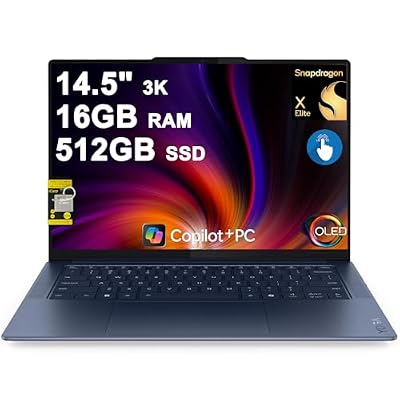
The laptop class in one machine: the fastest ARM CPU you can buy in a consumer laptop, with Linux support that must be checked model by model before purchase.
Specs:
– Processor: Qualcomm Snapdragon X Elite X1E-78-100, 12 cores
– Memory: 16GB LPDDR5X (soldered)
– Storage: 512GB SSD
– Display: 14.5-inch 3K OLED touch
– Ships with: Windows 11; Linux enablement for this platform is still maturing
Samsung T9 Portable SSD 2TB

A game library outlives any one machine, and this keeps the same installs usable on ARM and x86 PCs alike.
Specs:
– Model: MU-PG2T0B/AM
– Capacity: 2TB
– Interface: USB 3.2 Gen 2×2 over USB-C
– Maker-stated sequential read speed: up to 2,000 MB/s on hosts with a matching USB port
– Includes USB-C to C and USB-C to A cables
8BitDo Ultimate 2 Bluetooth Controller

Controllers are the one part of this setup with no translation layer at all: it pairs as a standard wireless gamepad and just works as an input device.
Specs:
– Model: 80ND
– Connectivity: Bluetooth, 2.4G wireless and wired USB
– Sticks: TMR joysticks
– Triggers: switchable between Hall Effect linear and tactile modes
– Includes charging dock and 2.4G adapter
FAQ
Can ARM Linux PCs run Steam?
Yes, with caveats. On 64-bit ARM systems the Steam client runs through Box86, since the client is a 32-bit program, or inside a FEX environment. The store, downloads and library all behave normally; what varies is whether each individual game survives translation.
Is FEX or Box64 better for games?
They optimise for different things. FEX runs software inside a contained x86 RootFS and suits complex or modern binaries, which is why Valve builds on it. Box64 stays closer to the native system, wraps host libraries directly and has a long track record on single-board computers. Many users end up with both installed.
Will anti-cheat games ever work on ARM Linux?
Only if publishers choose to support the platform. The barrier is policy and kernel access, not translator speed: kernel-level anti-cheat targets x86 Windows, and no translation layer changes that. Treat any specific game’s status as fixed until its publisher says otherwise.
Does a faster ARM chip fix the compatibility problem?
Partly. More CPU headroom absorbs translation overhead and lifts the tier of games that run well. It does not fix missing graphics driver features, unsupported instruction extensions or anti-cheat refusals, which are the harder half of the ceiling.
Final verdict
Gaming on ARM Linux PCs is real, documented and improving, and it is still a specialist’s platform. FEX and Box64 make a large back catalogue of indie, retro and older 3D games fair game on hardware that sips power, and Valve’s investment in FEX gives the route a future. Buy in for the catalogue that exists today — a board for tinkering, a Snapdragon laptop whose Linux status you have verified — and let the anti-cheat and AAA walls fall in their own time.










