

- Top Pick: Portta HDMI to Component Converter (PETHRT)
- Runner-up: AmazonBasics RCA Component Video Cable, 6 Feet
- Also consider: Amazon Basics 3.5mm to 2-Male RCA Audio Cable, 4 Feet
Most emulation assumes a modern flat panel, and for most systems that is the sensible default. But the 8-bit and 16-bit consoles, and nearly every arcade board of the era, were drawn for a cathode-ray tube running at 240p. On a real CRT those games need no scaling and no shader: the display draws them at the resolution they were made in.
As an Amazon Associate, we earn from qualifying purchases.
The catch is the wire between PC and television. A consumer CRT TV only accepts a 15 kHz signal, and a modern PC cannot produce one. This guide covers the three ways people bridge that gap — a modified graphics driver, a Linux setup built for the job, and converter boxes — trade-offs included.
This article contains affiliate links, and we may earn a commission when you buy through them at no extra cost to you.
Quick Answer
Yes: a PC can feed a CRT TV a true 240p signal, but only with the right chain. The established route is CRT Emudriver on a compatible older Radeon card, using VMMaker modelines or super resolutions. Linux users get the same result from GroovyMAME with SwitchRes. Converter boxes are easier, but they top out at 480i.
Why a CRT Still Wins for 240p-Era Games
The advantages are physical properties, not nostalgia. A CRT TV draws 240p progressively, leaving the natural dark gaps between scanlines that developers composed around; sprites and backgrounds were drawn expecting those gaps, and there is no scaling step to stretch pixels unevenly.
Motion is the second property: a CRT paints each frame in one pass of the electron beam and then goes dark, so scrolling stays sharp without sample-and-hold blur. The third is compatibility — light-gun games were built around the beam’s timing, and a CRT is the display they were designed to read — plus effectively zero display-side lag.
The Signal Problem: 31 kHz PCs, 15 kHz TVs
Standard-definition CRT TVs scan at 15 kHz, and the signals they accept — 240p and 480i — live inside that one narrow band. A PC graphics card normally starts at 480p, a 31 kHz signal, exactly double what the TV can lock onto — and an out-of-range signal gets you a rolling, scrambled picture or no picture at all.
That is why a plain cable never works: a passive HDMI-to-RCA lead changes the plug, not the signal. Something in the chain must generate or convert a low-resolution mode — either the graphics card produces one natively, or a box scales a high-resolution signal down. The next three sections take those routes in order of quality.
Route One: CRT Emudriver on Windows
CRT Emudriver is a set of modified AMD Catalyst drivers written by Calamity, the developer behind GroovyMAME, and documented on the Eiusdemmodi forums. Where the stock driver refuses low resolutions and low pixel clocks, the modified driver lets the card output true 15 kHz modes from its analogue VGA or DVI-I port. The current line is CRT Emudriver 2.0, whose documentation lists supported cards from the Radeon HD 2000 series through the HD 8000 series, plus the R5 230, R7 250 and some AMD APUs. Modern RDNA cards are not supported.
Two tools do the setup work. VMMaker generates the modelines — the timing recipes for each resolution — installs them into the driver, and can enable EDID emulation so Windows keeps offering the low modes. Arcade OSD switches between modes and adjusts geometry. Installation involves enabling Windows test signing, which the official walkthrough covers. It remains the only Windows route producing real 240p.
Route Two: GroovyMAME and GroovyArcade on Linux
On Linux the same job is done by SwitchRes, a library that generates a modeline on the fly for whatever game launches and switches the display to it. GroovyMAME is a MAME build with SwitchRes integrated: start a game and it picks or creates the matching resolution and refresh rate, so each arcade title runs at its native timing instead of a forced 60 Hz.
GroovyArcade packages this into a bootable Linux distribution for 15 kHz monitors and TVs, and RetroArch exposes a CRT SwitchRes option applying the same mode switching to its cores. If your emulation is mostly arcade and RetroArch, this route avoids the Windows driver; if you need Windows-only emulators, stay with CRT Emudriver.
Route Three: Converter Boxes, Honestly Assessed
The easiest path is a converter: HDMI in from any PC, component or composite out to the TV. Understand what you are accepting, though. These boxes are scalers: they convert a 720p or 1080p desktop to a fixed standard-definition output, usually 480i. No mainstream converter box documents a 240p output mode.
The consequences are real. Your 240p games are rendered at high resolution, scaled down to an interlaced signal, and the crisp structure of 240p is lost; fine detail flickers the way interlaced video does, and the scaling adds processing delay. For menu-driven games and a first experiment this route is legitimate; for action games it gives up most of what the CRT was for.
Modelines and Super Resolutions in Plain Terms
A modeline is a recipe: horizontal and vertical resolution, refresh rate, and the blanking intervals that tell the TV where each frame begins and ends. CRTs are analogue and flexible, so within the 15 kHz band a PC can send dozens of slightly different recipes — 256×240 for one system, 320×224 for another, an arcade board’s odd timings at its own refresh rate. VMMaker and SwitchRes write these recipes for you; you rarely type one by hand.
Super resolutions solve a practical problem: some drivers struggle with very narrow modes, so the PC sends a much wider mode — 2560 pixels across — at the same height and refresh. The TV still sees the correct 240-line signal, and the picture is identical because a CRT has no fixed horizontal pixels.
Living With an Old TV: Inputs, Service Menus and Safety
Input choice matters. On North American sets, component is the best connection most TVs offer and handles 240p cleanly; S-Video is a close second; composite is the fallback. European sets with RGB SCART take the cleanest signal of all. One trap: late HD CRTs and some widescreen sets digitise and upscale everything internally, reintroducing scaling and lag.
Geometry is adjusted in the TV’s service menu, reached with a brand-specific remote code. Write down every original value before changing anything, and adjust only geometry. CRT internals store dangerous voltage even when the set is unplugged, so this guide does not cover opening a television; internal faults are a job for a technician. Finally: these sets are heavy, decades old and slowly failing, so test before committing a room corner to one.
Emulator Settings for a 240p Output
With a real 15 kHz signal available, settings get simpler. Output the game’s native resolution and disable integer scaling — at 1x on a CRT there is nothing to scale. Turn off CRT shaders and filters; the tube does that work physically. GroovyMAME and SwitchRes match odd arcade refresh rates like a board’s 54 Hz instead of forcing 60 Hz and juddering, and one modeline per console system covers nearly everything.
Gear for the Setup
Portta HDMI to Component Converter (PETHRT)
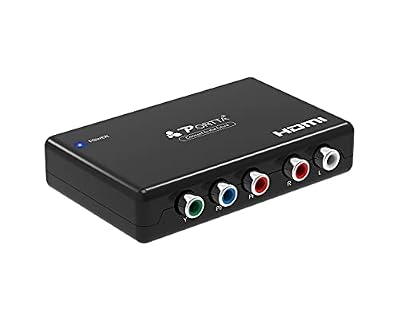
The converter-box route in a single unit: any PC’s HDMI output becomes component video plus stereo audio. It cannot produce 240p — read the section above before choosing it — but for a first experiment, nothing is simpler.
Specs:
– Input: HDMI video and audio
– Output: YPbPr component video, stereo R/L audio
– Model: PETHRT
– Maximum input: 1080p at 60 Hz
– 240p output: not stated
AmazonBasics RCA Component Video Cable, 6 Feet

The cable between a converter (or a transcoder on the Emudriver route) and the TV’s component inputs — the connection that stays clean where composite smears.
Specs:
– Connectors: 3x RCA male to 3x RCA male
– Signal: component video (YPbPr)
– Length: 6 feet (1.8 m)
– Audio: not carried; video only
Amazon Basics 3.5mm to 2-Male RCA Audio Cable, 4 Feet

Neither component nor S-Video carries sound. This cable takes audio from the PC’s headphone jack to the TV’s red and white inputs.
Specs:
– Connectors: 3.5mm male to 2x RCA male
– Length: 4 feet (1.2 m)
– Model: PBH-19821
– Plugs: gold-plated
8BitDo Pro 2 Bluetooth Controller (Hall Effect)
The Pro 2 covers every system in this guide: a proper D-pad for 8-bit and 16-bit games, sticks for anything later, and profiles you can swap per emulator.
Specs:
– Hall-effect analogue sticks
– Bluetooth and USB-C wired connection
– Two remappable back buttons
– Multiple stored profiles
Samsung T7 Portable SSD 1TB

The T7 holds a full disc-based library with room to spare and moves between your main PC and the CRT machine in seconds.
Specs:
– Capacity: 1TB (MU-PC1T0T/AM)
– Interface: USB 3.2 Gen 2, USB-C
– Read speed: up to 1,050 MB/s
– Drop resistant to 2 metres
How to Choose
Choose by how much of the real thing you want. For genuine 240p with per-game refresh rates, CRT Emudriver on Windows or GroovyArcade on Linux are the only routes that deliver it, and the card they need is an old, specific Radeon rather than anything current. If you simply want games on the corner CRT this weekend, a converter box gets a picture up today — at 480i, with the compromises above. Check your television first: an HD CRT undermines every route.
Who Should Skip
Skip this if your gaming is 3D-era and later: PlayStation 2 and GameCube games were built for 480i and 480p, and a flat panel serves them better. Skip it if you cannot source a standard-definition set locally, since shipping a CRT is a gamble. And skip the converter route if low lag is your reason for a CRT — it spends the advantage you came for.
FAQ
Can I just use an HDMI-to-RCA cable?
No. A passive cable changes the plug, not the signal, and the TV cannot display what arrives as 240p. You need a graphics card producing real 15 kHz modes, or an active converter that scales the picture down.
Which graphics cards work with CRT Emudriver?
The project’s documentation lists Radeon cards from the HD 2000 series through the HD 8000 series, plus the R5 230, R7 250 and some AMD APUs, with an analogue VGA or DVI-I output. Current RDNA and NVIDIA cards cannot be used with this driver.
Can a CRT TV be damaged by a wrong signal?
Most sets just refuse or scramble an out-of-range signal, but driving an older fixed-frequency set far outside 15 kHz is not risk-free. Stay inside the modes VMMaker or SwitchRes generates for a 15 kHz display.
Final Verdict
Emulation on a CRT TV is one of the few retro projects where the old display is not a compromise but the correct tool: native 240p, no scaling, true light-gun timing. The honest cost is the chain — an old Radeon and CRT Emudriver, or a Linux GroovyArcade build — because nothing about a modern PC wants to make a 15 kHz signal. Converter boxes work, but they hand you 480i and keep the change. Build the driver route if you will use the set weekly; take the shortcut only to find out whether you care.










