

- Top Pick: FiiO K11 Desktop DAC and Headphone Amplifier
- Runner-up: beyerdynamic DT 770 Pro (80 Ohm)
- Also consider: Creative Sound BlasterX G6
JamesDSP began life on Android, where James Fung’s effect processor built a following for packing a full rack of sound-shaping tools into one app. The Linux port, JamesDSP for Linux (JDSP4Linux), developed by Tim Schneeberger, rebuilds that suite as a native effect processor for PipeWire and PulseAudio clients. It places a virtual device in the audio graph, runs system sound through its effect chain, and hands the result to your real headphones or speakers.
For Linux gamers, the appeal is control over the last stage of game audio: correcting a headphone’s peaks, taming loud explosions without burying quiet footsteps, or adding crossfeed for long sessions. JamesDSP is not a driver, and it cannot rescue a poor recording or a weak headphone. It is a correction and preference tool: powerful, documented, and worth approaching one effect at a time.
As an Amazon Associate, we earn from qualifying purchases.
Quick answer
JamesDSP for Linux is a free, open-source effect processor that sits in the PipeWire graph and processes all system output. It offers two equalizers with AutoEQ integration, a partitioned convolver, crossfeed, automatic bass boost and compression, plus EEL2 scripting. Install the Flathub build, start with EQ only, and add effects one at a time.
What JamesDSP actually is
The heart of the project is libjamesdsp, the DSP core library that powers the Android original. JDSP4Linux wraps it in a desktop application and service that inserts itself into the PipeWire graph as a virtual output, applies your chain, and forwards the result to the physical device you selected. The project is GPL-3.0 licensed, and its PipeWire plumbing is based on EasyEffects.
One design decision shapes everything else: JamesDSP is designed for PipeWire. The PulseAudio backend exists only for backward compatibility and is in maintenance mode, receiving interface updates but not newer features. Selective app exclusion and changing the target audio device are documented as PipeWire-only. A legacy build exists for plain PulseAudio systems, but PipeWire is the recommended route.
The effect chain, block by block
The suite is fixed rather than modular: every effect below lives in one app, in the project’s own engine, not assembled from third-party plugins.
- Interpolated FIR equalizer. A flexible-band equalizer built on FIR filtering, aimed at precise tonal correction.
- Arbitrary response equalizer. The GraphicEQ-style tool known from EqualizerAPO, with integration for the AutoEQ database of headphone correction profiles (the lookup requires a network connection).
- ViPER-DDC. Parametric equalization driven by VDC files, for device-specific correction curves; the companion DDCToolbox creates those files.
- Partitioned convolver. Loads impulse responses to reproduce the character of spaces and devices, using automatic segmenting convolution, and accepts mono, stereo, and full true-stereo impulse responses.
- Crossfeed. Blends a portion of each channel into the other, in the BS2B tradition, with a convolution-based HRTF mode in the core library. On headphones, this block most changes how wide a game world feels.
- Soundstage wideness. A multiband stereo wideness controller treating different frequency regions differently.
- Automatic bass boost. A frequency-detecting design that analyses the incoming stream and sets its own gain, bandwidth, and cut-off, rather than applying a fixed shelf.
- Automatic dynamic range compressor. A highly automated multiband compressor, useful in games that swing between whispered dialogue and gunfire.
- Reverberation. A complex IIR network the project calls Progenitor 2.
- Analog modelling. An aliasing-free even-harmonic generator, in the vacuum-tube modelling tradition of the original app.
- Output limiter. The final safety block, catching peaks the other effects create.
- Live programmable DSP. An EEL2 scripting engine with a small built-in IDE (syntax highlighting, code completion, console output) for writing entirely custom effects.
JamesDSP vs EasyEffects
The overlap is real: both apps process PipeWire output system-wide, both offer equalization, compression, convolution, and limiting, and JamesDSP’s audio plumbing is literally based on EasyEffects code. If you already run EasyEffects happily, JamesDSP is an alternative flavour, not an upgrade.
The differences are architectural. EasyEffects is a plugin host: you build a chain from separate LSP, Calf, and other plugins, route individual apps, and process microphone input as well as output. JamesDSP is a single fixed suite with its own Android-inherited DSP core, working on the playback path. Its distinctive pieces, the AutoEQ-aware GraphicEQ, ViPER-DDC, BS2B-style crossfeed, automated bass and dynamics blocks, and the EEL2 scripting engine, reflect that heritage. Choose EasyEffects for per-app routing and plugin variety; choose JamesDSP for one coherent suite and per-device preset rules.
Installing JamesDSP
The recommended route on PipeWire systems is the Flathub package, me.timschneeberger.jdsp4linux, described by the project as the version for all distributions. One sandbox caveat applies: the Flatpak can only access its own sandboxed home directory by default, which is where its configuration and your impulse responses must live.
Arch users can install the jamesdsp package from the AUR, with a jamesdsp-git variant tracking development. Fedora and openSUSE users are served by a community COPR repository, and everyone else can build from source. PulseAudio holdouts get a separate legacy package and installation document, with the maintenance-mode warning attached.
Two setup rules from the project’s troubleshooting pages are worth following from the start. First, never set the virtual JamesDSP device as your default output: it has no volume controls, so set your real headphones or speakers as default and let JamesDSP target them. Second, since version 2.5.0 the app exposes a CLI and a D-Bus service, so presets and settings can be driven from scripts or keybinds.
Presets, per-device rules, and scripting
JamesDSP stores its configuration in an audio.conf file and supports named presets that can be saved, loaded, and deleted from the GUI or the command line. Preset rules can bind a preset to a specific output device, so your headphone correction loads when the headphones connect and your speaker preset returns when they unplug. The CLI mirrors the same operations, falling back to editing the configuration file directly when no instance is running.
The scripting engine deserves a sober description. EEL2 scripts run inside the live audio path with an auto-generated interface for their parameters, and the bundled IDE makes experimentation approachable. It is a genuine differentiator for tinkerers, and equally a place where a bad script can produce silence or distortion. Read scripts before loading them, like any other code.
Honest limits
Every effect costs CPU time, unevenly. The project’s troubleshooting guide names the convolver as especially resource-hungry and lists crackling as the symptom of a CPU that cannot finish processing in time; the suggested remedies are disabling heavy effects and giving the process real-time priority, including the realtime group fix if the kernel keeps killing the processing thread. On a modest machine already busy running a game, stack effects conservatively. No load figures are quoted here because the project publishes none.
There are boundaries no setting removes. JamesDSP processes playback only, so it does nothing for your microphone. It cannot add information a recording lacks, and heavy-handed correction can make a good headphone sound worse, which is why the standard advice is one block at a time with a bypass comparison handy. And remember the PulseAudio caveat: app exclusion and target-device switching are PipeWire-only.
Gear that makes the processing audible
DSP correction shows its value, and its mistakes, clearly on revealing headphones fed by a clean DAC.
FiiO K11 Desktop DAC and Headphone Amplifier

A desktop DAC and amplifier is the honest endpoint for a processed signal: JamesDSP shapes the sound in software, and the K11 converts and amplifies it without adding processing of its own. A gain switch and analogue volume knob suit sensitive in-ears and harder-to-drive over-ears alike.
Specs:
– DAC chip: Cirrus Logic CS43198
– Playback: up to 384 kHz, 32-bit PCM and DSD256 over USB, as maker-stated
– Inputs: USB-C, optical, coaxial
– Outputs: 6.35 mm headphone jack, RCA line-out
– Output power: maker-rated over 1400 mW into 32 ohms
– Tier: mid-range
Sennheiser HD 560S
A neutrally tuned open-back is the natural partner for EQ correction, with less house sound to fight. The HD 560S is a popular AutoEQ target, and its angled drivers present a wide field for crossfeed to shape.
Specs:
– Design: open-back, over-ear
– Impedance: 120 ohms
– Frequency response: 6 to 38,000 Hz, as maker-stated
– Cable: detachable 1.8 m, 3.5 mm plug with screw-on 6.35 mm adapter
– Earpads: velour, replaceable
– Weight: 240 g
– Tier: mid-range
beyerdynamic DT 770 Pro (80 Ohm)

The closed-back counterpoint: isolation for shared rooms, and a livelier low end that many owners tame with a gentle GraphicEQ cut. The 80-ohm version runs well from most desktop outputs.
Specs:
– Design: closed-back, over-ear
– Impedance: 80 ohms
– Frequency response: 5 to 35,000 Hz, as maker-stated
– Cable: 3 m straight, 3.5 mm plug with 6.35 mm adapter
– Weight: 270 g without cable
– Model number: 474746
– Tier: mid-range
Creative Sound BlasterX G6
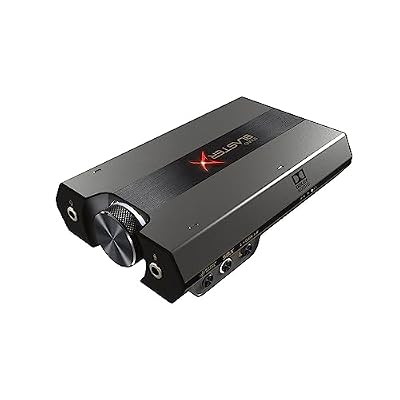
A USB gaming DAC with its own virtual surround and Dolby decoding. Treat it as an alternative processor, not a stacking partner: run either its surround or JamesDSP’s crossfeed and EQ on a given game, and compare.
Specs:
– Type: external USB DAC and headphone amplifier
– Playback: up to 32-bit, 384 kHz, as maker-stated
– Dynamic range: 130 dB, as maker-stated
– Amplifier: Xamp discrete headphone amp
– Processing: Dolby Digital decoding, 7.1 virtual surround
– Model: SB1770
– Tier: mid-range
SteelSeries Arctis Nova 7 Gen 2

A wireless headset is where system-level DSP earns its keep on Linux, because the maker’s tuning software targets other platforms. JamesDSP processes the dongle’s output like any other device, and a per-device preset rule can load your correction automatically.
Specs:
– Type: wireless gaming headset
– Connection: 2.4 GHz wireless plus Bluetooth, simultaneous
– Dongle: USB-C
– Drivers: 40 mm
– Model number: 61730
– Tier: premium
How to choose
Start from the job, not the effect list. For correction, begin with the GraphicEQ and an AutoEQ profile for your exact headphone, then listen for a few days. For flavour, add one block at a time: crossfeed for long sessions, the automatic compressor for games with wild volume swings, the convolver only with CPU headroom to spare. Confirm you are on PipeWire before expecting app exclusion or device switching. A widely profiled headphone and a quiet DAC give correction the cleanest canvas.
Who should skip
Skip JamesDSP if you are on plain PulseAudio and expect the full feature set: the advanced routing is PipeWire-only and that backend is maintenance-only. Skip it if you play competitive titles and prefer nothing extra in the audio path; any processing stage is one more thing between the game and your ears. Skip it if your real problem is your microphone, since JamesDSP works on playback only. And skip it if you are satisfied with EasyEffects’ per-app plugin chains; the overlap makes running both redundant.
FAQ
Is JamesDSP free?
Yes. JDSP4Linux is open-source software under the GPL-3.0 license, distributed through Flathub, the AUR, a Fedora COPR, and source builds.
Does JamesDSP work on PulseAudio?
It does, through a separate legacy build, but that backend is in maintenance mode. The project recommends PipeWire, and features such as app exclusion and target-device switching are documented as PipeWire-only.
Should I pick JamesDSP or EasyEffects?
Pick EasyEffects for per-application routing, microphone processing, and mix-and-match plugin chains. Pick JamesDSP for one integrated suite with AutoEQ-aware GraphicEQ, ViPER-DDC, crossfeed, per-device preset rules, and EEL2 scripting. Running both at once is not recommended.
Can JamesDSP improve my microphone for voice chat?
No. JamesDSP processes the playback path only. For microphone effects, use an input-capable processor or your chat app’s built-in noise suppression.
Final verdict
JamesDSP for Linux is the connoisseur’s alternative in PipeWire audio processing: one coherent, Android-born suite whose convolver, crossfeed, AutoEQ-aware equalizers, and scripting engine reward one-change-at-a-time tuning. It asks for PipeWire, a reasonably capable CPU, and honest expectations. Give it those, and it is the most characterful way to shape game audio on Linux; for per-app routing, EasyEffects remains the sensible default.










