

- Top Pick: Best for 1440p: Skytech Azure 3
- Runner-up: Best for Creation: CyberPowerPC Gamer Xtreme
- Also consider: Skytech King 95 Gaming PC (Ryzen 7 9700X, RTX 5070)
This budget tier is where 1440p gaming stops requiring compromises. Prebuilts here pair an RTX 5070-class graphics card with a modern eight-core or better processor, 32GB of DDR5 memory, and a fast Gen4 SSD, which is the combination that holds high settings and high refresh rates at 1440p without the price jump of 4K-focused machines. Every pick below is a complete, ready-to-run prebuilt with Windows 11 installed.
The three systems are organized by use case rather than ranked in a single line, because the right choice depends on your monitor and workload. One is tuned for very high frame rates at 1080p, one is the balanced 1440p pick for most buyers, and one adds the extra CPU cores that video editing, rendering, and streaming reward. Prices move often, so check the current price on the Amazon product page before you order.
As an Amazon Associate, we earn from qualifying purchases.
Quick Answer
For most buyers, the Skytech Azure 3 is the pick at this tier: its Ryzen 7 7700X, RTX 5070, and 32GB of DDR5 memory deliver smooth 1440p gaming at high settings, backed by a 360mm liquid cooler and an 850W Gold power supply. Choose the King 95 for maximum 1080p frame rates, or the CyberPowerPC Gamer Xtreme if creation work shares the desk.
Table of Contents
- Best for 1080p High-Refresh: Skytech King 95
- Best for 1440p: Skytech Azure 3
- Best for Creation: CyberPowerPC Gamer Xtreme
- How to Choose
- When to Move Up or Down a Tier
- Who Should Skip
- FAQ
- Final Verdict
Best for 1080p High-Refresh: Skytech King 95
Competitive players on a 1080p 240Hz or faster monitor need the CPU to feed frames as much as the GPU, and the King 95 leans into that with a Ryzen 7 9700X. Its higher boost clocks keep minimum frame rates up in esports titles, while the RTX 5070 has more than enough headroom at this resolution, leaving room to raise settings in single-player games. The panoramic King 95 case and 360mm liquid cooler also keep noise down during long sessions.
Specs:
- Processor: AMD Ryzen 7 9700X, up to 5.5GHz boost
- Graphics: NVIDIA GeForce RTX 5070, 12GB GDDR7
- Memory: 32GB DDR5 6000 RGB
- Storage: 1TB Gen4 NVMe SSD
- Power supply: 850W Gold
- Cooling: 360mm ARGB liquid cooler (AIO)
- Operating system: Windows 11 Home
Best for 1440p: Skytech Azure 3

The Azure 3 is the balanced build this tier exists for. The RTX 5070’s 12GB of GDDR7 memory suits 1440p textures at high and ultra settings, and DLSS upscaling plus frame generation extend that headroom in demanding releases. The Ryzen 7 7700X is a proven gaming processor that will not bottleneck the card, and 32GB of fast DDR5 means games, a browser, and chat apps can stay open together. An 850W Gold ATX 3 power supply leaves sensible room for a future GPU upgrade.
Specs:
- Processor: AMD Ryzen 7 7700X, up to 5.4GHz boost
- Graphics: NVIDIA GeForce RTX 5070, 12GB GDDR7
- Memory: 32GB DDR5 6000 RGB
- Storage: 1TB Gen4 NVMe SSD
- Power supply: 850W Gold ATX 3
- Cooling: 360mm ARGB liquid cooler (AIO)
- Operating system: Windows 11 Home
Best for Creation: CyberPowerPC Gamer Xtreme
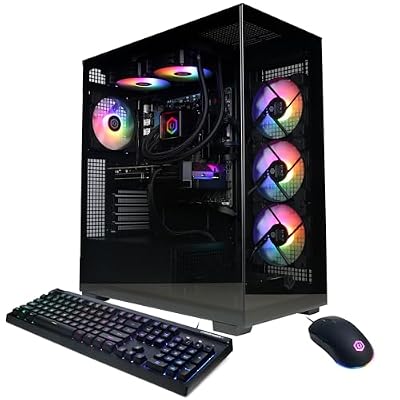
If the PC also has to edit video, render 3D scenes, or stream while gaming, the Gamer Xtreme configuration built around the Ryzen 9 9900X is the better tool. Its twelve cores finish exports and encodes far faster than the eight-core chips above, and the RTX 5070 still handles 1440p gaming and GPU-accelerated effects with ease. It is the pick for a hybrid desk where work deadlines matter as much as frame rates.
Specs:
- Processor: AMD Ryzen 9 9900X, 4.4GHz base
- Graphics: NVIDIA GeForce RTX 5070, 12GB GDDR7
- Memory: 32GB DDR5
- Storage: 1TB PCIe 4.0 NVMe SSD
- Connectivity: WiFi ready
- Included: Gaming keyboard and mouse
- Operating system: Windows 11 Home
How to Choose
Start with your monitor. At 1080p high-refresh, prioritize the fastest CPU, which is why the King 95 leads that section. At 1440p, the GPU does the heavy lifting, and every system here uses the same RTX 5070 class of card, so choose on cooling, power supply quality, and case airflow instead. Treat 32GB of DDR5 as the floor at this tier; builds that cut memory to 16GB to look cheaper will feel it in modern games and multitasking.
Check the power supply before you buy. An 850W Gold unit, as in both Skytech systems, supports this GPU class comfortably and survives one upgrade cycle. Also confirm storage: 1TB fills quickly with current game installs, so a free second M.2 slot is worth having. If you would rather assemble parts yourself at a nearby budget, our gaming PC build guide for the next budget step up shows what the money buys component by component.
When to Move Up or Down a Tier
Move up to the best gaming PC under the next tier if you play competitive titles at 1080p or 1440p with a very high refresh monitor and want a CPU-first build tuned for esports frame rates, or if you already suspect you will want stronger creation performance soon. The step up buys processor headroom, not a different class of graphics card.
Move down a tier if you game at 1080p on a 144Hz monitor or play mostly esports and indie titles. The systems in our best gaming PC under the lower tier use the previous class of hardware and still cover that workload well, freeing budget for a better monitor or peripherals. Stay at this tier if 1440p high-refresh is your target: it is the point where the RTX 5070 class, 32GB of memory, and proper cooling all arrive together without paying for 4K headroom you will not use.
Who Should Skip
Skip this tier if you own a 4K monitor and expect native 4K at high settings; that workload belongs to the higher tiers with a stronger GPU class. Skip it if you only play lightweight esports titles at 1080p, where a cheaper tier performs the same in practice. And skip prebuilts entirely if you enjoy building and already own parts you can reuse, since a self-build at a similar budget can redirect money toward the GPU.
FAQ
Is an RTX 5070 enough for 1440p high-refresh gaming?
Yes for most titles at high settings, especially with DLSS upscaling enabled. The most demanding ray-traced games may need balanced settings to hold the highest refresh rates, but the card’s 12GB of GDDR7 memory is well matched to the resolution.
Should I prioritize CPU or GPU at this tier?
For 1440p, the GPU matters most once you have a modern eight-core processor. For 1080p at very high refresh rates, or for editing and rendering, CPU cores and clocks matter more, which is what separates the three picks above.
Is 32GB of RAM necessary for gaming?
It is the sensible standard at this tier. Current games plus background apps can push past 16GB, and all three systems here include 32GB of DDR5, so memory should not be the reason to choose between them.
Can these PCs be upgraded later?
Yes. All three use standard desktop parts on current platforms, and the Skytech systems’ 850W power supplies leave room for a stronger graphics card. Check case clearance and the motherboard’s spare M.2 slots before planning storage upgrades.
Final Verdict
This tier is the 1440p sweet spot: an RTX 5070, 32GB of DDR5, and proper liquid cooling in every pick. Take the Skytech Azure 3 for balanced 1440p play, the King 95 if 1080p frame rates come first, and the CyberPowerPC Gamer Xtreme when creation work shares the machine. If your priorities shift toward esports CPU performance, the next tier up is compared in our guide linked above.










