A dual-monitor extender is the fastest way to double your laptop’s usable screen space without buying a desk full of hardware. These clip-on panels attach to your laptop lid and swing out to give you a second, or even a third, display that folds away when you are done, making them ideal for anyone who works in more than one place.
Because the category spans everything from ultra-light 14-inch panels to larger triple setups running in dual mode, the right choice depends on your laptop size, port availability, and operating system. This review compares the leading dual-monitor extenders to help you pick the one that fits your workflow.
As an Amazon Associate we earn from qualifying purchases.



Design & Build
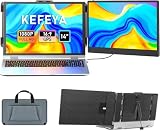
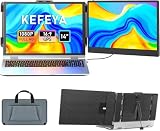
The lineup splits between focused dual-panel units and convertible triples. The KEFEYA 14-inch dual and domyfan 14-inch dual are purpose-built for two-screen work, compact and light with broad device compatibility that even extends to consoles like the Switch and PS5. The 235-degree rotating detachable model adds a panel that swivels for sharing, while triple-capable units like the 15.6-inch triple and the Vixtan 14-inch can run in dual mode when you want less bulk. Construction leans on aluminum for rigidity, and the 14-inch panels in particular strike a nice balance between screen size and manageable lid weight.
Performance
Display quality is a consistent strong point: 1080p FHD IPS panels with wide viewing angles that look great for documents, browsers, and video. The best single-cable USB-C models, like the KEFEYA and domyfan, carry both video and power over one line, which keeps the setup clean and the desk uncluttered. Windows laptops are typically plug-and-play, while Apple Silicon Macs often need a DisplayLink driver to drive the extra panel. The console compatibility on the KEFEYA is a genuine bonus for anyone who wants a portable second screen for gaming on the go. Refresh rates sit at 60Hz, ideal for productivity.
Pros & Cons
- Doubles screen space instantly for a major productivity boost anywhere.
- Single-cable USB-C convenience on the best dual models.
- Broad compatibility, including consoles on units like the KEFEYA.
- Compact 14-inch panels keep lid weight and bulk in check.
- macOS driver requirement for extra panels on Apple Silicon.
- Battery drain increases when powering a second screen.
- Lid weight can strain very thin laptop hinges.
Alternatives to Consider
If you frequently need three screens, a triple extender that runs in dual mode gives you room to grow. Desk-bound users get more value from a full-size external monitor on an arm. And gamers wanting a portable second screen for a console should prioritize the KEFEYA for its explicit Switch and PS5 support over office-focused panels.
Frequently Asked Questions
Will a dual extender work with my laptop?
Most fit 13 to 17-inch laptops over USB-C or HDMI. Confirm your USB-C port supports video output before purchasing.
Does it need its own power supply?
Single-panel dual setups often run off one USB-C cable, though some benefit from extra power to avoid draining your laptop battery.
Can I use it with a MacBook?
Yes, but Apple Silicon usually needs DisplayLink software for a second external panel. Windows laptops are generally plug-and-play.
Do these work with game consoles?
Some, like the KEFEYA, explicitly support the Switch and PS5, making them a handy portable display for gaming.
Verdict
A dual-monitor extender is one of the highest-impact upgrades a mobile worker can make. The KEFEYA 14-inch is our all-round pick for its single-cable simplicity and wide compatibility, while the domyfan is a strong, lightweight alternative. Check your laptop’s USB-C video support and OS, and you will have a two-screen workstation that travels anywhere.