

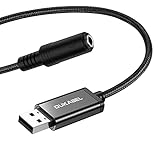
- Top Pick: USB Headphone Adapter, DUKABEL External Sound Card for PC, PS4, PS5-25CM | TRRS-Mic Supported, DAC Chip, 16bit/48KHz, Compatible with Windows, PC, Laptop, Mac, Linux, Desktops, PS4, PS5
- Best Value: MOSWAG USB to 3.5mm Jack Audio Adapter External Stereo Sound Card | Mic TRRS, no driver required, Nylon Braided, USB to Aux Compatible with Windows PC Laptop Mac Linux Speaker PS4, 7.84 Inch
- Premium Choice: ENVEL USB to 3.5mm Audio Adapter, External Stereo Sound Card | Dual TRS 3-Pole 3.5mm Headphone and Microphone Jack for PS4/PS5/PC/Laptop, Built-in Chip Mic-Supported Headphone Adapter
A USB sound card for a PS4 is a small dongle with one big job: turning a USB port into a headphone and microphone connection for a headset that does not plug in the way you want. Maybe your favorite headset ends in a single 3.5mm plug, maybe it has two separate plugs for sound and mic, or maybe you simply want a wired option when the controller jack is awkward. The real decision is the jack layout, then whether the adapter is stereo or sells a virtual surround mode.
This guide is for console owners who want a small accessory that does not turn into a compatibility headache in 2026. Every listing below names PS4 in its title, and each is read for what it states: the jack type, the driver note, the length and any audio claims. Specs such as sample rate are quoted only where the title provides them, so treat anything else as something to confirm with the seller before buying.
Quick Picks
As an Amazon Associate we earn from qualifying purchases at no extra cost to you.


| Product | Best for | Key spec from the title |
|---|---|---|
| DUKABEL USB Headphone Adapter | Headsets with a TRRS mic plug | DAC chip, 16bit/48KHz, 25CM |
| MOSWAG USB to 3.5mm Adapter | A sturdy, short cable | Mic TRRS, no driver, nylon braided |
| ENVEL USB Audio Adapter | Headsets with split plugs | Dual TRS 3-pole jacks |
| biaze USB Audio Adapter | Plug-and-play across PC and console | No drivers, TRS jack |
| 7.1 Channel USB Sound Card | A surround-labeled dongle | 7.1 channel, plug and play |
| Virtual 7.1 Sound Card with PUBG Effects | Gaming headsets and shooters | Virtual 7.1, PUBG sound effects |
| Pastall USB to 3.5mm Adapter | Docking stations and laptops too | USB A to 3.5mm TRRS female |
| USB to 3.5mm Audio Adapter (generic) | Broad device compatibility | 3.5mm aux stereo converter |
How to Choose
Match the jack to your headset
TRRS means one plug with four contacts that carries sound and microphone together, as on a typical phone or gaming headset. TRS with three contacts carries only sound, so a headset with split green and pink plugs needs an adapter with separate headphone and mic jacks. Choose by plug shape first, because the wrong jack gives sound with no voice chat.
Stereo versus virtual 7.1
Most adapters pass a stereo signal, which is what a console headset needs. A listing that says 7.1 usually means the chip simulates surround on a stereo headset; it is not seven separate drivers. That can help in games where footsteps matter, but it also adds processing. If you prefer natural stereo, avoid anything that enables effects by default.
Driver and plug-and-play claims
Several titles say no drivers needed, which is the safe expectation for a console accessory. A console cannot install software, so any adapter that needs a driver is a poor fit. Look for the words plug and play, and confirm that PS4 appears in the title rather than in a long list of unrelated devices.
Cable length and build
Shorter cables, like the 25CM and 7.84 inch examples, keep the dongle close to the controller or console and avoid tugging. Nylon braiding helps against kinks. Budget models cut corners on strain relief and shielding, so a braided cable and a clear jack layout are reasonable signs of care. Ignore marketing claims about audio quality that give no chip or sample rate, and remember that a clean analog signal still depends on the quality of the headset you plug in.
The 8 Best Options
Two further listings were left out: one that names Windows and Mac only, and one whose title lists PS5 and Switch 2 but not PS4.
DUKABEL USB Headphone Adapter
The DUKABEL is a short 25CM adapter that names PS4 and PS5, a DAC chip, 16bit/48KHz audio and TRRS mic support. It is the pick for someone with a single-plug gaming headset who wants the technical detail stated up front.
- Strength: sample rate and DAC chip are both in the title.
- Strength: TRRS microphone support is named.
- Trade-off: it is a stereo adapter, so no surround processing.
The short cable keeps the dongle close to the console, which helps if the front USB ports sit near the couch. Skip it if your headset uses separate sound and mic plugs, or if you want a longer lead to reach across a desk.
MOSWAG USB to 3.5mm Jack Audio Adapter
A nylon braided adapter at 7.84 inches with a TRRS mic input, described as needing no driver. It works with Windows, Mac, Linux and PS4 per the title, so the same piece moves between devices.
- Strength: nylon braiding resists tangling.
- Strength: no driver is stated.
- Trade-off: the title does not state the sample rate.
The braided lead is the standout choice for a bag or a controller pouch, since it tends to survive repeated bending better than a bare sleeve. Skip it if you want a specific chip or format listed, or a length beyond the short span in the title.
ENVEL USB to 3.5mm Audio Adapter
The ENVEL has dual TRS 3-pole jacks, one for headphones and one for the microphone, and names PS4, PS5, PC and laptop. It is for headsets with split plugs that otherwise cannot share a single jack.
- Strength: separate headphone and mic jacks.
- Strength: a built-in chip is mentioned.
- Trade-off: it will not suit a single TRRS plug.
Players who recently bought a streaming-style mic and a separate pair of studio headphones will find the split layout convenient, because each plug goes where it belongs without a splitter. Skip it if your headset has only one 3.5mm plug, since a single combined plug cannot use both jacks.
biaze USB Audio Adapter
This one lists PC, computers, laptops, PS5 and PS4, with plug and play, no drivers, and a 3.5mm headphone and microphone TRS jack for Windows and Mac. It suits buyers who use a headset across a console and a laptop.
- Strength: broad device list.
- Strength: no drivers needed.
- Trade-off: the title says TRS, so confirm how the mic connects.
The shared laptop-and-console angle is its main appeal, as a household with one headset and several devices can keep a single adapter on hand. Skip it if you need a specific jack explained clearly, or if you want the microphone behavior spelled out before you buy.
USB Sound Card, 7.1 Channel
A plug-and-play adapter that says 7.1 channel, clear sound, external microphone audio jack, and compatibility with PC, laptop, Mac, PS4 and headphones. It is for a buyer who likes the idea of a surround label without extra software.
- Strength: the title names PS4 plainly.
- Strength: no drivers needed.
- Trade-off: no brand or chip is named in the title.
The 7.1 label is easy to misread, so treat it as a mode on a stereo headset rather than a speaker count. Skip it if you prefer plain stereo or want a named brand and chip.
USB Sound Card Virtual 7.1 with PUBG Sound Effects
This virtual surround adapter promises PUBG sound effects and lists PC, PS4, PS5, Mac and a gaming headset. It targets players of competitive shooters who want a processing mode aimed at positional sound.
- Strength: a game-specific effect mode is named.
- Strength: plug and play.
- Trade-off: the effect processing is not always wanted.
The effect mode is presented as a feature, so owners can expect a changed sound signature compared with a plain adapter. Skip it if you prefer uncolored stereo, or if you play slower, atmospheric games where natural tone matters more.
Pastall USB to 3.5mm Jack Audio Adapter
The Pastall converts a USB A port to a 3.5mm TRRS female headset jack, aimed at PS4 and PS5 and also listing headphone, Mac, Linux, laptop, desktop and docking station use. It suits people who connect to different machines.
- Strength: a TRRS female jack is stated.
- Strength: docking station use is listed.
- Trade-off: a long compatibility list can hide limits.
The docking station mention is unusual in this group and hints at office or laptop use. Skip it if you want a console-only adapter, or if you like a title that sticks to a single platform.
USB to 3.5mm Audio Adapter (3.5mm Aux Stereo)
A generic external sound card jack adapter with a 3.5mm aux stereo converter, compatible with headset, PC, laptop, Mac, Linux, desktops, PS5 and PS4. It is a simple fit for anyone who needs just a working connection.
- Strength: PS4 and PS5 are both named.
- Strength: plug and play.
- Trade-off: no chip or sample rate is shown.
It is the plainest listing in the group, which suits people who want an adapter with no extras and no surround mode. Skip it if you want detailed audio specs, a named chip, or a cable with visible build details.
Which One Fits Your Situation
Your headset has a single 3.5mm plug with mic
The DUKABEL or MOSWAG, which name TRRS mic support. The DUKABEL states its sample rate, while the MOSWAG adds a braided lead, so pick by which detail matters more to you.
Your headset has separate green and pink plugs
The ENVEL, with dual TRS jacks, is the clear match. Plug the green end into headphones and the pink end into the microphone jack, and keep the cable away from the controller cord.
You play competitive shooters
The virtual 7.1 adapter with PUBG sound effects is the one aimed at that style.
You share a headset between devices
The Pastall or biaze list a wide set of devices.
Common Mistakes
- Buying a TRS adapter for a TRRS headset, and losing the microphone.
- Assuming 7.1 means seven real speakers.
- Ignoring PS4 in the title and trusting a long device list.
- Expecting a driver install on a console.
- Choosing the longest cable when a short one avoids snags, or leaving the adapter dangling from a front USB port where a bump can bend the connector.
Related guides
- Battery Operated Smoke And Carbon Monoxide Detectors
- Combination Smoke And Carbon Monoxide Detectors
- Aio Liquid Coolers For High Performance Gaming
Frequently Asked Questions
Do I need drivers on a PS4?
A console cannot install drivers, so look for plug and play wording. Most adapters in this guide say no drivers or plug and play in their titles, but console support can still vary, so read the seller notes for your system version.
Will the microphone work?
Only if the jack layout matches your headset. TRRS adapters suit single-plug headsets, while dual TRS jacks suit split plugs. When in doubt, count the dark bands on the plug: three bands usually means a combined headset plug.
Is virtual 7.1 better than stereo?
It is a processing mode that some players like, mainly for judging direction in busy online matches. Others prefer natural stereo for music and story games, so choose based on what you play most.
Do these work on PS5 too?
Several titles name PS5 as well as PS4, but confirm it in the listing you choose. Since the adapter is a USB device, it should also work as a plain headphone adapter on a laptop or desktop, which makes it a handy spare to keep in a drawer.







