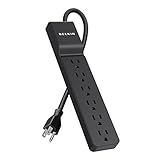
The best surge protector for a PS5 is a UL 1449-listed unit rated at 2,000 joules or more with a voltage protection rating (VPR) of 400V or lower, enough outlets for your TV and audio gear, and ideally coaxial or Ethernet protection if those cables connect to your console setup. Well-established lines that meet those criteria include APC SurgeArrest Performance models, Tripp Lite (Eaton) Isobar strips, Belkin’s higher-joule Pivot-Plug models and CyberPower’s professional series, typically costing $25–$80 depending on outlet count and extras.
As an Amazon Associate we earn from qualifying purchases at no extra cost to you.


What a PS5 actually draws, and why it matters
A surge protector does not need to supply much power for a console setup, but it should be sized for everything plugged into it, not just the PS5. Typical figures:
| Device | Typical draw while gaming | Rest mode / standby |
|---|---|---|
| PS5 (original or Slim) | about 200–230W | about 1–4W (more while charging controllers or downloading) |
| PS5 Pro | about 220–240W | about 1–4W |
| 55–65 inch LED TV | about 100–200W | under 1W |
| Soundbar with subwoofer | about 30–80W | under 2W |
| Wi-Fi router or mesh node | about 10–20W | same |
| Controller charging station | about 10W | under 1W |
Worked load calculation
Add up a full living room setup at its gaming peak: 240W (PS5 Pro) + 200W (65-inch TV) + 80W (soundbar) + 20W (router) + 10W (charger) = 550W. On a 120V circuit, that is 550 / 120 = about 4.6 amps. Almost every consumer surge protector is rated for 15 amps (1,800W), so the strip runs at roughly 30% of capacity. Load capacity is not the problem; protection quality and outlet layout are.
Where it does become a problem is daisy-chaining. Plugging a strip into another strip, or adding a space heater or gaming PC to the same strip, can push a 15A circuit and its breaker past safe limits. Keep the console setup on one quality protector plugged directly into a wall outlet.
The specs that separate good protection from marketing
| Spec | Minimum for a PS5 setup | Better | Why it matters |
|---|---|---|---|
| UL 1449 listing | Required | Current edition listing | Confirms the device was certified as a surge protective device, not just a power strip |
| Joule rating | 1,000J | 2,000–4,000J | Total energy it can absorb over its life before protection degrades |
| VPR (clamping voltage) | 500V | 330–400V | Lower means less voltage reaches the PS5 during a spike |
| Protection indicator | Required | Auto-shutoff when protection is spent | Tells you when the surge components have worn out |
| EMI/RFI filtering | Optional | Rated in dB | Reduces electrical noise, which can help audio hum |
| Coax / Ethernet ports | If you use cable internet or wired LAN | Both | Surges can enter through data lines, not just power |
A note on joules: the rating is cumulative wear capacity, not a guarantee against a single huge event. Internal metal oxide varistors (MOVs) degrade a little with every surge they absorb. A 3,000J unit simply lasts longer in an area with frequent small spikes than a 1,000J unit does.
Picks by setup
TV stand setup with cable internet: APC SurgeArrest Performance
The higher-end SurgeArrest models offer a high joule rating, a mix of standard and widely spaced outlets for power bricks, and coaxial plus Ethernet protection. That combination suits a setup where the cable modem or router sits next to the PS5 and TV. Typical price range is $35–$60.
Heavy-duty, metal housing: Tripp Lite (Eaton) Isobar
Isobar strips use isolated filter banks so noisy devices like subwoofers do not feed interference into other outlets, and they come in an all-metal housing that holds up well behind furniture. They are a strong option for a PS5 sharing a strip with an AV receiver. Expect roughly $60–$100.
Lots of outlets with rotating plugs: Belkin Pivot-Plug series
Rotating outlets make it easier to fit chunky power adapters without blocking neighbors. Choose a model in the higher joule range if the PS5 is the main device. Usually $25–$45.
Wall-mount or compact: CyberPower professional or wall-tap models
If your console sits next to the wall outlet and you only need four to six outlets, a compact wall-tap protector with a solid joule rating and indicator light keeps cables tidy. Typically $15–$35.
Outlet planning for a console corner
Count everything you will plug in, then add two. A typical setup needs:
- PS5
- TV
- Soundbar or receiver
- Subwoofer if separate
- Router or mesh node
- Controller charging station
- Lamp, LED strip or a second console
That is seven devices, so an 8- to 12-outlet protector with at least two widely spaced outlets is the realistic minimum. The PS5 itself uses a figure-8 (IEC C7) power cable with a standard two-prong wall plug, so it does not need a wide outlet, but the soundbar and TV adapters often do.
Surge protector vs UPS for a PS5
A surge protector handles spikes but does nothing during a power cut. If outages are common where you live, a line-interactive UPS with surge protection can keep the PS5 running long enough to save and shut down properly, which avoids the database rebuild prompts that sometimes follow an abrupt power loss.
For sizing, a PS5 Pro and a 65-inch TV together draw about 440W. A UPS rated around 900W / 1,500VA typically provides roughly 5–10 minutes at that load, which is enough to save and power down. If you only want to protect the console, a 600W unit is often sufficient. Pure sine wave output is the safer choice for modern power supplies with active power factor correction.
Maintenance and replacement
- Check the protection light every few months. If it is off, the strip may still pass power but no longer protects anything.
- Replace after a major event such as a nearby lightning strike or a power surge that tripped breakers, even if the light still shows protected.
- Plan to replace every 3–5 years in areas with unstable power, since MOVs wear out gradually.
- Use a grounded three-prong outlet. Surge protection relies on a ground path; on an ungrounded outlet most protectors offer little real protection, and many show a wiring fault indicator.
- Unplug during thunderstorms if you can. No consumer surge protector can stop a direct lightning strike.
Common questions
Does the PS5 need a surge protector at all?
The PS5’s internal power supply has basic protection, but it is not designed to absorb repeated spikes. A quality surge protector is cheap insurance for a console that costs several hundred dollars.
Can rest mode cause problems with a surge protector?
No. Rest mode draws only a few watts and works normally through a surge protector. Just avoid switching the strip off while the PS5 is in rest mode, which cuts power the same way an outage would.
Is a connected equipment warranty worth anything?
It can help, but claims usually require proof of the surge event and correct installation. Treat it as a bonus rather than the main reason to choose a model.