

Cloud gaming depends on a steady connection between the screen and the router, and that is where a network switch earns its place. A switch takes one wired connection from a router and turns it into several, so a television, a handheld dock, a console, and a laptop can all sit on the same wired network instead of crowding onto wireless. It does not make the cloud server closer, and it does not cut the round trip to the data center.
Judge the switches below by fit, not by speed claims. GeForce Now lists 15 Mbps for 720p and 25 Mbps for 1080p, with latency under 80 ms, while Xbox Cloud Gaming lists 10 Mbps and 20 Mbps for its tiers, and every gigabit switch here clears those figures many times over. The real differences are port count, a faster-than-gigabit router, and management controls.
As an Amazon Associate, we earn from qualifying purchases.
Quick answer
For most cloud-gaming homes, a five-port gigabit switch is enough: the TP-Link TL-SG105 or the Netgear GS305 wires a television and a handheld dock for steady play. Choose the eight-port TP-Link TL-SG108 when two rooms share one run, the Netgear GS305E when you want basic management controls, and the TP-Link TL-SG105S-M2 when your router and modem already run faster than gigabit.
Best network switches for cloud gaming
1. TP-Link TL-SG105 — Best for a single television setup
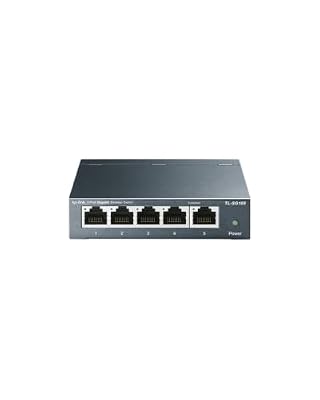
The TP-Link TL-SG105 is the simplest answer here, and for a single television that simplicity is a strength. It has five gigabit ports, so one cable comes in from the router and up to four go out: a smart television running a cloud-gaming app, a handheld dock, a console, and a spare port for a laptop. There is nothing to configure and no fan to hear during a quiet scene. Its metal case and shielded ports suit a living room shelf.
The limit is scale. Five ports disappear quickly once a household adds a second television or a wired access point, and there is no faster port for a multi-gigabit router. A cloud-gaming stream needs only a small fraction of a gigabit port, so the headroom here is about keeping downloads from fighting the stream for the same wireless channel.
Specs
| Spec | Detail |
|---|---|
| Ports | 5 gigabit RJ45 ports |
| Speed per port | 10, 100, and 1000 Mbps |
| Switching capacity | 10 Gbps |
| Management | Unmanaged, plug and play |
| Size | 3.9 by 3.9 by 1 inches |
2. TP-Link TL-SG108 — Best for two rooms on one run

The TP-Link TL-SG108 takes the same idea as the five-port model and stretches it across a household. Eight gigabit ports mean one cable from the router can feed a living-room television, a bedroom television, a handheld dock, a console, and a laptop, and still leave ports spare. That matters because the second television is often the reason a household starts looking at switches: one room is already wired, and the wireless room is the one that stutters.
Instead of running a separate long cable from the router to every device, one run goes to the switch and short cables fan out from there. The switch is fanless and metal, with eight auto-negotiating gigabit ports and a 16 Gbps switching capacity, far above what several simultaneous streams require.
Specs
| Spec | Detail |
|---|---|
| Ports | 8 gigabit RJ45 ports |
| Speed per port | 10, 100, and 1000 Mbps |
| Switching capacity | 16 Gbps |
| Management | Unmanaged, plug and play |
| Mounting | Desktop and wall mount |
3. Netgear GS305 — Best simple switch for a mixed-device shelf

The Netgear GS305 is the quiet rival to the five-port TP-Link, and the choice between them comes down to small physical details rather than speed. It also offers five gigabit ports in a fanless metal housing, it also needs no setup, and it also suits a television stand where a television, a handheld dock, and a console share one wired run. Its compact footprint fits on a crowded media shelf.
Netgear lists a maximum of 2.34 watts for this model, which is low even among small switches, so it adds almost nothing to the heat behind a television cabinet. The published specification also lists a 10 Gbps switching capacity and support for jumbo frames up to 9,216 bytes, a feature that matters more to local file transfers than to a cloud-gaming stream.
Specs
| Spec | Detail |
|---|---|
| Ports | 5 gigabit RJ45 ports |
| Speed per port | 10, 100, and 1000 Mbps |
| Switching capacity | 10 Gbps |
| Management | Unmanaged, plug and play |
| Maximum power | 2.34 watts |
4. Netgear GS305E — Best when you want basic management controls

The Netgear GS305E looks almost identical to the unmanaged GS305, but it answers a different question: what if you want some control over the network, not just more ports? This is the Easy Smart managed version, with a web-based interface for settings that unmanaged switches do not offer. The published feature set includes virtual local area network support, quality of service settings, and Internet Group Management Protocol snooping, which let a household separate traffic and give some devices priority.
That control is useful when one person streams a cloud game while another backs up files or runs a video call, because quality of service settings can keep the game stream from being crowded out. None of this lowers cloud latency on its own, and the GS305E is still a gigabit switch, so buy it for control and separation, not for speed.
Specs
| Spec | Detail |
|---|---|
| Ports | 5 gigabit RJ45 ports |
| Speed per port | 10, 100, and 1000 Mbps |
| Switching capacity | 10 Gbps |
| Management | Easy Smart managed, web interface with VLAN and QoS |
| Size | 94 by 100 by 27 millimeters |
5. TP-Link TL-SG105S-M2 — Best 2.5GbE upgrade for faster homes

The TP-Link TL-SG105S-M2 is the only switch here that moves past gigabit. Each of its five ports runs at 100 Mbps, 1 Gbps, or 2.5 Gbps, and the published switching capacity is 25 Gbps. For a cloud-gaming stream alone, that extra speed changes nothing, because the stream needs only a fraction of a gigabit. Where it matters is the rest of the household: a faster-than-gigabit plan, a router with a 2.5GbE port, large downloads, and local transfers all benefit from the wider pipe.
TP-Link states that the faster speed works over Cat5e cabling, so most homes do not need to rewire, although older cables should be checked if a port falls back to gigabit. The switch is unmanaged, fanless, and housed in metal, with desktop and wall mounting, and its published dimensions are 3.9 by 3.9 by 1.0 inches. Buy it when the router and the internet plan already support faster-than-gigabit speeds. On a standard gigabit router, the extra speed sits unused.
Specs
| Spec | Detail |
|---|---|
| Ports | 5 multi-gigabit RJ45 ports |
| Speed per port | 100 Mbps, 1 Gbps, and 2.5 Gbps |
| Switching capacity | 25 Gbps |
| Management | Unmanaged, plug and play |
| Cabling | Works over Cat5e, Cat6, and Cat6a cabling |
How to choose
Start by counting devices, not by comparing speeds. List every television, handheld dock, console, laptop, and access point that should sit on a cable, then add one spare port for the device that arrives next year. Five ports cover one room; eight ports cover two rooms or a room plus a work desk. A switch with no spare port is a switch that will be replaced.
Next, check the router and the internet plan, and match the switch to those. A gigabit router and a gigabit plan call for a gigabit switch, and the extra speed of a 2.5GbE model will sit unused. A router with a 2.5GbE port and a plan faster than gigabit call for the TL-SG105S-M2, because a gigabit switch would cap that connection. Finally, decide honestly whether management controls will be used: the GS305E helps where different kinds of traffic compete, and if nobody will open its settings page, an unmanaged switch is simpler.
Who should skip
Skip a switch entirely if the setup is one device and one short cable run from the router. A single television or handheld dock plugged directly into the router already has the most stable connection a switch can offer, and adding a box in the middle adds a cable, a power adapter, and a point of failure without improving the stream.
Skip the managed model if the settings page will never be opened, and skip the 2.5GbE model if the router and the internet plan are both gigabit. No switch fixes an internet plan below the published minimums for the service being used, or wireless interference for a device that stays on wireless. Fix the connection itself, or move the device closer to the router, before adding hardware.
Frequently asked questions
Does a network switch lower cloud-gaming latency?
No, not by itself. Latency to a cloud-gaming server is set by the internet connection, the distance to the server, and the route the traffic takes, and a switch sits inside the home network, after all of that. A switch replaces a wireless link with a wired one, removing wireless interference inside the home, but it cannot shorten the trip to the server.
How many ports do I need for cloud gaming?
Count the wired devices, then add one spare. A television and a handheld dock need two device ports plus one port for the cable from the router, which is three ports in use on a five-port switch. Add a console and a laptop, and the same switch is full. A second television pushes the count past five, which is when the eight-port model is the right choice.
Is a 2.5GbE switch worth it for cloud gaming?
It is worth it when the rest of the network is already faster than gigabit, and not otherwise. A cloud-gaming stream needs only a fraction of a gigabit, so a 2.5GbE switch does not improve the stream itself. It helps a household with a faster-than-gigabit plan, a 2.5GbE router port, and large downloads, because the switch stops capping those at gigabit.
Do I need a managed switch for a home cloud-gaming setup?
Most homes do not. An unmanaged switch wires devices together with no setup, and that is enough for a stable wired connection for a television and a dock. A managed switch such as the GS305E is useful when the household wants to separate devices or give some traffic priority, for example a game stream competing with a large backup.
Final verdict
The right switch matches the rooms, the router, and the willingness to manage settings, not the fastest box on the shelf. For most homes, the TP-Link TL-SG105 or the Netgear GS305 wires a single television and a handheld dock with nothing to configure. The TP-Link TL-SG108 is the pick when a second room joins the wired network, the Netgear GS305E when management controls will genuinely be used, and the TP-Link TL-SG105S-M2 for a household whose router and plan already run faster than gigabit.










