

- Top Pick: Logitech G Pro Wireless
- Runner-up: SteelSeries Rival 3
- Also consider: Glorious Model O
THE FINALS is Embark Studios’ free-to-play arena shooter, a game-show format built around destructible arenas and three-player squads fighting over cashout stations. It is also one of the very few big competitive shooters that genuinely runs on Linux. There is no native Linux build and Steam lists the game for Windows only, yet Linux and Steam Deck players are in the same lobbies as everyone else, because Embark keeps the game’s anti-cheat enabled for Proton and has said so in public, repeatedly.
That makes THE FINALS a maintained status rather than an official one. Embark does not list Linux as a supported platform, and the working state depends on a specific Proton branch and on Valve’s compatibility team reacting when a game update breaks something. This article records the current position from the trackers that matter, walks through the anti-cheat changes of the last year, and explains the one habit every Linux player of this game needs: checking the status again after every major patch.
As an Amazon Associate, we earn from qualifying purchases.
Quick answer
Yes. THE FINALS runs on Linux and Steam Deck today through Proton. ProtonDB rates it Gold from more than seventeen hundred player reports, Valve rates it Playable on Steam Deck, and the GamingOnLinux anti-cheat list marks it as working, currently on Proton Experimental. The standing caveat is patch day: major updates regularly break the game on Linux until Valve ships a Proton fix, which so far has always arrived.
The status at a glance
ProtonDB’s record for THE FINALS is Gold overall, with the best individual reports reaching Platinum and the recent trend also sitting at Gold, drawn from more than seventeen hundred reports with strong confidence. That is a healthy record for a live-service shooter, and it reflects completed online matches rather than menu screens: this is a multiplayer-only game, so a working report means the anti-cheat let the player in and kept them in.
On Steam Deck, Valve’s rating is Playable rather than Verified. The published reasons are the familiar handheld ones: some in-game text is small, and text entry means bringing up the on-screen keyboard manually. The default controller configuration works, and the game is a natural fit for the Deck’s sticks and triggers, but the rating honestly reflects a big desktop shooter squeezed onto a handheld screen.
There is no native Linux version and Embark has never announced one. The entire Linux story runs through Proton, which is why the anti-cheat position, covered next, decides everything.
The anti-cheat story: three layers in three years
THE FINALS launched in December 2023 with Easy Anti-Cheat from Epic Online Services. At first the anti-cheat stopped Linux players at the door, but an early update enabled the Linux path, and the game has run through Proton since. Easy Anti-Cheat only works under Proton when the developer switches on that support, and Embark switched it on and left it on.
The stack has grown since. In July 2025 Embark announced work on stronger, kernel-level anti-cheat measures, and the announcement triggered exactly the fear Linux players have learned from other publishers. Embark answered it directly in a community post: there are no plans to drop support for SteamOS, Proton, Wine or the Steam Deck, even though the platform is not officially supported. In a later update post the studio added the honest detail: the game depends on Proton Experimental, which is why Embark does not call Steam Deck support official, but the team works with CodeWeavers, the company behind much of Proton itself, to check releases before they ship, and has done since around Season 5.
In October 2025 Embark began rolling out Denuvo Anti-Cheat as an additional layer alongside its existing tools, and said the rollout would complete within about a week; the game’s Steam page now lists Denuvo as its kernel-level anti-cheat, and behaviour-based detection sits in the stack as well. The important part for Linux players is what did not happen: the working status survived the change. GamingOnLinux’s anti-cheat list, updated in September 2026, records THE FINALS as Works, names Denuvo Anti-Cheat, and adds the note that now defines the game on Linux: it regularly breaks after updates, and currently needs Proton Experimental.
A third layer is already being prepared. In mid-2026 Embark began testing Elytra, an anti-cheat system built in-house, inside THE FINALS. By the studio’s own description it is installed for most players but running passively, not yet enforcing anything, with a wider rollout to follow testing. Whether Elytra eventually replaces the third-party tools is Embark’s decision to announce; for now it changes nothing about the Linux status, and it is worth knowing about precisely because this game’s anti-cheat stack is where its Linux future will be decided.
The patch-day problem
Every source agrees on the pattern. A major THE FINALS update lands, something in the new build breaks under Proton, and Linux players freeze, crash or fail to launch until Valve updates the Proton Hotfix or Experimental branch. GamingOnLinux’s coverage is a rhythm of breakage and repair headlines stretching back to the game’s first year, and Valve has at times set a fixed Proton branch as the game’s default so players did not have to switch manually.
The practical routine is simple. Use Proton Experimental as your standing branch for this game, since that is the configuration the current tracker note names. When a big update drops, expect the possibility of a broken evening rather than a broken game: check the latest ProtonDB reports and the tracker note before assuming your system is at fault, and wait for the Valve-side fix that has followed every previous break. Players who need their shooter to work on a specific night, every night, should read the Who should skip section below before making THE FINALS their only competitive game.
Gear for a destruction-heavy shooter
THE FINALS rewards fast target switching and clean audio cues, since collapsing scenery telegraphs enemy movement. These five picks cover mouse, pad, monitor and headset for a Linux desk; all connect as standard USB or wireless devices with no vendor software required.
Logitech G Pro Wireless
A lightweight wireless mouse built for competitive shooters, with a shape that suits the constant flicking between targets this game demands.
Specs:
– LIGHTSPEED wireless connection with USB receiver
– HERO optical sensor
– Ambidextrous shell with removable side buttons
– Rechargeable battery, charged over USB
SteelSeries Rival 3

A wired budget-tier mouse with a true optical sensor and a safe, low-profile shape for claw and fingertip grips.
Specs:
– TrueMove Core optical sensor
– Wired USB connection
– Mechanical switches rated by the maker for extended click life
– Onboard profile storage
Glorious Model O
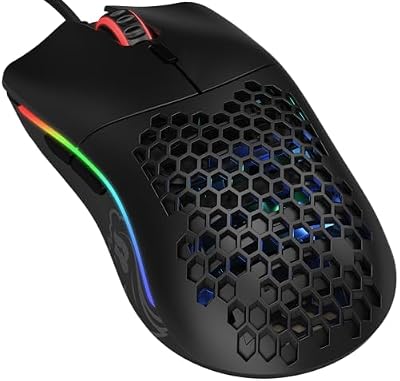
A honeycomb-shell wired mouse whose low weight makes long tracking movements and quick turns less tiring across a long session.
Specs:
– Pixart optical sensor
– Lightweight honeycomb shell
– Flexible braided cable
– PTFE glide feet
BenQ ZOWIE XL2546K

A 24.5-inch esports monitor whose high refresh rate and motion-clarity mode suit a game where enemies cross collapsing sightlines at speed.
Specs:
– 24.5-inch TN panel, 1920 by 1080
– 240 Hz refresh rate
– DyAc+ motion blur reduction
– Height, tilt and swivel stand with S Switch controller
SteelSeries Arctis Nova 7 Gen 2

A wireless headset for hearing destruction cues and callouts at once. On Linux it works as a standard USB audio device; the maker’s app-based tuning is a Windows feature, so treat it as strong hardware with plain controls on this platform.
Specs:
– Simultaneous 2.4 GHz wireless and Bluetooth
– Neodymium magnetic drivers
– Maker-stated battery life of more than fifty hours
– USB-C dongle with USB-A adapter in the box
How to choose
Start with the status, not the settings. Confirm the current tracker state, set Proton Experimental, and play your first matches expecting the game to feel normal, because when it works, it simply works: full lobbies, full modes, no separate Linux queue. Choose your Proton branch once and leave it alone unless a patch-day break forces a change.
Choose your platform by session type. Desktop Linux is the primary route, with mouse and keyboard and the full visual chaos readable at high refresh. The Steam Deck is a legitimate second machine for casual modes, with the Playable rating’s small text mattering most in menus and loadout screens. On either, keep the game on an SSD; a destructible, streaming-heavy shooter is unkind to slow storage.
Finally, choose your expectations. This is a working game with a committed developer and a documented repair loop, not a supported platform with a service guarantee. If that framing sounds fine, the gear above is ordinary competitive gear that needs no Linux-specific workarounds.
Who should skip
Skip THE FINALS as your main game if a broken patch evening ruins your week. The pattern is documented and recurring: updates break it, Valve fixes it, and the gap between the two is measured in days, not minutes. Ranked players chasing a season goal on a deadline carry that risk personally.
Skip it if you require official support. Embark’s position is commitment without a support desk: Linux is not a listed platform, and if something breaks, the fix comes from Valve’s Proton team and Embark’s pre-release checking, not from a ticket you can file. Also skip it if you dislike kernel-level anti-cheat on principle; the current stack includes one, even though its Linux path is enabled. Players in any of these groups are better served by the native or publisher-supported shooters elsewhere in this site’s Linux catalogue.
FAQ
Does THE FINALS have a native Linux version?
No. Steam lists the game for Windows only, and Embark has never announced a native build. Everything in this article runs through Proton, which is why the anti-cheat configuration matters so much for this title.
Which Proton version should Linux players use for THE FINALS?
Proton Experimental is the branch the current tracker guidance names, and it is also the branch Embark itself points to when explaining why Steam Deck support is committed but unofficial. After a major game update, Valve sometimes pushes fixes through the Hotfix branch first, so check recent reports if Experimental suddenly misbehaves.
Can you get banned for playing THE FINALS on Linux?
Embark has publicly committed to keeping SteamOS and Proton players able to play, and the anti-cheat is configured to admit them. That is a compatibility commitment, not a support contract: play through the standard Steam and Proton route, and avoid third-party injectors or overlays that modify the game, which anti-cheat systems treat as tampering on any platform.
Why does THE FINALS keep breaking after updates?
New builds change the code the compatibility layer has to handle, and this game’s anti-cheat stack makes it more sensitive than most. The documented pattern is a break after a major update followed by a Valve Proton update that restores it. It is annoying, but it has consistently been temporary.
Final verdict
THE FINALS is the proof that a big, anti-cheat-protected shooter can keep its Linux players when the developer decides to. The status today is genuinely good: ProtonDB Gold, a Playable Deck rating, an anti-cheat stack whose current layer is listed as working, and a studio that tests with CodeWeavers and says, on the record, that SteamOS support is not being dropped. The price of admission is vigilance: Proton Experimental as your branch, and a calm check of the trackers whenever a major update lands. For Linux players who want a current competitive shooter, there are very few better answers.










