

The Neo Geo is the odd one out in emulation because it was never one machine. SNK sold the same cartridge games on the MVS, the multi-slot arcade board, and on the AES, a home console for wealthy enthusiasts. The hardware is essentially shared, and what decides whether a game behaves like a coin-fed arcade board or a home console is the BIOS chip that boots it.
As an Amazon Associate, we earn from qualifying purchases.
This roundup compares the five routes worth using on PC: MAME, FinalBurn Neo, Fightcade, the RetroArch cores and Geolith. It also covers the BIOS every route needs, what the Universe BIOS changes, and why the Neo Geo CD is separate. Everything here assumes games and BIOS data dumped from hardware you own; no project here ships games.
This article contains an affiliate link for each product listed, and we may earn a commission on purchases.
Quick Answer
For most players, FinalBurn Neo is the best Neo Geo emulator on PC: fast, accurate enough for the full library and happy on modest hardware. Choose MAME for the reference implementation, Fightcade for rollback online play, and Geolith inside RetroArch for a console-style setup covering Neo Geo CD.
One System, Two Machines: MVS, AES and the BIOS
A Neo Geo game does not contain separate arcade and home versions. The cartridge holds one program, and the BIOS tells it which personality to present. An MVS BIOS produces arcade coin behaviour; an AES BIOS produces the home version, often with difficulty menus, practice modes and a continue system. Region matters too: games change language, title screens or content such as blood depending on whether the BIOS reports Japan, the USA or Europe.
SNK shipped many BIOS variants, which is why the archive an emulator expects, named neogeo.zip, bundles several BIOS images rather than one file. In MAME and FinalBurn Neo it sits alongside the game files as a parent set, and a game will not boot without it. Build yours from a BIOS dumped from your own board.
The third option inside that archive is the Universe BIOS, a replacement BIOS by Razoola, free for personal use at version 4.0. In emulation it is one of the selectable images. It switches region, flips between MVS and AES mode at boot, and adds a cheat database, a music jukebox, debug DIP access and a memory card manager.
The Emulators, One by One
MAME: the reference implementation
MAME treats the Neo Geo as one arcade system among thousands, and its driver is the yardstick the others are measured against. It documents the hardware down to the protection chips, defaults to the arcade experience with DIP switches, and expects neogeo.zip in the roms folder like any parent set. The trade-offs are weight and friction: MAME is large, its sets are versioned to specific releases, and the interface serves preservation rather than comfort. Pick it when correctness matters most.
FinalBurn Neo: the lightweight favourite
FinalBurn Neo, forked from FinalBurn Alpha, is the emulator most Neo Geo players actually run. It has its own Neo Geo driver, starts almost instantly, and runs the full cartridge library at full speed on modest hardware. The standalone build exposes DIP switches and BIOS selection directly, and its sets follow the same versioned, keep-everything-zipped discipline as MAME, including neogeo.zip. It lacks MAME’s debugging depth, which rarely matters for playing games.
Fightcade: built for online matches
Fightcade is a matchmaking client wrapped around a custom FinalBurn Neo build, with GGPO rollback netcode doing the networking. You join a room per game, challenge players from a lobby list, with replays and spectating included. The fighting catalogue is its heartland: The King of Fighters 98 and 2002 rooms are among the most populated on the service, alongside Samurai Shodown and Garou: Mark of the Wolves. It is free and supplies no games, so your own set must match the room’s.
RetroArch cores: FBNeo and MAME under one roof
Inside RetroArch, the same two engines appear as cores, and the FBNeo core is the practical pick. Its options expose the switches this system revolves around: a mode setting that selects an AES BIOS, an MVS BIOS by region, or the Universe BIOS, plus the memory card mode covered below. You also gain RetroArch’s shaders, save states and RetroAchievements. The current MAME core covers titles the FBNeo driver handles less well, at higher system cost.
Geolith: the console-first newcomer
Geolith takes the opposite approach to MAME. It is a RetroArch-only core written for accuracy with a home-console-first design, and its documentation claims compatibility with the complete commercial AES, MVS and CD libraries. Cartridge games load as single .neo files, the flash-cart ecosystem’s format, instead of versioned arcade sets, so the library never needs rebuilding as the core updates. The cost is conversion: sets must be turned into .neo files with the project’s tooling, and the BIOS comes as separate archives per mode.
Neo Geo CD Is a Different Machine
The Neo Geo CD plays mostly the same catalogue, but it is different hardware with a different BIOS, and cartridge emulators do not cover it by default. Its games shipped on disc with Red Book CD audio, so music streams from the disc image rather than the sound chip. The original models were notorious for long loading pauses, which the later CDZ revision worked to reduce.
Three routes handle it on PC. Geolith covers CD and CDZ alongside cartridges, using .cue or .chd images and the neocd.zip and neocdz.zip BIOS archives. The NeoCD core in RetroArch is a dedicated rewrite of the classic NeoCD emulator. MAME runs the CD systems through its software-list mechanism, the most involved setup here.
Memory Cards and the AES Versus MVS Choice
The Neo Geo’s memory card was an early taste of portable saves: progress written on an arcade cabinet could be carried home and back. Emulators reproduce this as card image files. The RetroArch FBNeo core offers a shared card used by every game, or a per-game card, tidier for big libraries. Back the files up; a lost card image is gone like the real thing.
Mode choice deserves a deliberate decision. MVS mode gives the arcade original: coin-up play, operator DIP settings and, in fighters, no training mode. AES mode gives the home release: options menus, difficulty selection and practice modes where included, with some games limiting continues. The Universe BIOS removes the need to commit, booting either personality from the same set.
Gear That Suits a Neo Geo Setup
HORI Fighting Stick Alpha

The library is dominated by fighting games and shooters built for a lever and four buttons, and a proper stick is the biggest upgrade to how they feel. HORI’s Alpha uses Hayabusa parts and opens from the top for maintenance.
Specs:
- Parts: Hayabusa lever and buttons
- Connection: wired USB, 10 ft cable
- Compatibility: Xbox Series X|S, Xbox One, Windows PC (AB11-001U)
- Layout: 8-button panel, replaceable artwork
- Extras: key lock mode, profile storage
HORI Fighting Stick Alpha on Amazon
MAYFLASH F500 Elite

The F500 Elite is the modding-friendly alternative: genuine Sanwa parts, as used in Japanese arcade cabinets, inside a case designed to be opened. Parts are standard sizes, and a PC sees it as a standard controller.
Specs:
- Parts: Sanwa joystick and buttons
- Connection: wired USB
- Compatibility: Windows PC plus many consoles
- Case: metal base, clear acrylic top for artwork
- Layout: 8-button arcade layout, turbo support
8BitDo M30 Bluetooth Controller
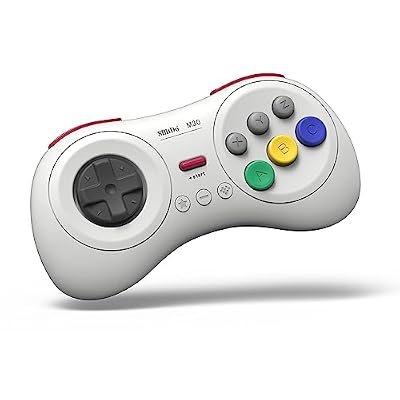
Not every session needs a stick. The run-and-gun and sports catalogue plays better on a pad, and the M30’s pivoting D-pad suits the rolling quarter-circle motions these games demand. Six face buttons map cleanly onto the Neo Geo’s four, over Bluetooth or wired USB-C.
Specs:
- Layout: 6 face buttons, pivoting D-pad, 2 shoulder buttons
- Connection: Bluetooth and wired USB-C
- Modes: X-input, D-input, Mac, Switch
- Battery: 480 mAh, up to 18 hours
- Weight: 115 g
8BitDo M30 Bluetooth Controller on Amazon
ASUS TUF Gaming VG249Q1A Monitor

Neo Geo games run just under 60 Hz and were drawn for CRTs, so what matters is low input lag, clean motion and variable refresh that can sit at an odd rate without tearing. This IPS panel overclocks to 165 Hz.
Specs:
- Panel: 23.8-inch IPS, 1920 x 1080
- Refresh rate: 165 Hz overclocked, FreeSync Premium
- Response: 1 ms MPRT, Extreme Low Motion Blur
- Inputs: HDMI and DisplayPort
- Extras: Shadow Boost, speakers, VESA mount
ASUS TUF Gaming VG249Q1A on Amazon
Samsung T7 Portable SSD 1TB

A combined cartridge, CD and Fightcade setup deserves fast, backed-up storage rather than a corner of a system drive. The T7 is quick, weighs about two ounces, and adds hardware encryption.
Specs:
- Capacity: 1 TB (MU-PC1T0T/AM)
- Interface: USB 3.2 Gen 2, up to 1,050 MB/s read
- Security: AES 256-bit hardware encryption
- Size: 3.3 x 2.2 x 0.3 inches, 2.08 ounces
- Build: shock-resistant metal enclosure
Samsung T7 Portable SSD 1TB on Amazon
How to Choose
Start with how you play. Solo players should take FinalBurn Neo standalone for simplicity, or the FBNeo core if the library already lives in RetroArch. Versus players should go straight to Fightcade; its lobbies and rollback netcode are the point. Collectors wanting a stable set and CD coverage in one place should invest the conversion time in Geolith. Keep MAME installed as the fallback for problem titles.
Who Should Skip
Skip this category if your interest is the Neo Geo Pocket Color, a different handheld covered by other emulators. Skip Fightcade if you only play alone; it adds accounts and lobbies you will never use. Skip Geolith if your sets are arcade-format and you do not want a conversion step. And skip Neo Geo emulation entirely if you own no original hardware or games to dump: the emulators ship with nothing to play.
FAQ
Do I need the neogeo.zip file for every emulator?
Almost. MAME and FinalBurn Neo, standalone and as RetroArch cores, require the neogeo.zip archive next to the game files, and Fightcade inherits the requirement from its FBNeo base. Geolith splits the same data into separate AES, MVS and CD archives in the RetroArch system folder. In every case the contents come from a BIOS dumped from your own board.
What is the difference between MVS and AES mode in an emulator?
The game is identical; the BIOS decides the presentation. MVS mode boots the arcade version with coin play and operator settings. AES mode boots the home version, which usually adds difficulty menus and, in many fighters, a practice mode. The Universe BIOS switches between the two, and changes region, without swapping files.
Can I play Neo Geo CD games in FinalBurn Neo or MAME?
Not in cartridge-focused setups; the CD is separate hardware with its own BIOS. Use the NeoCD core or Geolith in RetroArch, which accept disc images directly, or MAME’s software-list route. Expect the original loading pauses unless your core shortens them.
Final Verdict
The Neo Geo rewards players who understand its one big idea: the BIOS is the machine. FinalBurn Neo is the right default for most PC players, MAME remains the reference, Fightcade owns online play, and Geolith is the pick for a tidy RetroArch shelf including the CD library. Set your BIOS up once, choose AES or MVS behaviour deliberately, and the catalogue plays as it did on hardware most of us could only rent by the minute.










