

Mini LED is a backlight technology, and understanding that is the key to shopping for it sensibly. A mini-LED monitor replaces the handful of large backlight LEDs in an ordinary LCD with thousands of tiny ones, grouped into many local dimming zones. The payoff is much higher peak HDR brightness, far deeper contrast and far less blooming than a standard edge-lit LCD, because the screen can brighten highlights and darken shadows region by region. It is the LCD world’s answer to OLED-style contrast, achieved through the backlight rather than the panel itself.
- Best Mini LED Monitors and Alternatives at a Glance
- 1. KOORUI 27″ 4K QD-Mini LED Gaming Monitor – Dual-Mode (UHD 160Hz or FHD 320Hz)
- 2. KYY 15.6inch Portable Monitor 1080P FHD USB-C, HDR IPS
- 3. SANSUI 27 Inch Curved 240Hz Gaming Monitor FHD 1080P, 1500R
- 4. Sceptre E275W-19203R 27 inch 1080P LED Monitor 99% sRGB
- 5. Philips 221V8LB 22 inch Class Thin Full HD (1920 x 1080), 100Hz
- 6. Quntis Computer Monitor Lamp / Screen Light Bar for Eye Caring, USB
- How to Choose a Mini LED Monitor (and When You Don’t Need One)
- Frequently Asked Questions
- Related Guides
- Related Articles
Here is where we have to be honest with you. In 2026, true mini-LED monitors remain a premium category, and of the products in this roundup only one is actually a mini-LED display. The rest are conventional LED-backlit LCDs (and one is a monitor light bar accessory, not a monitor at all). Rather than misrepresent them, we have flagged each one clearly: we lead with the genuine mini-LED screen, then cover the standard-backlight alternatives for what they really are. Below is an at-a-glance comparison — note the ‘backlight’ framing — then a closer look at each and a buyer’s guide on what mini-LED does and when the conventional options make more sense.
As an Amazon Associate we earn from qualifying purchases at no extra cost to you.




🛒 Best Price Today on Amazon
Prime members get fast, free shipping on everything above, plus member-only deals. New members get a 30-day free trial — cancel anytime.
Best Mini LED Monitors and Alternatives at a Glance
| Product | Best For | Backlight / Type | Approx Price |
|---|---|---|---|
| KOORUI 27″ 4K QD-Mini LED | True mini-LED HDR | Genuine Mini LED, 4K dual-mode | around $500 |
| KYY 15.6″ Portable USB-C HDR | Portable HDR-ish screen | Standard LED (not mini-LED) | around $63 |
| SANSUI 27″ Curved 240Hz FHD | Fast everyday gaming | Standard LED (not mini-LED) | around $129 |
| Sceptre E275W 27″ 1080p | Budget desktop value | Standard LED (not mini-LED) | around $89 |
| Philips 221V8LB 22″ FHD | Compact secondary screen | Standard LED (not mini-LED) | around $70 |
| Quntis Monitor Light Bar | Desk lighting accessory | Not a monitor (light bar) | around $40 |
1. KOORUI 27″ 4K QD-Mini LED Gaming Monitor – Dual-Mode (UHD 160Hz or FHD 320Hz)

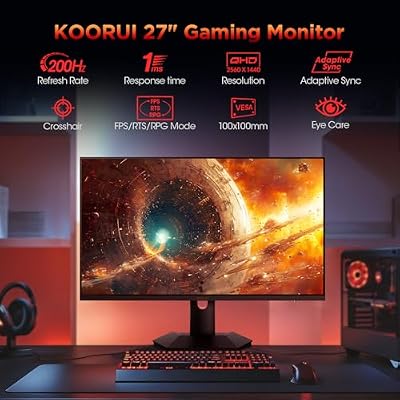
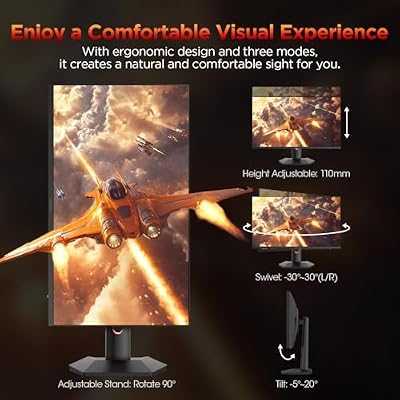
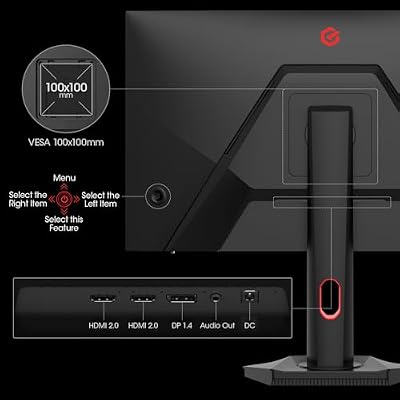
KOORUI 27 inch Mini-LED IPS Gaming Monitor, 200Hz 1ms, QHD 1440P HDR1000 | 97% DCI-P3, Adaptive Sync, PiP/PBP, Swivel/Pivot/Height Adjustable, HDMI and DisplayPort, Premium Gaming, Content Creation




As an Amazon Associate we earn from qualifying purchases. Product prices and availability are accurate as of the date/time indicated.
The KOORUI 27-inch is the only genuine mini-LED monitor in this roundup, so it rightly leads. It combines a QD-Mini LED backlight — thousands of tiny LEDs in many local dimming zones, paired with a quantum-dot layer for wide color — on a 4K UHD panel, with a clever dual-mode feature that runs at UHD 160Hz or drops to FHD at 320Hz for fast gaming. At around $500 it is by far the most expensive screen here, and the mini-LED engineering is the reason.
This is the pick if you specifically want what mini-LED delivers: high peak HDR brightness and deep, zone-controlled contrast with minimal blooming. The local dimming lets highlights pop while shadows stay dark, the quantum-dot layer broadens the color gamut, and the 4K resolution keeps everything razor-sharp for both HDR media and detailed work. The dual-mode trick means you can favour resolution or refresh depending on the game. If mini-LED HDR is your goal, this is the one true match on the list and a genuinely capable display.
Pros: Genuine QD-Mini LED with local dimming, strong HDR brightness, 4K, dual-mode refresh.
Cons: By far the most expensive here; mini-LED commands a premium price.
2. KYY 15.6inch Portable Monitor 1080P FHD USB-C, HDR IPS
Being honest: the KYY 15.6-inch portable is NOT a mini-LED monitor. It is a slim 1080p IPS portable display with HDR support and a standard edge-lit LED backlight, connecting over a single USB-C cable (or HDMI). We include it as an alternative for buyers who saw ‘HDR’ and wondered, but its HDR is the basic, software-style kind — it cannot match a true mini-LED’s zone-controlled brightness. At around $63 it is affordable and genuinely useful, just not mini-LED.
This is the screen to choose if what you actually want is a portable second display rather than mini-LED HDR. The IPS panel offers wide viewing angles and decent color, single-cable USB-C keeps the setup tidy, and the slim build slips into a laptop bag. It is a practical travel companion. Just set your expectations: the ‘HDR’ label here does not mean the local-dimming, high-brightness experience that defines mini-LED, so buy it for portability, not for backlight technology.
Pros: Affordable and genuinely portable, IPS with wide angles, tidy single-cable USB-C.
Cons: Not mini-LED — standard edge-lit LED with basic HDR; small 15.6-inch panel.
3. SANSUI 27 Inch Curved 240Hz Gaming Monitor FHD 1080P, 1500R

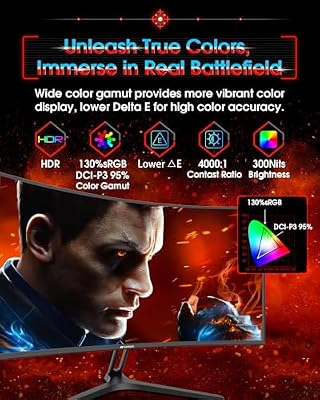
SANSUI 27 Inch Curved 240Hz Gaming Monitor FHD 1080P, 1500R Curve Computer Monitor, 130% sRGB, 4000:1 Contrast, HDR, FreeSync, MPRT 1Ms, Low Blue Light, HDMI DP Ports, Metal Stand, Cable Incl.




As an Amazon Associate we earn from qualifying purchases. Product prices and availability are accurate as of the date/time indicated.
To be clear, the SANSUI 27-inch curved is NOT a mini-LED monitor either. It is a conventional LED-backlit 1080p panel with a deep 1500R curve and a fast 240Hz refresh rate. We include it as an alternative because many shoppers who look at mini-LED are really after a great gaming screen, and at around $129 this delivers fast, immersive gaming — just through a standard backlight, not thousands of dimming zones.
This is the monitor to choose if smooth, responsive 1080p gaming matters more to you than mini-LED HDR. The 240Hz refresh keeps fast motion fluid, the 1500R curve pulls the edges toward you for immersion at close range, and the price is very approachable. What it does not offer is the per-zone brightness control and HDR punch of a real mini-LED display, so do not expect that. As an affordable, fast everyday gaming panel it is a strong pick — labelled honestly as a standard-backlight screen.
Pros: Fast 240Hz gaming, immersive 1500R curve, very affordable for the refresh rate.
Cons: Not mini-LED — standard LED backlight; 1080p with no local dimming or HDR punch.
4. Sceptre E275W-19203R 27 inch 1080P LED Monitor 99% sRGB

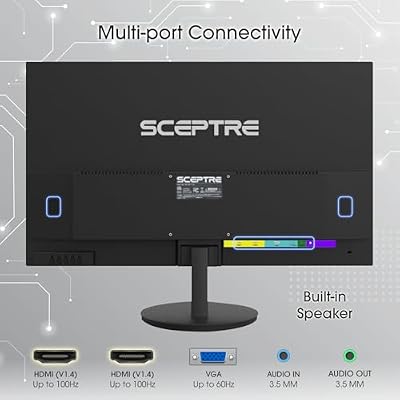
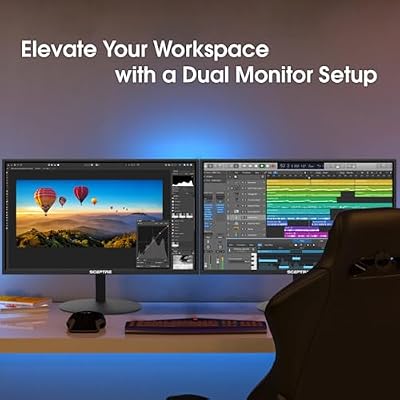
Sceptre E275W-19203R 27 inch1080P LED Monitor 99% sRGB 2X HDMI VGA Build-In Speakers, Machine Black (E275W-19203R series)



As an Amazon Associate we earn from qualifying purchases. Product prices and availability are accurate as of the date/time indicated.
For honesty’s sake, the Sceptre E275W is NOT a mini-LED monitor. It is a standard edge-lit LED-backlit 27-inch 1080p panel, notable mainly for its strong 99% sRGB color coverage, dual HDMI and VGA inputs, and built-in speakers. We include it as a budget alternative for buyers weighing value against backlight technology, and at around $89 it is an inexpensive, color-capable desktop screen — not a mini-LED one.
This is the monitor to choose if your real priority is affordable, color-accurate desktop work rather than HDR backlight wizardry. The 99% sRGB coverage is excellent for the price and well suited to web, photo and general use, the connectivity is generous, and the built-in speakers add convenience. It simply does not have mini-LED’s dimming zones or HDR brightness, so judge it as what it is: a solid, budget-friendly standard-LED panel with surprisingly good color for everyday tasks.
Pros: Strong 99% sRGB color for the price, dual HDMI plus VGA, built-in speakers, affordable.
Cons: Not mini-LED — standard edge-lit LED; basic HDR and no local dimming.
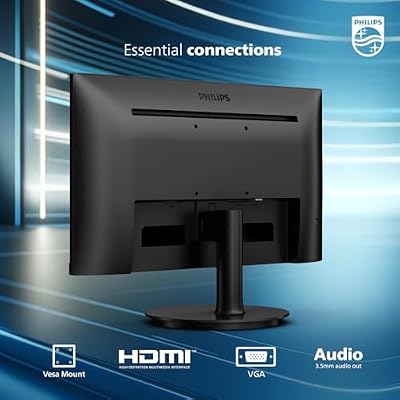
5. Philips 221V8LB 22 inch Class Thin Full HD (1920 x 1080), 100Hz

Philips 22 Inch Computer Monitor FHD 100Hz VA VESA Flicker-Free, 221V8LB | 1920×1080 LED Monitor, 4ms GtG, Adaptive Sync, HDMI 1.4, Tilt Adjust, Low Blue Light, 4yr Advance Replacement Warranty




As an Amazon Associate we earn from qualifying purchases. Product prices and availability are accurate as of the date/time indicated.
In the interest of honesty, the Philips 221V8LB is NOT a mini-LED monitor. It is a thin, compact 22-inch Full HD panel with a standard LED backlight and a 100Hz refresh rate, from a well-known brand. We include it as a small secondary-screen alternative for buyers who came for mini-LED but might actually need an affordable extra display. At around $70 it is a tidy, dependable little monitor — just not a mini-LED one.
This is the screen to choose when you want a small, brand-name secondary display for a desk where space is limited. The compact 22-inch size suits tight setups, the thin design looks clean, the 100Hz refresh is a smooth bonus over the usual 60Hz, and Philips’s reputation adds reassurance. It offers none of mini-LED’s local-dimming HDR, of course, so treat it as a practical, good-value standard-LED panel for light secondary duty rather than an HDR showpiece.
Pros: Compact and thin, trusted Philips brand, smooth 100Hz, affordable secondary screen.
Cons: Not mini-LED — standard LED backlight; small 22-inch 1080p with basic image quality.
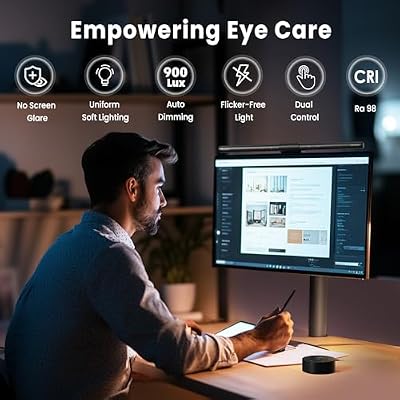
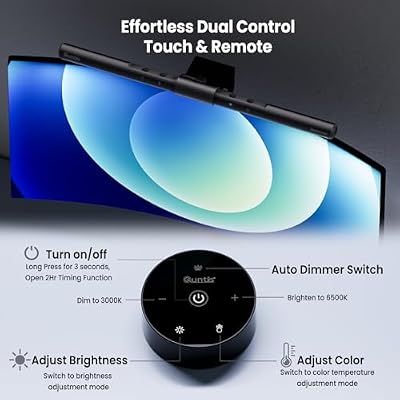
6. Quntis Computer Monitor Lamp / Screen Light Bar for Eye Caring, USB

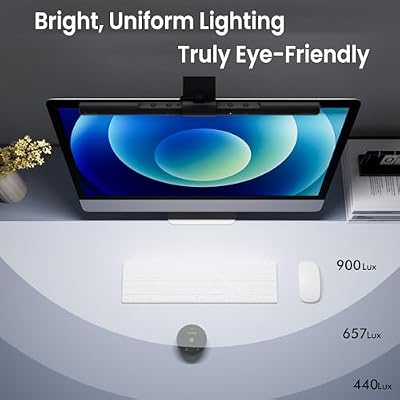
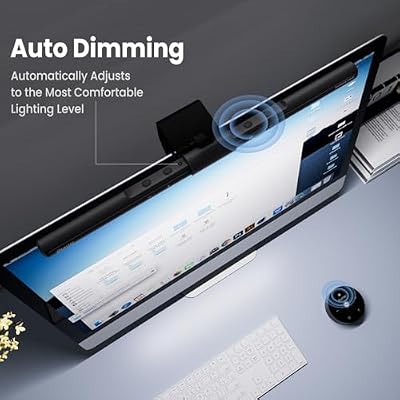
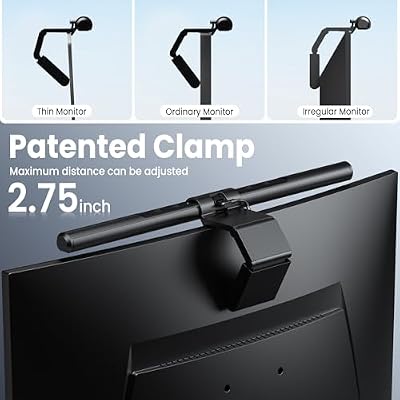
Quntis Computer Monitor Lamp, Screen Monitor Light Bar for Eye Caring, USB Reading LED Task Lamp with Auto-Dimming, Dimmable Light Bar, Touch Control, No Glare Space Saving Home Office Desk Lamps



As an Amazon Associate we earn from qualifying purchases. Product prices and availability are accurate as of the date/time indicated.
Full honesty: the Quntis is NOT a monitor at all — it is a monitor light bar, a slim USB-powered lamp that clips onto the top of your screen to illuminate your desk and reduce eye strain. It has nothing to do with mini-LED display technology and cannot show an image. We include it transparently because it sometimes appears alongside monitor searches, and at around $40 it is a useful accessory — but it belongs in a different category entirely.
This is the product to consider only if what you want is better desk lighting to accompany whichever monitor you choose. A monitor light bar like this sits on the bezel, casts a warm, even glow over your keyboard and desk without shining into your eyes or reflecting off the screen, and draws power over USB. It is genuinely helpful for late-night sessions and eye comfort. Just understand clearly what it is: a lighting accessory, not a mini-LED monitor, and not a substitute for one.
Pros: Useful eye-friendly desk lighting, clips onto the monitor bezel, simple USB power.
Cons: Not a monitor at all — a light bar accessory with no display or mini-LED relevance.
How to Choose a Mini LED Monitor (and When You Don’t Need One)
First, understand exactly what mini-LED is, because the term is increasingly used loosely. A true mini-LED monitor, like the KOORUI here, uses thousands of tiny backlight LEDs arranged in many independent local dimming zones. That lets the screen pump out high peak brightness for HDR highlights while keeping dark areas genuinely dark, producing deep contrast with minimal blooming. It is a backlight upgrade to an LCD, not a panel type — so the benefit is mainly HDR performance and contrast, not resolution or refresh on its own.
Next, learn to spot what is NOT mini-LED, because a great many screens carry an ‘HDR’ label without the backlight to back it up. A standard edge-lit LED monitor — which describes the KYY, SANSUI, Sceptre and Philips on this list — has only a few backlight LEDs and no meaningful local dimming, so its HDR is the basic, software-style kind that cannot match true mini-LED. Look for explicit mention of mini-LED backlighting and a real local-dimming zone count; if those are absent, assume the screen is conventional LED, whatever the box says.
Decide whether you actually need mini-LED at all, because it is a premium feature with a premium price. Mini-LED is worth paying for if you watch a lot of HDR media, do HDR content work, or simply want the best LCD contrast available — the bright highlights and inky shadows are a real, visible upgrade. If instead you mainly play fast games, do general desktop work, or need an affordable secondary screen, a good standard-LED panel like the fast SANSUI or the color-accurate Sceptre delivers far better value for your specific need.
Finally, match the rest of the specification to your use and set a realistic budget. A genuine mini-LED screen like the KOORUI also brings 4K resolution and high refresh, so you get sharpness and speed alongside the backlight, but you pay several times the price of the standard panels here. Be wary of cheap screens marketed as HDR or implying mini-LED at budget prices — at this price point true mini-LED is rare. Confirm the backlight is genuinely mini-LED, weigh whether HDR contrast is your priority, and pick accordingly from this honestly labelled list.
Frequently Asked Questions
What is the difference between mini-LED and regular LED monitors?
Mini-LED is a backlight upgrade. A regular LED monitor uses only a few backlight LEDs with little or no local dimming, while a mini-LED screen uses thousands of tiny LEDs in many dimming zones. That lets mini-LED deliver much higher HDR brightness and far deeper contrast with less blooming. On this list only the KOORUI is genuinely mini-LED; the KYY, SANSUI, Sceptre and Philips are standard edge-lit LED panels.
Are all the monitors in this list actually mini-LED?
No, and we have flagged this honestly. Of the products here, only the KOORUI 27-inch QD-Mini LED is a genuine mini-LED monitor. The KYY, SANSUI, Sceptre and Philips are conventional LED-backlit LCDs included as alternatives, and the Quntis is a monitor light bar accessory, not a display at all. We listed them transparently rather than misrepresenting standard screens as mini-LED.
Is mini-LED worth the extra money?
It depends on your priorities. If you watch HDR media, do HDR content work, or want the best contrast an LCD can offer, mini-LED’s bright highlights and deep shadows are a real, visible upgrade worth paying for. If you mainly play fast games or do general desktop work, a good standard-LED panel gives far better value. Mini-LED remains a premium category, as the KOORUI’s price reflects.
How can I tell if a monitor is really mini-LED before I buy?
Look for explicit mention of a mini-LED backlight and a stated local-dimming zone count — genuine mini-LED screens advertise both prominently. Be skeptical of inexpensive monitors that only say ‘HDR’ or imply mini-LED without naming the backlight, since true mini-LED is still a premium feature. If the backlight type and dimming zones are not clearly stated, assume the screen is conventional edge-lit LED.
Related Guides
- Best Monitors
- Best 4K Monitors
- Best HDR Monitors
- Best QD-OLED Monitors
- Best Gaming Monitors
- Best Portable Monitors
Affiliate Disclosure: As an Amazon Associate, we earn from qualifying purchases. If you click a link and make a purchase, we may earn a small commission at no extra cost to you. Prices and availability are accurate as of publication and may change.










