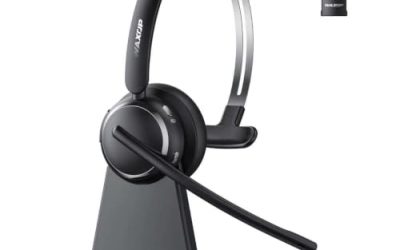
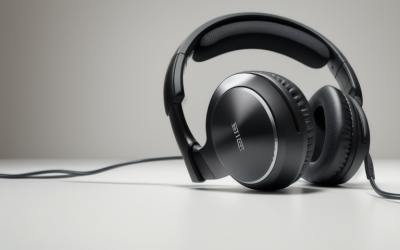
- Top Pick: Lenovo Wireless VoIP Headset Teams Certified, Noise-Canceling Mic, Bluetooth 5.3 Multipoint, USB-A Receiver, 31-Hour Talk & 60-Hour Playback, Lightweight Over-Ear Design, Replaceable Earcups
- Best Value: Microsoft Modern – Wireless Headset,Comfortable Stereo Headphones with Noise-Cancelling Microphone, USB-A dongle, On-Ear Controls, PC/Mac – Certified for Microsoft Teams,Black
- Premium Choice: Poly Voyager 4320 UC: Bluetooth, Wireless Headset with Noise-Canceling Mic | BT700 USB-C Adapter | Microsoft Teams & Google Meet Certified | Up to 24 Hours Talk Time | Charging Stand Included
A Teams headset has a different job than a gaming headset. It has to be understood clearly in a stand-up at nine in the morning, stay comfortable through back-to-back calls, and pair with a laptop, a desktop and often a phone without a menu dive. The search for “best microsoft teams headsets” is mostly a hunt for the right certification, the right connection type and a microphone that suppresses the noise around a home office or an open-plan floor.
This guide is written for remote workers, hybrid staff and IT buyers outfitting a team. Ten headsets are compared using only the details in their listings: wired or wireless connection, receiver type, noise handling, battery wording and the Teams certification claims. Where a headset says “works with” Teams rather than “certified”, that distinction is called out, because the wording matters when an IT department sets a standard. Wired and wireless models are both included so you can match your desk and your habits.
Quick Picks
As an Amazon Associate we earn from qualifying purchases at no extra cost to you.




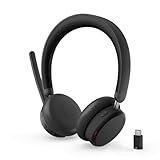


| Product | Best for | Key spec from the title |
|---|---|---|
| Lenovo Wireless VoIP Headset | Long wireless shifts | 31-hour talk, Bluetooth 5.3, multipoint |
| Microsoft Modern Wireless | Simple USB dongle setup | USB-A dongle, Teams certified |
| Poly Voyager 4320 UC | Desk plus charging stand | 24 hours talk time, BT700 USB-C adapter |
| Jabra Evolve 20 | Wired all-day comfort | USB-A and USB-C, dual-ear |
| Poly Blackwire 5220 | Flexible wired connections | USB-C, USB-A and 3.5mm |
| Logitech Zone Wireless | Noisy offices | Active noise cancellation, Qi charging |
| Lenovo Dual Mode ANC 6550 | Quiet focus on calls | Hybrid ANC, USB-C receiver |
| Logitech Zone Vibe 100 | Lightweight wear | Multipoint Bluetooth, over-ear |
| Logitech Zone 305 | Mobile plus laptop use | Native Bluetooth, many platforms |
| Logitech H570e | Wired USB-C simplicity | USB-C, inline controls |
How to Choose
Certified or merely compatible
Teams certification means the headset’s call buttons and status light integrate with the Teams app, so mute and answer controls behave as expected. A headset that only says “works with” Teams will still transmit audio but may not offer the same button integration. For a managed fleet, prefer the models that use the word certified in the title.
Wired versus wireless
Wired headsets, such as the Jabra Evolve 20, Poly Blackwire 5220 and Logitech H570e, never need charging and avoid pairing hiccups. Wireless models free you to walk, but you must keep an eye on battery and receiver compatibility. Check whether your computer has USB-A, USB-C or both, since a dongle must match the port.
Noise handling on both ends
Two features are easily confused. Active noise cancellation quiets what you hear, while a noise-canceling microphone reduces what others hear from your side. For open offices the first matters for focus, and for home offices the second matters for colleagues. Product titles here list one or both, so read carefully.
Battery, comfort and replaceable parts
Look for talk-time figures such as 24 or 31 hours and for wording about replaceable earcups, leatherette pads or lightweight design. Comfort is subjective, but spec details like on-ear versus over-ear shape and a charging stand tell you how the headset fits into a workday routine. If you wear glasses, lighter on-ear designs and soft leatherette pads are worth weighing, since pressure builds over a long call day.
The 10 Best Options
Lenovo Wireless VoIP Headset
This over-ear model lists Teams certification, a noise-canceling microphone, Bluetooth 5.3 with multipoint and a USB-A receiver. The title cites 31 hours of talk time and 60 hours of playback, and it adds replaceable earcups for longer service life, which is a thoughtful detail for a headset worn daily. Multipoint also means it can hold a laptop and a phone at once, so a call on one device does not require unpairing the other.
- Strength: 31-hour talk time can cover a full week of calls for many people.
- Strength: Replaceable earcups extend how long the headset stays comfortable.
- Trade-off: The USB-A receiver needs an adapter on a USB-C-only laptop.
Skip it if your computer has no USB-A port.
Microsoft Modern Wireless Headset
From the maker of Teams itself, this headset lists stereo headphones, a noise-cancelling microphone, a USB-A dongle, on-ear controls and support for PC and Mac, with Teams certification stated. It reads as the straightforward, standards-first pick for an office that simply wants things to work, and the dongle-based link avoids relying on a computer’s built-in Bluetooth.
- Strength: Teams certification comes straight from the platform’s own brand.
- Strength: On-ear controls keep volume and call actions within reach.
- Trade-off: The listing gives no talk-time figure and no noise cancellation for listening.
Skip it if you want active noise cancellation for your own ears.
Poly Voyager 4320 UC
Poly describes this as a Bluetooth wireless headset with a noise-canceling mic, a BT700 USB-C adapter, certification for Microsoft Teams and Google Meet, up to 24 hours of talk time and an included charging stand. It suits a desk worker who likes to dock the headset between meetings. The pairing of Teams and Google Meet certification also helps consultants who join client calls on whichever platform the client prefers.
- Strength: The charging stand gives the headset a permanent home on the desk.
- Strength: Teams and Google Meet certification suits mixed-platform workplaces.
- Trade-off: The adapter is USB-C, so USB-A-only machines need another solution.
Skip it if you want over-ear active noise cancellation for loud rooms.
Jabra Evolve 20
A wired dual-ear headset with USB-A and USB-C connection, in-line call controls and Teams certification. The title positions it for office and home use and mentions a comfortable fit for all-day wear, which makes it a no-fuss choice for anyone who values reliability over extras. Because it connects by cable, it also works as a dependable backup headset for a team that otherwise runs on wireless models.
- Strength: Both USB-A and USB-C are listed, so it fits nearly any current computer.
- Strength: Wired operation removes charging and pairing from the daily routine, and that makes it an easy spare.
- Trade-off: No noise cancellation feature is mentioned in the title.
Skip it if you need a quiet listening environment in a busy office.
Poly Blackwire 5220
A wired over-ear headset with a flexible boom microphone, noise-cancelling headphones and USB-C, USB-A and 3.5mm connections. The title says it works with Teams and Zoom and calls out an ergonomic design, which suits home workers who spend hours in conversation. The extra connectors mean the same headset can move between a work laptop, a personal desktop and a conference room computer without a drawer of adapters.
- Strength: Three connector types cover laptops, desktops and older audio jacks.
- Strength: A flexible boom lets you position the mic close to your mouth.
- Trade-off: The title says it works with Teams rather than naming certification.
Skip it if your IT policy requires a certified model.
Logitech Zone Wireless
A Bluetooth headset certified for Microsoft Teams and Zoom, with active noise cancellation, Qi wireless charging and leatherette ear pads. It targets people in open offices who need to shut out chatter around them while remaining reachable by their colleagues. Teams and Zoom certification in the same title covers workplaces that have not standardized on a single meeting app.
- Strength: Active noise cancellation helps with focus in shared spaces.
- Strength: Qi charging lets you top up the headset on a compatible pad.
- Trade-off: The title provides no battery hour figure to plan around.
Skip it if you prefer the certainty of a wired connection.
Lenovo Dual Mode Wireless ANC Headset 6550
This one lists hybrid active noise cancellation, Bluetooth dual connectivity, a USB-C receiver and Teams certification, with long battery life promised in general terms. It suits a worker on a recent laptop who wants a receiver and Bluetooth pairing in one package. The Teams certification claim means the buttons and status light are designed to cooperate with the app, which simplifies deployment across a department.
- Strength: Hybrid ANC and a USB-C receiver match modern slim laptops.
- Strength: Dual connectivity lets you move between a computer and a phone.
- Trade-off: Battery wording lacks a specific hour count.
Skip it if you want a USB-A receiver in the box or need a precise battery figure to plan around.
Logitech Zone Vibe 100
A lightweight wireless over-ear headset with a noise-canceling microphone and multipoint Bluetooth, working with Teams, Google Meet and Zoom on both Mac and PC. It is the easy-wear option for long calendars and mixed-platform workplaces. It keeps the feature list short, which suits people who dislike fiddling with settings and want a headset that is on and ready when the meeting starts.
- Strength: The lightweight build suits all-day wearing.
- Strength: Multipoint Bluetooth keeps two devices connected.
- Trade-off: The title says it works with Teams rather than carrying certification.
Skip it if your organization insists on certified hardware or if you want noise cancellation on the listening side.
Logitech Zone 305
A business-oriented wireless headset with native Bluetooth, labeled for Microsoft Teams and compatible with Windows, Mac, Chrome, Linux, iOS, iPadOS and Android. The broad platform list makes it a sensible shared headset for people who rotate between devices, for example a hot-desking team that shares a pool of headsets and works across Chromebooks, Windows laptops and phones.
- Strength: Wide compatibility spans laptops, tablets and phones.
- Strength: Native Bluetooth avoids the need for a dongle.
- Trade-off: No noise cancellation or battery figure appears in the title.
Skip it if active noise cancellation is a requirement.
Logitech H570e
A wired USB-C headset with stereo sound, noise-canceling microphones and inline controls, certified for Microsoft Teams. It is the simple plug-in answer for call centers, classrooms and any desk where charging a headset is one more thing to forget. Stereo sound and dual microphones are listed, so it covers both listening and speaking duties in a compact wired format, and the USB-C plug fits newer laptops without a hub.
- Strength: A USB-C wired design means no batteries and no pairing.
- Strength: Inline controls and Teams certification are both listed.
- Trade-off: It requires a USB-C port on the computer.
Skip it if your computer only offers USB-A.
Which One Fits Your Situation
You work in a loud open office
Choose the Logitech Zone Wireless or Lenovo ANC 6550 for active noise cancellation.
You want zero charging
The Jabra Evolve 20 or Logitech H570e skip batteries entirely.
You split time between laptop and phone
The Lenovo Wireless VoIP headset and Logitech Zone 305 handle multiple devices, and the Logitech Zone Vibe 100 adds multipoint pairing in a lighter shell.
You manage headsets for a team
Standardize on certified models such as the Microsoft Modern Wireless or the Poly Voyager 4320 UC, and keep a wired Logitech H570e as a spare for visitors.
Common Mistakes
- Buying a wireless headset without matching the receiver to your port.
- Assuming works with means certified.
- Confusing ANC with a noise-canceling microphone.
- Ignoring battery wording on wireless models.
- Skipping a wired backup for important calls, then losing the battery before a major meeting.
Related guides
- Aio Liquid Coolers For High Performance Gaming
- How To Lower Input Delay In Competitive Shooters
- External Hard Drives For Music Production
Frequently Asked Questions
Do I need a certified headset?
Not to hear audio, but certification gives button integration and a better chance that mute and answer controls behave consistently. It is mainly a convenience for teams that deploy many units.
Are wired headsets still worth it in 2026?
Yes, for reliability and zero charging. A wired model also removes pairing issues, which makes it a favorite for shared desks and a smart fallback for important calls.
What is multipoint?
It lets a headset connect to two devices at once, such as a laptop and a phone, so you can answer a call on either one without repairing the headset.
Will these work with Zoom?
Several list Zoom or Google Meet support in their titles, including the Poly and Logitech models, so one headset can serve more than one meeting app.