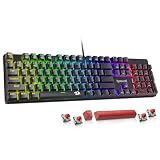
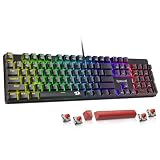
- Top Pick: Redragon Mechanical Gaming Keyboard Wired, 11 Programmable Backlit Modes, Hot-Swappable Red Switch, Anti-Ghosting, Double-Shot PBT Keycaps, Light Up Keyboard for PC Mac
- Best Value: Razer BlackWidow V4 X Mechanical Gaming Keyboard, Yellow Switches, Black
- Premium Choice: Logitech G413 SE Full-Size Mechanical Gaming Keyboard – Black
Shopping for a mechanical keyboard under $50 used to mean accepting compromise: mushy stabilizers, thin ABS keycaps that go shiny in a month, and switches soldered in place so a single failure meant replacing the whole board. That has changed. Budget boards in 2026 routinely ship with hot-swappable sockets, double-shot PBT keycaps, and pre-lubed switches — features that cost twice as much just a few years ago. The catch is that the sub-$50 shelf is also where the most aggressive corner-cutting happens, and spec sheets rarely tell you which is which.
This guide covers six mechanical keyboards that genuinely hold their value at this price, from full-size wired workhorses to a 75% wireless board with a volume knob. We break down what actually matters when spending under $50, review the top picks individually, and answer the questions buyers ask most often. Prices at this tier fluctuate, so a board that sits at $45 one week may drift above the cap the next — check current pricing before you commit.
Related guide: Apex pro tkl
As an Amazon Associate we earn from qualifying purchases at no extra cost to you.








⚡ Save on Your Next PC — Amazon Prime
Prime members get fast free shipping on the systems above, plus early access to Prime Day & Black Friday PC deals. New members get a 30-day free trial.
Watch: Best Mechanical Keyboard Under $50 — Video Review
How to Choose Mechanical Keyboard Under $50
- Confirm it’s actually mechanical: Several popular budget “gaming” keyboards use membrane or mecha-membrane switches with mechanical-style keycaps. If the listing avoids naming a switch type (red, brown, blue, yellow), assume it isn’t mechanical.
- Prioritize hot-swap sockets: Hot-swappable PCBs let you replace a dead switch with tweezers instead of a soldering iron, and they turn a $45 board into a platform you can upgrade later with better switches for $20.
- Look for PBT keycaps: Double-shot PBT resists the greasy shine that ABS develops within weeks of heavy use, and the legends can’t wear off because they’re molded in rather than printed on.
- Match the switch to your use: Linear switches (red, yellow) are smooth and quiet for gaming and shared spaces; tactile browns give a noticeable bump for typing; clicky blues are satisfying but loud enough to annoy anyone on your voice chat.
- Check size against your desk and your games: Full-size boards keep the numpad for spreadsheets and MMO macros, while 75% and TKL layouts free up several inches for low-DPI mouse sweeps in shooters.
The Best Picks Reviewed
Redragon Hot-Swappable Mechanical Gaming Keyboard
This is the most complete package under $50, pairing hot-swappable red switches with double-shot PBT keycaps and 11 backlight modes — a combination that’s still rare at this price. Anti-ghosting handles simultaneous inputs cleanly, and the socketed PCB means you can swap in your preferred switches down the line without replacing the board.
AULA F75 Pro Wireless
The F75 Pro is the value pick for anyone who wants a modern 75% layout with tri-mode connectivity (2.4GHz, Bluetooth 5.0, and USB-C) plus a machined volume knob. Pre-lubed Reaper switches feel noticeably smoother out of the box than typical budget linears, and the side-printed PBT keycaps hold up to years of use.
Redragon K580
A full-size board built for players who live in macro-heavy games, with dedicated macro keys along the left edge and a media wheel for volume adjustment mid-match. RGB per-key lighting and solid build quality make it feel more expensive than it is, though the software takes some patience to learn.
Logitech G413 SE
Logitech’s budget entry trades RGB for restraint: an aluminum-alloy top plate, tactile mechanical switches, and clean white backlighting in a full-size layout. It’s the pick for anyone who wants a durable, understated board from a brand with reliable warranty support rather than the flashiest spec sheet.
Razer BlackWidow V4 X
The V4 X brings Razer’s linear yellow switches — smooth, quiet, and fast-actuating — into reach at the top of this budget, often dipping under $50 during sales events. Doubleshot ABS keycaps and dedicated macro keys round out a board that feels genuinely premium, though you’ll want to watch for a discount rather than paying list price.
Frequently Asked Questions
Are mechanical keyboards under $50 actually worth buying?
Yes, with realistic expectations. You’ll get real mechanical switches, decent keycaps, and often hot-swap sockets — but you’re giving up gasket mounting, sound-dampening foam, and premium stabilizers found on $100+ boards. For most gamers, the jump from membrane to a budget mechanical is far larger than the jump from budget mechanical to enthusiast.
Which switch type is best for gaming?
Linear switches (red or yellow) are the common recommendation because they actuate smoothly with no tactile bump to interrupt rapid repeated presses. That said, plenty of competitive players use tactile browns without any measurable disadvantage — preference matters more than marketing claims about actuation speed.
Do I need a wireless keyboard for gaming?
Not necessarily. Modern 2.4GHz wireless is fast enough that latency isn’t a practical concern, but wired boards eliminate battery management entirely and cost less. Choose wireless if you value a clean desk or move between devices; choose wired if you want the maximum switch and build quality for your budget.
What does hot-swappable actually mean?
Hot-swappable keyboards have small sockets on the PCB that grip switch pins, so you can pull a switch out with a puller tool and drop a new one in without soldering. It makes repairs trivial and lets you experiment with different switch feels for the cost of a switch set rather than a new keyboard.
Final Thoughts
For most buyers, the Redragon hot-swappable board is the smartest use of $50 — PBT keycaps and socketed switches give it a longer useful life than anything else at this price. If you want wireless flexibility and a compact 75% layout, the AULA F75 Pro is the clear alternative, while the Logitech G413 SE remains the pick for anyone who prioritizes build quality and brand support over feature count.