

As an Amazon Associate we earn from qualifying purchases
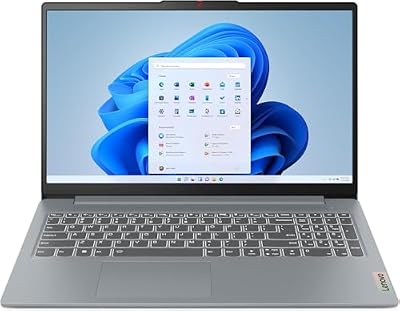

Best Laptops for Economics Students
Economics is a data subject long before it becomes an essay subject. A typical week mixes large spreadsheets, regression output, charts pasted into problem sets, dozens of journal tabs, and a statistics package quietly holding a dataset in memory. The best laptops for economics students are therefore not gaming machines or ultra-cheap note-takers: they are comfortable data workstations with enough RAM for multitab research, a fast SSD, a screen that fits a model and its output side by side, and — the detail students underestimate — a numeric keypad for fast, accurate data entry.
This guide is built around that workflow. Every pick below runs the tools economics courses actually assign, and the differences between them come down to processing headroom for bigger datasets, keyboard layout, screen size, and how much weight you carry between lectures.
What Economics Software Actually Requires
Start with the publishers’ own numbers, because they are lower than most students expect — and then buy headroom above them.
Microsoft lists Office 2024, which includes Excel, as needing a 1.1 GHz or faster two-core processor, 4 GB of RAM and 4 GB of available disk space on Windows, and 4 GB of RAM on Mac. That is a floor for opening the application, not a target for a workbook with thousands of rows, multiple sheets and a browser full of source data running beside it.
StataCorp’s published requirements are similarly modest on paper: Stata/MP needs 4 GB of memory and 4 GB of disk space, Stata/SE needs 2 GB, and Stata/BE needs 1 GB, on 64-bit Windows, macOS or Linux. The catch is built into how Stata works: it loads the dataset you are analysing into memory, so the practical limit on the size of dataset you can handle comfortably is your RAM, not the stated minimum. R and Python, distributed through the R Project and Python Software Foundation, are free and run on modest hardware for introductory work, but the same rule applies once you start merging survey data, running panel regressions or producing many charts in one session.
The sensible student specification that follows from those published floors is 16 GB of RAM, a 512 GB SSD, and a modern multi-core processor. That combination keeps Excel, Stata or R, a PDF reader and twenty research tabs open at once without swapping, and it leaves room for datasets to grow from first-year teaching files to final-year dissertation data. If your course is purely essay and spreadsheet based, 8 GB can work, but 16 GB is the safer four-year choice.
For a wider shortlist beyond economics alone, see our guide to the best laptops for students, which compares the full student field side by side.
How to Choose
Numeric keypad first. Entering data, checking figures and building tables is measurably faster and less error-prone on a dedicated keypad than on the number row. Most 15.6-inch Windows laptops include one; most 13- and 14-inch laptops, and every MacBook, do not. If you type numbers for hours each week, treat the keypad as a core feature, not a bonus — or budget for a separate USB keypad.
RAM and storage. Choose 16 GB of RAM for the multitasking pattern described above. A 512 GB SSD holds your software, several years of datasets, papers and backups without constant housekeeping. Note that on the Windows picks below the memory is soldered or onboard, and on the MacBook Air memory and storage are fixed at purchase, so buy the configuration you need for the whole degree.
Processor. Introductory econometrics runs on almost anything current. Multi-core performance starts to matter with Stata/MP, which StataCorp designs to use multiple cores, and with larger R or Python jobs. An eight-core chip gives visibly more headroom for final-year and postgraduate work than a quad-core chip.
Display. A 15.6-inch Full HD screen lets you place a spreadsheet and a paper side by side at readable sizes. A smaller, higher-resolution screen is sharper for reading journal articles but shrinks split-screen work. Anti-glare finishes help in bright lecture theatres and libraries.
Battery and weight. Manufacturers quote battery figures under their own test conditions, so treat them as comparisons within a brand rather than guarantees. A lighter machine you actually carry will serve you better than a heavier one left in your room, but the 15.6-inch keypad models here all sit in a similar, manageable weight band.
The Picks at a Glance
| Product | Processor | RAM / Storage | Display | Numeric keypad | Best for |
|---|---|---|---|---|---|
| Lenovo IdeaPad Slim 3 15ABR8 | AMD Ryzen 7 5825U, 8 cores | 16 GB DDR4 / 512 GB SSD | 15.6-inch FHD touchscreen | Yes | Heaviest data work |
| Acer Aspire 3 A315-24PT-R0UX | AMD Ryzen 5 7520U, 4 cores | 16 GB LPDDR5 / 512 GB SSD | 15.6-inch FHD IPS touch | Yes | Balanced all-rounder |
| ASUS Vivobook Go 15 E1504FA | AMD Ryzen 5 7520U, 4 cores | 16 GB LPDDR5 / 512 GB SSD | 15.6-inch FHD IPS | Yes | Lightest keypad option |
| Apple MacBook Air 13-inch (M4) | Apple M4 | 16 GB unified / 256 GB SSD | 13.6-inch Liquid Retina | No | Portability and battery |
Lenovo IdeaPad Slim 3 15ABR8 — Most Processing Headroom
- Amazon: https://www.amazon.com/dp/B0F2MLQPL3
The IdeaPad Slim 3 15ABR8 in this configuration pairs an eight-core AMD Ryzen 7 5825U (up to 4.5 GHz) with 16 GB of DDR4 memory and a 512 GB NVMe SSD. That core count is the reason it leads this list: Stata/MP is built to spread its most intensive tasks across cores, and larger R and Python jobs benefit in the same way, so this is the pick that will feel least stretched by a data-heavy dissertation.
The 15.6-inch Full HD touchscreen gives you room for a regression table beside the paper you are citing, and the full-size keyboard includes a numeric keypad for data entry. Lenovo’s PSREF documentation for the 15ABR8 family lists a 47 Wh integrated battery, Wi-Fi 6, a card reader and a weight starting at 1.62 kg, and notes that the memory is soldered and not upgradable — so the 16 GB configuration is the one to buy. One caution: this Amazon listing is a seller-configured variant, so check the exact specification on the listing matches the configuration described here before ordering.
Acer Aspire 3 A315-24PT-R0UX — Balanced All-Rounder with Touch
- Amazon: https://www.amazon.com/dp/B0CJV41KZN
The Aspire 3 A315-24PT-R0UX combines a quad-core AMD Ryzen 5 7520U with 16 GB of LPDDR5 memory and a 512 GB NVMe SSD, which comfortably covers the Excel, Stata, R and browser multitasking pattern of an undergraduate degree. Its 15.6-inch Full HD IPS touch display is easy to read for long reading sessions, and touch is genuinely useful for scrolling long journal PDFs and annotating charts.
The full-size keyboard includes a numeric keypad, which keeps this model firmly in the data-entry-friendly group. Acer’s listing puts the weight at 3.92 pounds and lists an average battery life figure of 13 hours under its own conditions; expect less in a real day of Wi-Fi research and statistics work, but the capacity is well matched to moving between lectures. Ports include USB-C, USB-A and HDMI, so connecting a library monitor or a projector for a group presentation needs no hub.
ASUS Vivobook Go 15 E1504FA — Lightest Way to Keep a Keypad
- Amazon: https://www.amazon.com/dp/B0G5PHGDQQ
The Vivobook Go 15 E1504FA uses the same class of hardware as the Acer — an AMD Ryzen 5 7520U with 16 GB of LPDDR5 memory and a 512 GB SSD — in a chassis ASUS lists at approximately 1.63 kg, making it the lightest numeric-keypad option here. The 15.6-inch Full HD IPS-level anti-glare display suits long spreadsheet sessions in bright rooms, and ASUS’s published specifications for the E1504FA family confirm the numeric keypad and a 180-degree lay-flat hinge, which helps when sharing a chart with a study partner across a table.
Memory on this model is onboard and capped at the fitted 16 GB, so again, buy this configuration rather than a smaller one. The Amazon listing for this configuration lists Wi-Fi 5 rather than Wi-Fi 6; on campus networks that is rarely the limiting factor for coursework, but it is worth knowing if fast local file transfers matter to you.
Apple MacBook Air 13-inch (M4) — For Portability, If You Skip the Keypad

- Amazon: https://www.amazon.com/dp/B0DZDCPMGK
The MacBook Air is the deliberate exception in this list. It has no numeric keypad, a smaller 256 GB SSD in this configuration, and memory and storage that Apple fixes at purchase. What it offers instead is the Apple M4 chip with 16 GB of unified memory, a sharp 13.6-inch Liquid Retina display at 2560-by-1664 resolution, Touch ID, and a weight of 2.7 pounds in a fanless body, with battery life Apple rates at up to 18 hours under its own test conditions.
Software compatibility is not a barrier: StataCorp publishes Stata for macOS on Apple silicon, Microsoft publishes Excel for Mac, and R and Python both run natively. Choose the Air if your economics work is mainly reading, writing, spreadsheets and moderate-size datasets, and you value carrying the lightest machine all day. If your course involves heavy manual data entry, pair it with a separate numeric keypad or choose one of the Windows models above.
Who Should Choose What
Choose the Lenovo IdeaPad Slim 3 15ABR8 if your degree leans quantitative — econometrics modules, a data-based dissertation, or plans for postgraduate study. Its eight-core processor is the strongest hedge against datasets growing over four years.
Choose the Acer Aspire 3 if you want the most balanced mix: keypad, touch display, 16 GB of memory and a full set of ports, without prioritising any single feature over the others.
Choose the ASUS Vivobook Go 15 if you walk or cycle between classes and want to keep the numeric keypad while carrying the least weight among the Windows picks.
Choose the MacBook Air if portability and battery life outrank data entry, and you are comfortable adding an external keypad for number-heavy assignments — or your department’s teaching is firmly Mac-based.
Whichever you choose, avoid dropping below 16 GB of RAM to save money at checkout. The published minimums from Microsoft and StataCorp will let the software install on far less, but the daily reality of economics study is several demanding applications open at once, and memory is the specification you cannot change later on any of these machines.
FAQ
Do economics students need a numeric keypad?
It is not required, but it is the single most useful keyboard feature for this subject. Entering and checking figures in spreadsheets and statistics packages is faster on a keypad, which is why three of the four picks here include one.
Is 8 GB of RAM enough for Stata, R and Excel?
The software will run: StataCorp lists 1 to 4 GB depending on edition, and Microsoft lists 4 GB for Office. The problem is multitasking — a browser, a PDF reader and a growing dataset alongside the statistics package will push past 8 GB in normal use, which is why this guide recommends 16 GB.
Can I use a Mac for economics, or do I need Windows?
A Mac works. Stata, Excel, R and Python are all published for macOS, including on Apple silicon. Check your own department’s module pages, though: if a specific course mandates a Windows-only teaching tool, a Windows laptop removes that risk entirely.
How much storage do datasets need?
Teaching datasets are usually small, but four years of software, papers, backups and your own project files add up. A 512 GB SSD, as fitted to the Windows picks here, avoids storage management becoming a recurring chore; the 256 GB MacBook Air configuration suits students who keep most files in cloud storage.
Do I need a dedicated graphics card?
No. None of the core economics tools — Excel, Stata, R or Python — require discrete graphics, and every pick here relies on integrated graphics. Spend the budget on RAM and storage instead.

















