A laptop that edits video in the morning and runs games at night has to satisfy two different checklists at once. Creative work cares about display color accuracy, GPU acceleration in editing and 3D apps, fast storage for large project files, and ports for card readers, audio interfaces and external drives. Gaming cares about the same GPU, but also about refresh rate, cooling headroom and the power limit the maker sets for the graphics chip. The four machines below are sold on Amazon US and were chosen because their published specifications cover both sides of that brief: wide-gamut or high-resolution creator displays, NVIDIA RTX graphics that accelerate Premiere Pro, DaVinci Resolve, Blender and Photoshop as well as games, and strong multi-core processors.


Every figure in this guide comes from maker or retailer listings published for the exact model named. Where a maker does not publish a figure, such as a GPU power limit for a specific configuration, we say so rather than guess.
Disclosure: As an Amazon Associate we earn from qualifying purchases.
What to check before you buy
Display. For color work, look for a panel the maker specifies with wide color gamut coverage (DCI-P3 is the common creator target) and a high resolution for timeline and canvas space. OLED and Mini LED panels give the contrast that photo and video grading needs. For gaming, the same panel’s refresh rate matters: 120 Hz and above feels fluid, while a 60 Hz 4K panel is a deliberate trade of speed for pixel density.
GPU and power limit. All four picks use NVIDIA GeForce RTX 40-series laptop GPUs, which means access to NVIDIA Studio drivers alongside the Game Ready line, plus hardware encoding (NVENC) for streaming and exports. The same GPU model can perform very differently depending on the wattage the chassis allows, so check the maker’s stated TGP for the exact model where it is published.
CPU, memory and storage. Rendering, compiling and multitasking across a game and a capture app reward core count. For creator work, 32 GB of memory is the comfortable floor, and a 1 TB SSD fills quickly with game installs and footage, so an upgrade path matters.
Ports. A full-size SD card reader saves photographers a dongle, Thunderbolt or USB4 gives one-cable docking and fast external SSDs, and HDMI lets you drive a reference monitor or TV.
If your priority is gaming first and you are set on an AMD processor, our separate roundup of the best gaming laptop AMD Ryzen models covers that side of the market. The picks below are creator-first machines that also play.
1. ASUS ProArt StudioBook 16 OLED (H7604JI-DS96T)
The ProArt StudioBook 16 OLED is ASUS’s dedicated creator flagship, and its listing reads like a workstation brief: a 16-inch 3.2K OLED touch display, an Intel Core i9-13980HX processor with 24 cores, and an NVIDIA GeForce RTX 4070 Laptop GPU with 8 GB of GDDR6, which ASUS lists as RTX Studio ready. That combination suits 4K timelines, 3D viewport work and GPU-accelerated effects, and the RTX 4070 is equally at home in current games at the panel’s native resolution with upscaling, or at lower resolutions for higher frame rates.
For upgradeability, the listing specifies 32 GB of DDR5 in SO-DIMM form, which is the socketed format rather than soldered memory, and storage is a 1 TB SSD. ASUS sells the ProArt line with its creator software bundle and the ASUS Dial control built into the touchpad on this series, aimed at scrubbing timelines and adjusting brush sizes. Warranty terms for this listing are set by ASUS and the seller, so confirm the term shown on the product page for this configuration before ordering.
Specs
- CPU: Intel Core i9-13980HX
- GPU: NVIDIA GeForce RTX 4070 Laptop GPU, 8 GB GDDR6
- Display: 16-inch 3.2K OLED touch display
- Memory: 32 GB DDR5 SO-DIMM
- Storage: 1 TB SSD
- Operating system: Windows 11 Home
2. Lenovo Yoga Pro 9i 16 (83DN0008US)
Lenovo’s Yoga Pro 9i is the display specialist of this group. Its 16-inch PureSight Pro panel is a 3.2K (3200 x 2000) Mini LED touchscreen running at 165 Hz, and Lenovo’s published specifications for this model put brightness at up to 1,200 nits with 100% DCI-P3 and 100% Adobe RGB coverage, a combination that serves HDR grading and print-oriented work while the 165 Hz refresh keeps games smooth. That dual character is rare: most creator panels this accurate top out at 60 Hz.
Inside, this configuration pairs an Intel Core Ultra 9 185H with an NVIDIA GeForce RTX 4060 Laptop GPU with 8 GB of GDDR6; published specifications for this model put the GPU at up to 100 W, a healthy allowance for a slim chassis. Memory is 32 GB of LPDDR5X, which is soldered on this platform, so choose the configuration you need at purchase; storage is a 1 TB NVMe SSD. The listing includes Windows 11 Pro, which suits creators who need its drive encryption and remote desktop features. Lenovo’s warranty for the Yoga line is a limited term set per configuration, so check the listing for the exact coverage.
Specs
- CPU: Intel Core Ultra 9 185H
- GPU: NVIDIA GeForce RTX 4060 Laptop GPU, 8 GB GDDR6, up to 100 W per Lenovo specifications
- Display: 16-inch 3.2K (3200 x 2000) Mini LED touch, 165 Hz, up to 1,200 nits, 100% DCI-P3 and 100% Adobe RGB per Lenovo
- Memory: 32 GB LPDDR5X (soldered)
- Storage: 1 TB NVMe SSD
- Operating system: Windows 11 Pro
3. Razer Blade 16 (RZ09-0483SEJ3-R3U1)
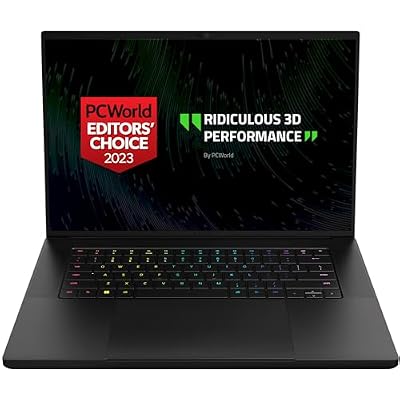
The Blade 16 is the gaming-leaning pick that still earns its place in a creator guide, largely because of its screen. This configuration’s dual-mode Mini LED display switches between a UHD+ (3840 x 2400) mode at 120 Hz for detailed editing work and an FHD+ mode at 240 Hz for competitive play, so one panel covers both jobs. Razer machines are also a common sight in creator setups because the CNC aluminum chassis, per-key RGB keyboard and Thunderbolt connectivity dock cleanly into a desk setup with external monitors and drives.
Performance hardware is an Intel Core i9-13950HX and an NVIDIA GeForce RTX 4070; Razer’s published material for this model lists the GPU at up to 140 W TGP, the highest allowance in this group, which helps both render times and frame rates. This configuration carries 32 GB of DDR5 memory and a 1 TB SSD, and it ships with a compact GaN charger. Razer’s standard limited warranty applies to Blade laptops, with the exact term shown on the listing for this configuration.
Specs
- CPU: Intel Core i9-13950HX
- GPU: NVIDIA GeForce RTX 4070 Laptop GPU, 8 GB GDDR6, up to 140 W TGP per Razer
- Display: 16-inch dual-mode Mini LED, UHD+ 120 Hz / FHD+ 240 Hz
- Memory: 32 GB DDR5
- Storage: 1 TB SSD
- Chassis: CNC aluminum, compact GaN charger included
4. GIGABYTE AERO 16 OLED (BSF-73US994SH)
The AERO 16 OLED is Gigabyte’s creator line, and this configuration is the resolution-first option: a 16-inch 4K UHD+ (3840 x 2400) OLED panel in a 16:10 aspect ratio. OLED contrast and the full 4K canvas suit photo editing, illustration and video work where pixel-level detail matters more than refresh rate; the panel runs at 60 Hz, so this is the pick for creators whose gaming leans toward single-player titles rather than esports.
The supporting hardware is an Intel Core i7-13700H and an NVIDIA GeForce RTX 4070 with 8 GB of GDDR6, with 16 GB of DDR5 memory and a 1 TB SSD in this configuration. The 16 GB memory figure is the one to weigh: it is fine for lighter editing and gaming, but heavy multitaskers should confirm whether the listing’s configuration can be expanded before buying, since Gigabyte does not state the upgrade path in the headline specifications. Connectivity includes Wi-Fi 6E per the listing, and the machine ships with Windows 11 Home. Warranty coverage is Gigabyte’s standard limited term for the AERO line as shown on the product page.
Specs
- CPU: Intel Core i7-13700H
- GPU: NVIDIA GeForce RTX 4070 Laptop GPU, 8 GB GDDR6
- Display: 16-inch 4K UHD+ (3840 x 2400) OLED, 60 Hz, 16:10
- Memory: 16 GB DDR5
- Storage: 1 TB SSD
- Wireless: Wi-Fi 6E
- Operating system: Windows 11 Home
Which one fits your work?
- Choose the ASUS ProArt StudioBook 16 OLED if you want a purpose-built creator workstation: the strongest CPU here, socketed DDR5 memory, a 3.2K OLED touch panel and RTX Studio positioning.
- Choose the Lenovo Yoga Pro 9i if the display is the decision: its Mini LED panel combines maker-stated full DCI-P3 and Adobe RGB coverage with a 165 Hz refresh, so grading and gaming share one screen without compromise.
- Choose the Razer Blade 16 if gaming performance comes first but creative work is a close second: the highest GPU power limit in this group and a dual-mode display that trades resolution for speed on demand.
- Choose the GIGABYTE AERO 16 OLED if a 4K OLED canvas is the priority and your games are not refresh-rate sensitive; just weigh the 16 GB memory configuration against your workload first.
Whichever you pick, confirm the exact configuration on the listing before ordering: laptop model numbers cover several CPU, GPU and memory combinations, and the specifications above apply to the configurations tied to each ASIN listed in the Specs blocks.