

- Top Pick: KLIM Wind Laptop Cooling Pad
- Runner-up: Cooler Master NotePal X3 Laptop Cooling Pad
- Also consider: Kootek Laptop Cooling Pad
Cloud gaming moves the heavy work to a remote server, but your laptop still works hard. The browser or streaming app decodes video nonstop, the Wi-Fi radio stays busy, and the screen stays lit for hours. That steady load warms the base of the machine, and a warm base can mean louder internal fans, a hot keyboard, and a laptop that slows down mid-match.
A fan-powered cooling pad attacks that problem directly. It pushes air across the underside of the laptop, lifts the keyboard to a more comfortable angle, and gives heat somewhere to go. The five pads below all use built-in fans and fit common laptop sizes.
As an Amazon Associate, we earn from qualifying purchases.
Quick Answer
For most cloud gamers, the KLIM Wind is the best starting point, with four fans and two USB ports. Pick the Kootek pad for five fans with separate controls, the TopMate C11 for a larger RGB pad with a phone holder, the Cooler Master NotePal X3 for one large quiet fan, and the ICE COOREL eight-fan pad for smaller laptops.
1. KLIM Wind Laptop Cooling Pad
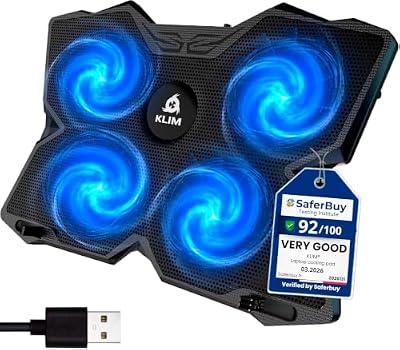
The KLIM Wind is a straightforward four-fan pad that fits a wide range of laptops, which makes it a safe first pick if you are not sure which size you need. Its four fans spin at up to 1200 RPM and move air across the whole underside of the machine rather than concentrating on one hot spot. Two USB ports mean the pad borrows one laptop port and gives one back, so a controller dongle still has a home.
Two tilt levels raise the rear of the laptop for a better view of the screen during long streaming sessions. Front pegs hold the laptop in place on the slope, and the metal surface helps spread heat away from the base. The maker backs the pad with a five-year warranty.
Specs
| Feature | Detail |
|---|---|
| Fans | 4 fans at up to 1200 RPM |
| Laptop fit | 11 to 19 inches |
| Height settings | 2 tilt levels |
| USB ports | 2 ports |
| Surface | Metal |
| Warranty | 5 years |
2. Cooler Master NotePal X3 Laptop Cooling Pad

The Cooler Master NotePal X3 takes the opposite approach from multi-fan pads: one very large 200mm fan instead of several small ones. A single large fan can move a good volume of air at a lower speed, which keeps the sound gentle. A dial on the pad controls fan speed, so you can turn it down when the stream is light and turn it up for a demanding game.
The pad supports laptops up to 17 inches and uses a blue LED fan that suits a gaming desk. Its mesh surface lets air reach the laptop base, and the wide deck gives a 15-inch or 16-inch laptop room to sit squarely, with the fan under the middle of the base.
Specs
| Feature | Detail |
|---|---|
| Fans | 1 fan, 200mm, blue LED |
| Laptop fit | Up to 17 inches |
| Fan control | Dial speed control |
| Height settings | Adjustable tilt |
| Surface | Mesh |
| USB ports | Not stated |
3. Kootek Laptop Cooling Pad

The Kootek pad uses a five-fan layout with one large central fan and four smaller fans around it. That arrangement spreads airflow across the base instead of focusing on a single point, which suits laptops with vents spread along the bottom edge. Each fan group has its own switch, so you can run the large fan alone, the four small fans alone, or all five together.
Six height settings give more tilt choices than most pads in this group, so you can fine-tune the screen angle for a couch session or a desk setup. The metal mesh deck is sturdy under a heavier laptop, and two USB ports keep a spare connection free for a controller receiver or a wired headset adapter. The fans spin at up to 2000 RPM at full speed.
Specs
| Feature | Detail |
|---|---|
| Fans | 5 fans, 1 large and 4 small |
| Fan speed | Up to 2000 RPM |
| Laptop fit | 12 to 17 inches |
| Height settings | 6 levels |
| USB ports | 2 ports |
| Surface | Metal mesh |
4. TopMate C11 Laptop Cooling Pad

The TopMate C11 is the largest pad in this roundup and the best fit for a big gaming laptop. It carries six fans, two large and four small, under a deck sized for laptops from 11 to 17.3 inches. Seven RGB lighting modes run along the sides of the pad to match a gaming setup. A built-in phone holder keeps a companion phone in view while you play.
Five height levels adjust the tilt, and the pad includes two USB ports for peripherals. The fan layout covers the full width of a 17-inch laptop base. The thermosetting plastic shell feels solid under a heavy laptop, and anti-slip sleeves help the machine stay put on the slope.
Specs
| Feature | Detail |
|---|---|
| Fans | 6 fans, 2 large and 4 small |
| Laptop fit | 11 to 17.3 inches |
| Height settings | 5 levels |
| Lighting | 7 RGB modes |
| USB ports | 2 ports |
| Extras | Phone holder |
5. ICE COOREL Laptop Cooling Pad with 8 Fans

The ICE COOREL eight-fan pad packs the most fans of any pick here into a deck made for smaller laptops. Eight fans spread airflow across the whole base, which is useful for a compact 13-inch or 14-inch machine that runs warm. Six height settings let you raise the screen for a better viewing angle, and two USB ports leave a connection free for accessories.
The mesh design helps air move freely, and the fan speed is adjustable so you can balance cooling against noise. This pad suits a cloud gamer who plays on a smaller laptop at a desk or on a lap desk, where the machine sits close and every bit of extra airflow counts.
Specs
| Feature | Detail |
|---|---|
| Fans | 8 fans |
| Laptop fit | 13 to 15.6 inches |
| Height settings | 6 levels |
| USB ports | 2 ports |
| Surface | Mesh |
| Fan control | Adjustable speed |
How to Choose
Start with size. Measure your laptop or check its screen size, then pick a pad that fits it fully. A pad that is too small leaves the edges hanging and the outer fans blowing at nothing. For a 17-inch laptop, choose the TopMate C11 or the Cooler Master NotePal X3. For a 13-inch or 14-inch machine, the ICE COOREL eight-fan pad is the better match.
Next, think about fan layout. One large fan is quiet and simple, while several small fans spread air more evenly across a wide base. If your laptop has intake vents along the whole bottom edge, a multi-fan pad such as the Kootek or the TopMate C11 will cover more of them.
Noise matters more in cloud gaming than in local gaming because the laptop itself is quieter and voice chat picks up background hum. Look for adjustable fan speed so you can turn the pad down during menus and voice calls.
Check the USB situation before you buy. Every pad here draws power from the laptop, and most give one port back through a built-in hub. Count your devices: a controller dongle, a headset receiver, and an external drive add up fast.
Who Should Skip
A cooling pad is not for everyone. If you play cloud games on a tablet, a phone, or a handheld, a laptop pad has nothing to sit under and will not help. The same applies if your laptop already runs cool during streaming and its internal fans rarely spin up.
Skip a fan pad if you need silence above all else. Even a quiet pad adds some sound, and a fanless stand is the better choice for a recording setup. Also skip these pads if your laptop has its intake vents on the sides or the rear rather than the bottom, since a pad blows air at the base and cannot help vents it cannot reach.
Small desks are another reason to pass. The largest pads here need real desk space. Measure your desk before ordering a wide deck.
Frequently Asked Questions
Do I need a cooling pad for cloud gaming?
You need one if your laptop gets warm or loud during long streaming sessions. Cloud gaming still decodes video and drives the display for hours, and a pad adds airflow under the base while lifting the screen to a better angle.
How many fans should a laptop cooling pad have?
There is no single right number. One large fan can be quiet and effective, while five or more small fans spread air across a wider base. Match the layout to your laptop: wide vent coverage suits a multi-fan pad, and a central vent suits a single large fan.
Will a cooling pad make my laptop quieter?
It can help. When the base stays cooler, the laptop internal fans may not need to spin as fast or as often. The pad itself adds some sound, so the net result depends on the pad.
Can I use a cooling pad with my laptop lid closed?
Yes, with care. A closed laptop, often called clamshell mode, can sit on a pad while an external monitor shows the game. Make sure the pad still lines up with the bottom vents and that the closed lid has room to breathe.
Final Verdict
The KLIM Wind is the best all-round cooling pad for cloud gaming, with four fans and a long warranty. The Kootek pad is the best budget choice for gamers who want separate fan controls and six tilt levels. The TopMate C11 suits large laptops best, the Cooler Master NotePal X3 suits gamers who want one large quiet fan, and the ICE COOREL eight-fan pad gives the most fan coverage for a smaller laptop.










