

- Top Pick: Samsung Internal SSD 990 1TB, Read/Write Speeds Up to 7,150/6,450 MB/s
- Best Value: Predator M.2 SSD 2TB GM7000 with DRAM cache NVMe 1.4 2280 PCIe Gen4×4 Ultra high speed (maximum read: 7400MB/s, max write: 6700MB/s) 3D NAND TLC Internal SSD Compatible with PS5 Pro – BL.9BWWR.106
- Premium Choice: DIGIERA LNV480 1TB PCIe Gen 4.0×4 NVMe M.2 2280 Internal SSD, Up to 5100MB/s Read 4500MB/s Write, High-Speed Storage for Gaming & Professional Workloads Laptop Desktop PC
Speed is the whole point of a modern solid state drive. The right SSD shaves seconds off game loads, lets big project files open in a blink, and makes a whole PC feel snappier from boot to shutdown. But ‘high speed’ covers two very different worlds: blistering internal NVMe drives that sit on the PCIe bus, and fast portable SSDs you carry in a pocket. This guide rounds up the best high speed SSDs in 2026 across both, so you can match the drive to where the speed actually matters for you.
- Best High Speed SSDs at a Glance
- 1. Crucial BX500 1TB 3D NAND SATA 2.5-Inch Internal SSD
- 2. SanDisk 1TB Extreme Portable SSD (Up to 1,050MB/s, USB-C)
- 3. Samsung T7 Portable SSD 2TB (Up to 1,050MB/s)
- 4. Samsung T7 Portable SSD 1TB (Up to 1,050MB/s, USB 3.2)
- 5. WD_BLACK SN770 1TB NVMe Internal Gaming SSD (Gen4 PCIe, M.2 2280)
- 6. Crucial P3 Plus PCIe Gen4 NVMe 1TB SSD (Up to 5,000MB/s Read)
- How to Choose a High Speed SSD
- Frequently Asked Questions
- Related Guides
- Related Articles
Our picks were chosen on the things that decide real-world speed: the interface (SATA, USB or PCIe Gen4), rated sequential read and write figures, capacity, and value for money. We have included a wide spread — from a value SATA drive to a Gen4 NVMe rated up to 5,000MB/s and 1,050MB/s portable drives — at prices from around $170 to around $396. We have not invented benchmark numbers; instead we explain the rated speeds, the interface each drive uses, and who each one is for. Below is an at-a-glance comparison of all six drives, followed by a closer look at each and a buyer’s guide to help you choose the fastest SSD for your needs and budget.
As an Amazon Associate we earn from qualifying purchases at no extra cost to you.


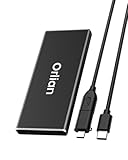


🛒 Best Price Today on Amazon
Prime members get fast, free shipping on everything above, plus member-only deals. New members get a 30-day free trial — cancel anytime.
Best High Speed SSDs at a Glance
| SSD | Best For | Standout Spec | Approx Price |
|---|---|---|---|
| Crucial BX500 1TB SATA | Easy SATA upgrade | Up to 540MB/s, 2.5-inch | around $170 |
| SanDisk Extreme Portable 1TB | Fast pocket storage | Up to 1,050MB/s, USB-C | around $188 |
| Samsung T7 2TB Portable | High-capacity portable | Up to 1,050MB/s, 2TB | around $396 |
| Samsung T7 1TB Portable | Portable speed value | Up to 1,050MB/s, USB 3.2 | around $235 |
| WD_BLACK SN770 1TB NVMe | Gaming NVMe value | PCIe Gen4, M.2 2280 | around $229 |
| Crucial P3 Plus 1TB Gen4 | Fastest sequential reads | Up to 5,000MB/s read | around $229 |
1. Crucial BX500 1TB 3D NAND SATA 2.5-Inch Internal SSD

Crucial BX500 1TB 3D NAND SATA 2.5-Inch Internal SSD, up to 540MB/s - CT1000BX500SSD1, Solid State Drive


As an Amazon Associate we earn from qualifying purchases. Product prices and availability are accurate as of the date/time indicated.
The Crucial BX500 1TB is the easy-upgrade pick of this list. As a 2.5-inch SATA drive rated up to 540MB/s, it is not the fastest option here, but it is the simplest way to make an older laptop or desktop feel dramatically quicker than the spinning hard drive it replaces. With 1TB of 3D NAND and a price of around $170, it is dependable, roomy value.
This is the right pick when the goal is a straightforward speed boost on almost any machine. SATA is universally supported, so the BX500 drops into practically any laptop or PC with a 2.5-inch bay, and the jump from a mechanical drive to this SSD is the single most noticeable upgrade most people can make. If you want fast, reliable, hassle-free storage rather than record-breaking benchmark numbers, the BX500 is the place to start.
Pros: Universally compatible SATA, big 1TB capacity, huge real-world boost over a hard drive.
Cons: SATA caps speed at ~540MB/s; far slower than NVMe drives here.
2. SanDisk 1TB Extreme Portable SSD (Up to 1,050MB/s, USB-C)

The SanDisk Extreme Portable 1TB is the fast pocket-storage pick. Over its USB-C, USB 3.2 connection it is rated for transfers up to 1,050MB/s — roughly double a typical SATA drive — in a rugged, compact body built to travel. At around $188 it is a strong-value way to carry serious speed with you.
This drive suits creators and gamers who move large files between machines: offloading footage on location, carrying a game library between PCs, or backing up quickly. The high rated speed means big transfers finish fast, while the durable, pocketable design shrugs off life on the move. For high-speed storage that does not stay chained to one computer, the SanDisk Extreme is an excellent choice.
Pros: Fast up to 1,050MB/s over USB-C, rugged portable design, strong value.
Cons: USB enclosure is slower than internal NVMe; needs a fast USB-C port to hit rated speeds.
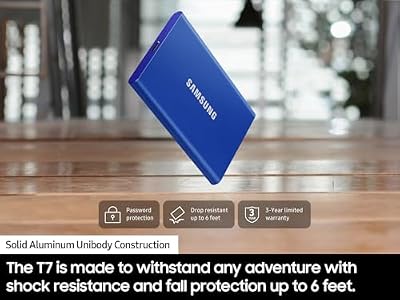
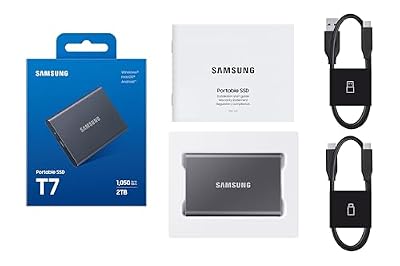
3. Samsung T7 Portable SSD 2TB (Up to 1,050MB/s)

Samsung T7 Portable SSD 2TB Titan Gray, USB 3.2 Gen 2, Up to 1,050MB/s | Reliable External Solid State Drive Storage for Gaming, Students, Professionals (MU-PC2T0T/AM)


As an Amazon Associate we earn from qualifying purchases. Product prices and availability are accurate as of the date/time indicated.
The Samsung T7 2TB is the high-capacity portable pick. It pairs the same quick 1,050MB/s rated USB transfer speed as its smaller sibling with a generous 2TB of storage, all in Samsung’s slim, credit-card-sized aluminium shell. At around $396 it is the priciest drive here, but it buys both speed and serious portable capacity.
This is the drive for the photographer, videographer or gamer who needs to carry a large, fast library in their pocket. Two terabytes is enough for substantial video projects or a big chunk of a Steam collection, and the high rated speed keeps transfers brisk. The compact, durable design makes it easy to slip into a bag. When you want maximum portable space without giving up speed, the T7 2TB is the standout.
Pros: Big 2TB capacity, fast 1,050MB/s rated speed, slim durable aluminium body.
Cons: Highest price here; USB speeds still trail internal NVMe drives.
4. Samsung T7 Portable SSD 1TB (Up to 1,050MB/s, USB 3.2)
Samsung T7 Portable SSD 1TB Titan Gray, USB 3.2 Gen 2, Up to 1,050MB/s | Reliable External Solid State Drive Storage for Gaming, Students, Professionals (MU-PC1T0T/AM)

As an Amazon Associate we earn from qualifying purchases. Product prices and availability are accurate as of the date/time indicated.
The Samsung T7 1TB is the portable speed-value pick — the same acclaimed T7 design and 1,050MB/s rated USB 3.2 transfer speed as the 2TB model, in a more affordable 1TB capacity at around $235. For most people carrying files between machines, 1TB hits the sweet spot of space and price.
This drive is ideal for the user who wants Samsung’s fast, dependable portable performance without paying for 2TB they may not need. The slim, shock-resistant aluminium body travels well, the rated speed makes large transfers quick, and broad USB-C compatibility means it works with laptops, desktops and many tablets. As a balanced, fast portable SSD, the T7 1TB is an easy recommendation.
Pros: Fast 1,050MB/s rated speed, compact durable build, sensible 1TB value.
Cons: USB interface is slower than NVMe; 1TB may be tight for heavy video work.
5. WD_BLACK SN770 1TB NVMe Internal Gaming SSD (Gen4 PCIe, M.2 2280)
![WD_BLACK 1TB SN770 NVMe Internal Gaming SSD Solid State Drive - Gen4 PCIe, M.2 2280, Up to 5,150 MB/s - WDS100T3X0E - [Previous Generation]](https://m.media-amazon.com/images/I/41dOBI0lrHL._SL400_.jpg)
WD_BLACK 1TB SN770 NVMe Internal Gaming SSD Solid State Drive - Gen4 PCIe, M.2 2280, Up to 5,150 MB/s - WDS100T3X0E - [Previous Generation]
As an Amazon Associate we earn from qualifying purchases. Product prices and availability are accurate as of the date/time indicated.
The WD_BLACK SN770 1TB is where this list moves into true internal NVMe speed. As a PCIe Gen4 M.2 2280 drive, it operates on the fast PCIe bus rather than the SATA or USB connections of the drives above, unlocking sequential speeds far beyond what those interfaces allow. Tuned for gaming and priced around $229, it is a superb high-speed value pick.
This is the drive for the gamer or PC builder who wants fast load times and a responsive system from an internal drive. As a Gen4 NVMe SSD it slots into an M.2 slot on a modern motherboard and delivers the kind of speed that makes games and applications launch quickly. If your machine has a free M.2 Gen4 slot and you want genuine NVMe performance without flagship pricing, the SN770 is the heart of this list.
Pros: Fast PCIe Gen4 NVMe speeds, gaming-tuned, M.2 2280 form factor, strong value.
Cons: Requires an M.2 NVMe slot; needs a Gen4 board to hit full speed.
6. Crucial P3 Plus PCIe Gen4 NVMe 1TB SSD (Up to 5,000MB/s Read)

Crucial P310 2280 4TB PCIe Gen4 NVMe Gaming PS5 SSD with Heatsink, Up to 7,100MB/s, PlayStation5, Laptop & Desktop (PC) Compatible, Solid State Drive – CT4000P310SSD5-01


As an Amazon Associate we earn from qualifying purchases. Product prices and availability are accurate as of the date/time indicated.
Topping the list for raw sequential speed is the Crucial P3 Plus 1TB, a PCIe Gen4 NVMe drive rated for reads up to 5,000MB/s — far quicker than any SATA or USB option here. It installs in an M.2 slot on a laptop or desktop and, at around $229, brings genuinely high-end sequential throughput to a mainstream budget.
This is the pick for the builder or creator who wants the fastest rated reads on this list for fast boots, near-instant level loads and quick handling of very large files. The Gen4 interface is what unlocks that 5,000MB/s headline, so you will get the most from it on a Gen4-capable system. If maximum sequential speed at a sensible price is the goal, the P3 Plus is the standout high-speed SSD here.
Pros: Very fast up to 5,000MB/s reads, Gen4 NVMe, works in laptops and desktops, great value.
Cons: Needs a Gen4 M.2 slot for full speed; 1TB capacity for the price.
How to Choose a High Speed SSD
Choosing a high speed SSD starts with the interface, because it sets the ceiling on how fast the drive can possibly go. SATA drives like the Crucial BX500 top out around 540MB/s; fast portable SSDs over USB-C, such as the SanDisk Extreme and Samsung T7, reach about 1,050MB/s; and internal PCIe Gen4 NVMe drives like the WD_BLACK SN770 and Crucial P3 Plus go far higher, up to 5,000MB/s and beyond. Decide first whether you need internal NVMe speed or portable convenience — that single choice frames everything else.
Form factor and compatibility come next, and they are non-negotiable. NVMe drives need an M.2 slot on your motherboard, and to hit their rated speeds they need a PCIe Gen4 slot specifically; a Gen4 drive in an older Gen3 slot will still work but slower. SATA drives need a 2.5-inch bay or SATA cable, and portable SSDs simply need a fast USB-C port. Always confirm what your laptop or PC supports before buying, so the drive you choose can actually reach the speed you paid for.
Capacity is the next balance to strike. The drives here span 1TB to 2TB: 1TB is plenty for a boot drive plus a healthy game or project library, while 2TB, as on the Samsung T7 2TB, suits large video collections or big Steam libraries. Bigger drives cost more, so match capacity to what you actually store — and remember a fast portable drive can supplement a smaller, faster internal one rather than replace it.
Finally, weigh speed against use case and budget together. For the biggest everyday feel-good upgrade on an old machine, a SATA drive like the BX500 is transformative for the money. For carrying fast storage between machines, a portable T7 or SanDisk Extreme is the answer. And for the fastest internal performance — quick boots, fast game loads, snappy file work — a Gen4 NVMe drive like the P3 Plus or SN770 is the pick. Set your budget, confirm compatibility, then choose the SSD on this list that lands on your priority. The fastest drive is the one that fits both your system and your workflow.
Frequently Asked Questions
Are NVMe SSDs much faster than SATA SSDs?
Yes, by a wide margin on paper. SATA drives like the Crucial BX500 are capped around 540MB/s, while PCIe Gen4 NVMe drives such as the Crucial P3 Plus are rated up to 5,000MB/s reads. For everyday tasks both feel fast compared with a hard drive, but for large file transfers and the quickest loads, NVMe is clearly faster — provided your motherboard has a suitable M.2 slot.
Do I need a portable SSD or an internal one?
It depends on how you use it. An internal NVMe drive like the WD_BLACK SN770 gives the fastest in-system speed for games and applications. A portable SSD such as the Samsung T7 trades some speed for the freedom to carry files between machines in your pocket. Many people benefit from both — a fast internal drive plus a portable for backups and transfers.
What does PCIe Gen4 mean for SSD speed?
PCIe Gen4 is the high-bandwidth interface that lets modern NVMe drives reach their highest speeds, such as the 5,000MB/s read figure on the Crucial P3 Plus. To get those speeds you need a motherboard with a Gen4 M.2 slot; a Gen4 drive in an older Gen3 slot still works but runs slower. Always check your board before buying a Gen4 SSD.
How much SSD capacity do I need?
For most users, 1TB strikes the best balance — enough for an operating system, a healthy game library and a good chunk of project files. If you work with large video projects or want a big portable game library, 2TB, like the Samsung T7 2TB, gives more breathing room. Match capacity to what you actually store, since larger drives cost more.
Related Guides
- Best SSDs
- Best NVMe SSDs
- Best Portable SSDs
- Best SSDs for Gaming
- Best Budget Gaming Setup
- Best Motherboards for NVMe
Affiliate Disclosure: As an Amazon Associate, we earn from qualifying purchases. If you click a link and make a purchase, we may earn a small commission at no extra cost to you. Prices and availability are accurate as of publication and may change.










