

Video editing places very different demands on a headset than competitive gaming does. When you are scrubbing a timeline, balancing dialogue against music, and listening for clipping or background hiss, you need a headset that reproduces sound honestly rather than one tuned with the booming, hyped bass that many gaming sets favour. Flat, even mids matter most, because that is where the human voice lives, and a clean treble helps you catch sibilance and edit points. Comfort is the other half of the equation: an edit can run for hours, so light clamping force and breathable pads beat aggressive isolation.
- Best Headsets for Video Editing at a Glance
- 1. OneOdio Studio Monitor & Mixing Headphones
- 2. HyperX Cloud II Gaming Headset
- 3. Sony MDR-ZX110 On-Ear Headphones
- 4. Logitech H390 USB Headset
- 5. BENGOO G9000 Stereo Gaming Headset
- 6. Turtle Beach Recon 70 Gaming Headset
- How to Choose a Headset for Video Editing
- Frequently Asked Questions
- Related Guides
- Related Articles
- Related Guides
This guide gathers six headsets that suit video editing on a real-world budget, ranging from around $15 to about $60. We have favoured wired models for their latency-free, dependable connection — the last thing you want mid-edit is a Bluetooth dropout — and we have leaned toward open or studio-leaning designs where the sound signature is more neutral. Whether you are cutting YouTube videos at a desk or finishing a client project, there is a sensible pick here that will not wreck your budget or your ears.
As an Amazon Associate we earn from qualifying purchases at no extra cost to you.



🛒 Best Price Today on Amazon
Prime members get fast, free shipping on everything above, plus member-only deals. New members get a 30-day free trial — cancel anytime.
Best Headsets for Video Editing at a Glance
| Product | Best For | Standout Spec | Approx Price |
|---|---|---|---|
| OneOdio Studio Monitor | Reference-style monitoring | 50mm drivers, dual-jack | around $32 |
| HyperX Cloud II | Comfort over long edits | Memory-foam pads, detachable mic | around $60 |
| Sony MDR-ZX110 | Ultra-budget editing | Lightweight on-ear | around $15 |
| Logitech H390 | Voiceover + editing combo | USB, noise-cancelling mic | around $16 |
| BENGOO G9000 | Budget closed-back | 40mm drivers, padded | around $30 |
| Turtle Beach Recon 70 | Light all-rounder | 40mm drivers, flip mic | around $40 |
1. OneOdio Studio Monitor & Mixing Headphones

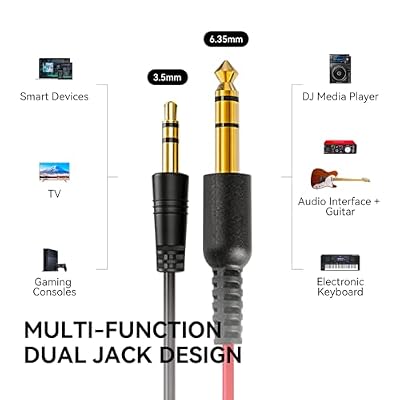
OneOdio Wired DJ Hi-Res Over-Ear Headphones for PC, Keyboard Guitar - Black | headphone with 50mm drivers, dual 3.5mm and 6.35mm jacks for studio monitoring, recording, podcasting, mixing and DJ use.



As an Amazon Associate we earn from qualifying purchases. Product prices and availability are accurate as of the date/time indicated.
If your priority is hearing your edit accurately, the OneOdio over-ear headphones are the natural starting point in this roundup. They are built as studio monitoring and mixing headphones rather than as a gaming set, which means the tuning leans toward a fuller, more even reproduction across the frequency range rather than an exaggerated bass shelf. For video editing that matters: you want to judge the real balance of dialogue, music and effects, not a colored version of it. The 50mm drivers have enough authority to reveal low-end detail without drowning the mids where voices sit.
The dual-jack design is a practical touch for a creator’s desk — you can chain a second pair of headphones for a collaborator reviewing a cut, or route cables flexibly around your setup. The over-ear closed design also blocks a reasonable amount of room noise so you can concentrate. At around $32 it is an inexpensive way to get a more honest listening reference than most gaming headsets provide, which is exactly what an editor needs when fine-tuning an audio mix.
Pros: Studio-style tuning suited to accurate monitoring; punchy 50mm drivers; useful dual-jack for shared listening; comfortable over-ear fit; strong value around $32.
Cons: No built-in microphone for voiceover; coiled cable can be bulky on a tidy desk; not the most refined treble at this price.
2. HyperX Cloud II Gaming Headset

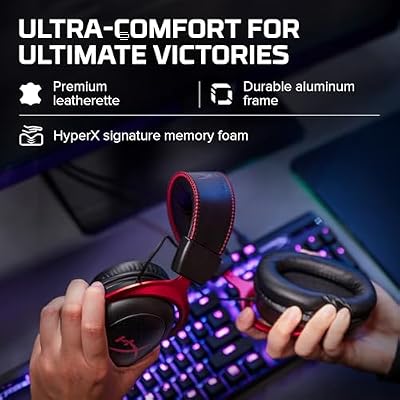
HyperX Cloud II Gaming Headset - 7.1 Surround Sound - Memory Foam Ear Pads - Durable Aluminum Frame - Multi Platform Headset - Works with PC, PS4, PS4 PRO, Xbox One, Xbox One S - Red (KHX-HSCP-RD)




As an Amazon Associate we earn from qualifying purchases. Product prices and availability are accurate as of the date/time indicated.
Long edits are won or lost on comfort, and that is where the HyperX Cloud II earns its place. Its memory-foam ear pads and padded headband are among the most comfortable in this price class, so it stays pleasant through the kind of multi-hour timeline session that defines real editing work. The closed over-ear design provides solid passive isolation, helping you focus on the audio in your project rather than the room around you.
Sound is balanced and clean enough to trust for general editing — the mids come through clearly, which is what you need for dialogue work, and the optional 7.1 virtual surround can stay switched off when you want a straight stereo reference. The detachable noise-cancelling microphone is a genuine bonus for an editor who also records scratch voiceover or jumps on review calls. At around $60 it is the most expensive pick here, but for all-day comfort plus a capable mic it justifies the spend.
Pros: Outstanding long-session comfort; clean, balanced mids for dialogue; detachable noise-cancelling mic for voiceover; durable aluminium frame; solid passive isolation.
Cons: Most expensive option in this roundup; virtual surround is a gaming feature you will mostly leave off; closed sound is less airy than open studio designs.
3. Sony MDR-ZX110 On-Ear Headphones

Sony ZX Series Wired On-Ear Headphones, Black MDR-ZX110


As an Amazon Associate we earn from qualifying purchases. Product prices and availability are accurate as of the date/time indicated.
Not every editing setup needs an expensive headset, and the Sony MDR-ZX110 proves the point at around $15. It is a lightweight on-ear pair from a brand with deep audio heritage, and for an editor on a strict budget it is a dependable, no-nonsense monitoring option. The compact, foldable build is easy to stash in a bag if you edit on the move, and the low weight means it never becomes a burden during a long cut.
The sound is clear and even-handed for the money, with enough mid-range presence to make dialogue editing workable. You will not get the isolation or low-end authority of a larger over-ear pair, so it is best for quieter rooms and reference listening rather than critical bass-heavy mixing. As a secondary pair or a starter headset for someone learning to edit, however, it is hard to argue with the value.
Pros: Extremely affordable at around $15; very light and foldable; clear, even sound for casual editing; trusted Sony audio brand; easy to travel with.
Cons: On-ear design isolates less than over-ear pairs; limited low-end authority; no microphone; build is plastic and basic.
4. Logitech H390 USB Headset

Logitech H390 Wired Headset PC/Laptop Stereo Headphones, USB-A, Black | For PC/Laptop, stereo headphones, microphone, in-line controls, works with Chromebook




As an Amazon Associate we earn from qualifying purchases. Product prices and availability are accurate as of the date/time indicated.
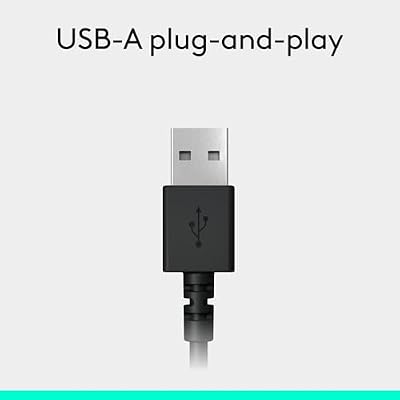
The Logitech H390 is the pick for the editor who is also a creator — someone recording voiceover, narration or client calls alongside their cutting work. It is a USB headset with a noise-cancelling boom microphone, so it handles both sides of the job: you can monitor your edit through the padded stereo earcups and then swing the mic into place to record a clean scratch track or join a review call. The USB connection means simple plug-and-play with a laptop or desktop and a consistent digital signal.
For pure monitoring it is not a studio-reference pair, but the stereo sound is clear and the in-line controls make quick volume and mute adjustments easy without leaving your editing software. At around $16 it is remarkably cheap for a comfortable headset that doubles as a competent voiceover mic, which is why it is a sensible all-in-one choice for budget content workflows.
Pros: Built-in noise-cancelling mic ideal for voiceover; simple USB plug-and-play; comfortable padded earcups; handy in-line controls; excellent value around $16.
Cons: USB-only limits use with some devices; sound is functional rather than reference-grade; microphone arm is fixed to one side.
5. BENGOO G9000 Stereo Gaming Headset

BENGOO G9000 Stereo Gaming Headset for PS4 PC Xbox One PS5 Controller, Noise Cancelling Over Ear Headphones with Mic, LED Light, 7.1 Surround Sound, Soft Memory Earmuffs for Nintendo Xbox Series X|S


As an Amazon Associate we earn from qualifying purchases. Product prices and availability are accurate as of the date/time indicated.
The BENGOO G9000 is included as the budget closed-back option, and at around $30 it offers a comfortable, isolating listening environment for editors who want to shut out a noisy room. Its 40mm drivers and generously padded earcups make for a relaxed fit during longer sessions, and the over-ear design keeps external distractions low so you can concentrate on the cut.
Being a gaming headset, its tuning is a touch more bass-forward than a true studio monitor, so it is best treated as a comfortable working pair rather than a critical mixing reference — keep that in mind when balancing low-end-heavy content. The flexible boom microphone is a useful extra for the editor who occasionally records rough voiceover or hops on a call. As an affordable, comfortable closed-back headset for general editing duties, it does the job.
Pros: Comfortable padded over-ear fit; good passive isolation for noisy rooms; built-in flexible mic; inexpensive at around $30; easy plug-in operation.
Cons: Bass-forward tuning is less neutral for critical mixing; build materials feel budget; cable and connectors are basic.
6. Turtle Beach Recon 70 Gaming Headset

Turtle Beach Recon 70 Wired Multiplatform Gaming Headset for PS5, PC, Xbox | PlayStation, PS4, Xbox Series X|S, Xbox One, Mobile, Flip-to-Mute Mic, 40mm Speakers, Lightweight, Soft Earpads, Black


As an Amazon Associate we earn from qualifying purchases. Product prices and availability are accurate as of the date/time indicated.
Rounding out the list, the Turtle Beach Recon 70 is a light, comfortable all-rounder that suits an editor who wants one headset for both work and play. At around $40 it is well made for the money, with a lightweight frame that stays comfortable across a long edit and a flip-up microphone that gets out of the way when you do not need it. The 40mm drivers deliver clear, defined audio that is perfectly serviceable for dialogue-focused editing.
Its multiplatform compatibility means the same headset works across a PC editing rig and a console for downtime, which adds practical value. As with most gaming headsets the signature is slightly enhanced rather than studio-flat, so for the most critical mixing you might prefer the OneOdio, but for everyday editing comfort and a tidy flip-away mic it is a likeable, sensible pick.
Pros: Lightweight and comfortable for long edits; clear, defined 40mm-driver sound; convenient flip-up mic; multiplatform use; good build at around $40.
Cons: Slightly enhanced rather than neutral tuning; isolation is moderate; not as plush as memory-foam rivals.
How to Choose a Headset for Video Editing
Choosing a headset for video editing is not about picking the loudest or most aggressively tuned gaming set — it is about hearing your project honestly. The single most important criterion is a balanced, fairly neutral sound signature, and especially clear mid-range, because dialogue, narration and most musical content live in the mids. A headset with a huge bass boost will trick you into mixing voices too quietly or pulling back low end that is actually fine, so a studio-leaning pair like the OneOdio is a safer reference than a bass-heavy gaming model.
Comfort is the second pillar, and it is easy to underestimate. Edits run long, so prioritise light clamping force, breathable or memory-foam pads, and low overall weight — the HyperX Cloud II is the benchmark here. If you wear glasses or edit for many hours at a stretch, comfort can matter more than a small difference in sound. Closed-back designs help if you work in a shared or noisy room by isolating outside sound, while lighter on-ear pairs like the Sony ZX110 are fine in a quiet space.
Think about connection and workflow next. Wired headsets give you a latency-free, dependable signal, which is exactly what you want when audio sync is critical; a USB model such as the Logitech H390 simplifies setup and adds a voiceover-ready microphone in one package. Finally, decide whether you need a microphone at all: pure monitoring favours a mic-less studio pair, but if you also record narration or join client review calls, a built-in or detachable boom mic turns one purchase into a complete editing-and-recording solution.
Frequently Asked Questions
Do I need an expensive headset for video editing?
No. For most YouTube and client editing, a balanced wired headset around $30 to $60 is plenty. What matters is a fairly neutral sound and clear mid-range so you can judge dialogue and music accurately, not a high price tag.
Are gaming headsets good for video editing?
They can be, with a caveat. Gaming headsets are often tuned with extra bass for effect, which is less ideal for critical mixing. Comfortable, balanced models like the HyperX Cloud II work well, but for true monitoring a studio-style pair such as the OneOdio is more honest.
Should I use open-back or closed-back headphones for editing?
Closed-back pairs isolate outside noise and stop sound leaking, which suits shared or noisy rooms and is the more common choice on a budget. Open-back designs sound more spacious but offer almost no isolation, so they only suit a quiet, private editing space.
Do I need a microphone on my editing headset?
Only if you also record voiceover or join review calls. If you simply monitor audio, a mic-less studio pair is fine. If you do both, a USB headset like the Logitech H390 with a noise-cancelling boom mic handles editing and narration in one device.
Related Guides
- best gaming headphones
- best gaming headsets under $300
- best gaming microphones
- best computer speakers for gaming
- best around-the-neck speakers for gaming
- best gaming keyboards
Affiliate Disclosure: As an Amazon Associate, we earn from qualifying purchases. If you click a link and make a purchase, we may earn a small commission at no extra cost to you. Prices and availability are accurate as of publication and may change.
















