

Affiliate disclosure: As an Amazon Associate we earn from qualifying purchases. This post contains affiliate links — if you buy through them we may earn a small commission at no extra cost to you. This never affects our recommendations.
You don’t need to spend $200 to get a gaming desk with the features that matter: cable management, LED lighting, monitor height accommodation, and enough surface area for a keyboard, mouse, and peripherals. The desks on this list all come in well under the $200 price ceiling while still delivering the core features gamers actually use. We focused on surface stability, storage utility, and setup versatility rather than aesthetic gimmicks.
All five picks are available on Amazon with verified reviews. Prices range from $44.99 to $64.99 — far below the $200 ceiling — which means you have budget left for a monitor arm, headset stand, or upgraded chair. Assembly is straightforward on all five, typically under 30 minutes with included hardware.
In a hurry? See the top-rated Gaming Desks Under $200 deals available right now:
🛒 Check Gaming Desks Under $200 Prices on Amazon →🛒 Best Price Today on Amazon
Prime members get fast, free shipping on everything above, plus member-only deals. New members get a 30-day free trial — cancel anytime.
Start 30-Day Prime Free Trial →See Today’s Amazon DealsTop Picks at a Glance
| Product | Best For |
|---|---|
| Gaming Desk with LED 2 Drawers | Best storage with LED |
| MOTPK 40″ with Storage | Best overall compact setup |
| Acrolix Small L-Shaped with Power | Best L-shape with outlets |
| L-Shaped 50″ Reversible | Best mid-size L-shape |
| DUMOS L-Shaped with CPU Shelf | Best budget with tower storage |

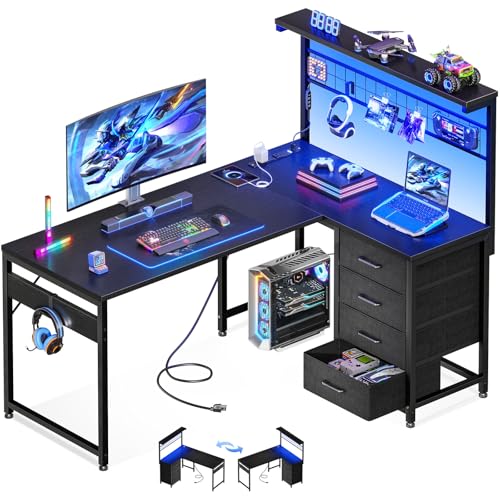


Gaming Desk with LED 2 Drawers
This desk’s two side drawers make it stand out in the sub-$50 category — most gaming desks at this price offer hooks and shelves but no enclosed storage. LED strips run along the desk’s underside for ambient lighting. The surface handles a single monitor plus keyboard and mouse setup comfortably. Assembly is approximately 20 minutes with the included tool.
- Pros: Two storage drawers, LED underglow, headphone hook, compact footprint
- Cons: Surface area limited to single-monitor setups, MDF construction, basic cabling grommets
MOTPK 40″ with Storage
The MOTPK packages a monitor riser shelf, side storage cabinet, headphone hook, and controller stand into a 40-inch desk that fits in smaller rooms. The monitor shelf raises screens to proper eye height without a separate arm, and the side cabinet provides closed storage for peripherals. LED lighting is included. It’s the most feature-complete compact gaming desk on this list.
- Pros: Monitor shelf included, side storage cabinet, LED, headphone hook, complete setup out of box
- Cons: 40″ width limits dual-monitor use, surface height fixed, heavier than flat desks
Acrolix Small L-Shaped with Power Outlets
Corner desks maximize usable space, and the Acrolix adds integrated power outlets to the L-shape design — a rare feature at this price that eliminates the need for a separate power strip on the desk. USB-A and USB-C charging ports are built in alongside the AC outlets. LED strips are included. The reversible corner section fits both left and right corner configurations.
- Pros: Integrated power outlets, USB charging ports, LED, reversible corner, L-shape maximizes space
- Cons: Shorter total arm length than full L-shapes, lighter build quality
L-Shaped 50″ Reversible
At 50 inches on the longer arm, this L-shape accommodates dual monitors on the main surface with room for peripherals. The corner section provides secondary space for a microphone arm, capture card, or secondary keyboard. LED strip lighting and cable management grommets are standard. Reversible design works in both corner configurations.
- Pros: 50″ main surface fits dual monitors, reversible, LED, cable grommets, affordable
- Cons: Thinner MDF surface, wobble at the corner joint under heavy monitor loads
DUMOS L-Shaped with CPU Shelf
The cheapest option on the list, the DUMOS includes a CPU tower shelf under the desk corner section — valuable for keeping the tower off the floor and improving airflow. LED strip, headphone hook, and monitor stand are included at the lowest price point. The trade-off is a thinner desktop surface that may flex under heavy monitor setups.

- Pros: Lowest price, CPU tower shelf, LED, headphone hook, monitor stand, L-shape layout
- Cons: Thinnest surface of the group, lighter frame, fewer cable management features
Buying Guide
Surface Size for Your Setup
For a single monitor, keyboard, and mouse, 40 inches of desk width is the practical minimum. For dual monitors, target at least 55 to 60 inches or an L-shaped desk where the second monitor sits on the corner section. If your room can fit a corner desk, an L-shape under $65 delivers more usable surface than a 60-inch straight desk at the same price.
Desktop Material and Thickness
Under $200, gaming desks use MDF or particleboard with a laminate surface. MDF at 0.75 inches thick is stable; thinner boards flex under heavy monitor loads. If you’re running a monitor arm bolted through the desk surface, check the desk thickness — thin surfaces may not hold the arm clamp securely and can crack under torque. Desks under $50 typically use thinner board; $60 and above generally uses standard 0.75-inch MDF.
Cable Management Features
Gaming desks often advertise “cable management” but the implementation varies significantly. A grommet hole is the minimum — it routes cables from the desktop surface to the floor. A cable tray underneath the desk is more useful, bundling cables along the frame out of sight. Hooks and clips on the desk legs add further organization. The MOTPK and Acrolix offer the most comprehensive cable management in this price range.
LED Lighting
LED strips on gaming desks are primarily aesthetic — they add ambient color to a dark gaming room and sync with RGB setups. At this price range, LED strips are basic single-color or remote-controlled color-changing strips rather than addressable per-LED systems. They’re a nice bonus but shouldn’t be the primary buying factor for a desk purchase.

Storage and Accessories
Drawers provide the most useful storage for peripherals, cables, and small accessories. Open shelves are good for controller stands and speakers but collect dust. CPU shelves under the corner are practical for tower owners. Headphone hooks are simple additions that prevent headsets from sitting on the desktop surface. Evaluate which storage features match your actual peripheral setup.
FAQ
Do I need an L-shaped desk for gaming?
Not necessarily — straight desks work well for single-monitor setups. L-shaped desks are beneficial if you run dual monitors, stream with a secondary monitor, or want dedicated space for a notebook or art tablet alongside your main setup.
Can I mount a monitor arm on a budget gaming desk?
Yes, but check the desk thickness first. Clamp-style monitor arms require a solid edge to grip — desks with hollow core construction or edges under 0.6 inches thick may not hold securely. Grommet-mount arms require a hole in the desk surface, which some desks pre-drill and others don’t.
How long do budget gaming desks last?
MDF desks under $100 typically last 3 to 5 years under normal use. Avoid placing heavy loads in the center unsupported, and don’t use excessive moisture near the surface — MDF swells when wet. Surface scratches are harder to repair on laminate than wood, so use a desk mat for the primary work area.

Is $200 enough for a good gaming desk?
Yes — all five desks on this list come in under $65 and deliver the core gaming desk features. You’d need to spend $300+ to get meaningfully better materials (solid wood or steel) or motorized height adjustment. Under $200, the feature differences are about surface size and storage configuration, not fundamental quality gaps.
Verdict
The MOTPK 40″ at $59.99 is the best single desk for compact room setups — the monitor shelf and side cabinet eliminate the need for additional accessories. For corner rooms, the Acrolix L-Shaped at $64.99 adds power outlets that make it the most practical all-in-one desk solution. Both leave significant budget from the $200 ceiling for chair, lighting, or peripheral upgrades.
Related Articles
Looking for more on this topic? Browse the hand-picked guides below — each one applies the same scoring rubric used in this review.
Frequently Asked Questions
What desk size do I need for a dual-monitor setup?
Aim for at least 120cm or 48 inches wide and 60cm or 24 inches deep for two 24-27 inch monitors. Depth matters more than most buyers expect, because it controls viewing distance and eye strain. If your desk is shallow, a monitor arm pushes screens back over the edge and reclaims usable surface.
Are LED gaming desks worth it?
The RGB strip is usually a cheap addressable LED run off USB, so it adds little cost and little value. What matters far more is the frame stability, surface material and cable management. Judge a desk by its steel frame gauge, leveling feet and weight capacity, and treat the lighting as a free extra.
How much weight can a budget desk hold?
Most sub-200 dollar desks rate between 100 and 220 pounds distributed load, which is far more than a typical setup requires. The real limitation is point load and lateral stability, meaning wobble when you type or lean. Look for a steel frame with cross-bracing rather than four unconnected legs.
Can I get a standing desk under 200 dollars?
Manual crank standing desks are available in this range, and they work, but adjusting takes 30-60 seconds of cranking which discourages frequent changes. Electric models under 200 dollars are rare and usually use a single motor with a low weight limit and slow travel. Consider a desktop converter instead.
What surface material holds up best?
Most budget desks use MDF or particleboard with a melamine or carbon-fibre-look laminate. Melamine resists scratches and spills reasonably well; textured carbon-fibre wrap peels at the edges over time. Check the edge banding quality, since that is where cheap desks fail first, and avoid leaving liquids on unsealed particleboard.
Ready to decide? Our #1 pick for 2026 is the Gaming Desk with LED 2 Drawers.
Live price & availability on Amazon.


