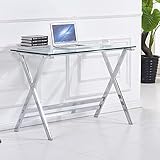
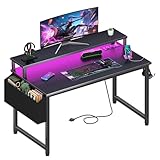
- Top Pick: Grandder 55×32 Extra-Deep Electric Standing Desk, Wide Desktop Fits 49" Ultrawide Monitor+Dual Screens, 176 lbs Capacity, 2 Memory Presets, Anti Collision, Computer Desk for Home Office & Gaming, Oak
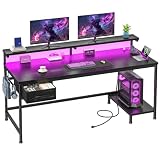
- Best Value: SEDETA 79" Gaming Desk with Fabric Drawers Storage, LED Light & Power Strip | Carbon Fiber Black Long Computer Desk with Monitor Stand, Keyboard Tray, CPU Shelf, CUP Holder, Hooks for Work, Writing
- Premium Choice: Lufeiya Gaming Desk with Power Outlets and LED Lights, 40 Inch Gamer Desk Table with Charging Station, Home Office Computer Desks with Monitor, Black
An ultrawide monitor changes what a desk has to do. A 34-inch panel is manageable on almost any table, but a 49-inch super ultrawide behaves like two screens fused together, and it asks for width, depth, and a surface that will not wobble when you lean on it. Buy the wrong desk and the monitor ends up crammed against the back edge, or hanging past the sides, with the keyboard pushed so close that your eyes work harder than they should.
This guide is for people who already own, or are about to buy, a wide display and want a desk that treats it as the main event. Six desks are covered, each judged only on what its listing title states. Monitor arms and the monitors themselves were left out because the question here is the furniture, not the screen it holds. Verify every dimension on the product page before committing in 2026, since several titles skip depth and thickness entirely.
Quick Picks
As an Amazon Associate we earn from qualifying purchases at no extra cost to you.




| Product | Best for | Key spec from the title |
|---|---|---|
| Grandder 55×32 Electric Standing Desk | 49-inch ultrawide plus extra screens | 55×32 top, 176 lbs capacity, 2 memory presets |
| SEDETA 79-Inch Gaming Desk | Long, storage-heavy setups | 79 inches, keyboard tray, CPU shelf |
| Arozzi Arena Ultrawide Curved | Dedicated ultrawide users | Water-resistant desk mat, monitor mount cut-outs |
| Pamray 58-Inch Gaming Desk | Mid-size rooms | 58 inches, drawers, USB ports |
| Korfile 40-Inch L-Shaped | Small corners | L-shaped, 3 storage tiers |
| Lufeiya 40-Inch Gaming Desk | Compact rooms | Power outlets, charging station |
How to Choose
Begin with the width of the top
Measure the monitor from edge to edge, not its diagonal. A 49-inch screen is a diagonal figure, and the physical width is a good deal longer than most people expect. Add enough clearance for speakers, a lamp, and a mouse zone on each side, and you will usually want a top that is clearly wider than the panel. If the spec sheet gives a width, compare it against the monitor’s own width listing, not the headline size.
Depth matters as much as width
Wide screens sit closer to the eyes than a standard monitor does, and a shallow desk forces the stand near the front edge. Titles that mention an extra-deep top, such as the 32-inch depth on the Grandder, address this directly. Look for enough room to keep the screen about an arm’s length from your face, and for space in front of the keyboard so your wrists have somewhere to rest.
Check the stand or arm plan
If the monitor stand is wide, make sure the desk has space for its feet. If you plan to use an arm instead, look for a flat edge or cut-outs that suit clamps. A desk with a built-in monitor shelf can push the screen high, which strains the neck, so check the shelf height too. The right plan depends on whether you want a clear desktop or a fixed riser.
What budget desks give up
Lower tiers often use thin particleboard, light frames, and small leg footprints. A wide top with few legs may flex under a heavy panel. Built-in LEDs and charging ports are pleasant extras, but they matter less than a frame that stays steady. Ignore marketing about carbon fiber texture; it is a surface print, not a structural material. Cable holes and trays are worth a look, because a wide screen and speakers create more wires than a standard monitor.
The 6 Best Options
Grandder 55×32 Electric Standing Desk
The Grandder is the one listing that speaks to ultrawides by name, stating that its wide desktop fits a 49-inch ultrawide plus dual screens. At 55 by 32 inches with a 176 lbs capacity, memory presets, and anti-collision features, it works as a sit-stand station for heavy multi-monitor rigs, finished in oak and described for both home office and gaming use. Buyers who juggle a wide monitor with a second screen are its clearest audience, because the listing frames the surface around exactly that arrangement and leaves room on the sides.
- Strength: an extra-deep top that explicitly mentions 49-inch ultrawide compatibility.
- Strength: electric height adjustment with 2 memory presets.
- Trade-off: a standing mechanism adds moving parts and requires an outlet.
Skip it if you want built-in drawers and storage on the desk itself.
SEDETA 79-Inch Gaming Desk
At 79 inches, this is the longest desk in the group, with a carbon fiber black finish, fabric drawers, LED lighting, and a power strip. The title also lists a monitor stand, keyboard tray, CPU shelf, cup holder, and hooks, so it is built as an all-in-one battlestation with room to spread out. The sheer length suits a wide panel flanked by speakers, and the built-in shelf and tray mean fewer separate purchases for the keyboard and tower.
- Strength: generous length leaves space for a wide panel and speakers.
- Strength: tray, shelf, and drawers keep accessories organized.
- Trade-off: the listing does not state depth, so confirm it for a wide screen.
Skip it if your room cannot take a desk of that length.
Arozzi Arena Ultrawide Curved
Arozzi names ultrawide support in the product name itself. The curved Gunmetal Galaxy design includes a full-surface, water-resistant desk mat, monitor mount cut-outs, and cable management netting, which suit a user who plans to clamp an arm and keep the cables out of sight. It reads as a purpose-built surface rather than a general office table. The mat covering the full top also means mouse movement and desk drinks are handled by the same material, which some buyers prefer to a separate pad.
- Strength: monitor mount cut-outs designed for arm installation.
- Strength: full-surface water-resistant mat protects the top.
- Trade-off: the title gives no dimensions, so check width and depth against your panel.
Skip it if you want integrated lighting, outlets, or drawers.
Pamray 58-Inch Gaming Desk
Pamray offers a 58-inch top with a monitor stand, drawers, and shelves, plus LED lights, power outlets, and USB ports. The title describes ample storage and a sturdy build for gaming, home office, work, or study. It sits in the middle of the group on size, which makes it a practical choice for a room that cannot fit the longest desks. Storage is the headline here, so it fits a setup where books, controllers, and chargers all need a home near the screen.
- Strength: drawers and shelves reduce clutter around the screen.
- Strength: power outlets and USB ports are built in.
- Trade-off: the included monitor stand may lift the display higher than you want.
Skip it if you plan to run a super ultrawide and need more width than 58 inches provides.
Korfile 40-Inch L-Shaped Gaming Desk
This L-shaped corner desk carries a 40-inch label, three tiers of storage shelves, a monitor stand, a power outlet, and LED lighting in carbon fiber black. It is described as suitable for small spaces, which tells you the priorities are footprint and storage rather than raw width. A modest ultrawide may suit it better than a super-wide panel. The corner shape can also split a workspace into a computing side and a storage side, which helps in a bedroom that doubles as an office.
- Strength: corner layout makes use of tight spaces.
- Strength: 3 tiers of shelving keep gear nearby.
- Trade-off: a 40-inch label leaves little margin for a very wide panel.
Skip it if your monitor is a 49-inch model and you need a long, flat surface.
Lufeiya 40-Inch Gaming Desk
Lufeiya lists power outlets, LED lights, and a charging station on a 40-inch black gaming table intended for home office computing. It is the plainest desk in the group, with fewer storage elements than most competitors. That simplicity may appeal to a buyer who wants a clean surface and a few built-in connections. Because the listing says little about storage, it works best when the rest of your gear already lives elsewhere and the desk simply needs to hold a screen, a keyboard, and a phone charger.
- Strength: built-in power outlets and a charging station.
- Strength: compact size fits tight rooms.
- Trade-off: 40 inches is narrow for super ultrawide setups.
Skip it if the monitor is wider than the desktop or you want storage.
Which One Fits Your Situation
You own a 49-inch super ultrawide
Go to the Grandder, which names that size in its title, or the SEDETA, whose 79-inch length offers the most room to breathe. The Grandder adds sit-stand flexibility, while the SEDETA brings storage.
You plan to mount the screen on an arm
The Arozzi Arena Ultrawide Curved has monitor mount cut-outs, so it suits a clamp-based approach that frees the desktop and lets you pull the display closer or push it back.
You work in a small room
The Korfile L-shaped model uses a corner, and the Lufeiya is the simplest compact choice if you only need a modest ultrawide. Both should be matched against the monitor width on the spec sheet.
You want a sit-stand frame for a heavy rig
The Grandder is the only electric standing model in the lineup, with 2 memory presets and anti-collision named in the title. If you alternate between sitting and standing and your screens are heavy, it is the sensible starting point, provided the 176 lbs figure covers your monitor, arms, and accessories together.
You need storage and ports
The Pamray combines drawers, shelves, outlets, and USB ports in a 58-inch top, which keeps peripherals close without a separate cabinet.
Common Mistakes
- Comparing the monitor diagonal with desk width instead of measuring the panel itself.
- Ignoring depth, which leaves the screen too close to your face.
- Choosing a standing desk without checking the capacity against monitor and gear weight.
- Counting built-in stands as helpful when they raise the display past eye level.
- Overlooking cable routing, which becomes harder with a wide panel and speakers.
- Trusting a built-in power strip to handle every device without checking how many outlets the listing actually names.
Related guides
- Battery Operated Smoke And Carbon Monoxide Detectors
- Combination Smoke And Carbon Monoxide Detectors
- Aio Liquid Coolers For High Performance Gaming
Frequently Asked Questions
How wide should a desk be for a 49-inch ultrawide?
The monitor is much wider than its diagonal suggests, so choose a top clearly longer than the panel. The Grandder and SEDETA are the two listings here with the most obvious fit. Always compare the panel’s physical width with the top’s width on the spec sheet, and add a few inches of margin on each side so the display does not feel boxed in.
Is a standing desk worth it for an ultrawide?
It can be, since heavy panels and accessories need a stable frame. Check the capacity figure, such as the 176 lbs on the Grandder, against your total gear weight.
Can I use a monitor arm on these desks?
The Arozzi lists cut-outs for mounts. For the others, check that the top thickness and edge shape suit a clamp, and keep the arm’s weight limit in mind.
Why were monitor arms excluded?
They are accessories, not desks. They pair well with a wide top, but this comparison focuses on the furniture itself.